



 本文介绍如何使用WindowManager在Android中创建浮动窗口,并探讨removeView与removeViewImmediate的区别,以避免窗体泄露问题。
转载自:https://blog.youkuaiyun.com/hxqneuq2012/article/details/52588536
正所谓没有遇到过类似于not attached to window manager、Android removeView view must not be null的开发者不是好工程师,今天我们就来看看WindowManager中removeView的那些坑。
其实也没必要细说它有多坑,只要避过这些坑即可。
经过这一段时间的项目开发,小结一条真理:
不要在像Activity这样有生命周期的东东里乱写东西,不然莫名其妙的被销毁,然后新建,但早已经是物是人非,最后就是状态异常、空指针各种Crash各种坑。
我们要实现的效果是:点击显示Button-addView,点击消除Button-removeView,
哈哈,不要喷,我想removeView可是想在哪就在哪,随心所欲,游离于Activity的生命周期之外~
直接上代码,将WindowManager抽离出来即可,一个小Demo:
首先添加相应权限:
- <span style="font-size:18px;"> <!-- 显示顶层浮窗 -->
- <uses-permission android:name="android.permission.SYSTEM_ALERT_WINDOW" /></span>
- <span style="font-size:18px;"><?xml version="1.0" encoding="utf-8"?>
- <LinearLayout xmlns:android="http://schemas.android.com/apk/res/android"
- android:layout_width="match_parent"
- android:layout_height="match_parent"
- android:orientation="vertical" >
- <Button
- android:id="@+id/show_btn_main"
- android:layout_width="match_parent"
- android:layout_height="wrap_content"
- android:focusable="true"
- android:text="button_show"
- android:textSize="18sp" />
- <Button
- android:id="@+id/remove_btn_main"
- android:layout_width="match_parent"
- android:layout_height="wrap_content"
- android:focusable="true"
- android:text="button_hide"
- android:textSize="18sp" />
- </LinearLayout></span>
- <span style="font-size:18px;">/**
- * Created by 权兴权意 on 2016/9/19.
- */
- import android.content.Context;
- import android.graphics.PixelFormat;
- import android.view.Gravity;
- import android.view.WindowManager;
- import android.view.WindowManager.LayoutParams;
- import android.widget.ImageView;
- import android.widget.Toast;
- public class WindowUtils {
- private static ImageView mView = null;
- private static WindowManager mWindowManager = null;
- private static Context mContext = null;
- public static void showWindow(final Context context) {
- Toast.makeText(context,"showPopupWindow",Toast.LENGTH_SHORT).show();
- // 获取应用的Context
- mContext = context.getApplicationContext();
- // 获取WindowManager
- mWindowManager = (WindowManager) mContext
- .getSystemService(Context.WINDOW_SERVICE);
- mView = new ImageView(context);
- mView.setImageResource(R.mipmap.ic_launcher);
- final WindowManager.LayoutParams params = new WindowManager.LayoutParams();
- // 类型
- params.type = WindowManager.LayoutParams.TYPE_SYSTEM_ALERT;
- // 设置flag
- // 如果设置了WindowManager.LayoutParams.FLAG_NOT_FOCUSABLE,弹出的View收不到Back键的事件
- params.flags = params.flags|WindowManager.LayoutParams.FLAG_NOT_FOCUSABLE;
- // 不设置这个弹出框的透明遮罩显示为黑色
- params.format = PixelFormat.TRANSLUCENT;
- // FLAG_NOT_TOUCH_MODAL不阻塞事件传递到后面的窗口
- // 设置 FLAG_NOT_FOCUSABLE 悬浮窗口较小时,后面的应用图标由不可长按变为可长按
- params.width = LayoutParams.WRAP_CONTENT;
- params.height = LayoutParams.WRAP_CONTENT;
- params.gravity = Gravity.CENTER;
- mWindowManager.addView(mView, params);
- }
- public static void removeWindow() {
- mWindowManager.removeViewImmediate(mView);
- }
- }
- </span>
- /**
- * Created by 权兴权意 on 2016/9/19.
- */
- import
- import android.app.Activity;
- import android.os.Bundle;
- import android.view.View;
- import android.view.View.OnClickListener;
- import android.widget.Button;
- public class MainActivity extends Activity {
- private Button show_btn_main;
- private Button remove_btn_main;
- @Override
- protected void onCreate(Bundle savedInstanceState) {
- super.onCreate(savedInstanceState);
- setContentView(R.layout.activity_main);
- show_btn_main = (Button) findViewById(R.id.show_btn_main);
- show_btn_main.setOnClickListener(new OnClickListener() {
- @Override
- public void onClick(View v) {
- WindowUtils.showWindow(MainActivity.this);
- }
- });
- remove_btn_main = (Button) findViewById(R.id.remove_btn_main);
- remove_btn_main.setOnClickListener(new OnClickListener() {
- @Override
- public void onClick(View v) {
- WindowUtils.removeWindow();
- }
- });
- }
- }
ok,大功告成,看看效果吧。
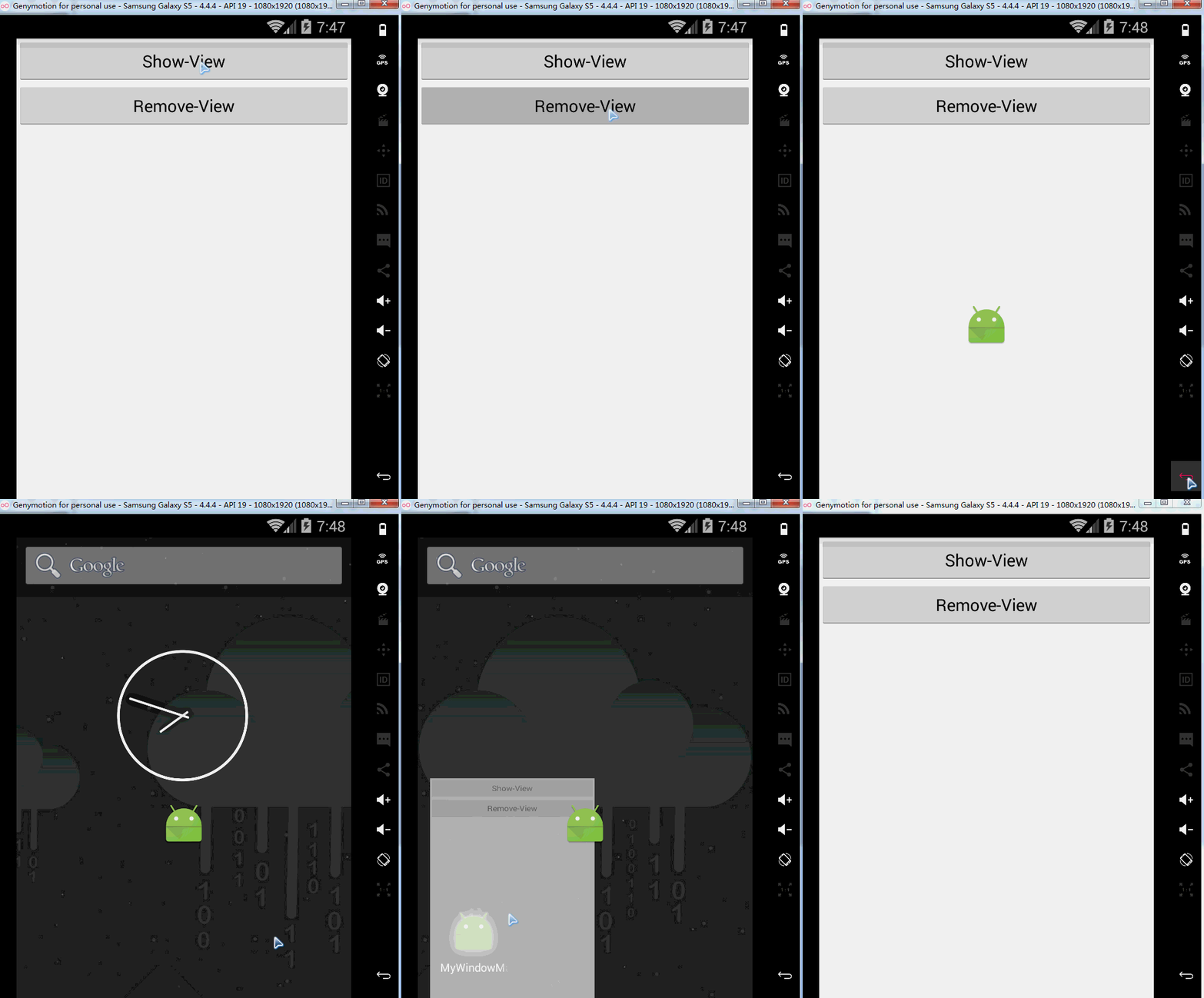
最后,提一下removeView和removeViewImmediate的区别:
问题及原因:
我们在做UI相关的代码时有时候会碰到WindowLeak,也就是所谓的窗体泄露,泄露的原因是因为androidUI操作在主线程中操作,但是我们会需要在一些线程或者异步任务中操作UI界面元素的需求,那么这个时候可能会出现类似问题。我在做浮动窗口的时候碰到了这个问题,浮动窗口需要用到WindowManager,windowManger又是一个activity的一个变量,它依存于Activity,当横竖屏切换或者activity销毁的时候这个变量会销毁。销毁的时候导致windowmanager通过AddView()方法添加的View没有依存,导致窗体泄露。那么问题来了,为什么这里会泄露了?
解决方法:
我在onDestroy()里面调用了removeView方法,想要避免窗体泄露,但是这个方法并不管用,后来换成removeViewImmediate()就解决了这个问题,原因就是两个方法设计到线程同步问题,removeViewImmediate()是通知View立刻调用View.onDetachWindow(),这说明这个方法是通过一个监听或者观察者来实现的,因为线程的同步跟异步问题导致activity销毁了,但view还没有被remove完,于是就产生了所谓的窗体泄露。说到这里,我想大家也能明白这两个方法的区别了。
话说回来,最好的方法还是抽离。





 扫一扫
扫一扫


 804
804

 被折叠的 条评论
为什么被折叠?
被折叠的 条评论
为什么被折叠?
 到【灌水乐园】发言





