


使用PhpSpreadsheet计算引擎
执行公式计算
由于PhpSpreadsheet表示内存中的电子表格,因此它还提供公式计算功能。单元格可以是值类型(包含数字或文本),也可以是公式类型(包含可以求值的公式)。例如,该公式=SUM(A1:A10) 计算得出A1,A2,...,A10中的值之和。
要计算公式,可以调用包含公式方法的单元格getCalculatedValue(),例如:
$spreadsheet->getActiveSheet()->getCell('E11')->getCalculatedValue();
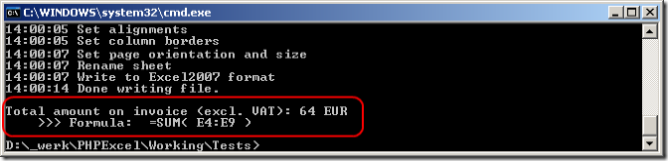
如果您在PhpSpreadsheet随附的发票演示中编写了以下代码行,则其评估值为“ 64”:
PhpSpreadsheet公式解析器的另一个不错的功能是,它可以在插入/删除行/列时自动调整公式。这是一个例子:
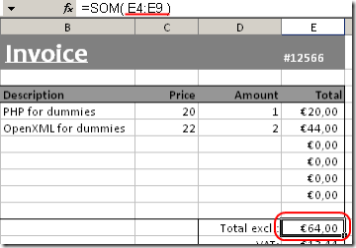
您会看到单元格E11中包含的公式是“ SUM(E4:E9)”。现在,当我编写以下代码行时,添加了两个新的产品线:
$spreadsheet->getActiveSheet()->insertNewRowBefore(7, 2);
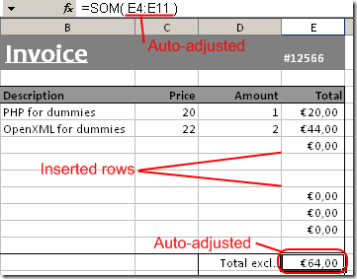
你注意到了吗?以前的单元格E11中的公式(当我插入2个新行时为E13)更改为“ SUM(E4:E11)”。同样,插入的单元格将复制前一个单元格的样式信息,就像Excel的行为一样。请注意,您可以插入行和列。
计算缓存
一旦计算引擎评估了单元格中的公式后,结果将被缓存,因此,如果您getCalculatedValue()再次调用同一单元格,则结果将从缓存中返回,而不是第二次评估公式。这有助于提高性能,因为就性能和速度而言,评估公式是一项昂贵的操作。
但是,有时您可能不希望这样,也许您已经更改了基础数据,并且需要使用该新数据重新评估相同的公式。
Calculation::getInstance($spreadsheet)->disableCalculationCache();
将禁用计算缓存,并刷新当前计算缓存。
如果您只想刷新缓存,则可以调用
Calculation::getInstance($spreadsheet)->clearCalculationCache();
已知限制
PhpSpreadsheet计算引擎有一些已知的限制。它们中的大多数是由于在执行之前将Excel公式转换为PHP代码的事实。这意味着Excel公式的计算取决于PHP的语言特性。
Xls不支持的功能
并非所有功能都受支持,要获取完整列表,请按名称阅读 功能列表。
运算符优先级
在Excel中+胜过&,就像在普通代数中*胜过一样+。前一条规则不是使用PhpSpreadsheet附带的计算引擎所能找到的。
涉及数字和文字的公式
包含数字和文本的公式可能会产生意外的结果,甚至导致文件内容无法读取。例如,=3+"Hello "期望该公式在Excel中产生错误(#VALUE!)。由于PHP转换"Hello "为数值(零)的事实,该公式的结果被评估为3,而不是错误。这还会导致Excel文档被生成为包含不可读的内容。
公式似乎不是在Excel2003中使用兼容包计算的?
这是兼容包的正常行为,Xlsx正确显示了这一点。使用\PhpOffice\PhpSpreadsheet\Writer\Xls如果你真的需要计算的值,或强制重新计算Excel2003中中。
处理日期和时间值
返回日期和时间值的Excel函数
在Excel中返回日期值的任何Date and Time函数都可以返回Excel时间戳或PHP时间戳或DateTime对象。
脚本可以通过调用\PhpOffice\PhpSpreadsheet\Calculation\Functions::setReturnDateType() 方法来更改用于返回日期值的数据类型 :
\PhpOffice\PhpSpreadsheet\Calculation\Functions::setReturnDateType($returnDateType);
以下常量可用于$returnDateType:
\PhpOffice\PhpSpreadsheet\Calculation\Functions::RETURNDATE_PHP_NUMERIC\PhpOffice\PhpSpreadsheet\Calculation\Functions::RETURNDATE_PHP_OBJECT\PhpOffice\PhpSpreadsheet\Calculation\Functions::RETURNDATE_EXCEL
该方法将在成功时返回布尔值True,在失败时返回False(例如,如果为返回日期类型传递了无效值)。
该\PhpOffice\PhpSpreadsheet\Calculation\Functions::getReturnDateType() 方法可用于确定此设置的当前值:
$returnDateType = \PhpOffice\PhpSpreadsheet\Calculation\Functions::getReturnDateType();
默认值为RETURNDATE_PHP_NUMERIC。
PHP时间戳
如果RETURNDATE_PHP_NUMERIC为Return Date Type设置了返回值,则通过对Excel中的Date和Time函数的任何访问返回到调用脚本的任何日期值将是一个整数值,表示距PHP / Unix基础日期的秒数。PHP / Unix的基准日期(0)在1970年1月1日为美国标准时间00:00。该值可以是正数或负数:因此-3600的值将是1969年12月31日的23:00。而1970年1月1日的+3600值为01:00。这使PHP的日期范围为1901年12月14日至2038年1月19日。
PHP DateTime对象
如果将Return Date Type设置为RETURNDATE_PHP_OBJECT,则通过对Excel中的Date和Time函数的任何访问返回到调用脚本的任何日期值将是一个PHP DateTime对象。
Excel时间戳
如果RETURNDATE_EXCEL为Return Date Type设置了返回值,则通过对Excel中的Date和Time函数的任何访问返回的日期值将是一个浮点值,代表距Excel基本日期的天数。Excel的基本日期由Excel使用的日历决定:Windows 1900或Mac 1904日历。1900年1月1日是Windows 1900日历的基准日期,而1904年1月1日是Mac 1904日历的基准日期。
脚本可以通过调用以下\PhpOffice\PhpSpreadsheet\Shared\Date::setExcelCalendar()方法来更改用于计算Excel日期值的日历 :
\PhpOffice\PhpSpreadsheet\Shared\Date::setExcelCalendar($baseDate);
以下常量可用于$baseDate:
\PhpOffice\PhpSpreadsheet\Shared\Date::CALENDAR_WINDOWS_1900\PhpOffice\PhpSpreadsheet\Shared\Date::CALENDAR_MAC_1904
该方法将在成功时返回布尔值True,在失败时返回False(例如,如果传入了无效值)。
该\PhpOffice\PhpSpreadsheet\Shared\Date::getExcelCalendar()方法可用于确定此设置的当前值:
$baseDate = \PhpOffice\PhpSpreadsheet\Shared\Date::getExcelCalendar();
默认值为CALENDAR_WINDOWS_1900。
返回日期/时间值的函数
- 日期
- DATEVALUE
- EDATE
- EOMONTH
- 现在
- 时间
- 时间值
- 今天
接受日期和时间值作为参数的Excel函数
作为参数传递给函数的日期值可以是Excel时间戳或PHP时间戳;或DateTime对象;或包含日期值的字符串(例如“ 2009年1月1日”)。PhpSpreadsheet将尝试根据PHP数据类型识别其类型:
整数将被视为PHP / Unix时间戳。实数值(浮点数)将被视为Excel日期/时间戳。任何PHP DateTime对象都将被视为DateTime 对象。任何字符串值(甚至包含直接数字数据的字符串值)都将转换为DateTime用于验证的对象作为基于服务器区域设置的日期值,因此,如果服务器设置为英国,则通过模棱两可的值'07 / 08/2008'将被视为2008年8月7日,而如果服务器为UK,则将其视为2008年7月8日设置为美国。但是,如果您传递的值(例如“ 31/12/2008”)被位于美国的服务器视为错误,但并不明确,则PhpSpreadsheet会尝试将其更正为2008年12月31日。字符串的内容与php DateTime对象实现所识别的任何格式都不匹配strtotime()(可以处理比常规strtotime()函数更广泛的格式),然后该函数将返回#VALUE错误。但是,Excel建议您始终对日期函数使用日期/时间戳,对PhpSpreadsheet的建议也相同:避免字符串,因为结果不可预测。
将数据写入Excel时,将应用相同的原理。包含日期实际值(而不是返回日期值的Excel函数)的单元格始终被写入Excel日期,并在必要时进行转换。如果格式化为日期的单元格包含整数或 DateTime对象值,则将其转换为Excel值以进行写入:如果格式化为日期的单元格包含实数值,则无需进行转换。请注意,字符串值被写为字符串,而不是转换为Excel日期时间戳值。
需要日期/时间值的函数
- 达蒂夫
- 天
- DAYS360
- EDATE
- EOMONTH
- 小时
- 分钟
- 月
- 网络日
- 第二
- 平日
- WEEKNUM
- 工作日
- 年
- 年分会
辅助方法
除了setExcelCalendar()和getExcelCalendar()方法,\PhpOffice\PhpSpreadsheet\Shared\Date该类中还有许多其他方法 可以帮助处理日期:
\ PhpOffice \ PhpSpreadsheet \ Shared \ Date :: excelToTimestamp($ excelDate)
从Excel日期时间戳转换日期/时间以返回PHP序列化的日期/时间戳。
请注意,此方法不会捕获超出PHP日期时间戳有效范围的Excel日期。
\ PhpOffice \ PhpSpreadsheet \ Shared \ Date :: excelToDateTimeObject($ excelDate)
将日期转换为Excel日期/时间戳以返回PHP DateTime 对象。
\ PhpOffice \ PhpSpreadsheet \ Shared \ Date :: PHPToExcel($ PHPDate)
转换PHP序列化的日期/时间戳或PHP DateTime对象以返回Excel日期时间戳。
\ PhpOffice \ PhpSpreadsheet \ Shared \ Date :: formattedPHPToExcel(year,year, month,day,day, hours = 0,minutes=0,minutes=0, seconds = 0)
接受年,月和日值(以及可选的时,分和秒值),并返回Excel日期时间戳值。
时区支持Excel日期时间戳转换
PhpSpreadsheet中日期函数的默认时区为UST(通用标准时间)。如果需要使用其他时区,则可以使用以下方法:
\ PhpOffice \ PhpSpreadsheet \ Shared \ Date :: getDefaultTimezone()
返回PhpSpeadsheet用于处理日期和时间的当前时区值。
\ PhpOffice \ PhpSpreadsheet \ Shared \ Date :: setDefaultTimezone($ timeZone)
将Excel日期时间戳转换的时区设置为$ timeZone,该值必须是有效的PHP DateTimeZone值。返回值是一个布尔值,其中true是成功,false是失败(例如,传递了无效的DateTimeZone值。)
\ PhpOffice \ PhpSpreadsheet \ Shared \ Date :: excelToDateTimeObject(excelDate,excelDate, timeZone)
\ PhpOffice \ PhpSpreadsheet \ Shared \ Date :: excelToTimeStamp(excelDate,excelDate, timeZone)
这些函数支持将时区作为可选的第二个参数。这会将特定时区应用于该函数调用,而不会影响默认的PhpSpreadsheet时区。
功能参考
数据库功能
降级
DAVERAGE函数返回列表或数据库中符合您指定条件的列中单元格的平均值。
句法
DAVERAGE (database, field, criteria)
参量
数据库组成列表或数据库的单元格范围。
数据库是相关数据的列表,其中相关信息的行是记录,数据的列是字段。列表的第一行包含每一列的标签。
字段指示函数中使用数据库的哪一列。
输入列标签为字符串(用双引号引起来),例如“ Age”或“ Yield”,或者输入代表列在列表中位置的数字(不带引号):1为第一列,2用于第二列,依此类推。
条件包含您指定条件的单元格范围。
您可以对criteria参数使用任何范围,只要它包含至少一个列标签和在列标签下方的至少一个单元格(您在其中为该列指定条件)即可。
返回值
float匹配单元格的平均值。
这是统计平均值。
例子
$database = [
    [ 'Tree',  'Height', 'Age', 'Yield', 'Profit' ],
    [ 'Apple',  18,       20,    14,      105.00  ],
    [ 'Pear',   12,       12,    10,       96.00  ],
    [ 'Cherry', 13,       14,     9,      105.00  ],
    [ 'Apple',  14,       15,    10,       75.00  ],
    [ 'Pear',    9,        8,     8,       76.80  ],
    [ 'Apple',   8,        9,     6,       45.00  ],
];

$criteria = [
    [ 'Tree',      'Height', 'Age', 'Yield', 'Profit', 'Height' ],
    [ '="=Apple"', '>10',    NULL,  NULL,    NULL,     '<16'    ],
    [ '="=Pear"',  NULL,     NULL,  NULL,    NULL,     NULL     ],
];

$worksheet->fromArray( $criteria, NULL, 'A1' )
    ->fromArray( $database, NULL, 'A4' );

$worksheet->setCellValue('A12', '=DAVERAGE(A4:E10,"Yield",A1:B2)');

$retVal = $worksheet->getCell('A12')->getCalculatedValue();
// $retVal = 12
笔记
此功能没有其他注释
DCOUNT
DCOUNT函数返回指定列表或数据库中符合条件的列中包含数字的单元格计数。
句法
DCOUNT(database, [field], criteria)
参量
数据库组成列表或数据库的单元格范围。
数据库是相关数据的列表,其中相关信息的行是记录,数据的列是字段。列表的第一行包含每一列的标签。
字段指示函数中使用数据库的哪一列。
输入列标签为字符串(用双引号引起来),例如“ Age”或“ Yield”,或者输入代表列在列表中位置的数字(不带引号):1为第一列,2用于第二列,依此类推。
条件包含您指定条件的单元格范围。
您可以对criteria参数使用任何范围,只要它包含至少一个列标签和在列标签下方的至少一个单元格(您在其中为该列指定条件)即可。
返回值
float匹配单元格的计数。
例子
$database = [
    [ 'Tree',  'Height', 'Age', 'Yield', 'Profit' ],
    [ 'Apple',  18,       20,    14,      105.00  ],
    [ 'Pear',   12,       12,    10,       96.00  ],
    [ 'Cherry', 13,       14,     9,      105.00  ],
    [ 'Apple',  14,       15,    10,       75.00  ],
    [ 'Pear',    9,        8,     8,       76.80  ],
    [ 'Apple',   8,        9,     6,       45.00  ],
];

$criteria = [
    [ 'Tree',      'Height', 'Age', 'Yield', 'Profit', 'Height' ],
    [ '="=Apple"', '>10',    NULL,  NULL,    NULL,     '<16'    ],
    [ '="=Pear"',  NULL,     NULL,  NULL,    NULL,     NULL     ],
];

$worksheet->fromArray( $criteria, NULL, 'A1' )
    ->fromArray( $database, NULL, 'A4' );

$worksheet->setCellValue('A12', '=DCOUNT(A4:E10,"Height",A1:B3)');

$retVal = $worksheet->getCell('A12')->getCalculatedValue();

// $retVal = 3
笔记
在MS Excel中,field参数是可选的。如果省略该字段,则DCOUNT将对数据库中符合条件的所有记录进行计数。PhpSpreadsheet中尚未实现此逻辑。
DCOUNTA
DCOUNT函数返回列表或数据库的列中不为空且匹配您指定条件的单元格计数。
句法
DCOUNTA(database, [field], criteria)
参量
数据库组成列表或数据库的单元格范围。
数据库是相关数据的列表,其中相关信息的行是记录,数据的列是字段。列表的第一行包含每一列的标签。
字段指示函数中使用数据库的哪一列。
输入列标签为字符串(用双引号引起来),例如“ Age”或“ Yield”,或者输入代表列在列表中位置的数字(不带引号):1为第一列,2用于第二列,依此类推。
条件包含您指定条件的单元格范围。
您可以对criteria参数使用任何范围,只要它包含至少一个列标签和在列标签下方的至少一个单元格(您在其中为该列指定条件)即可。
返回值
float匹配单元格的计数。
例子
$database = [
    [ 'Tree',  'Height', 'Age', 'Yield', 'Profit' ],
    [ 'Apple',  18,       20,    14,      105.00  ],
    [ 'Pear',   12,       12,    10,       96.00  ],
    [ 'Cherry', 13,       14,     9,      105.00  ],
    [ 'Apple',  14,       15,    10,       75.00  ],
    [ 'Pear',    9,        8,     8,       76.80  ],
    [ 'Apple',   8,        9,     6,       45.00  ],
];

$criteria = [
    [ 'Tree',      'Height', 'Age', 'Yield', 'Profit', 'Height' ],
    [ '="=Apple"', '>10',    NULL,  NULL,    NULL,     '<16'    ],
    [ '="=Pear"',  NULL,     NULL,  NULL,    NULL,     NULL     ],
];

$worksheet->fromArray( $criteria, NULL, 'A1' )
    ->fromArray( $database, NULL, 'A4' );

$worksheet->setCellValue('A12', '=DCOUNTA(A4:E10,"Yield",A1:A3)');

$retVal = $worksheet->getCell('A12')->getCalculatedValue();

// $retVal = 5
笔记
在MS Excel中,field参数是可选的。如果省略该字段,则DCOUNTA将对数据库中符合条件的所有记录进行计数。PhpSpreadsheet中尚未实现此逻辑。
DGET
DGET函数从与您指定的条件匹配的列表或数据库的列中提取单个值。
句法
DGET(database, field, criteria)
参量
数据库组成列表或数据库的单元格范围。
数据库是相关数据的列表,其中相关信息的行是记录,数据的列是字段。列表的第一行包含每一列的标签。
字段指示函数中使用数据库的哪一列。
输入列标签为字符串(用双引号引起来),例如“ Age”或“ Yield”,或者输入代表列在列表中位置的数字(不带引号):1为第一列,2用于第二列,依此类推。
条件包含您指定条件的单元格范围。
您可以对criteria参数使用任何范围,只要它包含至少一个列标签和在列标签下方的至少一个单元格(您在其中为该列指定条件)即可。
返回值
混合从匹配行的选定列中选择的值。
例子
$database = [
    [ 'Tree',  'Height', 'Age', 'Yield', 'Profit' ],
    [ 'Apple',  18,       20,    14,      105.00  ],
    [ 'Pear',   12,       12,    10,       96.00  ],
    [ 'Cherry', 13,       14,     9,      105.00  ],
    [ 'Apple',  14,       15,    10,       75.00  ],
    [ 'Pear',    9,        8,     8,       76.80  ],
    [ 'Apple',   8,        9,     6,       45.00  ],
];

$criteria = [
    [ 'Tree',      'Height', 'Age', 'Yield', 'Profit', 'Height' ],
    [ '="=Apple"', '>10',    NULL,  NULL,    NULL,     '<16'    ],
    [ '="=Pear"',  NULL,     NULL,  NULL,    NULL,     NULL     ],
];

$worksheet->fromArray( $criteria, NULL, 'A1' )
    ->fromArray( $database, NULL, 'A4' );

$worksheet->setCellValue('A12', '=GET(A4:E10,"Age",A1:F2)');

$retVal = $worksheet->getCell('A12')->getCalculatedValue();
// $retVal = 14
笔记
此功能没有其他注释
DMAX
DMAX函数返回列表或数据库中符合您指定条件的列中的最大数字。
句法
DMAX(database, field, criteria)
参量
数据库组成列表或数据库的单元格范围。
数据库是相关数据的列表,其中相关信息的行是记录,数据的列是字段。列表的第一行包含每一列的标签。
字段指示函数中使用数据库的哪一列。
输入列标签为字符串(用双引号引起来),例如“ Age”或“ Yield”,或者输入代表列在列表中位置的数字(不带引号):1为第一列,2用于第二列,依此类推。
条件包含您指定条件的单元格范围。
您可以对criteria参数使用任何范围,只要它包含至少一个列标签和在列标签下方的至少一个单元格(您在其中为该列指定条件)即可。
返回值
float匹配单元格的最大值。
例子
$database = [
    [ 'Tree',  'Height', 'Age', 'Yield', 'Profit' ],
    [ 'Apple',  18,       20,    14,      105.00  ],
    [ 'Pear',   12,       12,    10,       96.00  ],
    [ 'Cherry', 13,       14,     9,      105.00  ],
    [ 'Apple',  14,       15,    10,       75.00  ],
    [ 'Pear',    9,        8,     8,       76.80  ],
    [ 'Apple',   8,        9,     6,       45.00  ],
];

$criteria = [
    [ 'Tree',      'Height', 'Age', 'Yield', 'Profit', 'Height' ],
    [ '="=Apple"', '>10',    NULL,  NULL,    NULL,     '<16'    ],
    [ '="=Pear"',  NULL,     NULL,  NULL,    NULL,     NULL     ],
];

$worksheet->fromArray( $criteria, NULL, 'A1' )
    ->fromArray( $database, NULL, 'A4' );

$worksheet->setCellValue('A12', '=DMAX(A4:E10,"Profit",A1:B2)');

$retVal = $worksheet->getCell('A12')->getCalculatedValue();
// $retVal = 105
笔记
此功能没有其他注释
DMIN
DMIN函数返回与指定条件匹配的列表或数据库的列中的最小数字。
句法
DMIN(database, field, criteria)
参量
数据库组成列表或数据库的单元格范围。
数据库是相关数据的列表,其中相关信息的行是记录,数据的列是字段。列表的第一行包含每一列的标签。
字段指示函数中使用数据库的哪一列。
输入列标签为字符串(用双引号引起来),例如“ Age”或“ Yield”,或者输入代表列在列表中位置的数字(不带引号):1为第一列,2用于第二列,依此类推。
条件包含您指定条件的单元格范围。
您可以对criteria参数使用任何范围,只要它包含至少一个列标签和在列标签下方的至少一个单元格(您在其中为该列指定条件)即可。
返回值
float匹配单元格的最小值。
例子
$database = [
    [ 'Tree',  'Height', 'Age', 'Yield', 'Profit' ],
    [ 'Apple',  18,       20,    14,      105.00  ],
    [ 'Pear',   12,       12,    10,       96.00  ],
    [ 'Cherry', 13,       14,     9,      105.00  ],
    [ 'Apple',  14,       15,    10,       75.00  ],
    [ 'Pear',    9,        8,     8,       76.80  ],
    [ 'Apple',   8,        9,     6,       45.00  ],
];

$criteria = [
    [ 'Tree',      'Height', 'Age', 'Yield', 'Profit', 'Height' ],
    [ '="=Apple"', '>10',    NULL,  NULL,    NULL,     '<16'    ],
    [ '="=Pear"',  NULL,     NULL,  NULL,    NULL,     NULL     ],
];

$worksheet->fromArray( $criteria, NULL, 'A1' )
    ->fromArray( $database, NULL, 'A4' );

$worksheet->setCellValue('A12', '=DMIN(A4:E10,"Yield",A1:A3)');

$retVal = $worksheet->getCell('A12')->getCalculatedValue();
// $retVal = 6
笔记
此功能没有其他注释
D产品
DPRODUCT函数将匹配您指定条件的列表或数据库的列中的值相乘。
句法
DPRODUCT(database, field, criteria)
参量
数据库组成列表或数据库的单元格范围。
数据库是相关数据的列表,其中相关信息的行是记录,数据的列是字段。列表的第一行包含每一列的标签。
字段指示函数中使用数据库的哪一列。
输入列标签为字符串(用双引号引起来),例如“ Age”或“ Yield”,或者输入代表列在列表中位置的数字(不带引号):1为第一列,2用于第二列,依此类推。
条件包含您指定条件的单元格范围。
您可以对criteria参数使用任何范围,只要它包含至少一个列标签和在列标签下方的至少一个单元格(您在其中为该列指定条件)即可。
返回值
float匹配单元格的乘积。
例子
$database = [
    [ 'Tree',  'Height', 'Age', 'Yield', 'Profit' ],
    [ 'Apple',  18,       20,    14,      105.00  ],
    [ 'Pear',   12,       12,    10,       96.00  ],
    [ 'Cherry', 13,       14,     9,      105.00  ],
    [ 'Apple',  14,       15,    10,       75.00  ],
    [ 'Pear',    9,        8,     8,       76.80  ],
    [ 'Apple',   8,        9,     6,       45.00  ],
];

$criteria = [
    [ 'Tree',      'Height', 'Age', 'Yield', 'Profit', 'Height' ],
    [ '="=Apple"', '>10',    NULL,  NULL,    NULL,     '<16'    ],
    [ '="=Pear"',  NULL,     NULL,  NULL,    NULL,     NULL     ],
];

$worksheet->fromArray( $criteria, NULL, 'A1' )
    ->fromArray( $database, NULL, 'A4' );

$worksheet->setCellValue('A12', '=DPRODUCT(A4:E10,"Yield",A1:B2)');

$retVal = $worksheet->getCell('A12')->getCalculatedValue();
// $retVal = 140
笔记
此功能没有其他注释
DSTDEV
The DSTDEV function estimates the standard deviation of a population based on a sample by using the numbers in a column of a list or database that match conditions that you specify.
Syntax
DSTDEV(database, field, criteria)
Parameters
database The range of cells that makes up the list or database.
A database is a list of related data in which rows of related information are records, and columns of data are fields. The first row of the list contains labels for each column.
field Indicates which column of the database is used in the function.
Enter the column label as a string (enclosed between double quotation marks), such as "Age" or "Yield," or as a number (without quotation marks) that represents the position of the column within the list: 1 for the first column, 2 for the second column, and so on.
criteria The range of cells that contains the conditions you specify.
You can use any range for the criteria argument, as long as it includes at least one column label and at least one cell below the column label in which you specify a condition for the column.
Return Value
float The estimated standard deviation of the matching cells.
Examples
$database = [
    [ 'Tree',  'Height', 'Age', 'Yield', 'Profit' ],
    [ 'Apple',  18,       20,    14,      105.00  ],
    [ 'Pear',   12,       12,    10,       96.00  ],
    [ 'Cherry', 13,       14,     9,      105.00  ],
    [ 'Apple',  14,       15,    10,       75.00  ],
    [ 'Pear',    9,        8,     8,       76.80  ],
    [ 'Apple',   8,        9,     6,       45.00  ],
];

$criteria = [
    [ 'Tree',      'Height', 'Age', 'Yield', 'Profit', 'Height' ],
    [ '="=Apple"', '>10',    NULL,  NULL,    NULL,     '<16'    ],
    [ '="=Pear"',  NULL,     NULL,  NULL,    NULL,     NULL     ],
];

$worksheet->fromArray( $criteria, NULL, 'A1' )
    ->fromArray( $database, NULL, 'A4' );

$worksheet->setCellValue('A12', '=DSTDEV(A4:E10,"Yield",A1:A3)');

$retVal = $worksheet->getCell('A12')->getCalculatedValue();
// $retVal = 2.97
Notes
There are no additional notes on this function
DSTDEVP
The DSTDEVP function calculates the standard deviation of a population based on the entire population by using the numbers in a column of a list or database that match conditions that you specify.
Syntax
DSTDEVP(database, field, criteria)
Parameters
database The range of cells that makes up the list or database.
A database is a list of related data in which rows of related information are records, and columns of data are fields. The first row of the list contains labels for each column.
field Indicates which column of the database is used in the function.
Enter the column label as a string (enclosed between double quotation marks), such as "Age" or "Yield," or as a number (without quotation marks) that represents the position of the column within the list: 1 for the first column, 2 for the second column, and so on.
criteria The range of cells that contains the conditions you specify.
You can use any range for the criteria argument, as long as it includes at least one column label and at least one cell below the column label in which you specify a condition for the column.
Return Value
float The estimated standard deviation of the matching cells.
Examples
$database = [
    [ 'Tree',  'Height', 'Age', 'Yield', 'Profit' ],
    [ 'Apple',  18,       20,    14,      105.00  ],
    [ 'Pear',   12,       12,    10,       96.00  ],
    [ 'Cherry', 13,       14,     9,      105.00  ],
    [ 'Apple',  14,       15,    10,       75.00  ],
    [ 'Pear',    9,        8,     8,       76.80  ],
    [ 'Apple',   8,        9,     6,       45.00  ],
];

$criteria = [
    [ 'Tree',      'Height', 'Age', 'Yield', 'Profit', 'Height' ],
    [ '="=Apple"', '>10',    NULL,  NULL,    NULL,     '<16'    ],
    [ '="=Pear"',  NULL,     NULL,  NULL,    NULL,     NULL     ],
];

$worksheet->fromArray( $criteria, NULL, 'A1' )
    ->fromArray( $database, NULL, 'A4' );

$worksheet->setCellValue('A12', '=DSTDEVP(A4:E10,"Yield",A1:A3)');

$retVal = $worksheet->getCell('A12')->getCalculatedValue();
// $retVal = 2.65
Notes
There are no additional notes on this function
DSUM
The DSUM function adds the numbers in a column of a list or database that matches conditions you specify.
Syntax
DSUM(database, field, criteria)
Parameters
database The range of cells that makes up the list or database.
A database is a list of related data in which rows of related information are records, and columns of data are fields. The first row of the list contains labels for each column.
field Indicates which column of the database is used in the function.
Enter the column label as a string (enclosed between double quotation marks), such as "Age" or "Yield," or as a number (without quotation marks) that represents the position of the column within the list: 1 for the first column, 2 for the second column, and so on.
criteria The range of cells that contains the conditions you specify.
You can use any range for the criteria argument, as long as it includes at least one column label and at least one cell below the column label in which you specify a condition for the column.
Return Value
float The total value of the matching cells.
Examples
$database = [
    [ 'Tree',  'Height', 'Age', 'Yield', 'Profit' ],
    [ 'Apple',  18,       20,    14,      105.00  ],
    [ 'Pear',   12,       12,    10,       96.00  ],
    [ 'Cherry', 13,       14,     9,      105.00  ],
    [ 'Apple',  14,       15,    10,       75.00  ],
    [ 'Pear',    9,        8,     8,       76.80  ],
    [ 'Apple',   8,        9,     6,       45.00  ],
];

$criteria = [
    [ 'Tree',      'Height', 'Age', 'Yield', 'Profit', 'Height' ],
    [ '="=Apple"', '>10',    NULL,  NULL,    NULL,     '<16'    ],
    [ '="=Pear"',  NULL,     NULL,  NULL,    NULL,     NULL     ],
];

$worksheet->fromArray( $criteria, NULL, 'A1' )
    ->fromArray( $database, NULL, 'A4' );

$worksheet->setCellValue('A12', '=DMIN(A4:E10,"Profit",A1:A2)');

$retVal = $worksheet->getCell('A12')->getCalculatedValue();
// $retVal = 225
Notes
There are no additional notes on this function
DVAR
Not yet documented.
DVARP
Not yet documented.
Date and Time Functions
Excel provides a number of functions for the manipulation of dates and times, and calculations based on date/time values. it is worth spending some time reading the section titled "Date and Time Values" on passing date parameters and returning date values to understand how PhpSpreadsheet reconciles the differences between dates and times in Excel and in PHP.
DATE
The DATE function returns an Excel timestamp or a PHP timestamp or DateTime object representing the date that is referenced by the parameters.
Syntax
DATE(year, month, day)
Parameters
year The year number.
If this value is between 0 (zero) and 1899 inclusive (for the Windows 1900 calendar), or between 4 and 1903 inclusive (for the Mac 1904), then PhpSpreadsheet adds it to the Calendar base year, so a value of 108 will interpret the year as 2008 when using the Windows 1900 calendar, or 2012 when using the Mac 1904 calendar.
month The month number.
If this value is greater than 12, the DATE function adds that number of months to the first month in the year specified. For example, DATE(2008,14,2) returns a value representing February 2, 2009.
If the value of month is less than 1, then that value will be adjusted by -1, and that will then be subtracted from the first month of the year specified. For example, DATE(2008,0,2) returns a value representing December 2, 2007; while DATE(2008,-1,2) returns a value representing November 2, 2007.
day The day number.
If this value is greater than the number of days in the month (and year) specified, the DATE function adds that number of days to the first day in the month. For example, DATE(2008,1,35) returns a value representing February 4, 2008.
If the value of day is less than 1, then that value will be adjusted by -1, and that will then be subtracted from the first month of the year specified. For example, DATE(2008,3,0) returns a value representing February 29, 2008; while DATE(2008,3,-2) returns a value representing February 27, 2008.
Return Value
mixed A date/time stamp that corresponds to the given date.
This could be a PHP timestamp value (integer), a PHP DateTime object, or an Excel timestamp value (real), depending on the value of \PhpOffice\PhpSpreadsheet\Calculation\Functions::getReturnDateType().
Examples
$worksheet->setCellValue('A1', 'Year')
    ->setCellValue('A2', 'Month')
    ->setCellValue('A3', 'Day');

$worksheet->setCellValue('B1', 2008)
    ->setCellValue('B2', 12)
    ->setCellValue('B3', 31);

$worksheet->setCellValue('D1', '=DATE(B1,B2,B3)');

$retVal = $worksheet->getCell('D1')->getCalculatedValue();
// $retVal = 1230681600
// We're going to be calling the same cell calculation multiple times,
//    and expecting different return values, so disable calculation cacheing
\PhpOffice\PhpSpreadsheet\Calculation\Calculation::getInstance()->setCalculationCacheEnabled(FALSE);

$saveFormat = \PhpOffice\PhpSpreadsheet\Calculation\Functions::getReturnDateType();

\PhpOffice\PhpSpreadsheet\Calculation\Functions::setReturnDateType(
    \PhpOffice\PhpSpreadsheet\Calculation\Functions::RETURNDATE_EXCEL
);

$retVal = call_user_func_array(
    ['\PhpOffice\PhpSpreadsheet\Calculation\Functions', 'DATE'],
    [2008, 12, 31]
);
// $retVal = 39813.0

\PhpOffice\PhpSpreadsheet\Calculation\Functions::setReturnDateType(
    \PhpOffice\PhpSpreadsheet\Calculation\Functions::RETURNDATE_PHP_NUMERIC
);

$retVal = call_user_func_array(
    ['\PhpOffice\PhpSpreadsheet\Calculation\Functions', 'DATE'],
    [2008, 12, 31]
);
// $retVal = 1230681600

\PhpOffice\PhpSpreadsheet\Calculation\Functions::setReturnDateType($saveFormat);
Notes
There are no additional notes on this function
DATEDIF
The DATEDIF function computes the difference between two dates in a variety of different intervals, such number of years, months, or days.
Syntax
DATEDIF(date1, date2 [, unit])
Parameters
date1 First Date.
Excel日期值,PHP日期时间戳,PHP DateTime对象或表示为字符串的日期。
date2第二个日期。
Excel日期值,PHP日期时间戳,PHP DateTime对象或表示为字符串的日期。
单位用于计算的间隔类型
这是一个字符串,包含下面列出的值之一:
| 单元 | 含义 | 描述 |
|---|---|---|
| 米 | 月数 | 在日期之间完成日历月。 |
| d | 天 | 日期之间的天数。 |
| ÿ | 年份 | 在日期之间完成日历年。 |
| ym | 不包括月份的月份 | 在日期之间完成日历月,就好像它们是同一年一样。 |
| 码 | 不含年份的天数 | 在日期之间完成日历日,就好像它们是同一年一样。 |
| md | 不包括年月的天数 | 完成日期之间的日历日,就好像它们是同一月和同一年。 |
单位值不区分大小写,默认为d。
返回值
整数反映两个日期之间差异的整数值。
这可以是两个日期之间的完整天数,月数或年数,具体取决于传递给函数的间隔单位值作为第三个参数。
例子
$worksheet->setCellValue('A1', 'Year')
    ->setCellValue('A2', 'Month')
    ->setCellValue('A3', 'Day');

$worksheet->setCellValue('B1', 2001)
    ->setCellValue('C1', 2009)
    ->setCellValue('B2', 7)
    ->setCellValue('C2', 12)
    ->setCellValue('B3', 1)
    ->setCellValue('C3', 31);

$worksheet->setCellValue('D1', '=DATEDIF(DATE(B1,B2,B3),DATE(C1,C2,C3),"d")')
    ->setCellValue('D2', '=DATEDIF(DATE(B1,B2,B3),DATE(C1,C2,C3),"m")')
    ->setCellValue('D3', '=DATEDIF(DATE(B1,B2,B3),DATE(C1,C2,C3),"y")')
    ->setCellValue('D4', '=DATEDIF(DATE(B1,B2,B3),DATE(C1,C2,C3),"ym")')
    ->setCellValue('D5', '=DATEDIF(DATE(B1,B2,B3),DATE(C1,C2,C3),"yd")')
    ->setCellValue('D6', '=DATEDIF(DATE(B1,B2,B3),DATE(C1,C2,C3),"md")');

$retVal = $worksheet->getCell('D1')->getCalculatedValue();
// $retVal = 3105

$retVal = $worksheet->getCell('D2')->getCalculatedValue();
// $retVal = 101

$retVal = $worksheet->getCell('D3')->getCalculatedValue();
// $retVal = 8

$retVal = $worksheet->getCell('D4')->getCalculatedValue();
// $retVal = 5

$retVal = $worksheet->getCell('D5')->getCalculatedValue();
// $retVal = 183

$retVal = $worksheet->getCell('D6')->getCalculatedValue();
// $retVal = 30
$date1 = 1193317015; // PHP timestamp for 25-Oct-2007
$date2 = 1449579415; // PHP timestamp for 8-Dec-2015

$retVal = call_user_func_array(
    ['\PhpOffice\PhpSpreadsheet\Calculation\Functions', 'DATEDIF'],
    [$date1, $date2, 'd']
);
// $retVal = 2966

$retVal = call_user_func_array(
    ['\PhpOffice\PhpSpreadsheet\Calculation\Functions', 'DATEDIF'],
    [$date1, $date2, 'm']
);
// $retVal = 97

$retVal = call_user_func_array(
    ['\PhpOffice\PhpSpreadsheet\Calculation\Functions', 'DATEDIF'],
    [$date1, $date2, 'y']
);
// $retVal = 8

$retVal = call_user_func_array(
    ['\PhpOffice\PhpSpreadsheet\Calculation\Functions', 'DATEDIF'],
    [$date1, $date2, 'ym']
);
// $retVal = 1

$retVal = call_user_func_array(
    ['\PhpOffice\PhpSpreadsheet\Calculation\Functions', 'DATEDIF'],
    [$date1, $date2, 'yd']
);
// $retVal = 44

$retVal = call_user_func_array(
    ['\PhpOffice\PhpSpreadsheet\Calculation\Functions', 'DATEDIF'],
    [$date1, $date2, 'md']
);
// $retVal = 13
笔记
如果Date1晚于Date2,则DATEDIF将返回#NUM!错误。
DATEVALUE
DATEVALUE函数返回由格式为文本字符串的日期表示的日期。使用DATEVALUE将文本表示的日期转换为序列号。
句法
DATEVALUE(dateString)
参量
date日期字符串。
字符串,表示日期值。
返回值
混合对应于给定日期的日期/时间戳。
根据的值,它可以是PHP时间戳记值(整数),PHP DateTime对象或Excel时间戳记值(实数) \PhpOffice\PhpSpreadsheet\Calculation\Functions::getReturnDateType()。
例子
$worksheet->setCellValue('A1', 'Date String');
    ->setCellValue('A2', '31-Dec-2008')
    ->setCellValue('A3', '31/12/2008')
    ->setCellValue('A4', '12-31-2008');

$worksheet->setCellValue('B2', '=DATEVALUE(A2)')
    ->setCellValue('B3', '=DATEVALUE(A3)')
    ->setCellValue('B4', '=DATEVALUE(A4)');

\PhpOffice\PhpSpreadsheet\Calculation\Functions::setReturnDateType(
    \PhpOffice\PhpSpreadsheet\Calculation\Functions::RETURNDATE_EXCEL
);

$retVal = $worksheet->getCell('B2')->getCalculatedValue();

$retVal = $worksheet->getCell('B3')->getCalculatedValue();

$retVal = $worksheet->getCell('B4')->getCalculatedValue();
// $retVal = 39813.0 for all cases
// We're going to be calling the same cell calculation multiple times,
//    and expecting different return values, so disable calculation cacheing
\PhpOffice\PhpSpreadsheet\Calculation\Calculation::getInstance()->setCalculationCacheEnabled(FALSE);

$saveFormat = \PhpOffice\PhpSpreadsheet\Calculation\Functions::getReturnDateType();

\PhpOffice\PhpSpreadsheet\Calculation\Functions::setReturnDateType(
    \PhpOffice\PhpSpreadsheet\Calculation\Functions::RETURNDATE_EXCEL
);

$retVal = call_user_func_array(
    ['\PhpOffice\PhpSpreadsheet\Calculation\Functions', 'DATEVALUE'],
    ['31-Dec-2008']
);
// $retVal = 39813.0

\PhpOffice\PhpSpreadsheet\Calculation\Functions::setReturnDateType(
    \PhpOffice\PhpSpreadsheet\Calculation\Functions::RETURNDATE_PHP_NUMERIC
);

$retVal = call_user_func_array(
    ['\PhpOffice\PhpSpreadsheet\Calculation\Functions', 'DATEVALUE'],
    ['31-Dec-2008']
);
// $retVal = 1230681600

\PhpOffice\PhpSpreadsheet\Calculation\Functions::setReturnDateType($saveFormat);
笔记
DATEVALUE使用的php DateTime对象实现strtotime() (可以处理比常规strtotime() 函数更广泛的格式),并且当参数值是字符串时,也可以为传递给其他日期函数(例如DATEDIF)的任何date参数调用它。
警告: -PhpSpreadsheet比MS Excel接受更广泛的日期格式,因此Excel完全有可能返回#VALUE!传递了无法解释的日期字符串时出错,而PhpSpreadsheet可以将同一字符串转换为正确的日期值。
写入Xls或Xlsx时,在计算中使用字符串格式日期的工作簿中应格外小心。
天
DAY函数返回日期。日期以1到31之间的整数形式给出。
句法
DAY(datetime)
参量
datetime日期。
Excel日期值,PHP日期时间戳,PHP DateTime对象或表示为字符串的日期。
返回值
整数反映月份的整数值。
整数形式,取值范围是1〜31。
例子
$worksheet->setCellValue('A1', 'Date String')
    ->setCellValue('A2', '31-Dec-2008')
    ->setCellValue('A3', '14-Feb-2008');

$worksheet->setCellValue('B2', '=DAY(A2)')
    ->setCellValue('B3', '=DAY(A3)');

$retVal = $worksheet->getCell('B2')->getCalculatedValue();
// $retVal = 31

$retVal = $worksheet->getCell('B3')->getCalculatedValue();
// $retVal = 14
$retVal = call_user_func_array(
    ['\PhpOffice\PhpSpreadsheet\Calculation\Functions', 'DAYOFMONTH'],
    ['25-Dec-2008']
);
// $retVal = 25
笔记
请注意,PhpSpreadsheet函数是 \PhpOffice\PhpSpreadsheet\Calculation\Functions::DAYOFMONTH()静态调用该方法时。
DAYS360
DAYS360函数根据某些会计系统使用的360天年(每个12个相等的期间,每个30天)来计算两个日期之间的差额。
句法
DAYS360(date1, date2 [, method])
参量
date1第一个日期。
Excel日期值,PHP日期时间戳,PHP DateTime对象或表示为字符串的日期。
date2第二个日期。
Excel日期值,PHP日期时间戳,PHP DateTime对象或表示为字符串的日期。
方法布尔标志(TRUE或FALSE)
这是一个标志,用于根据以下列出的值确定要在计算中使用的方法:
| 方法 | 描述 |
|---|---|
| 假 | U.S. (NASD) method. If the starting date is the last day of a month, it becomes equal to the 30th of the same month. If the ending date is the last day of a month and the starting date is earlier than the 30th of a month, the ending date becomes equal to the 1st of the next month; otherwise the ending date becomes equal to the 30th of the same month. |
| TRUE | European method. Starting dates and ending dates that occur on the 31st of a month become equal to the 30th of the same month. |
The method value defaults to FALSE.
Return Value
integer An integer value that reflects the difference between the two dates.
This is the number of full days between the two dates, based on a 360 day year.
Examples
$worksheet->setCellValue('B1', 'Start Date')
    ->setCellValue('C1', 'End Date')
    ->setCellValue('A2', 'Year')
    ->setCellValue('A3', 'Month')
    ->setCellValue('A4', 'Day');

$worksheet->setCellValue('B2', 2003)
    ->setCellValue('B3', 2)
    ->setCellValue('B4', 3);

$worksheet->setCellValue('C2', 2007)
    ->setCellValue('C3', 5)
    ->setCellValue('C4', 31);

$worksheet->setCellValue('E2', '=DAYS360(DATE(B2,B3,B4),DATE(C2,C3,C4))')
    ->setCellValue('E4', '=DAYS360(DATE(B2,B3,B4),DATE(C2,C3,C4),FALSE)');

$retVal = $worksheet->getCell('E2')->getCalculatedValue();
// $retVal = 1558

$retVal = $worksheet->getCell('E4')->getCalculatedValue();
// $retVal = 1557
$date1 = 37655.0; // Excel timestamp for 25-Oct-2007
$date2 = 39233.0; // Excel timestamp for 8-Dec-2015

$retVal = call_user_func_array(
    ['\PhpOffice\PhpSpreadsheet\Calculation\Functions', 'DAYS360'],
    [$date1, $date2]
);
// $retVal = 1558

$retVal = call_user_func_array(
    ['\PhpOffice\PhpSpreadsheet\Calculation\Functions', 'DAYS360'],
    [$date1, $date2, TRUE]
);
// $retVal = 1557
Notes
警告:-当第三个(可选)参数使用PHP布尔值时(如上例所示),此功能当前不适用于Xls Writer,并且该编写器将生成并出错。如果方法参数使用数字0或1,它将起作用。或者,如果改用Excel TRUE()和FALSE()函数。
EDATE
EDATE函数返回DateTime 代表日期的Excel时间戳或PHP时间戳或对象,该日期是在指定日期(start_date)之前或之后的月份数。使用EDATE来计算到期日或到期日,该到期日或到期日与发行日期在当月的同一天。
句法
EDATE(baseDate, months)
参量
baseDate开始日期。
Excel日期值,PHP日期时间戳,PHP DateTime对象或表示为字符串的日期。
月要添加的月数。
一个整数值,指示baseDate之前或之后的月数。几个月的正值表示将来的日期;负值表示过去的日期。
返回值
混合的日期/时间戳,与基础+月相对应。
根据的值,它可以是PHP时间戳记值(整数),PHP DateTime对象或Excel时间戳记值(实数) \PhpOffice\PhpSpreadsheet\Calculation\Functions::getReturnDateType()。
例子
$worksheet->setCellValue('A1', 'Date String')
    ->setCellValue('A2', '1-Jan-2008')
    ->setCellValue('A3', '29-Feb-2008');

$worksheet->setCellValue('B2', '=EDATE(A2,5)')
    ->setCellValue('B3', '=EDATE(A3,-12)');

\PhpOffice\PhpSpreadsheet\Calculation\Functions::setReturnDateType(
    \PhpOffice\PhpSpreadsheet\Calculation\Functions::RETURNDATE_EXCEL
);

$retVal = $worksheet->getCell('B2')->getCalculatedValue();
// $retVal = 39600.0 (1-Jun-2008)

$retVal = $worksheet->getCell('B3')->getCalculatedValue();
// $retVal = 39141.0 (28-Feb-2007)
\PhpOffice\PhpSpreadsheet\Calculation\Functions::setReturnDateType(
    \PhpOffice\PhpSpreadsheet\Calculation\Functions::RETURNDATE_EXCEL
);

$retVal = call_user_func_array(
    ['\PhpOffice\PhpSpreadsheet\Calculation\Functions', 'EDATE'],
    ['31-Oct-2008', 25]
);
// $retVal = 40512.0 (30-Nov-2010)
笔记
警告: -Xls Writer当前不支持此功能,因为它不是Excel 5中的标准功能,而是Analysis ToolPak的外接程序。
EOMONTH
The EOMONTH function returns an Excel timestamp or a PHP timestamp or DateTime object representing the date of the last day of the month that is the indicated number of months before or after a specified date (the start_date). Use EOMONTH to calculate maturity dates or due dates that fall on the last day of the month.
Syntax
EOMONTH(baseDate, months)
Parameters
baseDate Start Date.
An Excel date value, PHP date timestamp, PHP DateTime object, or a date represented as a string.
months Number of months to add.
An integer value indicating the number of months before or after baseDate. A positive value for months yields a future date; a negative value yields a past date.
Return Value
mixed A date/time stamp that corresponds to the last day of basedate + months.
根据的值,它可以是PHP时间戳记值(整数),PHP DateTime对象或Excel时间戳记值(实数) \PhpOffice\PhpSpreadsheet\Calculation\Functions::getReturnDateType()。
例子
$worksheet->setCellValue('A1', 'Date String')
    ->setCellValue('A2', '1-Jan-2000')
    ->setCellValue('A3', '14-Feb-2009');

$worksheet->setCellValue('B2', '=EOMONTH(A2,5)')
    ->setCellValue('B3', '=EOMONTH(A3,-12)');

\PhpOffice\PhpSpreadsheet\Calculation\Functions::setReturnDateType(\PhpOffice\PhpSpreadsheet\Calculation\Functions::RETURNDATE_EXCEL);

$retVal = $worksheet->getCell('B2')->getCalculatedValue();
// $retVal = 39629.0 (30-Jun-2008)

$retVal = $worksheet->getCell('B3')->getCalculatedValue();
// $retVal = 39507.0 (29-Feb-2008)
\PhpOffice\PhpSpreadsheet\Calculation\Functions::setReturnDateType(
    \PhpOffice\PhpSpreadsheet\Calculation\Functions::RETURNDATE_EXCEL
);

$retVal = call_user_func_array(
    ['\PhpOffice\PhpSpreadsheet\Calculation\Functions', 'EOMONTH'],
    ['31-Oct-2008', 13]
);
// $retVal = 40147.0 (30-Nov-2010)
笔记
警告: -Xls Writer当前不支持此功能,因为它不是Excel 5中的标准功能,而是Analysis ToolPak的外接程序。
小时
HOUR函数返回时间值的小时。小时以整数形式给出,范围从0(12:00 AM)到23(11:00 PM)。
句法
HOUR(datetime)
参量
datetime时间。
Excel日期/时间值,PHP日期时间戳,PHP DateTime对象或表示为字符串的日期/时间。
返回值
整数反映一天中的小时的整数值。
整数形式,取值范围是0〜23。
例子
$worksheet->setCellValue('A1', 'Time String')
    ->setCellValue('A2', '31-Dec-2008 17:30')
    ->setCellValue('A3', '14-Feb-2008 4:20 AM')
    ->setCellValue('A4', '14-Feb-2008 4:20 PM');

$worksheet->setCellValue('B2', '=HOUR(A2)')
    ->setCellValue('B3', '=HOUR(A3)')
    ->setCellValue('B4', '=HOUR(A4)');

$retVal = $worksheet->getCell('B2')->getCalculatedValue();
// $retVal = 17

$retVal = $worksheet->getCell('B3')->getCalculatedValue();
// $retVal = 4

$retVal = $worksheet->getCell('B4')->getCalculatedValue();
// $retVal = 16
$retVal = call_user_func_array(
    ['\PhpOffice\PhpSpreadsheet\Calculation\Functions', 'HOUROFDAY'],
    ['09:30']
);
// $retVal = 9
笔记
请注意,PhpSpreadsheet函数是 \PhpOffice\PhpSpreadsheet\Calculation\Functions::HOUROFDAY()静态调用该方法时。
分钟
MINUTE函数返回时间值的分钟。分钟以整数形式给出,范围为0到59。
句法
MINUTE(datetime)
参量
datetime时间。
Excel日期/时间值,PHP日期时间戳,PHP DateTime对象或表示为字符串的日期/时间。
返回值
整数反映小时中分钟的整数值。
整数形式,取值范围是0〜59。
例子
$worksheet->setCellValue('A1', 'Time String')
    ->setCellValue('A2', '31-Dec-2008 17:30')
    ->setCellValue('A3', '14-Feb-2008 4:20 AM')
    ->setCellValue('A4', '14-Feb-2008 4:45 PM');

$worksheet->setCellValue('B2', '=MINUTE(A2)')
    ->setCellValue('B3', '=MINUTE(A3)')
    ->setCellValue('B4', '=MINUTE(A4)');

$retVal = $worksheet->getCell('B2')->getCalculatedValue();
// $retVal = 30

$retVal = $worksheet->getCell('B3')->getCalculatedValue();
// $retVal = 20

$retVal = $worksheet->getCell('B4')->getCalculatedValue();
// $retVal = 45
$retVal = call_user_func_array(
    ['\PhpOffice\PhpSpreadsheet\Calculation\Functions', 'MINUTE'],
    ['09:30']
);
// $retVal = 30
笔记
请注意,PhpSpreadsheet函数是 \PhpOffice\PhpSpreadsheet\Calculation\Functions::MINUTE()静态调用该方法时。
月
MONTH函数返回日期的月份。月份为1到12之间的整数。
句法
MONTH(datetime)
参量
datetime日期。
Excel日期值,PHP日期时间戳,PHP DateTime对象或表示为字符串的日期。
返回值
integer An integer value that reflects the month of the year.
This is an integer ranging from 1 to 12.
Examples
$worksheet->setCellValue('A1', 'Date String');
$worksheet->setCellValue('A2', '31-Dec-2008');
$worksheet->setCellValue('A3', '14-Feb-2008');

$worksheet->setCellValue('B2', '=MONTH(A2)');
$worksheet->setCellValue('B3', '=MONTH(A3)');

$retVal = $worksheet->getCell('B2')->getCalculatedValue();
// $retVal = 12

$retVal = $worksheet->getCell('B3')->getCalculatedValue();
// $retVal = 2
$retVal = call_user_func_array(
    ['\PhpOffice\PhpSpreadsheet\Calculation\Functions', 'MONTHOFYEAR'],
    ['14-July-2008']
);
// $retVal = 7
Notes
Note that the PhpSpreadsheet function is \PhpOffice\PhpSpreadsheet\Calculation\Functions::MONTHOFYEAR() when the method is called statically.
NETWORKDAYS
The NETWORKDAYS function returns the number of whole working days between a start date and an end date. Working days exclude weekends and any dates identified in holidays. Use NETWORKDAYS to calculate employee benefits that accrue based on the number of days worked during a specific term.
Syntax
NETWORKDAYS(startDate, endDate [, holidays])
Parameters
startDate Start Date of the period.
An Excel date value, PHP date timestamp, PHP DateTime object, or a date represented as a string.
endDate End Date of the period.
An Excel date value, PHP date timestamp, PHP DateTime object, or a date represented as a string.
假日假日日期的可选数组。
从工作日历中排除的一个或多个日期的可选范围,例如州和联邦假日以及浮动假日。
该列表可以是包含日期的单元格范围,也可以是Excel日期值,PHP日期时间戳,PHP日期对象或表示为字符串的日期的数组常量。
返回值
整数工作天数。
startDate和endDate之间的工作天数。
例子
笔记
此功能没有其他注释
现在
NOW函数返回当前日期和时间。
句法
NOW()
参量
该NOW()功能没有参数。
返回值
混合的与当前日期和时间相对应的日期/时间戳。
根据的值,它可以是PHP时间戳记值(整数),PHP DateTime对象或Excel时间戳记值(实数) \PhpOffice\PhpSpreadsheet\Calculation\Functions::getReturnDateType()。
例子
笔记
请注意,PhpSpreadsheet函数是 \PhpOffice\PhpSpreadsheet\Calculation\Functions::DATETIMENOW()静态调用该方法时。
第二
SECOND函数返回时间值的秒数。第二个整数形式,取值范围是0到59。
句法
SECOND(datetime)
参量
datetime时间。
Excel日期/时间值,PHP日期时间戳,PHP DateTime对象或表示为字符串的日期/时间。
返回值
整数反映分钟内秒数的整数值。
整数形式,取值范围是0〜59。
例子
$worksheet->setCellValue('A1', 'Time String')
    ->setCellValue('A2', '31-Dec-2008 17:30:20')
    ->setCellValue('A3', '14-Feb-2008 4:20 AM')
    ->setCellValue('A4', '14-Feb-2008 4:45:59 PM');

$worksheet->setCellValue('B2', '=SECOND(A2)')
    ->setCellValue('B3', '=SECOND(A3)');
    ->setCellValue('B4', '=SECOND(A4)');

$retVal = $worksheet->getCell('B2')->getCalculatedValue();
// $retVal = 20

$retVal = $worksheet->getCell('B3')->getCalculatedValue();
// $retVal = 0

$retVal = $worksheet->getCell('B4')->getCalculatedValue();
// $retVal = 59
$retVal = call_user_func_array(
    ['\PhpOffice\PhpSpreadsheet\Calculation\Functions', 'SECOND'],
    ['09:30:17']
);
// $retVal = 17
笔记
请注意,PhpSpreadsheet函数是 \PhpOffice\PhpSpreadsheet\Calculation\Functions::SECOND()静态调用该方法时。
时间
尚未记录。
时间值
尚未记录。
今天
尚未记录。
平日
WEEKDAY函数返回给定日期的星期几。该日期以1到7之间的整数形式给出,但可以修改为返回0到6之间的值。
句法
WEEKDAY(datetime [, method])
参量
datetime日期。
Excel日期值,PHP日期时间戳,PHP DateTime对象或表示为字符串的日期。
方法整数标志(值0、1或2)
这是一个标志,用于根据以下列出的值确定要在计算中使用的方法:
method | Description
:-----:|------------------------------------------
0      | Returns 1 (Sunday) through 7 (Saturday).
1      | Returns 1 (Monday) through 7 (Sunday).
2      | Returns 0 (Monday) through 6 (Sunday).
方法值默认为1。
返回值
整数反映星期几的整数值。
这是一个整数,范围是1到7,或0到6,取决于method的值。
例子
$worksheet->setCellValue('A1', 'Date String')
    ->setCellValue('A2', '31-Dec-2008')
    ->setCellValue('A3', '14-Feb-2008');

$worksheet->setCellValue('B2', '=WEEKDAY(A2)')
    ->setCellValue('B3', '=WEEKDAY(A3,0)')
    ->setCellValue('B4', '=WEEKDAY(A3,2)');

$retVal = $worksheet->getCell('B2')->getCalculatedValue();
// $retVal = 12

$retVal = $worksheet->getCell('B3')->getCalculatedValue();
// $retVal = 2

$retVal = $worksheet->getCell('B4')->getCalculatedValue();
// $retVal = 2
$retVal = call_user_func_array(
    ['\PhpOffice\PhpSpreadsheet\Calculation\Functions', 'WEEKDAY'],
    ['14-July-2008']
);
// $retVal = 7
笔记
请注意,PhpSpreadsheet函数是 \PhpOffice\PhpSpreadsheet\Calculation\Functions::WEEKDAY()静态调用该方法时。
WEEKNUM
尚未记录。
工作日
尚未记录。
年
YEAR函数返回日期的年份。
句法
YEAR(datetime)
参量
datetime日期。
Excel日期值,PHP日期时间戳,PHP DateTime对象或表示为字符串的日期。
返回值
整数反映一年中月份的整数值。
这是整数年值。
例子
$worksheet->setCellValue('A1', 'Date String')
    ->setCellValue('A2', '17-Jul-1982')
    ->setCellValue('A3', '16-Apr-2009');

$worksheet->setCellValue('B2', '=YEAR(A2)')
    ->setCellValue('B3', '=YEAR(A3)');

$retVal = $worksheet->getCell('B2')->getCalculatedValue();
// $retVal = 1982

$retVal = $worksheet->getCell('B3')->getCalculatedValue();
// $retVal = 2009
$retVal = call_user_func_array(
    ['\PhpOffice\PhpSpreadsheet\Calculation\Functions', 'YEAR'],
    ['14-July-2001']
);
// $retVal = 2001

 3264


 扫一扫


 被折叠的 条评论
为什么被折叠?
 到【灌水乐园】发言


