


 本文介绍了如何在Windows系统中通过命令行工具获取并导出Wi-Fi配置文件,详细步骤包括使用`netsh wlan show profile`列出所有Wi-Fi配置,然后使用`netsh wlan export profile`命令将配置导出为XML文件。在导出的XML文件中,`keyMaterial`字段即为Wi-Fi的密码,对于网络管理员和用户来说,这是一项实用的技术操作。
1、win+r-》cmd
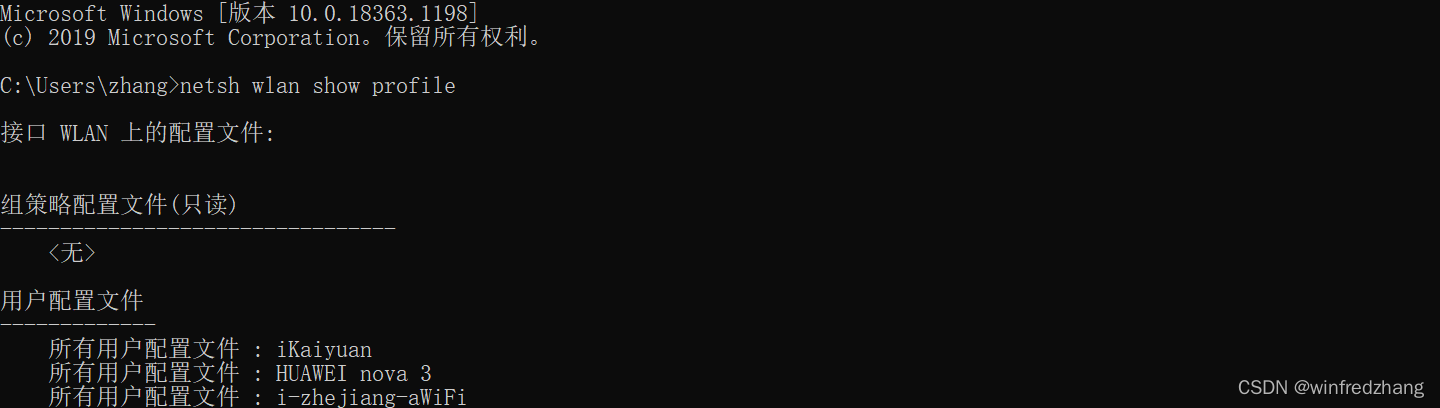
2、输入命令:
netsh wlan show profile
3、输入命令:
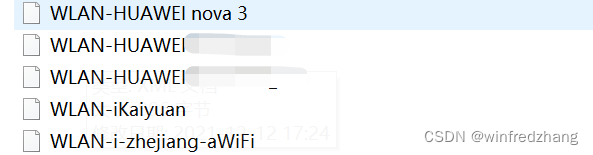
netsh wlan export profile folder=d:\ key=clear

4、打开notepad,拖入xml文件:
	<MSM>
		<security>
			<authEncryption>
				<authentication>WPA2PSK</authentication>
				<encryption>AES</encryption>
				<useOneX>false</useOneX>
			</authEncryption>
			<sharedKey>
				<keyType>passPhrase</keyType>
				<protected>false</protected>
				<keyMaterial>12345678</keyMaterial>
			</sharedKey>
		</security>
	</MSM>
keyMaterial就是密码。





 扫一扫
扫一扫


 1594
1594

 被折叠的 条评论
为什么被折叠?
被折叠的 条评论
为什么被折叠?
 到【灌水乐园】发言





