设置有两种方式:
1、在Editor>font 里面设置默认字体
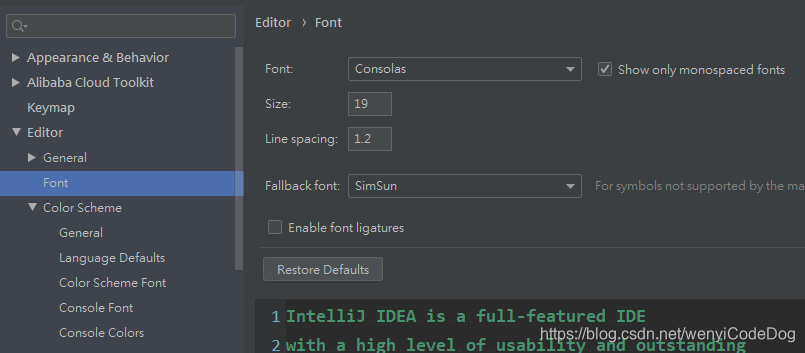
2、在Editor>ColorSchemeFont里面设置自己的字体
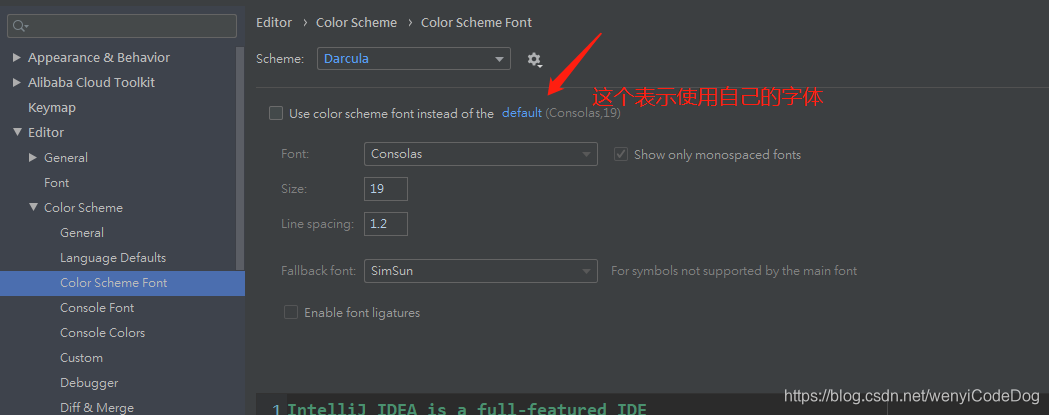
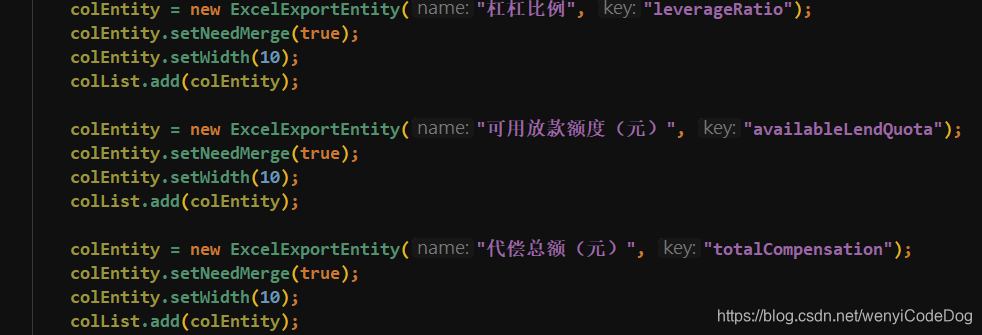
修改后就更加的好看了


 墨衍会员
·
AI 创作全网分发
墨衍智能分发
本文由作者通过墨衍一键同步至各平台
1分发平台
1.3w累计阅读
1.4w+平均单平台
已同步平台
优快云
微信公众号
微博
知乎
掘金
百家号
博客园
抖音
小红书
你的文章也可以这样分发
墨衍会员 ¥399起/年,写一次发全网
我也要
设置有两种方式:
1、在Editor>font 里面设置默认字体
2、在Editor>ColorSchemeFont里面设置自己的字体
修改后就更加的好看了
IDEA 2024.1 字体配置进阶:解决 3 类中文字体渲染与乱码问题
本文详细解析了IDEA 2024.1中文字体渲染与乱码问题的根源,并提供了系统级和IDE内部的解决方案。从JRE字体配置到操作系统优化,再到IDE分层字体设置和编码统一,帮助开发者彻底解决字体模糊、回退和乱码问题,提升编码体验。
idea设置中文版(详细)
右上角有File点开然后找到settings...打开Marketplace这个是搜索插件Instead这个是本地安装过的然后搜索chinese 点击install下载中文插件下载完成把复选框点亮点击ok然后会跳出来这个点击Restart重启Idea就会变成中文版的了......
IDEA2019.2汉化包
IDEA2019.2汉化包,附加使用说明。
IDEA设置中文界面
选择对应版本点击进入 -- 点 Download 下载。在打开IDEA就是中文了,end。把下载的包放入IDEA 的安装目录。在 github 搜索。
手把手教你用nRF52832+RFX2401C设计远距离蓝牙模块(附完整原理图/PCB文件)
本文详细介绍了如何利用nRF52832 SoC与RFX2401C射频前端芯片设计远距离蓝牙模块,涵盖芯片选型、阻抗匹配、PCB布局等关键环节。通过实战指南和完整原理图/PCB文件,帮助工程师实现输出功率可达20dBm的蓝牙模块设计,适用于智能家居、运动追踪等物联网应用。
HomeAssistant+HACS实战:5分钟搞定米家设备接入(附HomeKit配置技巧)
本文详细介绍了如何通过HomeAssistant和HACS插件商店快速接入米家设备,并分享HomeKit配置技巧。从HACS安装到米家设备接入,再到HomeKit设备集成,提供一站式智能家居解决方案,帮助用户实现设备统一管理和自动化场景设置。
IDEA U 2019 安装 设置中文
软件下载 https://pan.baidu.com/s/1kVBO8MvdgmFCRX9lgFlvyQ [提取码]: 2svq 安装步骤 1、鼠标右击【Idea 2019.zip】,选择解压到【Idea 2019】。 2、双击打开【Idea 2019】文件夹。 3、鼠标右击【ideaIU-2019.1.exe】,选择【以管理员身份运行】。 4、点击【Next】。 5、点击【Browse…】更改...
基于Mind+、MOTT实现人工智能
@基于Mind+、MOTT实现人工智能 人工智能实验 一、实验目的及要求 【一】实现人脸识别 【二】实现云数据库应用 【三】实现测温数据mqtt上传至物联网云平台 二、实验原理与内容 基于二哈实现多人人脸学习和识别 基于TinywebDB实现云数据库应用 基于EasyIoT实现mqtt数据上传。 三、实验软硬件环境 硬件:掌控板 软件:Mind+ 四、实验过程(实验步骤、记录、数据、分析) 1.基于二哈实现多人人脸学习和识别 ①在Mind+扩展上的传感器选项选择HUSKYLENS AI 摄像头 ②配置哈士
JAVA学习【IDEA转中文】
找到Plugins设置,在中间的搜索框搜索Chinese 剩下的那个Chinese (Simplified) language Pack EAP 就是我们需要的中文简体了,点击display下载应用, 下载后之后会询问你是否重启idea软件,点击重启,重启之后就是中文界面了。...
LSTM量化选股实战:从数据清洗到回测归因的工程化闭环
LSTM(长短期记忆网络)是一种专为建模长程依赖而设计的循环神经网络,其门控机制能有效应对金融时序数据的非线性、高噪声与动态演化特性。相比传统统计模型或简单RNN,LSTM在股价趋势建模中展现出更强的鲁棒性与泛化能力,尤其适合处理日频多因子时序信号。其技术价值不仅在于提升预测精度,更在于支撑可归因、可审计的量化策略工程实践——从特征构建、标签定义到滚动回测,每一步都需严防未来信息泄露与过拟合风险。典型应用场景包括A股多因子选股、行业轮动信号生成及Alpha组合优化。本文聚焦LSTM在真实量化场景中的落地难点
工控安全政策系列导读:国际标准IEC 62443标准系列
IEC 62443由ANSI/ISA提出,被ISO/IEC采纳,所以该标准会以不同的名字出现,包括:ANSI/ISA-99,ISA-99,ISA 62443,ISO/IEC 62443,ISO 62443,IEC 62443。其中IEC 62443-2-1已等同采纳为国标,于2016年10月发布,标准编号为GB/T 33007。 IEC 62443是在国...
IDEA 2018.2 升级到 IDEA 2019.2,中文字体渲染问题
解决方案 IDEA 2018.2升级到 IDEA 2019.2,中文字体渲染问题 修改一下备用字体就可以 共需要修改两处: 1、Setting -> Editor -> Font 修改 Fallback font 为 simsun 2、Setting -> Editor -> Color Scheme -> Color Scheme Font 修改 Fallback ...
脑机接口最新发展动态报告 (2024-2025)
脑机接口动态
IDEA 2018.2 升级到 IDEA 2019.2,中文字体渲染问题 中文显示异常
原文链接:https://blog.youkuaiyun.com/Mr_Mocha/article/details/100618809 解决方案 IDEA 2018.2升级到 IDEA 2019.2,中文字体渲染问题 修改一下备用字体就可以 共需要修改两处: 1、Setting -> Editor -> Font 修改 Fallback font 为 simsun 2、Setting -...
YOLOv8改进 | 特殊场景检测篇 | 最新的多尺度特征提取DICAM(全网独家首发,增强水下图像的质量)
本文给大家带来的最新改进机制是多尺度特征提取和通道注意力机制DICAM,深度Inception和通道注意力模块(DICAM)主要用于用于增强水下图像的质量、对比度和色偏。所提出的DICAM模型考虑了水下图像的比例退化和不均匀色偏,从而提高图像的质量。通过在两个公开的水下图像增强数据集上的广泛实验,验证了提出的模型在全参考和无参考图像质量评估指标方面。欢迎大家订阅我的专栏一起学习YOLO,购买专栏读者联系读者入群获取进阶项目文件!
Serial RapidIO Gen2 IP 说明(一)
概述 高速IO(RapidIO)互联架构,用来兼容当前最流行的集成通信处理器、主处理器、联网的数字信号处理器,是一种高性能、分组交换(报文交换)的互联技术。它解决了高性能嵌入式产业稳定性、高带宽以及系统内部更快的总线速率的需求。 高速IO(RapidIO)标准由三层定义:逻辑层、传输层、物理层。逻辑层定义了所有的协议内容和报文格式。这些是终端发起和完成一次传输所必需的信息。传输层提供了报文从一个端点传输到另外一个端点必要的路线信息。物理层则描述了设备级的端口声明,如报...
IDEA_使用小问题
字体 01 中文 变粗,缺字 IDEA 2018.2升级到 IDEA 2019.2,中文字体渲染问题 修改一下备用字体就可以 共需要修改两处: 1、Setting -> Editor -> Font 修改 Fallback font 为 simsun 2、Setting -> Editor -> Color Scheme -> Color Scheme Font 修改 Fallback font 为 simsun ...
VB摄像头监控
该VB模块可对摄像头捕获的画面进行录像等,可在创建的窗口进行控制
idea 2019 设置注释字体修改
今天使用idea时,发现注释写出来的是字体样式变了 可以通过File-->Settings-->font进入字体设置; 在font中找到Fallback font 设置字体;
efm32 入门.pdf
本PDF共计22页,介绍的是操作驱动API,下载与否自己斟酌。
android 蓝牙通讯demo
android 下蓝牙通讯demo,实现了发现蓝牙,使能蓝牙,通过蓝牙发送消息。
IDEA修改注释内中文字体
主字体为 Inconsolata 今天敲代码的时候突然发现IDEA的注释里,中文字体有点奇怪,尤其是“校验” 所以找了方法修改一下,现把我的方法贴出 如何在不改变英文字体的情况下,改变注释中的中文字体 首先打开 file - settings 输入 font 根据图上 1,2,3修改后,保存即可 效果图 ...
深度学习工具包 DeepLearningToolbox
深度学习工具包Deprecation notice.-----This toolbox is outdated and no longer maintained.There are much better tools available for deep learning than this toolbox, e.g. [Theano](http://deeplearning.net/software/theano/), [torch](http://torch.ch/) or [tensorflow](http://www.tensorflow.org/)I would suggest you use one of the tools mentioned above rather than use this toolbox.Best, Rasmus.DeepLearnToolbox================A Matlab toolbox for Deep Learning.Deep Learning is a new subfield of machine learning that focuses on learning deep hierarchical models of data.It is inspired by the human brain's apparent deep (layered, hierarchical) architecture.A good overview of the theory of Deep Learning theory is[Learning Deep Architectures for AI](http://www.iro.umontreal.ca/~bengioy/papers/ftml_book.pdf)For a more informal introduction, see the following videos by Geoffrey Hinton and Andrew Ng.* [The Next Generation of Neural Networks](http://www.youtube.com/watch?v=AyzOUbkUf3M) (Hinton, 2007)* [Recent Developments in Deep Learning](http://www.youtube.com/watch?v=VdIURAu1-aU) (Hinton, 2010)* [Unsupervised Feature Learning and Deep Learning](http://www.youtube.com/watch?v=ZmNOAtZIgIk) (Ng, 2011)If you use this toolbox in your research please cite [Prediction as a candidate for learning deep hierarchical models of data](http://www2.imm.dtu.dk/pubdb/views/publication_details.php?id=6284)```@MASTERSTHESIS\{IMM2012-06284, author = "R. B. Palm", title = "Prediction as a candidate for learning deep hierarchical models of data", year = "2012",}```Contact: rasmusbergpalm at gmail dot comDirectories included in the toolbox-----------------------------------`NN/` - A library for Feedforward Backpropagation Neural Networks`CNN/` - A library for Convolutional Neural Networks`DBN/` - A library for Deep Belief Networks`SAE/` - A library for Stacked Auto-Encoders`CAE/` - A library for Convolutional Auto-Encoders`util/` - Utility functions used by the libraries`data/` - Data used by the examples`tests/` - unit tests to verify toolbox is workingFor references on each library check REFS.mdSetup-----1. Download.2. addpath(genpath('DeepLearnToolbox'));Example: Deep Belief Network---------------------```matlabfunction test_example_DBNload mnist_uint8;train_x = double(train_x) / 255;test_x = double(test_x) / 255;train_y = double(train_y);test_y = double(test_y);%% ex1 train a 100 hidden unit RBM and visualize its weightsrand('state',0)dbn.sizes = [100];opts.numepochs = 1;opts.batchsize = 100;opts.momentum = 0;opts.alpha = 1;dbn = dbnsetup(dbn, train_x, opts);dbn = dbntrain(dbn, train_x, opts);figure; visualize(dbn.rbm{1}.W'); % Visualize the RBM weights%% ex2 train a 100-100 hidden unit DBN and use its weights to initialize a NNrand('state',0)%train dbndbn.sizes = [100 100];opts.numepochs = 1;opts.batchsize = 100;opts.momentum = 0;opts.alpha = 1;dbn = dbnsetup(dbn, train_x, opts);dbn = dbntrain(dbn, train_x, opts);%unfold dbn to nnnn = dbnunfoldtonn(dbn, 10);nn.activation_function = 'sigm';%train nnopts.numepochs = 1;opts.batchsize = 100;nn = nntrain(nn, train_x, train_y, opts);[er, bad] = nntest(nn, test_x, test_y);assert(er < 0.10, 'Too big error');```Example: Stacked Auto-Encoders---------------------```matlabfunction test_example_SAEload mnist_uint8;train_x = double(train_x)/255;test_x = double(test_x)/255;train_y = double(train_y);test_y = double(test_y);%% ex1 train a 100 hidden unit SDAE and use it to initialize a FFNN% Setup and train a stacked denoising autoencoder (SDAE)rand('state',0)sae = saesetup([784 100]);sae.ae{1}.activation_function = 'sigm';sae.ae{1}.learningRate = 1;sae.ae{1}.inputZeroMaskedFraction = 0.5;opts.numepochs = 1;opts.batchsize = 100;sae = saetrain(sae, train_x, opts);visualize(sae.ae{1}.W{1}(:,2:end)')% Use the SDAE to initialize a FFNNnn = nnsetup([784 100 10]);nn.activation_function = 'sigm';nn.learningRate = 1;nn.W{1} = sae.ae{1}.W{1};% Train the FFNNopts.numepochs = 1;opts.batchsize = 100;nn = nntrain(nn, train_x, train_y, opts);[er, bad] = nntest(nn, test_x, test_y);assert(er < 0.16, 'Too big error');```Example: Convolutional Neural Nets---------------------```matlabfunction test_example_CNNload mnist_uint8;train_x = double(reshape(train_x',28,28,60000))/255;test_x = double(reshape(test_x',28,28,10000))/255;train_y = double(train_y');test_y = double(test_y');%% ex1 Train a 6c-2s-12c-2s Convolutional neural network %will run 1 epoch in about 200 second and get around 11% error. %With 100 epochs you'll get around 1.2% errorrand('state',0)cnn.layers = { struct('type', 'i') %input layer struct('type', 'c', 'outputmaps', 6, 'kernelsize', 5) %convolution layer struct('type', 's', 'scale', 2) %sub sampling layer struct('type', 'c', 'outputmaps', 12, 'kernelsize', 5) %convolution layer struct('type', 's', 'scale', 2) %subsampling layer};cnn = cnnsetup(cnn, train_x, train_y);opts.alpha = 1;opts.batchsize = 50;opts.numepochs = 1;cnn = cnntrain(cnn, train_x, train_y, opts);[er, bad] = cnntest(cnn, test_x, test_y);%plot mean squared errorfigure; plot(cnn.rL);assert(er<0.12, 'Too big error');```Example: Neural Networks---------------------```matlabfunction test_example_NNload mnist_uint8;train_x = double(train_x) / 255;test_x = double(test_x) / 255;train_y = double(train_y);test_y = double(test_y);% normalize[train_x, mu, sigma] = zscore(train_x);test_x = normalize(test_x, mu, sigma);%% ex1 vanilla neural netrand('state',0)nn = nnsetup([784 100 10]);opts.numepochs = 1; % Number of full sweeps through dataopts.batchsize = 100; % Take a mean gradient step over this many samples[nn, L] = nntrain(nn, train_x, train_y, opts);[er, bad] = nntest(nn, test_x, test_y);assert(er < 0.08, 'Too big error');%% ex2 neural net with L2 weight decayrand('state',0)nn = nnsetup([784 100 10]);nn.weightPenaltyL2 = 1e-4; % L2 weight decayopts.numepochs = 1; % Number of full sweeps through dataopts.batchsize = 100; % Take a mean gradient step over this many samplesnn = nntrain(nn, train_x, train_y, opts);[er, bad] = nntest(nn, test_x, test_y);assert(er < 0.1, 'Too big error');%% ex3 neural net with dropoutrand('state',0)nn = nnsetup([784 100 10]);nn.dropoutFraction = 0.5; % Dropout fraction opts.numepochs = 1; % Number of full sweeps through dataopts.batchsize = 100; % Take a mean gradient step over this many samplesnn = nntrain(nn, train_x, train_y, opts);[er, bad] = nntest(nn, test_x, test_y);assert(er < 0.1, 'Too big error');%% ex4 neural net with sigmoid activation functionrand('state',0)nn = nnsetup([784 100 10]);nn.activation_function = 'sigm'; % Sigmoid activation functionnn.learningRate = 1; % Sigm require a lower learning rateopts.numepochs = 1; % Number of full sweeps through dataopts.batchsize = 100; % Take a mean gradient step over this many samplesnn = nntrain(nn, train_x, train_y, opts);[er, bad] = nntest(nn, test_x, test_y);assert(er < 0.1, 'Too big error');%% ex5 plotting functionalityrand('state',0)nn = nnsetup([784 20 10]);opts.numepochs = 5; % Number of full sweeps through datann.output = 'softmax'; % use softmax outputopts.batchsize = 1000; % Take a mean gradient step over this many samplesopts.plot = 1; % enable plottingnn = nntrain(nn, train_x, train_y, opts);[er, bad] = nntest(nn, test_x, test_y);assert(er < 0.1, 'Too big error');%% ex6 neural net with sigmoid activation and plotting of validation and training error% split training data into training and validation datavx = train_x(1:10000,:);tx = train_x(10001:end,:);vy = train_y(1:10000,:);ty = train_y(10001:end,:);rand('state',0)nn = nnsetup([784 20 10]); nn.output = 'softmax'; % use softmax outputopts.numepochs = 5; % Number of full sweeps through dataopts.batchsize = 1000; % Take a mean gradient step over this many samplesopts.plot = 1; % enable plottingnn = nntrain(nn, tx, ty, opts, vx, vy); % nntrain takes validation set as last two arguments (optionally)[er, bad] = nntest(nn, test_x, test_y);assert(er < 0.1, 'Too big error');```[](https://bitdeli.com/free "Bitdeli Badge")
idea修改中文字体
idea修改中文字体 打开文件>设置>编辑器>字体 取消勾选等宽字体 选择次要字体 应用完成
IDEA修改中文字体为微软雅黑
1. 找到IDEA安装目录下的fontconfig.properties.src文件 如我的路径是:D:\App\JetBrains\IntelliJ IDEA 2020.1.3\jbr\lib\fontconfig.properties.src 2. 打开文件,将其全部替换为以下内容,保存退出 # # # Copyright (c) 2003, 2019, Oracle and/or its affiliates. All rights reserved. # DO NOT ALTER OR REM
Windows 下 JetBrains 系列如 IDEA、PhpStorm、PyCharm 中文优化字体方案
因为博主主力工具是 MacBook Pro,所以在 macOS 下 IDEA 使用 Monaco 字体时,字体显得非常美观(毕竟 Retina 2K,在小小的 15 吋笔电上)。回家后面对 1080P 的 Windows 10(我一定要存钱上个 4K HDR!!!),面对这样难受的字体。心里万只草泥马奔腾啊。 多说两句,之前有做过 Monaco 与微软雅黑的混合字体,但是搁置两年了,毕竟空闲时...
idea设置中文字体不倾斜
突然有一天发现,idea的中文字体倾斜真心不好看,于是找到的摆正的方法: setting > editor > color scheme > language default > comments > docComment > text 去掉Italic(斜体字)勾选,搞定!其他的地方如果是斜体的,照着去掉这个勾选。收工! ...
[JSP] 课堂笔记——在IDEA上配置Tomcat的问题(2019.12.6)
目录1 遇到的问题1.1 无法使用内置对象问题描述解决方案1.2 Tomcat无法热部署问题描述解决方案1.3 idea中文字体问题问题描述解决方案 1 遇到的问题 1.1 无法使用内置对象 问题描述 无法使用Tomcat的内置对象 解决方案 将<%!%>改为<%%> 语句格式 用途 <%!JSP 声明语句%> 通常声明全局变量、常量、方法、类...
Idea 代码用好看的中文字体方法:
找到安装的idea路径中jdr的lib文件进去: 转存失败重新上传取消 用记事本创建文件名及格式为fontconfig.properties的文件: 复制以下代码进文件: # Version version=1 # Component Font Mappings allfonts.chinese-ms936=Microsoft Yahei allfonts.chine...
IntelliJ IDEA 调整UTF-8编码后,注释的中文字体乱码解决方法
IntelliJ IDEA 调整UTF-8编码后,注释的中文字体乱码解决方法 首先保证是设置的,UTF-8编码 之后就注释是乱码的话进行如下调整 调整前 设置 改 Fallback font 字体 为黑体(SimHei)就不乱码了 ...


 被折叠的 条评论
为什么被折叠?
 到【灌水乐园】发言


 349


 扫一扫


