vxe-table设置选中行的样式

vxe-table自定义选中行样式

需求是用户选中的这行数据的时间a,如果晚于外部定义的时间b,这一行数据设置背景色为红色,否色为绿色,且用户没选的数据不受影响,背景色不变

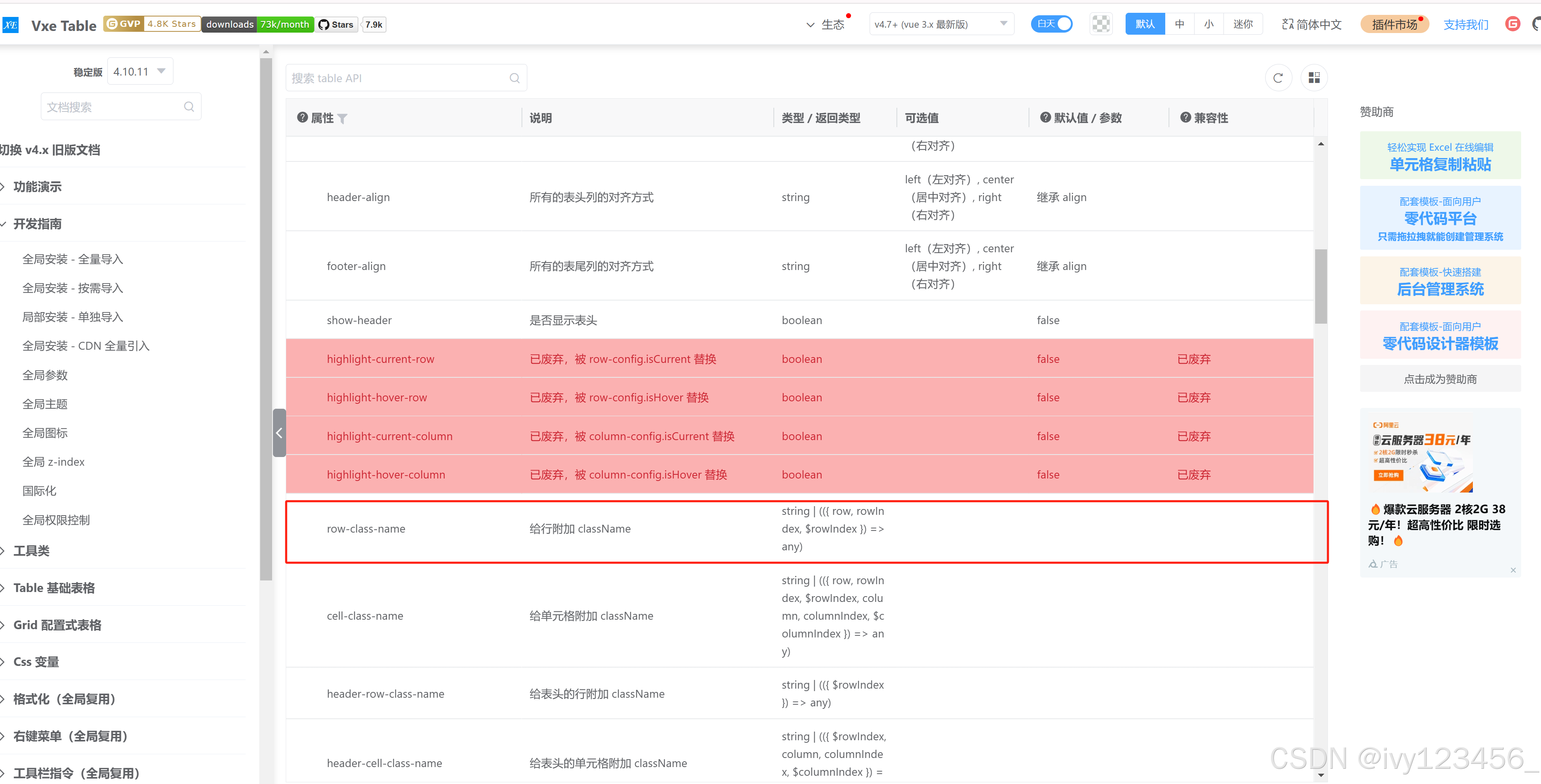
首选给vxe-table设置行样式需要用到“row-class-name ” 属性

html代码

<vxe-table
        ref="popupTable"
        :data="data"
        border
        resizable
        stripe
        :header-cell-style="{
          'text-align': 'center',
          color: '#000000',
          backgroundColor: '#f2f2f2',
          width: 'auto'
        }"
        height="560px"
        :cell-style="{ 'text-align': 'center', color: '#000000' }"
        :row-class-name="rowDialogClassName"
        :seq-config="{ seqMethod }"
        :row-config="{ isHover: true, keyField: 'id' }"
        :checkbox-config="{ reserve: true }"
      >
        <vxe-column fixed type="checkbox" width="50" />
        <vxe-column type="seq" title="序号" width="60" />
 </vxe-table>

具体方法实现

//弹框内行样式
const rowDialogClassName = ({ row, rowIndex, $rowIndex }) => {
  const aTime = new Date(b)
  let hasMatch = false
  for (const item of state.selectionList) {
    let isEqual = true
    const keys = Object.keys(row)
    for (const key of keys) {
      if (item[key] !== row[key]) {
        isEqual = false
        break
      }
    }
    if (isEqual) {
      hasMatch = true
      const itemTime = new Date(item.a)
      const itemTimeOnlyDate = new Date(
        itemTime.getFullYear(),
        itemTime.getMonth(),
        itemTime.getDate()
      )
      if (aTime < itemTimeOnlyDate) {
        return 'red-row'
      } else if (aTime >= itemTimeOnlyDate) {
        return 'yellow-row'
      }
    }
  }
  return hasMatch ? '' : ''
}

state.selectionList //用户选中的数据


在使用 `vxe-table` 时,若需要根据中行的某些条件动态设置背景色,可以通过 `row-class-name` 属性结合自定义方法来实现。该属性允许为每一行指定一个或多个类名,从而控制样式。 ### 实现方式 1. **定义 `row-class-name` 属性** 在 `<vxe-table>` 标签中添加 `:row-class-name="rowDialogClassName"`,然后在 Vue 的 `methods` 中定义 `rowDialogClassName` 方法,用于判断当前行是否满足特定条件,并返回对应的类名。 2. **编写样式规则** 使用 CSS 定义对应的类名样式,例如 `.red-row` 和 `.green-row`,分别表示红色和绿色背景。 3. **动态判断行状态** 在 `rowDialogClassName` 方法中,可以获取到当前行数据,并与外部定义的时间进行比较,从而决定应用哪种样式。 ### 示例代码 #### HTML 部分 ```html <vxe-table ref="popupTable" :data="data" border resizable stripe :header-cell-style="{ 'text-align': 'center', color: '#000000', backgroundColor: '#f2f2f2' }" height="560px" :cell-style="{ 'text-align': 'center', color: '#000000' }" :row-class-name="rowDialogClassName" > <vxe-column fixed type="checkbox" width="50"></vxe-column> <vxe-column type="seq" title="序号" width="60"></vxe-column> </vxe-table> ``` #### JavaScript 部分(Vue methods) ```javascript methods: { rowDialogClassName({ row }) { const timeA = new Date(row.time); // 假设每行有一个时间字段名为 "time" const timeB = new Date('2024-01-01'); // 外部定义的时间 if (timeA > timeB) { return 'red-row'; } else { return 'green-row'; } } } ``` #### CSS 部分 ```css .red-row { background-color: #ffcccc !important; /* 红色背景 */ } .green-row { background-color: #ccffcc !important; /* 绿色背景 */ } ``` ### 注意事项 - **优先级问题**:由于 `vxe-table` 自带的样式可能会覆盖自定义样式,因此建议在自定义类名中使用 `!important` 来提高优先级。 - **动态更新**:如果外部定义的时间 `timeB` 是动态变化的,则需要确保在变化后触发重新渲染表格,或者监听变化并手动调用刷新方法。 - **性能优化**:当数据量较大时,应避免频繁操作 DOM 或执行复杂计算,以防止影响性能。 通过上述方法,可以灵活地根据业务需求为 `vxe-table` 的中行设置不同的背景色 [^1]。
评论
成就一亿技术人!
拼手气红包6.0元
还能输入1000个字符
 
红包 添加红包
表情包 插入表情
 条评论被折叠 查看
添加红包

请填写红包祝福语或标题

红包个数最小为10个

红包金额最低5元

当前余额3.43前往充值 >
需支付:10.00
成就一亿技术人!
领取后你会自动成为博主和红包主的粉丝 规则
hope_wisdom
发出的红包
实付
使用余额支付
点击重新获取
扫码支付
钱包余额 0

抵扣说明:

1.余额是钱包充值的虚拟货币,按照1:1的比例进行支付金额的抵扣。
2.余额无法直接购买下载,可以购买VIP、付费专栏及课程。

余额充值


