





 本文深入探讨了Linux输入子系统的各个方面,包括如何通过ioctl调用获取设备版本、身份信息、名称和拓扑信息等。此外,还详细介绍了如何确定设备的能力和特性,如按键状态、LED状态、重复率设置及绝对轴的状态等。
Using the Input Subsystem, Part II
 (2008-06-20 14:21:09)
In last month's article, we saw how the Linux input subsystemworked inside the kernel, ending with a quick mention of the eventhandlers. Each handler essentially provides a different user-spaceAPI, converting input events into the particular format that makesup that API.
One of the key aspects of the input subsystem integration intoLinux is the availability of the event interface. This basicallyexposes the raw events to userspace through a collection ofcharacter device nodes—one character device node per logical inputdevice. The event interface is a really powerful technique, becauseit allows the manipulation of the events in userspace withoutinformation loss. For example, legacy mouse interfaces support onlytwo relative axes and up to five buttons. These are normally mappedto the two real axes and three real buttons, with the fourth andfifth buttons logically being mapped to the scroll wheel up andscroll wheel down events.
However, this mapping becomes a problem when trying to use amouse with a scroll wheel and more than three buttons, because anyadditional buttons can be mapped only to an existing button. Thelegacy APIs also impede use of advanced input devices, such asspace balls and other devices' with many axes. By contrast, theevent API provides full access to the devices capabilities, and iteven includes a per-device description of those capabilities andother device characteristics.
This month's article focuses on the various ioctl capabilitiesof the event interface, in addition to the normal read and writecalls.
Finding the Version of the Event Interface
The event interface supports determining the version of theevent device code, using the EVIOCGVERSION ioctl function. Theargument is an int (32 bits) and is meant to be interpreted as amajor version (two high bytes), a minor version (third byte) and apatch level (low byte). The same value is returned from each eventdevice on a machine.
An example of the EVIOCGVERSION is shown in Listing 1. The firstargument to the ioctl function is an open file descriptor for theevent device node (for example, /dev/input/event0). Notice that youhave to pass a pointer to the integer variable, not the variableitself, as the third argument to the ioctl call.
Listing 1. Sample EVIOCGVERSION Function
Finding Information about the Device's Identity
The event interface supports retrieving information associatedwith the underlying device using the EVIOCGID ioctl. The argumentis a pointer to an input_id structure; the input_id structure isdefined as shown in Listing 2. The __u16 data type is aLinux-specific, unsigned 16-bit integer. You can safely cast it toa standard uint16_t in your code.
Listing 2. iput_id Structure Definitions
The bus type is the only field that contains accurate data. Youshould probably consider it to be an opaque, enumerated type, andcompare it with the various BUS_x type definitions provided in<linux/input.h>. The vendor, productand version fields are bus type-specific information relating tothe identity of the device. Modern devices (typically using PCI orUSB) do have information that can be used, but legacy devices (suchas serial mice, PS/2 keyboards and game ports on ISA sound cards)do not. These numbers therefore are not meaningful for some valuesof bus type.
An example of the EVIOCGID ioctl is shown in Listing 3. Thisexample calls the ioctl and then prints out the results. The caselogic shows all current bus types. Here is an example of runningthat code: vendor 045e product 001d version 0111is on a Universal Serial Bus.
Listing 3. Sample EVIOCGID ioctl
In addition to the type of bus and the vendor, product andversion information, some devices can provide strings that make upmeaningful names. This can be obtained from the event interfaceusing the EVIOCGNAME ioctl. This ioctl provides a string andreturns the length of the string (or a negative error value). Ifthe string is too long to fit into the argument, it will betruncated. An example is provided in Listing 4. If it seems strangethat the argument is not &name, remember the nameof an array is the same as a pointer to the first element.Therefore, &name would be a pointer to a pointer tothe first element, which is not what we want. If you really want touse a dereference, use &(name[0]).
Listing 4. Example Trunctated String
Here is an example of running that eventcode:
The device on /dev/input/event0 says its name
    is Logitech USB-PS/2 Optical Mouse
Not all devices contain meaningful names, however, so kernelinput drivers try to provide something meaningful. For example, USBdevices without manufacturer or product strings concatenate thevendor and product ID information.
Although device identity and name information is often useful,it may not be sufficient information to tell which device you have.For example, if you have two joysticks that are the same, you mayneed to identify them based on which port they use. This is usuallyknown as topology information, and you can get this from the eventinterface using the EVIOCGPHYS ioctl. Like EVIOCGNAME, thisprovides a string and returns the length of the string (or anegative error number). An example is shown in Listing 5; runningthat example will produce something like:
The device on /dev/input/event0 says its path
    is usb-00:01.2-2.1/input0
Listing 5. Using EVIOCGPHYS for Topology Information
To understand what this string is showing, you need to break itdown into parts. The usb part means this is a physical topologyfrom the USB system. The 00:01.2 is the PCI businformation for the USB host controller (in this case, bus 0, slot1, function 2). The 2.1 shows the path from the root hub to thedevice. In this case, the upstream hub is plugged in to the secondport on the root hub, and that device is plugged in to the firstport on the upstream hub. input0 means this is the first eventdevice on the device. Most devices have only one, but multimediakeyboards may present the normal keyboard on one interface and themultimedia function keys on a second interface. This topologyexample is shown in Figure 1.
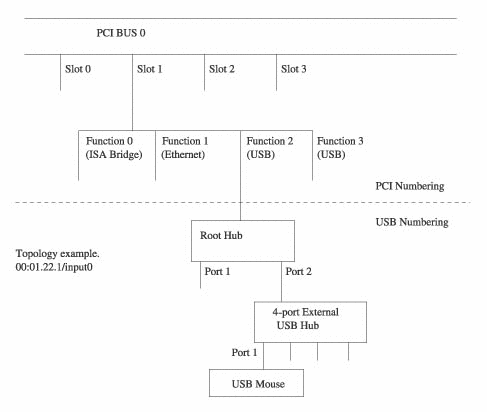
Figure 1. Keyboard Topology
This setup doesn't help if you swap the cables on two identicaldevices. The only thing that can help in this case is if the devicehas some form of unique identifier, such as a serial number. Youcan get this information using the EVIOCGUNIQ ioctl. An example isshown in Listing 6. Most devices don't have such an identifier, andyou will get an empty string from this ioctl.
Listing 6. Finding a Unique Identifier
Determining the Device Capabilities and Features
For some applications, it might be enough to know the deviceidentity, because this would allow you to handle any special casesdepending on what device is being used. However, it doesn't scalewell; consider a case where you want to enable scroll wheelhandling only if the device has a scroll wheel. You really don'twant to have to list the vendor and product information for everymouse with a scroll wheel in your code.
To avoid this problem, the event interface allows you todetermine which features and capabilities are available for aparticular device. The types of features supported by the eventinterface are:
-
EV_KEY: absolute binary results, such as keysand buttons.
-
EV_REL: relative results, such as the axes on amouse.
-
EV_ABS: absolute integer results, such as theaxes on a joystick or for a tablet.
-
EV_MSC: miscellaneous uses that didn't fitanywhere else.
-
EV_LED: LEDs and similar indications.
-
EV_SND: sound output, such as buzzers.
-
EV_REP: enables autorepeat of keys in the inputcore.
-
EV_FF: sends force-feedback effects to adevice.
-
EV_FF_STATUS: device reporting of force-feedbackeffects back to the host.
-
EV_PWR: power management events.
These are only the types of features; a wide range ofindividual features can be found within each type. For example, theEV_REL feature type distinguishes between X, Y and Z axes andhorizontal and vertical wheels. Similarly, the EV_KEY feature typeincludes literally hundreds of different keys and buttons.
The capabilities or features of each device can be determinedthrough the event interface, using the EVIOCGBIT ioctl. Thisfunction allows you to determine the types of features supported byany particular device, for example, whether it has keys, buttons orneither. It further allows you to determine the specific featuresthat are supported, for example, which keys or buttons arepresent.
The EVIOCGBIT ioctl takes four arguments. If we consider it asioctl(fd, EVIOCGBIT(ev_type, max_bytes), bitfield), then the fdargument is an open file descriptor; ev_type is the type offeatures to return (with 0 as a special case, indicating the listof all feature types supported should be returned, rather than thelist of particular features for that type); max_bytes shows theupper limit on how many bytes should be returned; and bitfield is apointer to the memory area where the result should be copied. Thereturn value is the number of bytes actually copied on success or anegative error code on failure.
Let's look at a couple of examples of the EVIOCGBIT ioctl call.The first example, Listing 7, shows how to determine the types offeatures present. It determines how much memory is required for thebit array using evtype_bitmask, based on the EV_MAX definition in<linux/input.h>. The ioctl is thensubmitted, and the event layer fills in the bit array. We then testeach bit in the array and show where the bit was set, whichindicates the device does have at least one of this type offeature. All devices support the EV_SYN feature type in 2.5; theinput core sets this bit.
Listing 7. Determining Features with EVIOCGBIT
When run, with a keyboard as the target, the example in Listing7 produces:
Supported event types:
  Event type 0x00  (Synchronization Events)
  Event type 0x01  (Keys or Buttons)
  Event type 0x11  (LEDs)
  Event type 0x14  (Repeat)
With a mouse as the target, the exampleproduces:
Supported event types:
  Event type 0x00  (Synchronization Events)
  Event type 0x01  (Keys or Buttons)
  Event type 0x02  (Relative Axes)
Retrieving Input from (and to) the Device
Having determined what capabilities a particular device has, youknow what types of events it will produce and what types of eventsyou can send.
Retrieving events from a device requires a standard characterdevice “read” function. Each time you read from the event device(e.g., /dev/input/event0), you will get a whole number of events,each consisting of a struct input_event.
Listing 8. Checking for Busy Spots
The example shown in Listing 8 does a busy loop on the open filedescriptor, trying to read any events. It filters out any eventsthat don't correspond to keys and then prints out the variousfields in the input_event structure. Running this while typing onmy keyboard produced:
Event: time 1033621164.003838, type 1, code 37, value 1
Event: time 1033621164.027829, type 1, code 38, value 0
Event: time 1033621164.139813, type 1, code 38, value 1
Event: time 1033621164.147807, type 1, code 37, value 0
Event: time 1033621164.259790, type 1, code 38, value 0
Event: time 1033621164.283772, type 1, code 36, value 1
Event: time 1033621164.419761, type 1, code 36, value 0
Event: time 1033621164.691710, type 1, code 14, value 1
Event: time 1033621164.795691, type 1, code 14, value 0
You get one event per key press and another per key release.
This read interface has all the normal characteristics of acharacter device, meaning you don't need to use a busy loop. Youcan simply wait until your program needs some input from the deviceand then perform the read call. In addition, if you are interestedin the input from a number of devices, you can use the poll andselect functions to wait on a number of open devices at the sametime.
Sending information to the device is a process similar toreceiving it, except you use the standard write function instead ofread. It is important to remember that the data used in the writecall has to be a struct input_event.
A simple example of writing data is shown in Listing 9. Thisexample turns the Caps Lock LED on, waits 200 milliseconds and thenturns the Caps Lock LED off. It then turns the Num Lock LED on,waits 200 milliseconds, and then turns the Num Lock LED off. Thecycle then repeats (in an infinite busy loop), so you see alternateflashing of the two keyboard LEDs.
Listing 9. Sample Data Write Function
By now it should be fairly clear that you receive events onlywhen something changes—a key is pressed or released, the mouse ismoved and so on. For some applications, you need to be able todetermine what the global state of the device is. For example, aprogram that manages keyboards may need to determine which LEDs arecurrently lit and which keys are currently depressed on thekeyboard, even though some of the keys may have been depressedbefore the application started.
The EVIOCGKEY ioctl is used to determine the global key andbutton state for a device. An example is shown in Listing 10. Thisioctl is similar to the EVIOCGBIT(...,EV_KEY,...) function in someways; instead of setting a bit in the bit array for each key orbutton that the device can send, EVIOCGKEY sets a bit in the bitarray for each key or button that is depressed.
Listing 10. Determining a Device's Global Key and ButtonState
The EVIOCGLED and EVIOCGSND functions are analogous toEVIOCGKEY, except that they return which LEDs are currently lit andsounds that are currently turned on, respectively. An example ofhow you would use EVIOCGLED is shown in Listing 11. Again, each bitis interpreted in the same way as the bits in the bit array arefilled in by EVIOCGBIT.
You can determine the repeat rate settings for a keyboard usingthe EVIOCGREP ioctl. An example is shown in Listing 12, with twoelements to the array. The first element specifies the delay beforethe keyboard starts repeating, and the second element specifies thedelay between subsequent repeats. So if you hold down a key, you'llget one character straight away, a second character rep[0]milliseconds later, a third character rep[1] milliseconds after thesecond character and another character every rep[1] millisecondsthereafter, until you release the key.
Listing 12. Checking the Repeat Rate Settings
You also can set the key repeat rate using EVIOCSREP. This usesthe same two-element array that you'd use to get the settings, asshown in Listing 13; it sets the initial delay to 2.5 seconds andthe repeat rate to 1 per second.
Listing 13. Setting the Repeat Rates
Some input drivers support variable mappings between the keysheld down (which are interpreted by the keyboard scan and reportedas scancodes) and the events sent to the input layer. Youcan determine what key is associated with each scancode using theEVIOCGKEYCODE ioctl. An example is shown in Listing 14, which loopsover the first 100 scancodes. The value of the scancode (input tothe function) is the first element in the integer array, and theresulting input event key number (keycode) is the second element inthe array. You can also modify the mapping, using the EVIOCSKEYCODEioctl. An example is shown in Listing 15; this ioctl maps my M keyto always produce a letter N. Be aware that keycode ioctl functionsmay not work on every keyboard—that USB keyboard is an example of adriver that does not support variable mappings.
Listing 14. Looping over Scancodes
The EVIOCGABS function also provides state information. Insteadof filling in a bit array that represents the global state ofboolean values, however, it provides a struct input_absinfo (seeListing 16) for one absolute axis. If you want the global state fora device, you have to call the function for each axis present onthe device. An example is shown in Listing 17. The elements in thearray are signed 32-bit quantities, and you can safely treat themas equivalent to int32_t. The first element shows the current valueof the axis, the second and third elements show the current limitsof the axis, the fourth element shows the size of the “flat”section (if any) of the response and the last element shows thesize of the error that may be present.
Listing 16. input_absinfo for an Absolute Axis
Listing 17. Checking Globabl State by Axis
Force Feedback
Three additional ioctl functions may be used for controllingforce-feedback devices: EVIOCSFF, EVIOCRMFF andEVIOCGEFFECT. These functions currently send a force-feedbackeffect, remove a force-feedback effect and determine how manysimultaneous effects can be used, respectively. Because theforce-feedback support is still emerging and substantial workremains to be done, it is a little premature to fully document theAPI. The web sites listed in the Resources section of this articlemay have updated information by the time you read this.





 扫一扫
扫一扫


 791
791

 被折叠的 条评论
为什么被折叠?
被折叠的 条评论
为什么被折叠?
 到【灌水乐园】发言





