


导言:项目最近用到换肤功能,要匹配四套皮肤,在github上对比了几个换肤库,发现Android-skin-support的star量比较高,(github地址)用起来效果也不错。当时项目比较紧,留下几个疑问,现在把源码看了看,搞明白了到底是怎么回事。
先说心中的疑问:
1:换肤库是怎么实现对原有的系统控件View的换肤支持?
2:是怎么根据不同的皮肤来找到对应的资源文件的?
3:切换皮肤后,是怎么更新现有View的皮肤的?
带着这三个疑问,我们来从源码看起(本文只讲解androidx的,android包的其实也是一样道理,也可以跳过源码直接看总结结果):
一、xml布局文件是怎么变成对象的?
xml布局文件要想变成一个实实在在的view对象,都会调用LayoutInflater.inflate()方法。
下图是AppcompatActivity的setContentView()的加载layout的实现处。(此处略过AppCompatDelegate代理AppCompatActivity的全生命周期)
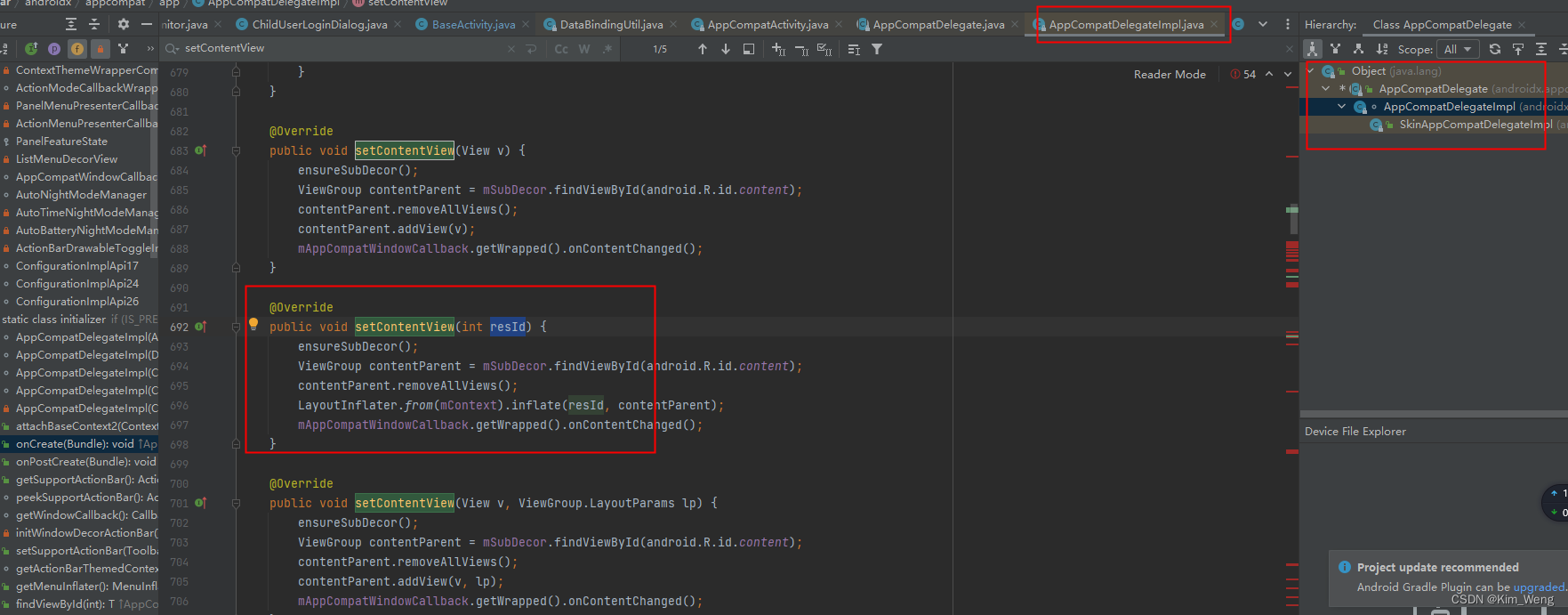
看到LayoutInflater.inflate()是不是很熟悉。比如View通过xml布局创建,也是通过View.inflate(Context context, @LayoutRes int resource, ViewGroup root)方法来加载的。
/**
 * Inflate a view from an XML resource.  This convenience method wraps the {@link
 * LayoutInflater} class, which provides a full range of options for view inflation.
 *
 * @param context The Context object for your activity or application.
 * @param resource The resource ID to inflate
 * @param root A view group that will be the parent.  Used to properly inflate the
 * layout_* parameters.
 * @see LayoutInflater
 */
public static View inflate(Context context, @LayoutRes int resource, ViewGroup root) {


    LayoutInflater factory = LayoutInflater.from(context);
    return factory.inflate(resource, root);
}
方法的本质还是通过LayoutInflater.inflate() 来实现的。下面我们来看下LayoutInflater.inflate()的具体实现。
  /**
     * Inflate a new view hierarchy from the specified xml resource. Throws
     * {@link InflateException} if there is an error.
     *
     * @param resource ID for an XML layout resource to load (e.g.,
     *        <code>R.layout.main_page</code>)
     * @param root Optional view to be the parent of the generated hierarchy (if
     *        <em>attachToRoot</em> is true), or else simply an object that
     *        provides a set of LayoutParams values for root of the returned
     *        hierarchy (if <em>attachToRoot</em> is false.)
     * @param attachToRoot Whether the inflated hierarchy should be attached to
     *        the root parameter? If false, root is only used to create the
     *        correct subclass of LayoutParams for the root view in the XML.
     * @return The root View of the inflated hierarchy. If root was supplied and
     *         attachToRoot is true, this is root; otherwise it is the root of
     *         the inflated XML file.
     */
    public View inflate(@LayoutRes int resource, @Nullable ViewGroup root, boolean attachToRoot) {


        final Resources res = getContext().getResources();
        if (DEBUG) {


            Log.d(TAG, "INFLATING from resource: \"" + res.getResourceName(resource) + "\" ("
                  + Integer.toHexString(resource) + ")");
        }

        View view = tryInflatePrecompiled(resource, res, root, attachToRoot);
        if (view != null) {


            return view;
        }
        XmlResourceParser parser = res.getLayout(resource);
        try {


            return inflate(parser, root, attachToRoot);
        } finally {


            parser.close();
        }
    }
注意到先是tryInflatePrecompiled(resource, res, root, attachToRoot) 此处不做过多解释,主要是先从预编译的dex包里面通过反射来加载View。而反射获取对应的View时可以直接获取到预编译的View对象,而不需要递归调用XML解析。
下面我们看return inflate(parser, root, attachToRoot);方法。
/**
* Inflate a new view hierarchy from the specified XML node. Throws
* {@link InflateException} if there is an error.
* <p>
* <em><strong>Important</strong></em> For performance
* reasons, view inflation relies heavily on pre-processing of XML files
* that is done at build time. Therefore, it is not currently possible to
* use LayoutInflater with an XmlPullParser over a plain XML file at runtime.
*
* @param parser XML dom node containing the description of the view
* hierarchy.
* @param root Optional view to be the parent of the generated hierarchy (if
* <em>attachToRoot</em> is true), or else simply an object that
* provides a set of LayoutParams values for root of the returned
* hierarchy (if <em>attachToRoot</em> is false.)
* @param attachToRoot Whether the inflated hierarchy should be attached to
* the root parameter? If false, root is only used to create the
* correct subclass of LayoutParams for the root view in the XML.
* @return The root View of the inflated hierarchy. If root was supplied and
* attachToRoot is true, this is root; otherwise it is the root of
* the inflated XML file.
*/
public View inflate(XmlPullParser parser, @Nullable ViewGroup root, boolean attachToRoot) {
synchronized (mConstructorArgs) {
Trace.traceBegin(Trace.TRACE_TAG_VIEW, "inflate");
final Context inflaterContext = mContext;
final AttributeSet attrs = Xml.asAttributeSet(parser);
Context lastContext = (Context) mConstructorArgs[0];
mConstructorArgs[0] = inflaterContext;
View result = root;
try {
advanceToRootNode(parser);
final String name = parser.getName();
if (DEBUG) {
System.out.println("**************************");
System.out.println("Creating root view: "
+ name);
System.out.println("**************************");
}
if (TAG_MERGE.equals(name)) {
if (root == null || !attachToRoot) {
throw new InflateException("<merge /> can be used only with a valid "
+ "ViewGroup root and attachToRoot=true");
}
rInflate(parser, root, inflaterContext, attrs, false);
} else {
// Temp is the root view that was found in the xml
final View temp = createViewFromTag(root, name, inflaterContext, attrs);
ViewGroup.LayoutParams params = null;
if (root != null) {
if (DEBUG) {
System.out.println("Creating params from root: " +
root);
}
// Create layout params that match root, if supplied
params = root.generateLayoutParams(attrs);
if (!attachToRoot) {
 最低0.47元/天 解锁文章






 扫一扫
扫一扫


 718
718

 被折叠的 条评论
为什么被折叠?
被折叠的 条评论
为什么被折叠?
 到【灌水乐园】发言





