


如何使用 RocketMQ 消息中间件和开源 RuoYi 框架进行整合,编写一个具有发送和接收消息、查询和删除功能的可视化界面。我们将使用 Spring Boot 和 Thymeleaf 作为前端模板引擎。
### 技术栈
- **后端**:
- Spring Boot
- RocketMQ
- MyBatis Plus(用于数据库操作)
- Lombok(简化代码)
- **前端**:
- Thymeleaf
- Bootstrap(美化界面)
### 开发步骤
#### 1. 创建 Spring Boot 项目
使用 Spring Initializr 创建一个新的 Spring Boot 项目,选择以下依赖:
- Spring Web
- Thymeleaf
- MyBatis Plus
- Lombok
- RocketMQ
#### 2. 配置 RocketMQ
在 `application.yml` 中配置 RocketMQ 的名称服务器地址:
```yaml
spring:
rocketmq:
name-server: 10.5.103.6:9876
producer:
group: springboot_producer_group
consumer:
group: springboot_consumer_group
```
#### 3. 添加 RocketMQ 依赖
在 `pom.xml` 中添加 RocketMQ 的依赖:
```xml
<dependency>
<groupId>org.apache.rocketmq</groupId>
<artifactId>rocketmq-spring-boot-starter</artifactId>
<version>2.2.0</version>
</dependency>
```
#### 4. 创建消息生产者和消费者
##### 消息生产者
```java
import org.apache.rocketmq.spring.core.RocketMQTemplate;
import org.springframework.beans.factory.annotation.Autowired;
import org.springframework.web.bind.annotation.PostMapping;
import org.springframework.web.bind.annotation.RequestBody;
import org.springframework.web.bind.annotation.RestController;
@RestController
public class MessageController {
@Autowired
private RocketMQTemplate rocketMQTemplate;
@PostMapping("/send-message")
public String sendMessage(@RequestBody MessageDto messageDto) {
rocketMQTemplate.convertAndSend("TestTopic1", messageDto.getMessage());
return "Message sent successfully";
}
}
```
##### 消息消费者
```java
import org.apache.rocketmq.spring.annotation.RocketMQMessageListener;
import org.apache.rocketmq.spring.core.RocketMQListener;
import org.springframework.stereotype.Service;
@Service
@RocketMQMessageListener(topic = "TestTopic1", consumerGroup = "springboot_consumer_group")
public class MessageConsumer implements RocketMQListener<String> {
@Override
public void onMessage(String message) {
System.out.println("Received message: " + message);
}
}
```
#### 5. 创建消息模型
```java
import lombok.Data;
@Data
public class MessageDto {
private String message;
}
```
#### 6. 创建数据库表和实体类
假设我们需要一个表来存储消息记录:
```sql
CREATE TABLE message_record (
id BIGINT AUTO_INCREMENT PRIMARY KEY,
message TEXT NOT NULL,
created_at TIMESTAMP DEFAULT CURRENT_TIMESTAMP
);
```
对应的实体类:
```java
import com.baomidou.mybatisplus.annotation.TableId;
import com.baomidou.mybatisplus.annotation.TableName;
import lombok.Data;
import java.time.LocalDateTime;
@Data
@TableName("message_record")
public class MessageRecord {
@TableId
private Long id;
private String message;
private LocalDateTime createdAt;
}
```
#### 7. 创建 Mapper 和 Service
##### Mapper
```java
import com.baomidou.mybatisplus.core.mapper.BaseMapper;
import org.apache.ibatis.annotations.Mapper;
@Mapper
public interface MessageRecordMapper extends BaseMapper<MessageRecord> {
}
```
##### Service
```java
import com.baomidou.mybatisplus.extension.service.impl.ServiceImpl;
import org.springframework.stereotype.Service;
@Service
public class MessageRecordService extends ServiceImpl<MessageRecordMapper, MessageRecord> {
}
```
#### 8. 创建 Controller
##### 查询和删除消息记录
```java
import com.baomidou.mybatisplus.core.conditions.query.QueryWrapper;
import org.springframework.beans.factory.annotation.Autowired;
import org.springframework.web.bind.annotation.*;
import java.util.List;
@RestController
@RequestMapping("/messages")
public class MessageRecordController {
@Autowired
private MessageRecordService messageRecordService;
@GetMapping
public List<MessageRecord> getAllMessages() {
return messageRecordService.list();
}
@DeleteMapping("/{id}")
public String deleteMessage(@PathVariable Long id) {
messageRecordService.removeById(id);
return "Message deleted successfully";
}
}
```
#### 9. 创建 Thymeleaf 视图
##### 消息列表页面
```html
<!DOCTYPE html>
<html xmlns:th="http://www.thymeleaf.org">
<head>
<title>Message List</title>
<link rel="stylesheet" href="https://maxcdn.bootstrapcdn.com/bootstrap/4.0.0/css/bootstrap.min.css">
</head>
<body>
<div class="container">
<h1>Message List</h1>
<table class="table">
<thead>
<tr>
<th>ID</th>
<th>Message</th>
<th>Created At</th>
<th>Action</th>
</tr>
</thead>
<tbody>
<tr th:each="message : ${messages}">
<td th:text="${message.id}"></td>
<td th:text="${message.message}"></td>
<td th:text="${message.createdAt}"></td>
<td>
<form th:action="@{/messages/{id}(id=${message.id})}" method="post">
<input type="hidden" name="_method" value="delete">
<button type="submit" class="btn btn-danger">Delete</button>
</form>
</td>
</tr>
</tbody>
</table>
</div>
</body>
</html>
```
##### 发送消息页面
```html
<!DOCTYPE html>
<html xmlns:th="http://www.thymeleaf.org">
<head>
<title>Send Message</title>
<link rel="stylesheet" href="https://maxcdn.bootstrapcdn.com/bootstrap/4.0.0/css/bootstrap.min.css">
</head>
<body>
<div class="container">
<h1>Send Message</h1>
<form th:action="@{/send-message}" method="post">
<div class="form-group">
<label for="message">Message:</label>
<textarea class="form-control" id="message" name="message" rows="3"></textarea>
</div>
<button type="submit" class="btn btn-primary">Send</button>
</form>
</div>
</body>
</html>
```
#### 10. 配置 Thymeleaf
在 `application.yml` 中配置 Thymeleaf:
```yaml
spring:
thymeleaf:
prefix: classpath:/templates/
suffix: .html
mode: HTML
encoding: UTF-8
cache: false
```
### 总结
通过以上步骤,我们完成了以下功能:
1. **发送消息**:通过 POST 请求发送消息到 RocketMQ。
2. **接收消息**:通过 RocketMQ 消费者接收消息并处理。
3. **查询消息记录**:从数据库中查询所有消息记录并显示在页面上。
4. **删除消息记录**:通过 DELETE 请求删除指定的消息记录。
package org.example.controller;

import org.apache.rocketmq.client.producer.SendCallback;
import org.apache.rocketmq.client.producer.SendResult;
import org.apache.rocketmq.spring.core.RocketMQTemplate;
import org.springframework.beans.factory.annotation.Autowired;
import org.springframework.messaging.support.MessageBuilder;
import org.springframework.web.bind.annotation.GetMapping;
import org.springframework.web.bind.annotation.RequestMapping;
import org.springframework.web.bind.annotation.RestController;

import java.util.ArrayList;
import java.util.List;


@RestController
@RequestMapping("/producer")
public class ProducerController {

    @Autowired
    private RocketMQTemplate rocketMQTemplate;


    /**
     * 同步发送消息到指定主题
     * @param message
     * @return
     */
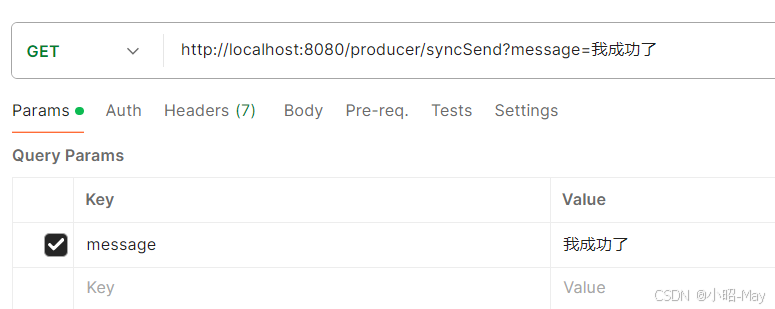
    @GetMapping("/syncSend")
    public String syncSend(String message) {
        // 同步发送消息到指定主题
        rocketMQTemplate.syncSend("test-topic", message);
        return "Sync message: " + message + " sent";
    }
    /**
     * 异步发送消息到指定主题
     * @param message
     * @return
     */

//    http://localhost:8080/producer/syncSend
    @GetMapping("/asyncSend")
    public String asyncSend(String message) {
        // 异步发送消息到指定主题
        rocketMQTemplate.asyncSend("test-topic", MessageBuilder.withPayload(message).build(), new SendCallback() {
            @Override
            public void onSuccess(SendResult sendResult) {
                System.out.println("Async message sent successfully, result: " + sendResult);
            }

            @Override
            public void onException(Throwable throwable) {
                System.err.println("Failed to send async message: " + throwable.getMessage());
            }
        }, 3000, 3); // 3000 ms timeout, delay level 3

        return "Async message: " + message + " sent";
    }

    /**
     * 发送单向消息到指定主题,无需等待Broker的确认
     * @param message
     * @return
     */
    @GetMapping("/sendOneWay")
    public String sendOneWay(String message) {
        // 发送单向消息到指定主题,无需等待Broker的确认
        rocketMQTemplate.sendOneWay("test-topic", message);
        return "OneWay message: " + message + " sent";
    }

    // 发送顺序消息
    @GetMapping("/sendOrderly")
    public String sendOrderly(String message) {
        // 发送顺序消息到指定主题
        rocketMQTemplate.syncSendOrderly("test-topic", message, "order");
        return "Orderly message: " + message + " sent";
    }

    // 发送延迟消息
    @GetMapping("/sendDelayed")
    public String sendDelayed(String message) {
        // 发送延迟消息到指定主题,延迟级别为3
        rocketMQTemplate.syncSend("test-topic", MessageBuilder.withPayload(message).build(), 1000, 3);
        return "Delayed message: " + message + " sent";
    }

    // 发送批量消息
    @GetMapping("/sendBatch")
    public String sendBatch() {
        List<String> messages = new ArrayList<>();
        messages.add("message1");
        messages.add("message2");
        // 批量发送消息到指定主题
        rocketMQTemplate.syncSend("test-topic", messages);
        return "Batch messages sent";
    }
}
package org.example.controllertwo;

import org.apache.rocketmq.spring.annotation.RocketMQMessageListener;
import org.apache.rocketmq.spring.core.RocketMQListener;
import org.springframework.stereotype.Service;

/**
 * 定义一个消费者,监听test-topic主题的消息
 * @author 冰点
 * @version 1.0.0
 * @date 2023/9/9 16:29
 */

@Service
@RocketMQMessageListener(topic = "test-topic", consumerGroup = "my-consumer_test-topic")
public class MyConsumer implements RocketMQListener<String>{

    // 当收到消息时,该方法将被调用
    @Override
    public void onMessage(String message) {
        System.out.println("Received message: "+ message);
    }
}
package org.example;

import org.springframework.boot.SpringApplication;
import org.springframework.boot.autoconfigure.SpringBootApplication;

@SpringBootApplication
public class Main {
    public static void main(String[] args) {
        SpringApplication.run(Main.class, args);
        System.out.println("Application started successfully!");
    }
}
rocketmq.producer.sendMessageTimeout=10000
spring.rocketmq.name-server=localhost:9876
rocketmq.name-server=localhost:9876
rocketmq.producer.group=my-producer-group
<?xml version="1.0" encoding="UTF-8"?>
<project xmlns="http://maven.apache.org/POM/4.0.0"
         xmlns:xsi="http://www.w3.org/2001/XMLSchema-instance"
         xsi:schemaLocation="http://maven.apache.org/POM/4.0.0 http://maven.apache.org/xsd/maven-4.0.0.xsd">
    <modelVersion>4.0.0</modelVersion>
    <parent>
        <groupId>org.springframework.boot</groupId>
        <artifactId>spring-boot-starter-parent</artifactId>
        <version>2.7.15</version>
        <relativePath/>
    </parent>

    <groupId>org.example</groupId>
    <artifactId>MQ</artifactId>
    <version>1.0-SNAPSHOT</version>
    <name>springboot-icepip-rocketMQ-example</name>
    <description>Spring boot 集成rocketMQ 示例</description>
    <properties>
        <maven.compiler.source>8</maven.compiler.source>
        <maven.compiler.target>8</maven.compiler.target>
        <project.build.sourceEncoding>UTF-8</project.build.sourceEncoding>
    </properties>


    <dependencies>
        <dependency>
            <groupId>org.springframework.boot</groupId>
            <artifactId>spring-boot-starter-web</artifactId>
        </dependency>
        <dependency>
            <groupId>org.apache.rocketmq</groupId>
            <artifactId>rocketmq-spring-boot-starter</artifactId>
            <version>2.0.4</version>
        </dependency>

        <dependency>
            <groupId>org.projectlombok</groupId>
            <artifactId>lombok</artifactId>
            <optional>true</optional>
        </dependency>
        <dependency>
            <groupId>org.springframework.boot</groupId>
            <artifactId>spring-boot-starter-test</artifactId>
            <scope>test</scope>
        </dependency>
        <dependency>
            <groupId>org.springframework.boot</groupId>
            <artifactId>spring-boot-starter-actuator</artifactId>
        </dependency>

        <dependency>
            <groupId>org.springframework.boot</groupId>
            <artifactId>spring-boot-starter-thymeleaf</artifactId>
        </dependency>

    </dependencies>

    <build>
        <plugins>
            <plugin>
                <groupId>org.springframework.boot</groupId>
                <artifactId>spring-boot-maven-plugin</artifactId>
                <configuration>
                    <excludes>
                        <exclude>
                            <groupId>org.projectlombok</groupId>
                            <artifactId>lombok</artifactId>
                        </exclude>
                    </excludes>
                </configuration>
            </plugin>
        </plugins>
    </build>

</project>
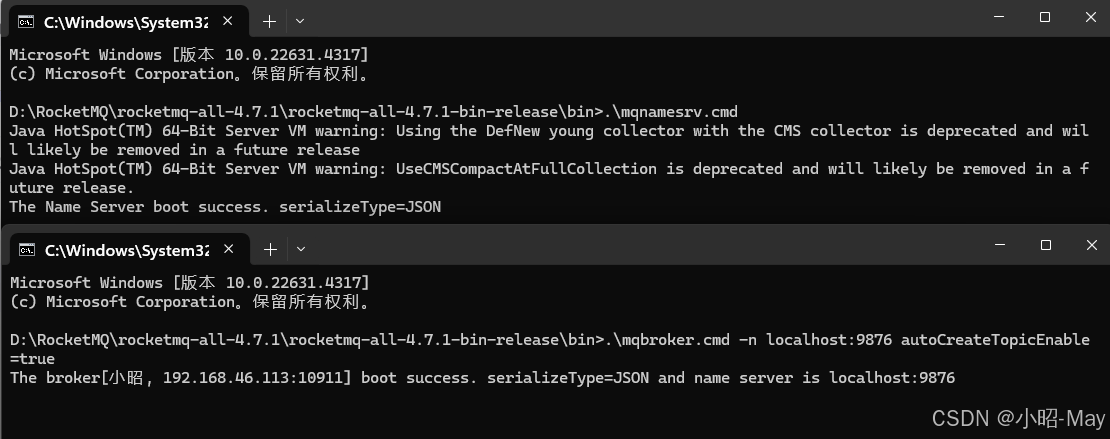
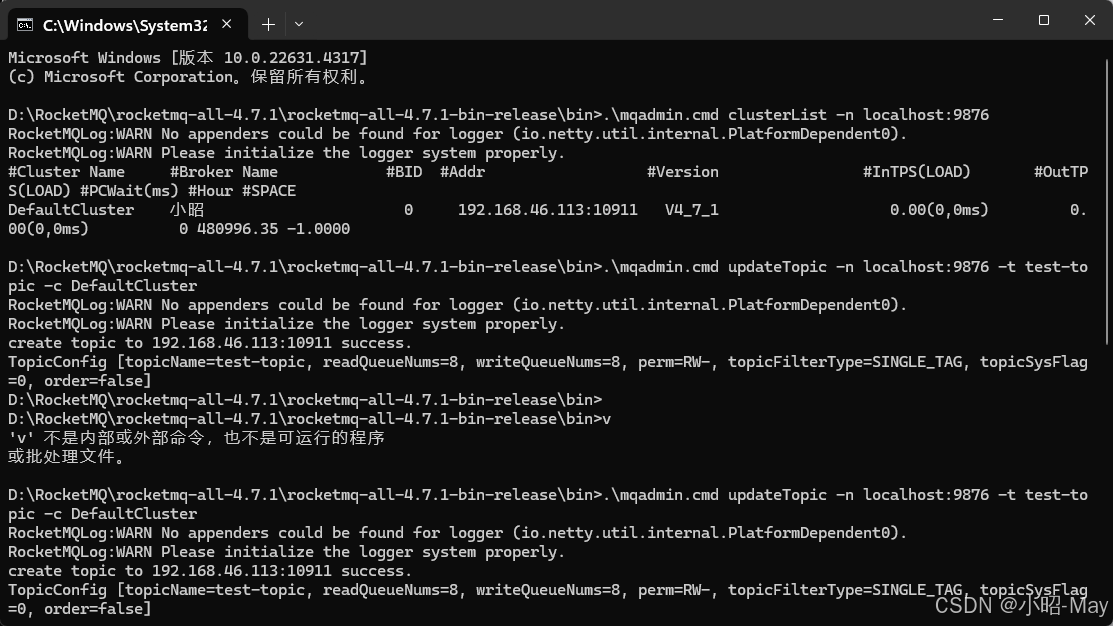
.\mqnamesrv.cmd
.\mqbroker.cmd -n localhost:9876 autoCreateTopicEnable=true





 扫一扫
扫一扫


 1599
1599

 被折叠的 条评论
为什么被折叠?
被折叠的 条评论
为什么被折叠?
 到【灌水乐园】发言





