


1、背景
当我们通过RestTemplate调用其它服务的API时,所需要的参数须在请求的URL中进行拼接,如果参数少的话或许我们还可以忍受,一旦有多个参数的话,这时拼接请求字符串就会效率低下。
2、Feign概述
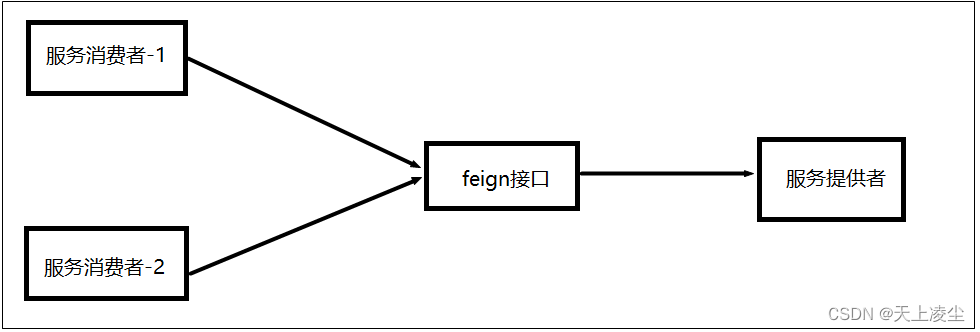
Feign是Spring Cloud提供的声明式、模板化的HTTP客户端, 它使得调用远程服务就像调用本地服务一样简单,只需要创建一个接口并添加一个注解即可。
Spring Cloud集成Feign并对其进行了增强,使Feign支持了Spring MVC注解;Feign默认集成了Ribbon,所以Fegin默认就实现了负载均衡的效果。
3、Feign入门
3.1、创建服务提供者
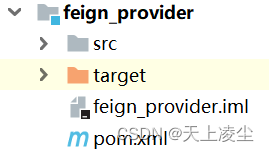
3.1.1、创建工程
3.1.2、application.yml文件
server:
  port: 9090
spring:
  cloud:
    nacos:
      discovery:
        server-addr: 192.168.209.129:8848
  application:
    name: feign-provider
3.2、创建Feign接口
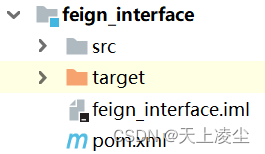
3.2.1、创建工程
3.2.2、pom.xml文件
<?xml version="1.0" encoding="UTF-8"?>
<project xmlns="http://maven.apache.org/POM/4.0.0"
         xmlns:xsi="http://www.w3.org/2001/XMLSchema-instance"
         xsi:schemaLocation="http://maven.apache.org/POM/4.0.0 http://maven.apache.org/xsd/maven-4.0.0.xsd">
    <parent>
        <artifactId>springcloud_parent</artifactId>
        <groupId>com.bjpowernode</groupId>
        <version>1.0-SNAPSHOT</version>
    </parent>
    <modelVersion>4.0.0</modelVersion>

    <artifactId>feign_interface</artifactId>

    <dependencies>
        <!--Spring Cloud OpenFeign Starter -->
        <dependency>
            <groupId>org.springframework.cloud</groupId>
            <artifactId>spring-cloud-starter-openfeign</artifactId>
        </dependency>
        <dependency>
            <groupId>com.bjpowernode</groupId>
            <artifactId>springcloud_common</artifactId>
            <version>1.0-SNAPSHOT</version>
        </dependency>
    </dependencies>
</project>
3.2.3、Feign
package com.bjpowernode.feign;

import com.bjpowernode.fallback.UserFeignFallback;
import com.bjpowernode.pojo.User;
import org.springframework.cloud.openfeign.FeignClient;
import org.springframework.web.bind.annotation.PathVariable;
import org.springframework.web.bind.annotation.RequestMapping;
@FeignClient(value="sentinel-provider",fallbackFactory = UserFeignFallback.class)
@RequestMapping(value = "/provider")
public interface UserFeign {
    @RequestMapping(value = "/getUserById/{id}")
    public User getUserById(@PathVariable(value="id") Integer id);
}
3.3、创建服务消费者
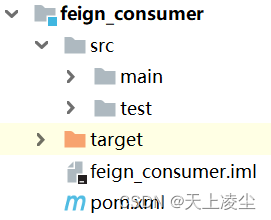
3.3.1、创建工程
3.3.2、pom.xml文件
<?xml version="1.0" encoding="UTF-8"?>
<project xmlns="http://maven.apache.org/POM/4.0.0"
         xmlns:xsi="http://www.w3.org/2001/XMLSchema-instance"
         xsi:schemaLocation="http://maven.apache.org/POM/4.0.0 http://maven.apache.org/xsd/maven-4.0.0.xsd">
    <parent>
        <artifactId>springcloud_parent</artifactId>
        <groupId>com.bjpowernode</groupId>
        <version>1.0-SNAPSHOT</version>
    </parent>
    <modelVersion>4.0.0</modelVersion>

    <artifactId>ribbon_consumer</artifactId>

    <dependencies>
        <dependency>
            <groupId>org.springframework.boot</groupId>
            <artifactId>spring-boot-starter-web</artifactId>
        </dependency>
        <dependency>
            <groupId>com.bjpowernode</groupId>
            <artifactId>springcloud_common</artifactId>
            <version>1.0-SNAPSHOT</version>
        </dependency>
        <dependency>
            <groupId>com.alibaba.cloud</groupId>
            <artifactId>spring-cloud-starter-alibaba-nacos-discovery</artifactId>
        </dependency>
        <!--feign接口-->
        <dependency>
            <groupId>com.bjpowernode</groupId>
            <artifactId>feign_interface</artifactId>
            <version>1.0-SNAPSHOT</version>
        </dependency>
    </dependencies>
</project>
3.3.3、application.yml
server:
  port: 80
spring:
  cloud:
    nacos:
      discovery:
        server-addr: 192.168.209.129:8848
  application:
    name: feign-consumer
3.3.4、controller
package com.bjpowernode.controller;

import com.bjpowernode.feign.UserFeign;
import com.bjpowernode.pojo.User;
import org.springframework.beans.factory.annotation.Autowired;
import org.springframework.cloud.client.ServiceInstance;
import org.springframework.cloud.client.discovery.DiscoveryClient;
import org.springframework.cloud.client.loadbalancer.LoadBalancerClient;
import org.springframework.web.bind.annotation.PathVariable;
import org.springframework.web.bind.annotation.RequestMapping;
import org.springframework.web.bind.annotation.RestController;
import org.springframework.web.client.RestTemplate;

import java.util.List;
import java.util.Random;

@RestController
@RequestMapping(value = "/consumer")
public class ConsumerController {

    @Autowired
    private UserFeign userFeign;

    @RequestMapping(value = "/getUserById/{id}")
    public User getUserById(@PathVariable Integer id) {
        return userFeign.getUserById(id);
    }
}
3.3.5、启动类
package com.bjpowernode;

import org.springframework.boot.SpringApplication;
import org.springframework.boot.autoconfigure.SpringBootApplication;
import org.springframework.cloud.client.discovery.EnableDiscoveryClient;
import org.springframework.cloud.openfeign.EnableFeignClients;

@SpringBootApplication
@EnableDiscoveryClient
//@EnableFeignClients(basePackages = "com.bjpowernode.feign")
@EnableFeignClients//开启feign接口扫描
public class ConsumerApp {

    public static void main(String[] args) {
        SpringApplication.run(ConsumerApp.class);
    }
}
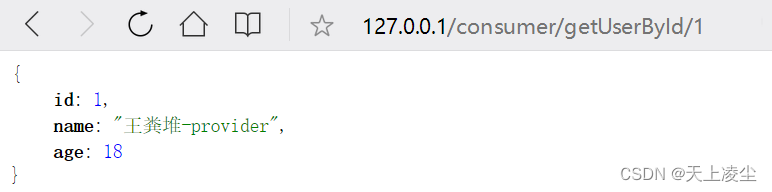
3.3.6、最终测试
4、Feign的原理
4.1、将Feign接口代理类注入到Spring容器中
@EnableFeignClients注解开启Feign扫描,先调用FeignClientsRegistrar.registerFeignClients()方法扫描@FeignClient注解的接口,再将这些接口注入到Spring IOC容器中,方便后续被调用。
public void registerFeignClients(AnnotationMetadata metadata,
			BeanDefinitionRegistry registry) {
		... ... ...
         //扫描feign接口
		for (String basePackage : basePackages) {
			Set<BeanDefinition> candidateComponents = scanner
					.findCandidateComponents(basePackage);
			for (BeanDefinition candidateComponent : candidateComponents) {
				if (candidateComponent instanceof AnnotatedBeanDefinition) {
					AnnotatedBeanDefinition beanDefinition = (AnnotatedBeanDefinition)
                                                              candidateComponent;
                      //获得UserFeign的详细信息
					AnnotationMetadata annotationMetadata = beanDefinition.getMetadata();
					Assert.isTrue(annotationMetadata.isInterface(),
							"@FeignClient can only be specified on an interface");

					Map<String, Object> attributes = annotationMetadata
							.getAnnotationAttributes(FeignClient.class.getCanonicalName());
					String name = getClientName(attributes);
					registerClientConfiguration(registry, name,
							attributes.get("configuration"));
                      //注入Feign接口代理类到Spring容器中
					registerFeignClient(registry, annotationMetadata, attributes);
				}
			}
		}
	}
4.2、RequestTemplate封装请求信息
SynchronousMethodHandler.invoke(): 当定义的的Feign接口中的方法被调用时,通过JDK的代理方式为Feign接口生成了一个动态代理类,当生成代理时,Feign会为每个接口方法创建一个RequestTemplate。该对象封装了HTTP请求需要的全部信息,如请url、参数,请求方式等信息都是在这个过程中确定的。
 public Object invoke(Object[] argv) throws Throwable {
        //创建一个RequestTemplate
        RequestTemplate template = this.buildTemplateFromArgs.create(argv);
        Retryer retryer = this.retryer.clone();

        while(true) {
            try {
                //发出请求
                return this.executeAndDecode(template);
            } catch (RetryableException var8) {
                ... ... ...
            }
        }
    }
package feign;

public final class RequestTemplate implements Serializable {
    ... ... ... ... ... ...
    private UriTemplate uriTemplate;
    private HttpMethod method;
    private Body body;
    ... ... ... ... ... ...
}
4.3、发送请求
SynchronousMethodHandler.executeAndDecode():
通过RequestTemplate生成Request,然后把Request交给Client去处理,Client可以是JDK原生的URLConnection,Apache的HttpClient,也可以时OKhttp,最后Client结合Ribbon负载均衡发起服务调用。
 Object executeAndDecode(RequestTemplate template) throws Throwable {
        //生成请求对象
        Request request = this.targetRequest(template);
        if (this.logLevel != Level.NONE) {
            this.logger.logRequest(this.metadata.configKey(), this.logLevel, request);
        }

        long start = System.nanoTime();

        Response response;
        try {
            //发起请求
            response = this.client.execute(request, this.options);
        } catch (IOException var15) {
            ... ... ...

            throw FeignException.errorExecuting(request, var15);
        }
 }
5、Feign参数传递
传参方式:
-
restful风格:
feign接口:@PathVarible【拼接restful形式的url】
-
?传参
feign接口:@RequestParam【拼接?形式的url】
-
pojo参数
provider: @RequestBody User user【获取请求体中的json串】
6、Feign请求超时
6.1、模拟超时
修改feign_provider
feign的默认超时时间为1s,这里使线程睡眠2s来模拟超时
@Service
public class UserServiceImpl implements UserService {

	@Override
	public User getUser() {
        //模拟网络延迟
		try {
			Thread.sleep(2000);
		} catch (InterruptedException e) {
			e.printStackTrace();
		}
		return new User(1,"王粪堆",18);
	}
}
6.2、测试

6.3、设置feign的超时时间
ribbon:
  ConnectTimeout: 5000 #请求连接的超时时间
  ReadTimeout: 5000 #请求处理的超时时间






 扫一扫
扫一扫


 5477
5477

 被折叠的 条评论
为什么被折叠?
被折叠的 条评论
为什么被折叠?
 到【灌水乐园】发言





