


 该文章展示了如何使用JavaServlet和JSP实现用户登录功能,包括前端登录页面设计、后端验证以及登录成功后跳转到商品页面展示商品信息。涉及到的数据库操作包括连接MySQL数据库和查询商品表。
一、MySQL:
users表:

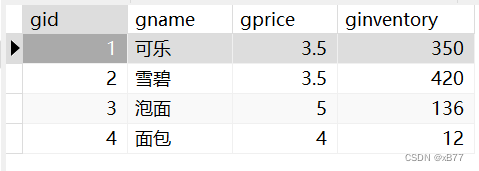
goods表:
二、jsp
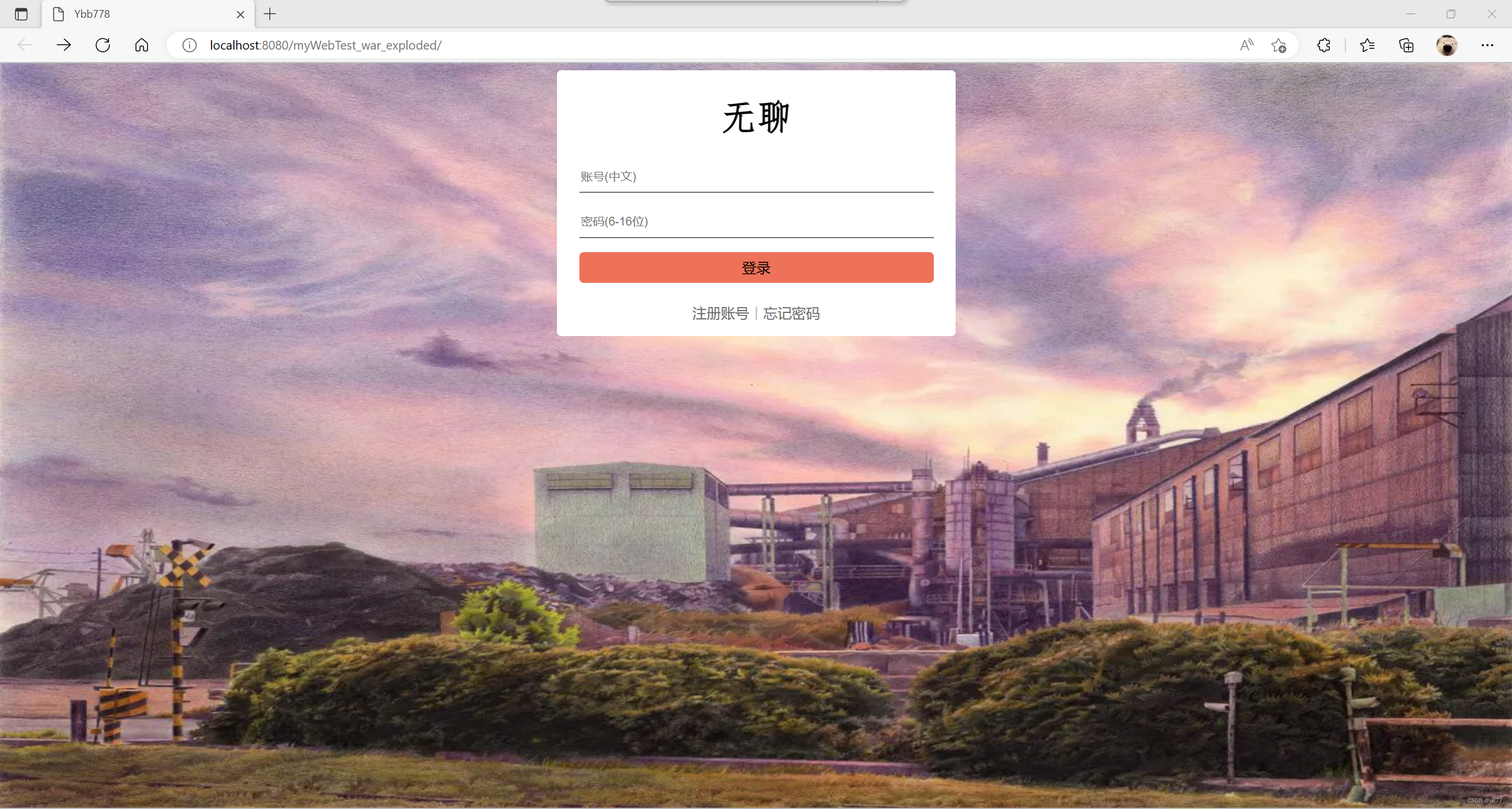
jsp前端登录显示代码:
<%--
  Created by IntelliJ IDEA.
  User: xbyan
  Date: 2023/2/14
  Time: 16:03
  To change this template use File | Settings | File Templates.
--%>
<%@ page contentType="text/html;charset=UTF-8" language="java" %>
<html>
<head>
    <title>Ybb778</title>
</head>
<style>
    body {
        background-image: url("image/bkgd.jpg");
        background-size: 100% 100%;
    }

    p {
        font-family: FangSong;
        font-size: 40px;
        font-weight: bold;
        text-align: center;
        margin-top: 18px;
        margin-bottom: 10px;
    }

    .biao {
        width: 450px;
        height: 300px;
        margin: auto auto;
        background-color: white;
        border-radius: 5px;
    }

    tr {
        width: 400px;
        height: 40px;
        border: 0;
    }

    .one input {
        width: 400px;
        height: 35px;
        outline: none;
        border: none;
        border-bottom: 1px solid #000
    }

    .t {
        width: 100%;
        height: 100%;
    }

    .one {
        text-align: center;
    }

    #two {
        border: none;
        background-color: #ed7158;
        border-radius: 5px;
        font-size: 16px;
        font-family: "Microsoft YaHei UI";
        cursor: pointer;
    }

    .three {
        text-align: center;
    }

    .four {
        text-decoration: none;
        color: #696969;
    }

    .five {
        color: #C0C0C0;
    }

    .one input:hover {
        border-color: red;
    }

    .four:hover {
        color: #383030;
    }

    #two:hover {
        background-color: #d54d32;
    }
</style>

<body>
<div class="biao">
    <form action="welcome" method="post">
        <table class="t">
            <tr>
                <td><p>无聊</p></td>
            </tr>
            <tr>
                <td class="one"><input type="text" name="userName" placeholder="账号(中文)"
                                       onkeyup="this.value=this.value.replace(/[^\u4e00-\u9fa5]/g,'')"
                                       onbeforepaste="clipboardData.setData('text',clipboardData.getData('text').replace(/[^/u4E00-/u9FA5]/g,''))"
                                       pattern="[\u4e00-\u9fa5]{2,6}" maxlength="6">
                </td>
            </tr>
            <tr>
                <td class="one"><input type="password" name="pwd" placeholder="密码(6-16位)" minlength="6"
                                       maxlength="16">
                </td>
            </tr>
            <tr>
                <td class="one"><input type="submit" value="登录" id="two"></td>
            </tr>
            <tr>
                <td class="three"><a href="enroll.jsp" class="four">注册账号</a><a class="five">丨</a><a
                        href="forget.jsp" class="four">忘记密码</a></td>
            </tr>
        </table>
    </form>
</div>
<script>
    <!-- required 必须选择一个-->
    var inputs = document.getElementsByTagName('input');
    for (var i = 0; i < inputs.length; i++) {
        inputs[i].required = true;
    }
</script>
</body>
</html>
效果图:
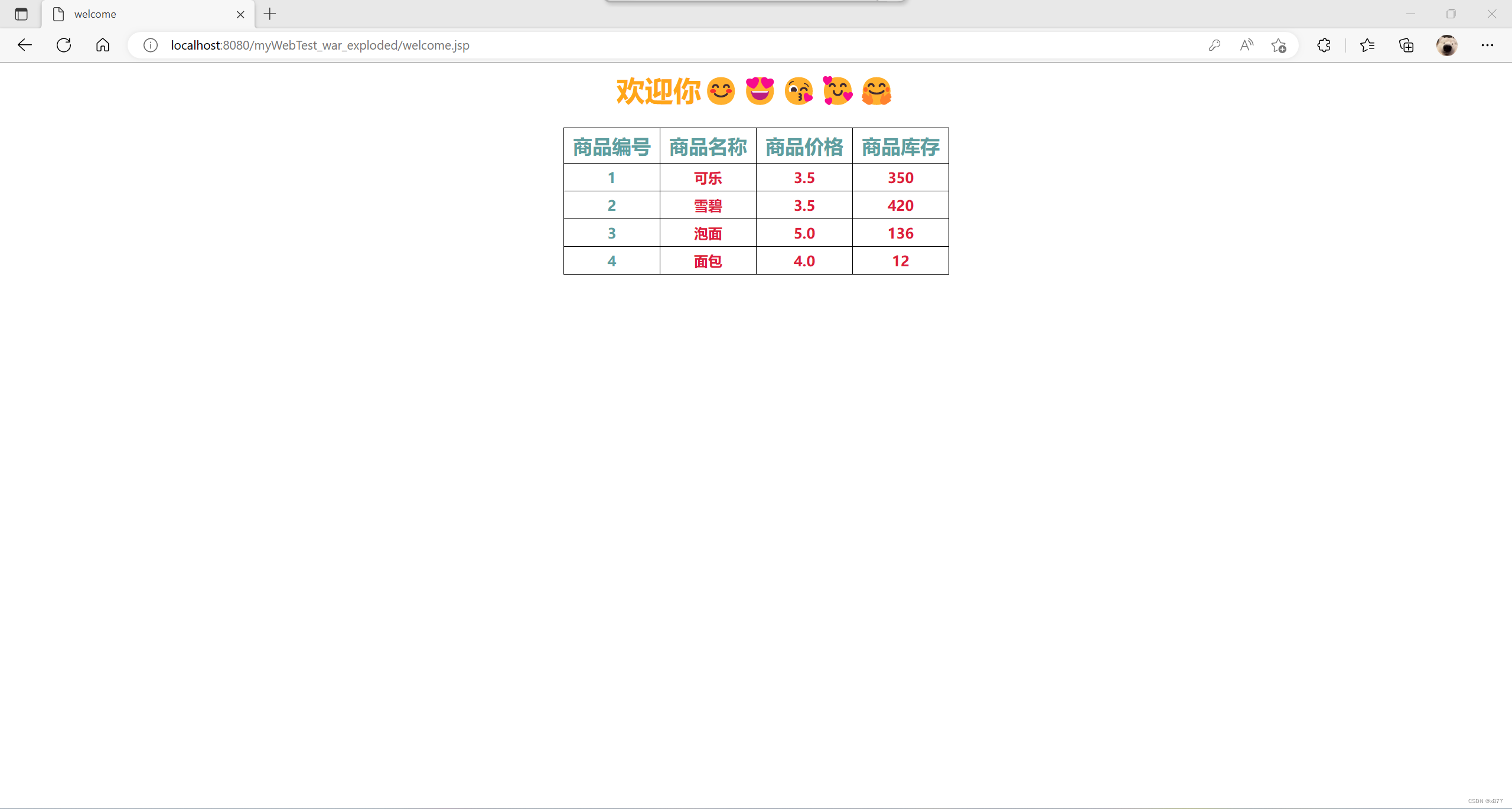
如果数据库有该用户,跳转到商品页面,jsp代码:
<%@ page import="java.util.List" %>
<%@ page import="com.bing.bean.Goods" %><%--
  Created by IntelliJ IDEA.
  User: xbyan
  Date: 2023/2/16
  Time: 12:15
  To change this template use File | Settings | File Templates.
--%>
<%@ page contentType="text/html;charset=UTF-8" language="java" %>
<html>
<head>
    <title>welcome</title>
</head>
<style>
    h1 {
        color: orange;
        text-align: center;
    }

    table {
        border-collapse: collapse;
        margin: auto;
    }

    .table-header th {
        padding: 10px;
    }

    tr.one {
        font-size: 22px;
        color: cadetblue;
    }

    tr.two th:first-child {
        color: cadetblue;
    }

    tr.two th:not(:first-child) {
        color: crimson;
    }

    td, th {
        padding: 5px 10px;
        border: 1px solid black;
    }
</style>
<body>
<h1>欢迎你😊😍😘🥰🤗</h1>
<table>
    <thead>
    <tr class="one">
        <th>商品编号</th>
        <th>商品名称</th>
        <th>商品价格</th>
        <th>商品库存</th>
    </tr>
    </thead>
    <tbody>

    <%
        HttpSession session1 = request.getSession();
        List<Goods> goodsList = (List<Goods>) session1.getAttribute("goodList");
        for (Goods goods : goodsList) {

    %>

    <tr class="two">
        <th><%=goods.getGid()%>
        </th>
        <th><%=goods.getGname()%>
        </th>
        <th><%=goods.getGprice()%>
        </th>
        <th><%=goods.getGinventory()%>
        </th>
    </tr>
    <%

        }
    %>

    </tbody>
</table>
</body>
</html>
效果图:
三、java代码:
连接数据库:
package com.bing.util;

import java.sql.Connection;
import java.sql.DriverManager;
import java.sql.PreparedStatement;
import java.sql.ResultSet;

public class JDBCUtil {
    private static String driver = "com.mysql.cj.jdbc.Driver";// 驱动包
    private static String url = "jdbc:mysql://localhost:3306/jwTest?useSSL=false&serverTimezone=UTC";// 数据库地址
    private static String username = "root";// 数据库账号
    private static String password = "root";// 数据库密码
    private static Connection con = null;

    public static Connection getCon() {
        try {
            Class.forName(driver);
            con = DriverManager.getConnection(url, username, password);
        } catch (Exception e) {
            e.printStackTrace();
        }
        return con;
    }

    public static void close(ResultSet rs, PreparedStatement ps, Connection con) {
        try {
            if (rs != null) {
                rs.close();
                System.out.println("ResultSet已释放...");
            }
            if (ps != null) {
                ps.close();
                System.out.println("PreparedStatement已释放...");
            }
            if (con != null) {
                con.close();
                System.out.println("Connection已释放...");
            }
        } catch (Exception e) {
            e.printStackTrace();
        }

    }

    public static void close(PreparedStatement ps, Connection con) {
        try {
            if (ps != null) {
                ps.close();
                System.out.println("PreparedStatement已释放...");
            }
            if (con != null) {
                con.close();
                System.out.println("Connection已释放...");
            }
        } catch (Exception e) {
            e.printStackTrace();
        }

    }
}
登录代码:
package com.bing.servlet;

import com.bing.dao.EnrollDao;
import com.bing.dao.impl.UserDaoImpl;

import javax.servlet.ServletException;
import javax.servlet.annotation.WebServlet;
import javax.servlet.http.HttpServlet;
import javax.servlet.http.HttpServletRequest;
import javax.servlet.http.HttpServletResponse;
import java.io.IOException;

@WebServlet("/welcome")
public class Login extends HttpServlet {
    @Override
    protected void doGet(HttpServletRequest req, HttpServletResponse resp) throws ServletException, IOException {
        doPost(req, resp);
    }

    @Override
    protected void doPost(HttpServletRequest req, HttpServletResponse resp) throws ServletException, IOException {

        /*
         * 处理请求源发送过来的数据
         * */
        req.setCharacterEncoding("UTF-8");// 将编码改为UTF-8
        String user = req.getParameter("userName");// user接收上个页面的userName值
        String pwd = req.getParameter("pwd");// pwd接收上个页面的pwd值
        // 响应的编码
        resp.setCharacterEncoding("UTF-8");
        // 文本格式
        resp.setContentType("text/html;charset=UTF-8");
        UserDaoImpl userDao = new UserDaoImpl();

        if (userDao.userExists(user) && userDao.login(user, pwd) == null) {
            resp.sendRedirect("forget.jsp");// 用户存在 密码不对 进入更改密码、忘记密码界面
        } else if (userDao.login(user, pwd) != null) {
            req.getRequestDispatcher("selectAllGoods").forward(req, resp);
            // resp.sendRedirect("welcome.jsp");// 账号、密码正确  进入欢迎界面
        } else if (!userDao.userExists(user)) {
            resp.sendRedirect("enroll.jsp");// 用户不存在 注册用户
        } else {
            resp.sendRedirect("cao.jsp");// 特殊情况
        }
    }

}
查询商品表代码:
package com.bing.servlet;

import com.bing.bean.Goods;
import com.bing.dao.impl.GoodsDaoImpl;

import javax.servlet.ServletException;
import javax.servlet.annotation.WebServlet;
import javax.servlet.http.HttpServlet;
import javax.servlet.http.HttpServletRequest;
import javax.servlet.http.HttpServletResponse;
import javax.servlet.http.HttpSession;
import java.io.IOException;
import java.util.List;

@WebServlet("/selectAllGoods")
public class SelectAllGoods extends HttpServlet {
    @Override
    protected void doGet(HttpServletRequest req, HttpServletResponse resp) throws ServletException, IOException {
        doPost(req, resp);
    }

    @Override
    protected void doPost(HttpServletRequest req, HttpServletResponse resp) throws ServletException, IOException {
        GoodsDaoImpl goodsDao = new GoodsDaoImpl();
        List<Goods> goodsList = goodsDao.selectGoods();
        System.out.println(goodsList);
        HttpSession session = req.getSession();
        session.setAttribute("goodList",goodsList);
        resp.sendRedirect("welcome.jsp");
    }
}
这样我们就完成了





 扫一扫
扫一扫


 5539
5539

 被折叠的 条评论
为什么被折叠?
被折叠的 条评论
为什么被折叠?
 到【灌水乐园】发言





