


 本文介绍了如何在HarmonyOS应用中使用Tablist和PageSlider组件来实现多页面切换的效果。Tablist用于创建页签,每个页签可以有不同的布局,如DirectionalLayout、TableLayout等。PageSlider则用于在不同页面间滑动切换。通过设置Tablist的属性和监听事件,以及PageSlider的PageChangedListener,实现了页面内容与页签的同步更新。此外,文章还提供了XML布局代码和Java代码示例,展示了如何动态添加按钮并监听其点击事件。
1、Tablist
Tablist是harmonyOS的一个组件,它可以实现多个页签栏的切换,Tab为某个值页签。页签中可以放按钮、输入框等常见的组件,每个页签的布局可以不一致,可以设置成DirectionalLayout、TableLayout、AdaptiveBoxLayout等布局。每个Tab放置在Tablist中,每个页签的名称可以根据自己需要去设置,但应该简洁明了。
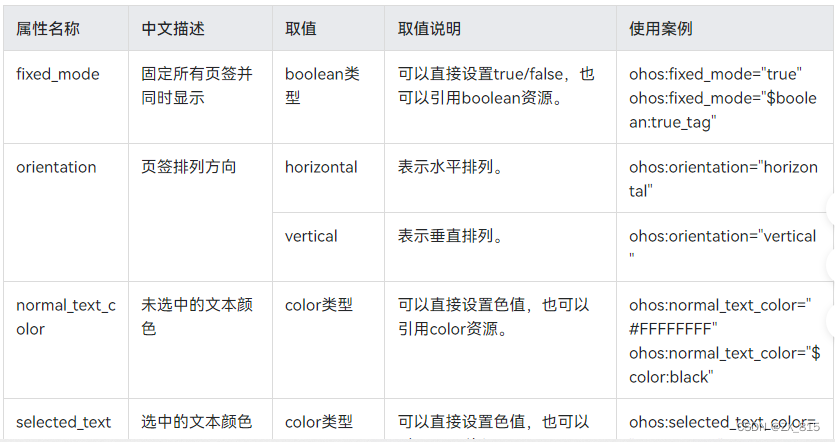
Tablist的共有属性继承ScrollView,属性如下图所示,如果想了解更多属性可参考HarmonyOS官方文档
2、PageSlider
PageSlider是用于页面之间切换的组件,它通过响应滑动事件完成页面间的切换。
PageSlider无自有的XML属性,共有XML属性继承自:StackLayout
3、代码
测试程序共三个xml文件,ability_main.xml中包含Tablist和PageSlider,是主要布局文件,firstpage_tab.xml和message_tab.xml文件是两个tab,用于展示不同内容
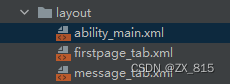
具体xml代码如下:
ability_main.xml
<?xml version="1.0" encoding="utf-8"?>
<DirectionalLayout
    xmlns:ohos="http://schemas.huawei.com/res/ohos"
    ohos:height="match_parent"
    ohos:width="match_parent"
    ohos:orientation="vertical"
    >
    <TabList
        ohos:id="$+id:tablist"
        ohos:height="match_content"
        ohos:width="match_parent"
        ohos:background_element="#dddddd"
        ohos:normal_text_color="#a0a0a0"
        ohos:selected_text_color="#0000FF"
        ohos:selected_tab_indicator_color="#00FF00"
        ohos:weight="1"
        />
    <PageSlider
        ohos:id="$+id:page_slider"
        ohos:height="match_content"
        ohos:width="match_parent"
        ohos:weight="9"
        >
    </PageSlider>

</DirectionalLayout>
firstpage_tab.xml
<?xml version="1.0" encoding="utf-8"?>
<DirectionalLayout
    xmlns:ohos="http://schemas.huawei.com/res/ohos"
    ohos:height="match_parent"
    ohos:width="match_parent"
    ohos:orientation="vertical"
    >
    <Text
        ohos:id="$+id:testtext"
        ohos:height="match_content"
        ohos:width="match_content"
        ohos:text="这是首页"
        ohos:text_size="32fp"
        />
    <Button
        ohos:id="$+id:firstBt"
        ohos:height="match_content"
        ohos:width="match_content"
        ohos:text_size="32fp"
        ohos:background_element="#0000f1"
        ohos:text="first"/>
</DirectionalLayout>
message_tab.xml
<?xml version="1.0" encoding="utf-8"?>
<DirectionalLayout
    xmlns:ohos="http://schemas.huawei.com/res/ohos"
    ohos:height="match_parent"
    ohos:width="match_parent"
    ohos:orientation="vertical"
    ohos:background_element="#D8D536"
    >
    <Text
 最低0.47元/天 解锁文章






 扫一扫
扫一扫


 880
880

 被折叠的 条评论
为什么被折叠?
被折叠的 条评论
为什么被折叠?
 到【灌水乐园】发言





