


目录
一、通配符
| 通配符 | 描述 |
|---|---|
| * | 匹配任何元素标签,同层模糊 |
| @* | 匹配任何属性,同层模糊 |
| node() | 匹配任何类型,同层模糊 |
| */ | 匹配任何元素标签,多层模糊 |
| // | 匹配任何元素标签,多级压缩 |
使用方法如下:
result = html.xpath('/html/body/div/*/div/div[*]/node()/main/article/div/div[*]/div')[0]
1、* 同层模糊
/html/body/div[0]/main/article/a/div
/html/body/div[1]/main/article/div/div
倘如想将上述两个合并,代码如下
/html/body/div[*]/main/article/*/div
2、同层合并(or操作)
/div/h2/a
/div/h4/a
倘如想将上述两个合并,代码如下
/div/*[self::h2 or self::h4]/a
3、*/ 多层模糊
/html/body/div/div/div/main/article/div/div
/html/body/div/div/div/div/main/article/div/div
倘如想将上述两个合并,代码如下
/html/body/div/div/*//main/article/div/div
4、字符串包含匹配
只要div的class属性包含字符串
"item-article"都能匹配到
//div[contains(@class, 'item-article')]
二、遍历
| 通配符 | 描述 |
|---|---|
| xpath(‘./*’) | 遍历当前节点的子节点 |
| xpath(‘.//*’) | 遍历当前节点下的所有节点 |
| xpath(‘//*’) | 不管赋加谁都从根节点开始,遍历所有节点 |
from lxml import etree
xml_data = """
<div>
    <child1>
        <subchild1>Value1</subchild1>
        <subchild2>Value2</subchild2>
    </child1>
    <child2 class="2">
        <subchild3>Value3</subchild3>
    </child2>
    <a href="#"></a>
</div>
"""
div = etree.fromstring(xml_data)

elements = div.xpath('./*')   # 遍历div下所有子节点
for element in elements:
    if element.tag == 'a':
        etree.strip_attributes(element, ["href"])   # 删除属性
    if element.tag == 'child2' and element.get('class') == "2":
        element.getparent().remove(element)   # 删除标签
content_html = etree.tostring(div, method='html', encoding='utf-8').decode('utf-8')
print(content_html)
1.获取某标签下的第一个子标签
(如:selection)
html.xpath('.//div/selection/*[1]')
三、属性选择
<div id="a123456">
div[@id=“a123456”]
<div class="article-content" as="abc"> # 多个属性选择用 and
div[@class=“article-content” and as=“abc”]
四、删除不想要元素
html = etree.HTML(resp.text)
[element.getparent().remove(element) for element in html.xpath("/html/body/div/div/div/main/article")]
五、删除不想要元素,但保留其子元素(不改变位置)
from lxml import etree
txt = '''
<div>
<div >兄弟1</div>
<div class="target"><p>孩子1</p><p>孩子2</p><p>孩子3</p></div>
<div >兄弟2</div>
</div>
'''
html = etree.HTML(txt)
target = html.xpath('/html/body/div/div[@class="target"]')[0]
[target.addprevious(child) for child in target]
target.getparent().remove(target)
print(etree.tostring(html,encoding='utf-8').decode('utf-8'))
输出
"""
<html><body><div>
<div>兄弟1</div>
<p>孩子1</p><p>孩子2</p><p>孩子3</p>
<div>兄弟2</div>
</div>
</body></html>
"""
六、获取标签名、属性名、属性值
element = html.xpath("/html/body/div/div/div/main/article")
print(element.tag)  # 标签名 div h1 a p span
print(element.get('href'))   # 获取元素href属性的值
print(element.items())  # 属性名称和属性值 class id
print(element.text)  # 文本
print(element.xpath("//*"))  # 所有元素,包含多级
七、删除属性
from lxml import etree
etree.strip_attributes(element,["href"])
八、打印输出元素路径
element_path = []
element_path_attr = []
element_path_index = []
while element:
    attr = '['+' and '.join(["@"+str(i[0])+'="'+str(i[1])+'"' for i in element.items() if i[0] in ['class','id','name','type','title','target','rel']])+']'
    element_path.insert(0,'/'+element.tag)
    element_path_attr.insert(0,'/'+element.tag + attr.replace('[]',''))
    element_path_index.insert(0, '/' + element.tag + ('['+str(element.getparent().index(element)+1)+']' if element.getparent() else ''))
    element = element.getparent()
print(''.join(element_path))
print(''.join(element_path_attr))
print(''.join(element_path_index))
# div/div/a
# div[@class="layout"]/div[@class="wrapper"]/a
# div[1]/div[3]/a[1]
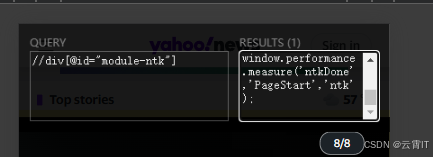
九、Xpath Helper插件
强烈推荐使用,效果如下
十、以html格式打印某元素
打印element元素标签
from lxml import etree
etree.tostring(element,encoding='unicode',method='html')






 扫一扫
扫一扫


 22万+
22万+

 被折叠的 条评论
为什么被折叠?
被折叠的 条评论
为什么被折叠?
 到【灌水乐园】发言





