



目录
1.结构体初识
1.结构体是什么东西?
1.1 是一种新的数据类型---->自定义类型
1.2 为什么有结构体
1.3 完整定义结构体的语法
struct 标识符
{
基本数据类型;
};
常见的定义方式
struct MM			//struct MM : 类型
{
	char name[20];
	int age;
	int num;
};
struct MM object;
//object:  结构体变量    struct MM: 自定义的数据类型
不常见的定义方式
struct
{
	char name[20];
	int age;
	int num;
} role;            //role:唯一一个结构体变量,且可以初始化
如
struct
{
	char name[20];
	int age;
	int num;
} role={“g_role”,29,1004};   //初始化,缺点:指针访问不了结构体变量
int main()
{
    role.age = 38;
	role.num = 9999;
	return 0;  //因为没有数据类型名,所以定义不了其他变量,故是只有一个变量的结构体
}
- 如何定义结构体变量
int num;
struct 结构体名 变量名;
int p;
struct 结构体名 指针名;
int array[4];
struct 结构体名 数组名[数组长度]
//1.结构体变量
	struct MM myMM;
//2.结构体指针
	struct MM* pMM;
//3.结构体数组
	struct MM array[4];
3.如何访问结构体中成员
3.1 变量去访问: 变量.成员
3.2 指针访问: 结构体指针->成员
(*结构体指针).成员
    struct MM myMM;
	printf("请输入姓名,年龄,编号:");
	scanf("%s%d%d", myMM.name, &myMM.age, &myMM.num);//输入数据
	printf("%s\t%d\t%d\n", myMM.name, myMM.age, myMM.num);
定义变量初始化
struct MM g_MM = {"Baby",18,1002};  //全局变量
int main()
{
    //1.1 定义变量去初始化
    //定义变量时可以初始化,初始化的顺序一定要和结构体定义变量的顺序一致
	struct MM yourMM = {"Baby",18,1002};  //
	//错误写法,分开写错误
	//struct MM object;
	//object = { "Baby",18,1002 };
	return 0;
}
2.结构体数组
结构体数组:
struct 结构体名 数组名[数组长度]
struct MM
{
	char name[20];
	int age;
	int num;
};
int main()
{
	struct MM myMM[3]; //myMM[0]  myMM[1] myMM[2]
	printf("请输入三个学生的信息:\n");
	for (int i = 0; i < 3; i++)
	{
		printf("请输入第 %d 位的信息:", i + 1);
		//myMM[0]
		//myMM[1]
		scanf("%s%d%d", myMM[i].name, &myMM[i].age, &myMM[i].num);
		//scanf("%s%d%d", (myMM+i)->name, & (myMM+i)->age, & (myMM+i)->num);
	}
	printf("姓名\t年龄\t编号\n");
	for (int i = 0; i < 3; i++)
	{
		printf("%s\t%d\t%d\n", myMM[i].name, myMM[i].age, myMM[i].num);
	}
	return 0;
}
3.结构体指针
    //错误
	//int* p = NULL; //(void *)0  强制转换语法 (目标类型)变量
	//*p = 100;
指针要充当变量使用: 变量存值
	//1. 指向变量
	struct MM myMM;
	p = &myMM;
	strcpy(p->name, "ILoveyou");
	p->age = 18;
	p->num = 1001;
	printf("%s\t%d\t%d\n", myMM.name, myMM.age, myMM.num);
	printf("%s\t%d\t%d\n", (*p).name, (*p).age, (*p).num);
	printf("%s\t%d\t%d\n", p->name, p->age, p->num);
//2. 动态内存申请
	struct MM* pMM = (struct MM*)malloc(sizeof(struct MM));
	strcpy(pMM->name, "MM");
	pMM->age = 18;
	pMM->num = 1001;
	//动态内存申请更多的是为结构体数组存在
struct MM* pArray = (struct MM*)malloc(sizeof(struct MM) * 3);
//更多的是用这种方法
//动态内存申请是为了结构体数组存在
//结构体指针变成结构体数组
4.typedef和结构体的定义
typedef用于起别名
struct MM
{
	char name[20];
	int age;
	int num;
};
typedef struct MM MMTYPE;
typedef struct MM* LPMM;
//定义方式与以下方式相同
typedef int INT
typedef int * LPINT;
typedef int array[2];
使用
struct student_afihaoicnab
{
	char name[20];
	int age;
};
typedef struct student_afihaoicnab stu;
//也可以写成
//typedef struct student_afihaoicnab
//{
//	char name[20];
//	int age;
//}stu;
stu* Lpstu2 = (stu*)malloc(sizeof(stu));
Lpstu2->age = 18;
strcpy(Lpstu2->name, "li");
printf("%s\t%d\t\n", Lpstu2->name, Lpstu2->age);
#include <stdio.h>
#include <string.h>
#include <windows.h>
typedef struct student_score_info
{
	char name[20];
	int age;
	int num;
}SSI,*LPSSI,SARRY[2];
/*

typedef struct student_score_info  SSI;
typedef int INT;

typedef struct student_score_info* LPSSI
typedef int * LPINT;

typedef struct student_score_info SARRY[2]
typedef int array[2];

*/

struct MM
{
	char name[20];
	int age;
	int num;
};
typedef struct MM MMTYPE;
typedef struct MM* LPMM;
int main()
{
	//正常写法
	struct student_score_info mm;
	SSI  t_mm;
	struct student_score_info* pMM = &mm;
	LPSSI p = &mm;  //结构体指针的别名一定要有标识前缀,如LPSSI的LP
	//LPVOID lpvoid = NULL;  //void *
	struct student_score_info array[2];
	SARRY myarray;
	return 0;
}
5.结构中的指针
struct boy
{
	char *name;         //指针的时候不能直接赋值,用字符串拷贝函数
	int age;
	int num;
};
int main()
{
	struct boy myboy;
	char InputName[20];
	printf("请输入姓名:");
	scanf("%s", InputName);
	//赋值的方法
	myboy.name = (char *)malloc(strlen(InputName) + 1);
	strcpy(myboy.name,InputName);          //复制
	myboy.age = 18;
	myboy.num = 1001;
	printf("%s\t%d\t%d\t\n", myboy.name, myboy.age, myboy.num);
	free(myboy.name);
	myboy.name = NULL;
	return 0;
}
6.结构体的内存问题
结构体中不允许空的结构体
struct MM //不允许空的结构体
{

};
struct MM
{
	char name[3];	//3
	int inum;		//4
	int age;		//4
	double num;		//8
};
内存问题:
	//占用多少内存只和内存申请有关系
	struct MM* pMM = (struct MM*)malloc(sizeof(struct MM));
不对齐 所有内存之和
	             对齐的方式: 地址总线
节省内存的写法:
	              字符当一个字节处理
	              从小到大写
struct MM
{
	char name[3];	//3  小的  不论name[i]中i有多少 只按数据类型(char)占用的字节比较
	int inum;		//4
	int age;		//4
	double num;		//8  大的
};
具体去算字节数:
struct MM
{
	char name[3];	//占用3个字节
	int inum;		//4
	double num;		//8
};
int main()
{
	//占用多少内存只和内存申请有关系
	struct MM* pMM = (struct MM*)malloc(sizeof(struct MM));
	printf("%d\n", sizeof(struct MM));  //输出占用16个字节
	return 0;
}
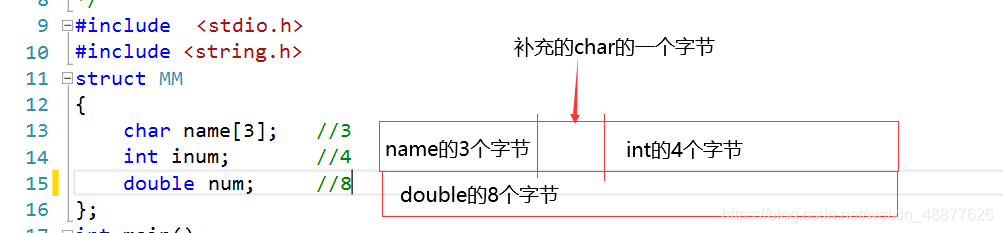
共占用16的字节
如果这样写
struct MM
{
	char name[3];	//占用3个字节
	double num;		//8
	int inum;		//4
};
char需要补5个字节,int需要补4个字节 ,一个结构体共24个字节
7.联合体和枚举类型(比较鸡肋)
7.1联合体
1.联合体相当于共用体
     	所有变量的共用最长的内存.,所有变量用同一块内存
    	struct 关键字改为union,用法相同
union MM    //变量公用
{
	char name[30];  //这三个变量用的是char name[30];的内存
	int age;
	int num;
};
一次只能初始化一个变量
union MM myMM = { "Iloveyou"};         //正确
union MM myMM = { "Iloveyou",18,1001};//报错
仍可以拷贝
union MM
{
	char name[30];
	int age;
	int num;
};
int main()
{
	union MM myMM = { "10"};
	strcpy(myMM.name, "1001");
	printf("%s\n", &myMM.age);  //打印1001
	//因为三个变量公用char内存,对char name初始化,age,num也用name
	myMM.age = 99;
	printf("%d\n", myMM.age);  //打印99
	printf("%s\n", &myMM.name);//99在阿斯克码表中为c
	printf("%d\n", myMM.num);//99
}
7.2枚举类型
2.枚举类型: 整形常量
    	项目一些具有代表性的常量的符号替换
//项目一些具有代表性的常量的符号替换
enum direction {UP=72,DOWN=80,LEFT=75,RIGHT=77};
//默认的值:0 1 2....
//enum weekdays{一,二,三,四,五,六,七};//默认初始化0~6
enum weekdays{一,二,三,四,五,六,七};
//局部的默认: 是前者的+1
enum COLOR {RED=1,BLACK,YELLOW=9,BLUE};//BLACK默认2,BLUE默认10
int main()
{
    char userKey = _getch();
	switch (userKey)
	{
	case UP:
		printf("%d\t", 一);
		break;
	case DOWN:
		printf("%d\t", 二);
		break;
	case LEFT:
		printf("%d\t", 三);
		break;
	case RIGHT:
		printf("%d\t", 四);
		break;
	}
	return 0;
}
printf("BLACK:%d\t,BLUE=%d\n", BLACK, BLUE);
8.位段结构体(多用于电路程序设计)
精准到位
struct flag
{
    //:后面表示用几位二进制位存储
	unsigned int a : 2;  //32λ    11   //3  表示用2位二进制存储
	unsigned int b : 3;	 //111			//7
	unsigned int c : 4;	 //1111			//15
	unsigned int d : 4;	 //1111			//15  表示用4位二进制存储
};
int main()
{
	struct flag myFlag = { 3,8,17,15 };
	printf("%d\t%d\t%d\t%d\n", myFlag.a, myFlag.b, myFlag.c, myFlag.d);
	//                              3        0        1           15
	return 0;
}
9.结构体嵌套
    1.以另一个结构体变量为数据成员
    2.以另一个结构体指针为数据成员
不常见的写法
1
struct A //A结构体中直接嵌套一个B结构体
{
	int num;
	struct B
	{
		int age;
	};
};
int main()
{
    struct A aObject = { 11,23 };//可以不使用第二个结构体变量就可以直接赋值
	printf("%d\t%d\n", aObject.age, aObject.num);
	struct A* pA = &aObject;//也可以由指针访问
	printf("%d\t%d\n", pA->age, pA->num);
    return 0;
}
2
struct  MM
{
	int num;
	struct GG
	{
		int age;
	}boy;
};
int main()
{
    struct MM mmObject = { 121,134 };
	printf("%d\t%d\n", mmObject.num, mmObject.boy.age);//前缀mmObject.boy.age剥洋葱法
return 0;}
比较常见的写法,以结构体变量为成员的写法
1
struct score
{
	int math;
	int english;
};
struct student
{
	struct score stuScore;
	char name[20];
	int num;
};
    struct student Bug = { 23,34,"张三",1001 };//初始化的两种方法
	struct student Liu = { {23,434},"Liu",1002 };
	//剥洋葱
	printf("%d\t%d\t%s\t%d\n", Liu.stuScore.math,Liu.stuScore.english, Liu.name, Liu.num);
2指针方式嵌套
struct score
{
	int math;
	int english;
};
struct studentInfo
{
	struct score* pScore;  //*pScore是一个指针,没有内存,不能充当变量,
	                       //需要先申请内存,然后数据初始化
	char name[20];
	int num;
};
int main()
{   //申请内存
    struct studentInfo* p = (struct studentInfo*)malloc(sizeof(struct studentInfo));
    //上方的指针申请与pScore无关,需要下方对pScore申请内存
	p->pScore = (struct score*)malloc(sizeof(struct score));
	p->pScore->english = 14;
	p->pScore->math = 100;
	strcpy(p->name, "迪丽热巴");
	p->num = 1004;
	printf("%d\t%d\t%s\t%d\n", p->pScore->math, p->pScore->english,
		p->name, p->num);
	system("pause");
    return 0;
}
上方一定需要考虑指针是否能充当变量使用
10.结构体数组对于数据的一些基本操作
表格数据的增删改查
    1.传参写法: 局部变量    尽量使用传参写法
     2.不传参写法: 全局变量
     数组写法的局限性,就是大小问题
11.结构体变量与函数的关系
struct MM
{
	char name[20];
	int age;
	int num;
};
void printMM(struct MM object)
{
	printf("%s\t%d\t%d\n", object.name, object.age, object.num);
}
void modify(struct MM object)
{
	struct MM temp = { "迪丽热巴",18,1003 };
	object = temp;
	printMM(object);
}
int main()
{
	struct MM mm = { "刘亦菲",28,1001 };
	modify(mm);
	printMM(mm);
	return 0;
}
输出时函数改了,main里面没有改
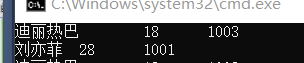
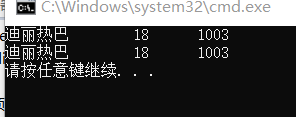
解决办法
要修改实参的值就要传实参的地址
struct MM
{
	char name[20];
	int age;
	int num;
};
void printMM(struct MM object)
{
	printf("%s\t%d\t%d\n", object.name, object.age, object.num);
}
void modify(struct MM *p)
{
	struct MM temp = { "迪丽热巴",18,1003 };
	*p = temp;
	printMM(*p);
}
int main()
{
	struct MM mm = { "刘亦菲",28,1001 };
	modify(&mm);
	printMM(mm);
	return 0;
}
结构体返回指针问题
//结构体返回指针的问题
struct MM* createMM()  //讲指针变成变量
{
	struct MM* pmm = (struct MM*)malloc(sizeof(struct MM)); //把指针变成变量.
	return pmm;  //指针变量
}
int main()
{
    //若在主函数中直接定义指针,不是变量
    //struct MM* pMM;
    //pMM->name;    不是变量,所以不能直接赋值
    //pMM->age;
    struct MM* pMM=cerateMM();//此时pMM是一个变量,可以直接赋值
    strcpy(p->name,"afafaagwtbw");
    pMM->age-18;
    pMM->num=1234;
    return 0;
}
只要指针能够指向一个结构体变量,申请了内存,它就能充当一个结构体变量使用。
指针变成变量的方法
1.指针指向向变量:用变量地址赋值。
2.动态内存申请。
动态内存申请
struct MM* initMM(const char* name, int age, int num)
{
	struct MM* pmm = (struct MM*)malloc(sizeof(struct MM)); //把指针变成变量.
	strcpy(pmm->name, name);
	pmm->age = age;
	pmm->num = num;
	return pmm;
}
12.什么是链表
链表就是一个结构体变量
struct people
{
	char name[20];
	int age;
	int num;
	char addr[20];
};

struct Node
{
	//int data;       //数据域
	struct MM data;   //指针域
	struct Node* next;
};
链表的一个结点包括数据域和指针域

用第一个节点表示整个链表
头节点:没有存数据 有头链表,常用
首节点:存数据 无头链表
12.1静态内存申请
手动申请,手动释放
#include <stdio.h>
struct MM
{
	char name[20];
	int age;
	int num;
};

struct Node
{
	//struct MM data;
	int data;			//数据域
	struct Node* next;	//指针域
};

int main()
{
	struct Node node1 = { 1,NULL };
	struct Node node2 = { 2,NULL };
	struct Node node3 = { 3,NULL };
	node1.next = &node2;
	node2.next = &node3;
	struct Node* pMove = &node1;
	while(pMove!=NULL)
	{
		printf("%d\t", pMove->data);
		pMove = pMove->next;
	}
	//1.链表是什么?
	//2.链表怎么表示
	//3.链表如何打印

	return 0;
}
12.2动态内存申请
#include <stdio.h>
#include <stdlib.h>
struct Node //节点结构体
{
	int data;
	struct Node* next;
};
1.没有在封装
用第一个节点表示整个链表
有头链表: 1.创建表头--->创建结构体变量
用指针表示结构体变量?
   1.1用变量地址初始化,
   1.2动态内存申请
//1.创建表头,即创建结构体变量
struct Node* createHead()
{
	//1.动态内存申请
	struct Node* headNode = (struct Node*)malloc(sizeof(struct Node));
	//(*headNode).next = NULL;
	headNode->next = NULL;//变量要初始化
	return headNode;   //返回变量
}

2.创建节点—>把用户数据加工成节点为插入准备
struct Node* createNode(int data)
{
	struct Node* newNode = (struct Node*)malloc(sizeof(struct Node));
	newNode->data = data;
	newNode->next = NULL;  //作为链表结束标志
	return newNode;
}

//3.表头插入
//自己写时候,参数要能够解释出意思
//以headNode 为表头链表
//插入的数据是data
void insertByHead(struct Node* headNode,int data)
{
	struct Node* newNode = createNode(data);	//调用自己写的函数
	//下面两句先后顺序不能交换
	//先连后断
	newNode->next = headNode->next;
	headNode->next = newNode;
	/*
		headNode->next = newNode;
		newNode->next = headNode->next;  //newNode->next = newNode
	*/
}

//4.表尾插入
void insertByTail(struct Node* headNode, int data)
{
	struct Node* newNode = createNode(data);
	struct Node* pTail = headNode;
	while (pTail->next != NULL)
	{
		pTail = pTail->next;
	}
	pTail->next = newNode;
}
//5.指定位置插入
//data:插入的数据
//posData: 指定位置
void insertByAppoin(struct Node* headNode, int data, int posData)
{
	//做这种查找类插入,先不要着急创建节点?考虑没找到情况
	struct Node* frontNode = headNode;		//左
	struct Node* posNode = headNode->next;	//右
	//注意: && 短路处理
	//posNode != NULL作为找到表尾的退出条件
	//当posNode等于NULL ,NULL->data 的非法访问
	//frontNode->next!=NULL&&posNode->data != posData
	while (posNode != NULL && posNode->data != posData )//难点
	{
		//frontNode = frontNode->next;
		//posNode = posNode->next;
		frontNode = posNode;
		posNode = frontNode->next;  //posNode=posNode->next;
		//frontNode 是posNode左边
		//最后一节点:frontNode  posNode就是NULL
	}
	//退出循环,分析讨论是否找到
	if(posNode==NULL)
	{
		printf("%d\t", frontNode->data);
		printf("未找到,无法插入信息!\n");
	}
	else
	{
		struct Node* newNode = createNode(data);
		frontNode->next = newNode;
		newNode->next = posNode;
	}
}

删除操作:
打狗要看主人: 把一个节点下一个删除,要考虑删除节点上一节点next
不能删除NULL的东西
//6.表头删除
void deleteByHead(struct Node* headNode)
{
	struct Node* nextNode = headNode->next;
	if (nextNode != NULL) //防御性编程
	{
		headNode->next = nextNode->next;
		free(nextNode);
		nextNode = NULL;
	}
}

//7.表尾删除
void deleteByTail(struct Node* headNode)
{
	struct Node* frontNode = NULL;
	struct Node* tailNode = headNode;  //NULL;
	//struct Node* tailNode = headNode->naxt;  会引发中断
	while (tailNode->next != NULL) //NULL->next!=NULL
	{
		frontNode = tailNode;
		tailNode = frontNode->next;
	}
	if (frontNode == NULL)
	{
		printf("表为NULL,删除失败\n");
	}
	else
	{
		frontNode->next = NULL;
		free(tailNode);
		tailNode = NULL;
	}
}
//8.指定位置删除
void deleteByAppoin(struct Node* headNode, int posData)
{
	struct Node* frontNode = headNode;
	struct Node* posNode = headNode->next;
	while (posNode != NULL && posNode->data != posData)
	{
		frontNode = posNode;
		posNode = frontNode->next;
	}
	if (posNode == NULL)
	{
		printf("未找到,无法删除!\n");
	}
	else
	{
		frontNode->next = posNode->next;
		free(posNode);
		posNode = NULL;
	}
}

//9.遍历--->打印
void printList(struct Node* headNode)
{
	//为什么指向第二个节点? 因为第一个节点没有存数据
	struct Node* pMove = headNode->next;
	while (pMove != NULL)
	{
		printf("%d\t", pMove->data);
		pMove = pMove->next;
	}
	printf("\n");
}
int main()
{
	struct Node* list = createHead();
	for (int i = 0; i < 3; i++)
	{
		insertByHead(list, i);
	}
	printList(list);
	insertByTail(list, 100);
	printList(list);
	insertByAppoin(list, 99, 100);
	printList(list);
	insertByAppoin(list, 102, 112122);
	insertByAppoin(list, 102, 2);
	printList(list);
	deleteByHead(list);
	printList(list);
	deleteByTail(list);
	printList(list);
	deleteByAppoin(list, 1);
	printList(list);
	return 0;
}
13.链表在项目当中的使用
链表:充当数据的容器
特点:灵活的存储数据
int date 改为 struct name date





 扫一扫
扫一扫


 1221
1221

 被折叠的 条评论
为什么被折叠?
被折叠的 条评论
为什么被折叠?
 到【灌水乐园】发言





