对于vue之中的模糊搜索功能
后端
const express = require('express');
const router = express.Router();
const {
  formatData
} = require('../utils/tools');
const mongo = require('../utils/mongo');

// get /api/search 模糊搜索
router.get('/', async (req, res) => {
  let {
    page = 1, size = 10, sort = "time", q,
  } = req.query;

  const skip = (page - 1) * size; //0
  const limit = size * 1; //10

  console.log("我是查询的字段", q);

  // 处理排序参数
  sort = sort.split(','); // ['price'],['price','-1']

  try {
    // 查询所有商品
    const {
      result
    } = await mongo.find('bookAll', {
      // title 为查询的字段 就是你数据库的某个字段!  q为要查询的值
      title: {
        $regex: q
      }
    }, {
      skip,
      limit,
      sort
    })
    res.send(formatData({
      data: result
    }))
  } catch (err) {
    res.send({
      status: 400
    })
  }

})

module.exports = router;
前端
Shelf.vue
<template>
<div class="shelf">
<div class="shelf_header">
<van-icon class="len" size="20px" name="search" />
<input @click="gotoSearch" class="search" type="text" placeholder="请输入书名或者作者名" />
</div>
<div class="shelf_box">
<div v-for="item in ShelfList" :key="item.bookId" class="card-item">
<img :src="item.cover" alt />
<h3 class="book-title">{
{
item.title }}</h3>
</div>
</div>
</div>
</template>
<script>
export default {
name: "Shelf",
data() {
return {
shelfList: [],
};
},
created() {
this.getShelfList();
},
computed: {
ShelfList() {
return this.$store.state.bookCategory.shelfList;
},
},
methods: {
async getShelfList() {
this.$store.commit("getShelfList");
},
gotoSearch() {
this.$router.push({
name: "Search",
});
},
},
components: {
},
};
</script>
<style lang="scss" scoped>
.shelf {
width: 96%;
margin-left: 2%;
padding: 10px 0;
.shelf_header {
position: relative;
margin-bottom: 10px;
height: 31px;
border-radius: 5px;
.len {
top: 6px;
left: 6px;
position: absolute;
}
.search {
background: #ccc;
padding-left: 28px;
border: none;
width: 100%;
height: 100<



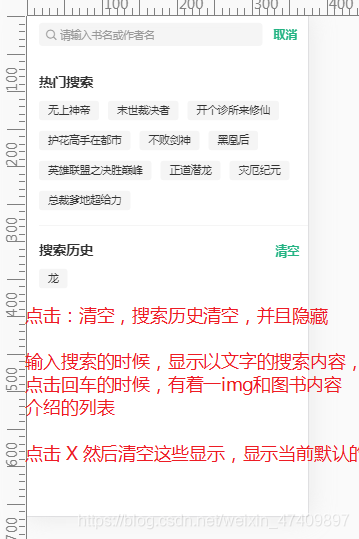
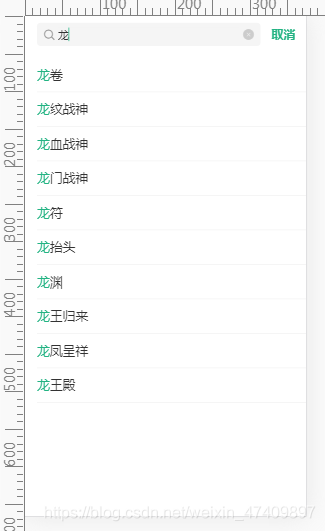
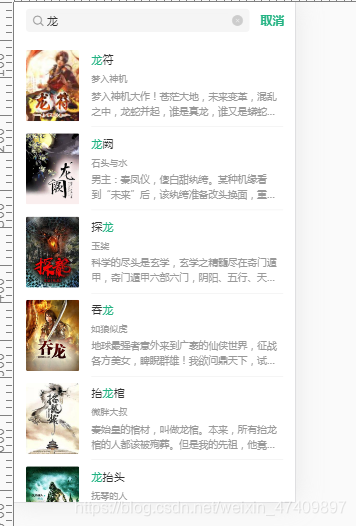
 本文介绍在Vue中实现前后端模糊搜索功能的方法,包括后端Express路由设置与数据库查询,前端Shelf.vue和search.vue组件的交互逻辑及界面设计。
 最低0.47元/天 解锁文章






 扫一扫
扫一扫


 1228
1228

 被折叠的 条评论
为什么被折叠?
被折叠的 条评论
为什么被折叠?
 到【灌水乐园】发言





