



 本文介绍了如何在Maven项目中使用MyBatis Generator插件,自动生成model、dao和mapper,提升开发效率。步骤包括配置Maven依赖、设置generatorConfig.xml并执行插件,生成后的文件结构也随之展示。
mybatis代码生成插件
一、介绍
mybatis-generator是一款在使用mybatis框架时,自动生成model、dao和mapper的工具,很大程度上减少了业务开发人员的手动编码时间。
二、使用
2.1 第一步:创建maven工程,导入代码生成插件
<?xml version="1.0" encoding="UTF-8"?>
<project xmlns="http://maven.apache.org/POM/4.0.0"
         xmlns:xsi="http://www.w3.org/2001/XMLSchema-instance"
         xsi:schemaLocation="http://maven.apache.org/POM/4.0.0 http://maven.apache.org/xsd/maven-4.0.0.xsd">
    <modelVersion>4.0.0</modelVersion>

    <groupId>com.charls</groupId>
    <artifactId>mybatis-generator</artifactId>
    <version>1.0-SNAPSHOT</version>

    <dependencies>
        <dependency>
            <groupId>org.mybatis.generator</groupId>
            <artifactId>mybatis-generator-core</artifactId>
            <version>1.3.2</version>
        </dependency>
    </dependencies>

    <build>
        <plugins>
            <plugin>
                <groupId>org.mybatis.generator</groupId>
                <artifactId>mybatis-generator-maven-plugin</artifactId>
                <version>1.3.2</version>
                <configuration>
                    <configurationFile> src/main/resources/generatorConfig.xml </configurationFile>
                </configuration>
            </plugin>
        </plugins>
    </build>
</project>
2.2 第二步:在maven工程的resources目录下提供generatorConfig.xml文件
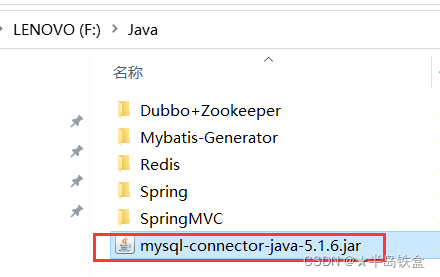
注意:这里自己数据库驱动的位置以及版本对应(这是我的位置)
<?xml version="1.0" encoding="UTF-8"?>
<!DOCTYPE generatorConfiguration
        PUBLIC "-//mybatis.org//DTD MyBatis Generator Configuration 1.0//EN"
        "http://mybatis.org/dtd/mybatis-generator-config_1_0.dtd">
<generatorConfiguration>
    <!--数据库驱动-->
    <classPathEntry location="F:\Java\mysql-connector-java-5.1.6.jar"/>
    <!-- 一个数据库一个context -->
    <context id="MYTables" targetRuntime="MyBatis3">
        <commentGenerator>
            <!--suppressDate:**阻止**生成的注释包含时间戳-->
            <property name="suppressDate" value="true"/>
            <!--suppressAllComments:**阻止**生成注释-->
            <property name="suppressAllComments" value="true"/>
        </commentGenerator>
        <!--数据库链接地址账号密码-->
        <jdbcConnection driverClass="com.mysql.jdbc.Driver"
                        connectionURL="jdbc:mysql://localhost:3306/health"
                        userId="root" password="root">
        </jdbcConnection>
        <javaTypeResolver>
            <!--控制是否强制DECIMAL和NUMERIC类型的字段转换为Java类型的 java.math.BigDecimal-->
            <property name="forceBigDecimals" value="false"/>
        </javaTypeResolver>
        <!--生成Model类存放位置(也就是我们所说的pojo)-->
        <javaModelGenerator targetPackage="com.charls.pojo"
                            targetProject="src\main\java">
            <property name="enableSubPackages" value="true"/>
            <property name="trimStrings" value="true"/>
        </javaModelGenerator>
        <!--生成映射文件存放位置-->
        <sqlMapGenerator targetPackage="mapper"
                         targetProject="src\main\resources">
            <property name="enableSubPackages" value="true"/>
        </sqlMapGenerator>
        <!--生成Dao类存放位置-->
        <javaClientGenerator type="XMLMAPPER"
                             targetPackage="com.charls.dao"
                             targetProject="src\main\java">
            <property name="enableSubPackages" value="true"/>
        </javaClientGenerator>
        <!--生成对应表及类名-->
        <table tableName="t_checkitem" domainObjectName="CheckItem"
               enableCountByExample="false" enableUpdateByExample="false"
               enableDeleteByExample="false" enableSelectByExample="false"
               selectByExampleQueryId="false"/>
    </context>
</generatorConfiguration>
2.3 第三步:执行插件
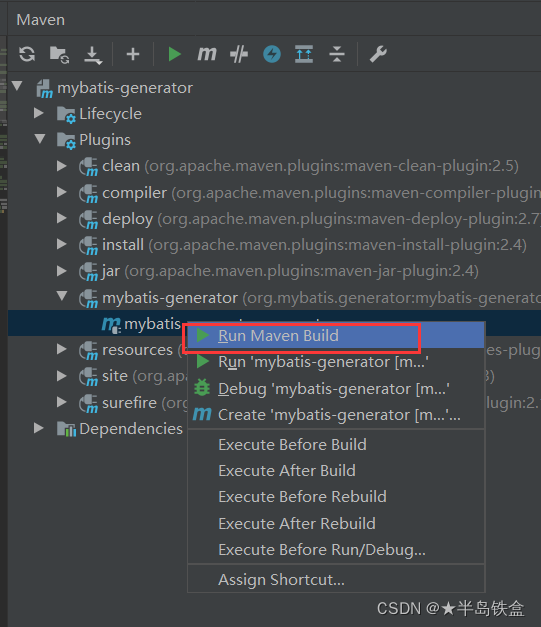
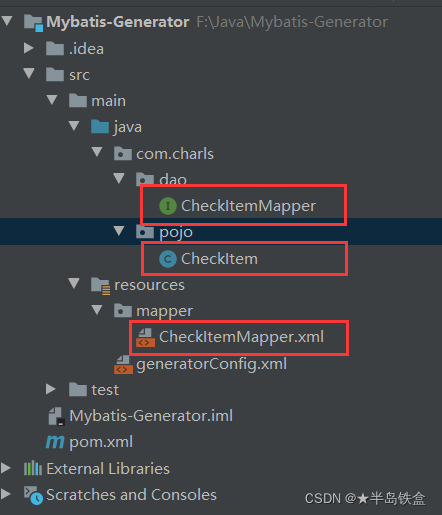
执行完成后查看项目,已经生成了相关文件:





 扫一扫
扫一扫


 1万+
1万+

 被折叠的 条评论
为什么被折叠?
被折叠的 条评论
为什么被折叠?
 到【灌水乐园】发言





