



双层循环之radio、checkbox、textarea
)
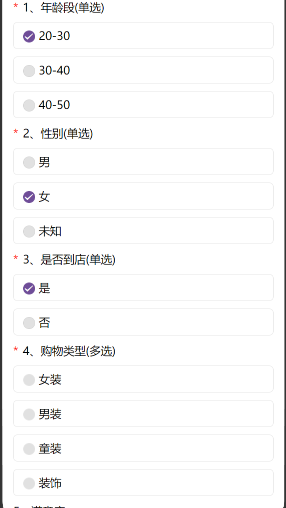
代码片.
// An highlighted block
<template>
	<view class="box">

		<view class="content">

			<!-- 0:单选,1:多选,2:简单回答 -->
			<view style="margin: 28rpx 0 0 0;" v-if='radioList.length>0'>
				<view v-for='(item,index) in radioList' :key='index'>
					<view class="flex item-center">
						{{index+1+'、'+item.itemName}}(单选)
					</view>
					<radio-group @change="radioChange" :class="custTypeId==0?'radio-purple':custTypeId==1?'radio-blue':'radio-green'">
							<label class="flex item-center borderbox padding" v-for="(v, i) in item.optionList" :key="i">
									<radio :value="index+','+i" :checked="v.checked"/>
									<view>{{v.value}}</view>
							</label>
					</radio-group>
				</view>
				<!-- 多选 -->
				<view v-if='checkboxList.length>0'>
					<view v-for='(item,index) in checkboxList' :key='index'>
						<view class="bold flex item-center">
							{{radioList.length+index+1+'、'+item.itemName}}(多选)
						</view>
						<checkbox-group :class="custTypeId==0?'checkbox-purple':custTypeId==1?'checkbox-blue':'checkbox-green'">
								<label class="flex item-center borderbox padding" v-for="(v,i) in item.optionList" :key="i" @click="checkBoxClick(v.id)">
									<checkbox  :checked="v.checked"/>
									<view>{{v.value}}</view>
								</label>
						</checkbox-group>

					</view>
				</view>
				<!-- 文本域 -->
				<view v-if='textareaList.length>0'>
					<view v-for='(item,index) in textareaList' :key='index'>
							<view class="bold flex item-center">
								{{radioList.length+checkboxList.length+index+1+'、'+item.itemName}}
							</view>
							<view class="borderbox uni-textarea" style="margin-top: 20rpx;">
								<textarea auto-blur='true'  @blur="inputValue($event,item.id,item.itemName)"  style="height:240rpx;border-radius: 8rpx;background: #F8F8F8;width:670rpx;padding: 20rpx 0 0 20rpx;" />
							</view>
						</view>
					</view>
				</view>
			<view class="footer flex item-center between">
				<view :class="custTypeId==0?'purple-bg':custTypeId==1?'blue-bg':'green-bg'" @click='submitQuestion'>提交参数</view>
			</view>
		</view>

	</view>
</template>

<script>
export default {
	data() {
		return{
			custTypeId:0,
			radioList:[],
			checkboxList:[],
			textareaList:[],
			checkedRadiolist:[],
			checkedCheckboxlist:[],
			checkedTextareaList:[],
			list:[
				{
					id: "168",
					itemName: "请选择性别",
					type:0,
					optionList:[
						{
							checked: false,
							id: "10",
							value: "男"
						},
						{
							checked: false,
							id: "11",
							value: "女"
						}
					]
				},
				{
					id: "169",
					itemName: "请选择血型",
					type:0,
					optionList:[
						{
							checked: false,
							id: "12",
							value: "O"
						},
						{
							checked: false,
							id: "13",
							value: "A"
						},
						{
							checked: false,
							id: "14",
							value: "AB"
						},
						{
							checked: false,
							id: "15",
							value: "B"
						}
					]
				},
				{
					id: "170",
					itemName: "请选择爱好",
					type:1,
					optionList:[
						{
							checked: false,
							id: "16",
							value: "吃饭"
						},
						{
							checked: false,
							id: "17",
							value: "睡觉"
						},
						{
							checked: false,
							id: "18",
							value: "打豆豆"
						},
						{
							checked: false,
							id: "19",
							value: "追剧"
						}
					]
				},
				{
					id: "171",
					itemName: "喜欢的颜色",
					type:1,
					optionList:[
						{
							checked: false,
							id: "20",
							value: "蓝色"
						},
						{
							checked: false,
							id: "21",
							value: "白色"
						},
						{
							checked: false,
							id: "22",
							value: "灰色"
						},
						{
							checked: false,
							id: "23",
							value: "粉色"
						}
					]
				},
				{
					id: "172",
					itemName: "有什么好的建议",
					type: 2,
					value:''
				},
				{
					id: "173",
					itemName: "随便说点什么",
					type: 2,
					value: ''
				},
			]
		}
	},
	onLoad(){
		this.radioList = this.list.filter(v=>v.type==0)
		this.checkboxList = this.list.filter(v=>v.type==1)
		this.textareaList = this.list.filter(v=>v.type==2)
	},
	methods:{
		submitQuestion(){
			let paramsList = this.checkedRadiolist.concat(this.checkedCheckboxlist,this.checkedTextareaList)
			console.log('提交参数',paramsList)
		},
		inputValue:function(e,itemId,itemName){
				let obj = {
				  itemId:itemId,
					itemName:itemName,
					itemValue:e.detail.value,
					itemType:2,
				}
				//去掉重复
				this.checkedTextareaList.forEach((v,i)=>{
					if(v.itemId == obj.itemId){
						this.checkedTextareaList.splice(i,1)
					}
				})
				this.checkedTextareaList.push(obj)
				//去掉空值
				this.checkedTextareaList.forEach((v,i)=>{
					if(v.itemValue==''){
						this.checkedTextareaList.splice(i,1)
					}
				})
		},
		checkBoxClick(id){
			 //每次点击数据会叠加,先清空
			 this.checkedCheckboxlist = []
			 this.checkboxList.forEach((v,i)=>{
				  v.optionList.forEach((val,index)=>{
						//(1) 把选中的改成true,其他改为false
						if(id == val.id){
							val.checked = !val.checked
						}
						//(2)选中的,拼参数
						if(val.checked){
							this.checkedCheckboxlist.push({
								 itemType:1,
								 itemId:v.id,
								 itemName:v.itemName,
								 itemValue:val.value
							})
						}
					})
			 })
		},
		radioChange:function(e){
			 let resList= e.detail.value.split(',')
			 let pIndex = resList[0],cIndex = resList[1]
			 let pItem = this.radioList[pIndex]
			 pItem.optionList.forEach((v,i)=>{
				let obj = {
					itemId:pItem.id,
					itemName:pItem.itemName,
					itemType:0,
				}
				if(cIndex == i){
					v.checked = true
					obj.itemValue = v.value
					//切换时,去掉重复的
					this.checkedRadiolist.forEach((item,index)=>{
						if(item.itemId == obj.itemId){ //注意:比较的是obj中的itemId
								this.checkedRadiolist.splice(index,1)
						}
					})
					this.checkedRadiolist.push(obj)
				}else{
					v.checked = false
				}
			})
			// console.log('单选参数',this.checkedRadiolist)
		},
	}
}
</script>
<style>
	/* #ifdef H5 */
	 uni-checkbox .uni-checkbox-input{
		 width: 29rpx;
		 height: 29rpx;
		 font-size:24rpx !important;
		 border-radius: 50% !important;
	 }
	uni-radio .uni-radio-input{
		 width: 29rpx;
		 height: 29rpx;
	}
	uni-checkbox .uni-checkbox-input .uni-checkbox-input-checked{
		width: 29rpx;
		height: 29rpx;
		color:#fff !important;
		/* border-color: #6F4D98; */
		border-radius: 50%;
		/* background:#6F4D98!important; */
	}
	/* uni-复选-颜色改变-checked */
	.checkbox-purple .uni-checkbox-input .uni-checkbox-input-checked{
		border-color: #6F4D98;
		background:#6F4D98!important;
	}
	.checkbox-blue .uni-checkbox-input .uni-checkbox-input-checked{
		border-color: #023694;
		background:#023694!important;
	}
	.checkbox-green .uni-checkbox-input .uni-checkbox-input-checked{
		border-color: #0D6B38;
		background:#0D6B38!important;
	}
	uni-radio .uni-radio-input .uni-radio-input-checked{
	 width: 29rpx;
	 height: 29rpx;
	 border-radius: 50%;
	 color:#FFFFFF !important;
	 /* background:#6F4D98!important; */
	 border-color: #E6E6E6;
	}
	/* uni-单选-改变颜色checked */
	.radio-purple .uni-radio-input .uni-radio-input-checked{
		background:#6F4D98!important;
	}
	.radio-blue .uni-radio-input .uni-radio-input-checked{
		background:#023694!important;
	}
	.radio-green .uni-radio-input .uni-radio-input-checked{
		background:#0D6B38!important;
	}
	/*  */
	uni-radio .uni-radio-input .uni-radio-input-checked::before{
		 width: 29rpx;
		 height: 29rpx;
		 line-height: 29rpx;
		 border-radius: 50%;
		 text-align: center;
		 font-size:24rpx;
		 color:#fff;
		/* background: #6F4D98;
		 border-color: #6F4D98; */
		 transform:translate(-50%, -50%) scale(1);
		 -webkit-transform:translate(-50%, -50%) scale(1);
		}
		/* uni-单选-改变颜色-checked::before */
		.radio-purple .uni-radio-input .uni-radio-input-checked::before{
			background: #6F4D98;
			 border-color: #6F4D98;
		}
		.radio-blue .uni-radio-input .uni-radio-input-checked::before{
			background: #023694;
			 border-color: #023694;
		}
		.radio-green .uni-radio-input .uni-radio-input-checked::before{
			background: #0D6B38;
			 border-color:#0D6B38;
		}
		uni-checkbox .uni-checkbox-input.uni-checkbox-input-checked::before{
			 width: 29rpx;
			 height: 29rpx;
			 line-height: 29rpx;
			 text-align: center;
			 border-radius: 50%;
			 font-size:32rpx;
			 /* border-color: #6F4D98; */
		}
		/* uni-复选-改变颜色-checkbox::before */
		.checkbox-purple .uni-checkbox-input.uni-checkbox-input-checked::before{
			border-color: #6F4D98;
		}
		.checkbox-blue .uni-checkbox-input.uni-checkbox-input-checked::before{
			border-color:  #023694;
		}
		.checkbox-green .uni-checkbox-input.uni-checkbox-input-checked::before{
			border-color:  #0D6B38;
		}
	 /* #endif */
	/* #ifdef APP-PLUS ||MP-WEIXIN */
	checkbox .wx-checkbox-input {
		width: 29rpx;
		height: 29rpx;
		border-color: #E6E6E6;
		border-radius: 50% !important;
	}
	checkbox .wx-checkbox-input.wx-checkbox-input-checked{
		width: 29rpx;
		height: 29rpx;
		color:#fff !important;
		/* border-color: #6F4D98; */
		border-radius: 50%;
		/* background:#6F4D98!important; */
	}
	/* wx-复选-改变颜色-checked */
	.checkbox-purple .wx-checkbox-input.wx-checkbox-input-checked{
			border-color: #6F4D98;
			background:#6F4D98!important;
	}
	.checkbox-blue .wx-checkbox-input.wx-checkbox-input-checked{
			border-color: #023694;
			background:#023694!important;
	}
	.checkbox-green .wx-checkbox-input.wx-checkbox-input-checked{
			border-color: #0D6B38;
			background:#0D6B38!important;
	}
	checkbox .wx-checkbox-input.wx-checkbox-input-checked::before{
		 width: 29rpx;
		 height: 29rpx;
		 line-height: 29rpx;
		 text-align: center;
		 border-radius: 50%;
		 font-size:32rpx;
		 color:#fff;
		/* background: #6F4D98;
		 border-color: #6F4D98; */
	}
	/* wx-复选-改变颜色-checked::before */
	.checkbox-purple .wx-checkbox-input.wx-checkbox-input-checked::before{
		background: #6F4D98;
		border-color: #6F4D98;
	}
	.checkbox-blue .wx-checkbox-input.wx-checkbox-input-checked::before{
		background: #023694;
		border-color: #023694;
	}
	.checkbox-green .wx-checkbox-input.wx-checkbox-input-checked::before{
		background: #0D6B38;
		border-color: #0D6B38;
	}
	radio .wx-radio-input{
		 width: 29rpx;
		 height: 29rpx;
	}
	radio .wx-radio-input.wx-radio-input-checked{
	 width: 29rpx;
	 height: 29rpx;
	 color:#fff !important;
	 /* background:#6F4D98!important; */
	 border-radius: 50%;
	 /* border-color: #6F4D98; */
	}
	/* wx-单选-改变颜色checked */
	.radio-purple .wx-radio-input.wx-radio-input-checked{
		 border-color: #6F4D98;
		 background:#6F4D98!important;
	}
	.radio-blue .wx-radio-input.wx-radio-input-checked{
		 border-color: #023694;
		 background:#023694!important;
	}
	.radio-green .wx-radio-input.wx-radio-input-checked{
		 border-color: #0D6B38;
		 background:#0D6B38!important;
	}
	radio .wx-radio-input.wx-radio-input-checked::before{
		 width: 29rpx;
		 height: 29rpx;
		 line-height: 29rpx;
		 text-align: center;
		 border-radius: 50%;
		 font-size:24rpx;
		 color:#fff;
		 /* background: #6F4D98;
		 border-color: #6F4D98; */
		 transform:translate(-50%, -50%) scale(1);
		 -webkit-transform:translate(-50%, -50%) scale(1);
		}
	/* wx-单选-改变颜色checked::before*/
	.radio-purple .wx-radio-input.wx-radio-input-checked::before{
		background: #6F4D98;
		border-color: #6F4D98;
	}
	.radio-blue .wx-radio-input.wx-radio-input-checked::before{
		background: #023694;
		border-color: #023694;
	}
	.radio-green .wx-radio-input.wx-radio-input-checked::before{
		background:#0D6B38;
		border-color: #0D6B38;
	}
	/* #endif */
</style>
<style lang="scss" scoped>

//
.box{
	width: 100%;
	box-sizing: border-box;
	font-size: 30rpx;
	.content{
		padding: 0 28rpx;
	}
	.title{
		text-align: center;
		padding: 28rpx 0;
		font-size: 34rxp;
	}
	.tit-purple{
		color: #61348E;
	}
	.tit-blue{
		color: #023694;
	}
	.tit-green{
		color: #0D6B38;
	}
	.flex{
		display: flex;
	}
	.item-center{
		align-items: center;
	}
	.between{
		justify-content: space-between;
	}
	.borderbox{
			border: 2rpx solid #E6E6E6;
			border-radius: 12rpx;
			margin: 0 0 20rpx 0;
			font-size: 30rpx;
	}
	.borderbox:nth-of-type(1){
		margin-top: 20rpx;
	}
	.padding{
		padding: 15rpx 0 15rpx 24rpx;
	}
	.icon{
		margin: 0 12rpx 0 0;
		color: red;
	}
	.footer{
		width: 100%;
		padding:20rpx 68rpx;
		box-sizing: border-box;
		view{
			padding: 12rpx 48rpx;
			border-radius: 200rpx;
		}
		.view-border-purple{
			color: #6F4D98;
			border: 2rpx solid #6F4D98;
		}
		.view-border-blue{
			color: #023694;
			border: 2rpx solid #023694;
		}
		.view-border-green{
			color: #0D6B38;
			border: 2rpx solid #0D6B38;
		}
		.purple-bg{
			color: #fff;
			background: #6F4D98;
		}
		.blue-bg{
			color: #fff;
			background: #023694;
		}
		.green-bg{
			color: #fff;
			background: #0D6B38;
		}
		.grey-bg{
			color: #fff;
			background: #c0c0c0;
			border: 2rpx solid #c0c0c0;
		}
	}
}
</style>





 扫一扫
扫一扫


 3085
3085

 被折叠的 条评论
为什么被折叠?
被折叠的 条评论
为什么被折叠?
 到【灌水乐园】发言





