


 本文介绍了如何利用jQuery实现简单的Tab切换功能。通过jQuery的隐式迭代和遍历操作,可以方便地为多个标签对象应用切换效果。
用jQuery实现简单的Tab切换
具体代码如下:
<!DOCTYPE html>
<html>
<head>
	<meta charset="utf-8">
	<title></title>
	<style type="text/css">
		.box{width: 500px;height: 400px;border: solid 1px black;margin: 20px auto;}
		.box ul{margin: 0;padding: 0;list-style: none;height: 40px;line-height:40px;
				display: flex;background: #ccc;text-align: center;}
		.box li{flex:1;border-left: solid 1px black;border-right: solid 1px black;}
		.box li.active{background: red;}

		.cont{}
		.cont div{width: 500px;height: 360px;display: none;}
		.cont .cont1{background: pink;display: block;}
		.cont .cont2{background: skyblue;}
		.cont .cont3{background: wheat;}
		.cont .cont4{background: green;}
	</style>
</head>
<body>
	<div class="box">
		<ul><li>1</li><li>2</li><li>3</li><li>4</li></ul>
		<div class="cont">
			<div class="cont1">第一个选项卡的内容区域</div>
			<div class="cont2">第二个选项卡的内容区域</div>
			<div class="cont3">第三个选项卡的内容区域</div>
			<div class="cont4">第四个选项卡的内容区域</div>
		</div>
	</div>
</body>
<!-- 必须下载并导入jQuery包:也就是jquery.js -->
<script src="../jquery.js"></script>
<script type="text/javascript">

$(".box").find("li").click(function(){

	// 先给当前加,然后取消其他
	// 此处的this,默认找到的是原生js的DOM对象
	// 如果想使用jq的方法,需要先转成jq的DOM对象
		$(this).addClass("active").siblings().removeClass("active");

	// 获取当前点击元素的索引
	// console.log($(this).index());
    	$(".cont").children("div").css("display","none").eq($(this).index()).css("display","block");
})
</script>
</html>
具体实现效果如下:
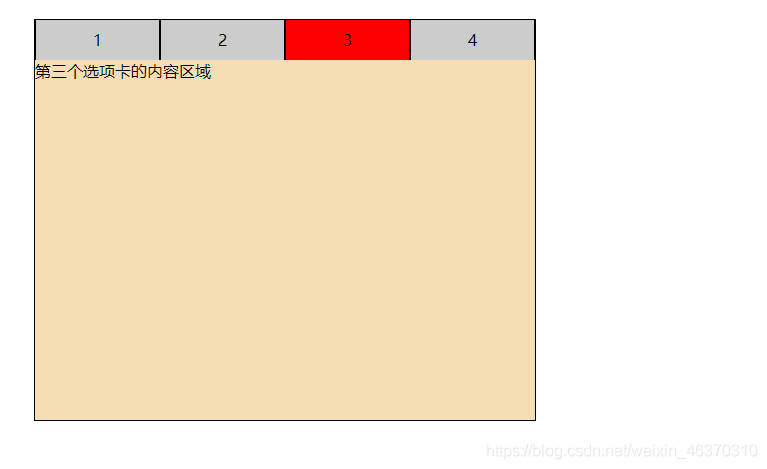
上面代码现了jQuery的隐式迭代:
隐式——计算机程序默认自动执行的操作
迭代—— 此处指的是遍历操作
总结 : jQuery会默认对数组(伪数组)中的所有标签对象,循环遍历,都执行相应操作。





 扫一扫
扫一扫


 407
407

 被折叠的 条评论
为什么被折叠?
被折叠的 条评论
为什么被折叠?
 到【灌水乐园】发言





