


 本文详细介绍了SKU管理系统的功能设计,包括无限规格与规格值的支持、批量设置售价和库存、数据校验及单元格合并等核心功能,适用于复杂产品管理。
管理系统SKU实例:
一、需求
1.首先我们要了解你此次拿到的SKU相关的需求和普通的SKU功能有什么不同点;
2.以下示例以求完善所有SKU相关功能会涉及到的情况;
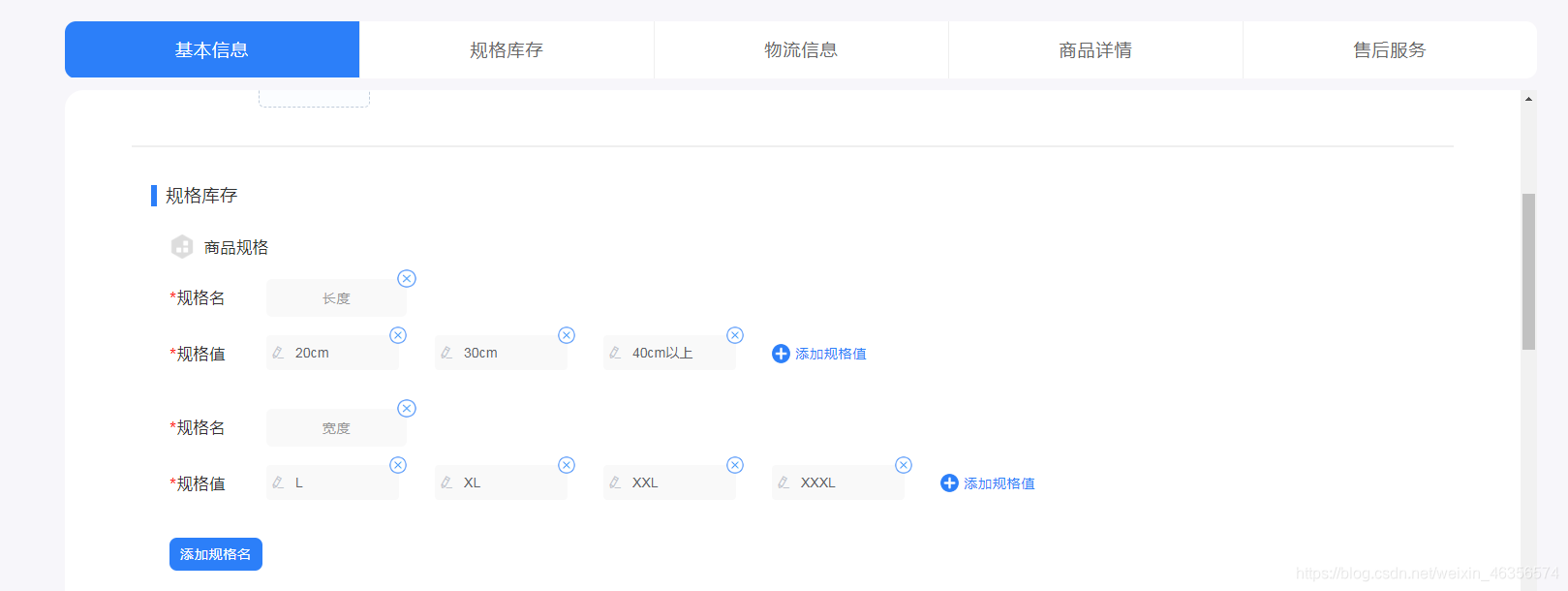
3.需求举例:(1)要拥有多个规格,且没有限制(这里一般情况为4个规格,这里扩大范围来增加难度)
(2)每一个规格又拥有多个规格值,且没有限制(一般情况是有限制的,但是根据产品不同又有多又少,这里直接无限制)
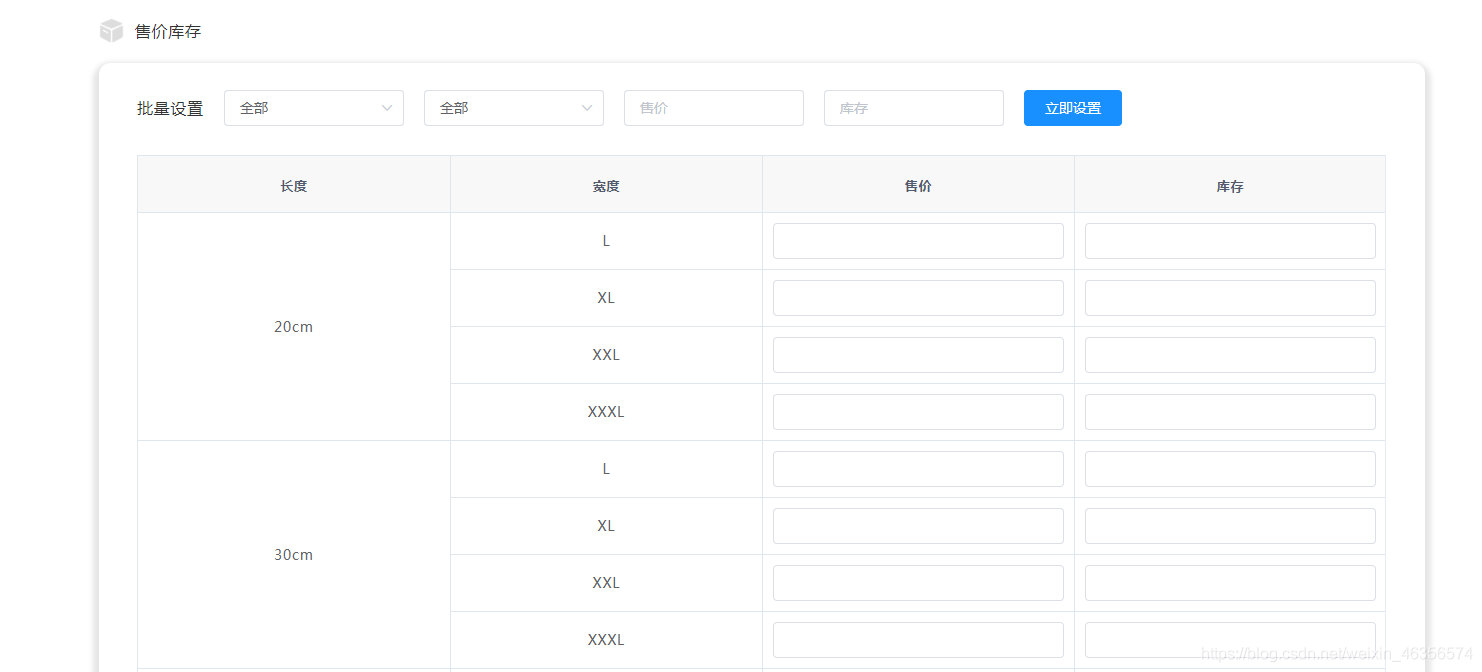
(3)规格和规格值再新增、编辑、删除时都要同步出一个SKU所有可能的列表,并且列表每一行拥有单独设置售价和库存的输入框;
(4)能够支持选择规格组合来批量设置售价和库存;
(5)除批量设置的输入框以外所有输入框均包含数据校验;
二、需求分析(略)
三、成品展示

四、实现过程梳理(可直接复制进行使用)
1.规格是字符串类型,且一个规格有多个规格值,这里采用弹窗的形式对规格进行新增和修改;
2.那么在没有规格的时候就应该是有一个缺省状态的,从代码中不难看出我是根据规格所在数组的长度来判断是否具有规格,长度为0就证明规格不存在,缺省为一个添加规格的按钮,点击后触发弹窗显示,用的是dialog弹窗,showCreatSpecificationAndInventory来绑定他的显示与隐藏;
3.当输入完成后点击确认按钮或者回车将触发sureSpecificationAndInventory()方法,里面并不需要传入参数,如果是修改再点击对应需要修改的规格时就记录显示弹窗对应的规格数组中的索引即可;
4.这里需要注意的是为空的时候不能校验通过,否则在底部形成的表格会显得怪异不好看;然后最主要的还是我们在每次新增或者编辑我们的规格后需要初始化或者保持不变我们的规格值;
//specificationValue这是当前输入的规格,showCreatSpecificationAndInventory 是否展示编辑弹窗、、
//isEditSpecificationValue是否是编辑状态,productInfo商品对象,
//productInfo.specification规格数组,name是规格名,value是规格值数组
//spanArr是一个空的数组,用于存放每一行记录的合并数;
//pos是spanArr的索引,getSpecificationList()方法是遍历出所有可能出现的规格组合情况
sureSpecificationAndInventory() {
      if (this.specificationValue.replace(/\s/g, "") == "") {
        this.showCreatSpecificationAndInventory = false;
        return;
      }
      if (this.isEditSpecificationValue) {
        this.productInfo.specification[
          this.EditSpecificationValueIndex
        ].name = this.specificationValue.replace(/\s/g, "");
        this.isEditSpecificationValue = false;
      } else {
        this.productInfo.specification.push({
          name: this.specificationValue.replace(/\s/g, ""),
          value: [""]
        });
      }
      this.showCreatSpecificationAndInventory = false;
      this.specificationValue = "";
      this.pos = [0, 0, 0, 0];
      this.spanArr = [[], [], [], []];
      this.getSpecificationList();
    }
5.在你创建好规格后,自然就要创建你的规格值了,对应的value值通过v-model进行双向绑定即可,显示就不说了,不懂的就多看基础知识,我只讲重点,也就是规格情况和规格组合渲染
//这个方法进行规格组合情况遍历,为的是将列表数据给列出来
//这里稍微说一下,脑子如果转不过来的话就几个人一起看,这里是比较麻烦的部分之一,不过最麻烦的还是在H5的规格遍历,这里先暂时看这个;
//首先可以看到我创建了一个局部变量oldSpecification,他的作用是因为我们的商品对象中specification是会不停地变化的
//然后这里我们要知道规格组合是怎样的,其实就是一个排列组合的形式,第一个规格取一个,第二个规格取一个,依次取一个就构成了我们想要的规格组合;
//既然知道是排列组合我们就来写这个排列组合的方法,那么无论如何我们都应该知道规格组合的组成个数就是我们规格名的个数,那么第一层循环就是我们的规格名oldSpecification;
//看到这里就直接看这层循环,对应的注释我就写到循环里面,仔细看绝对有用
getSpecificationList() {
//遍历出所有可能出现的规格组合情况,(以4个为例子,但是你可以将其变成N个,只需要取消this.productInfo.specification的长度限制即可)由于最多只有4个规格名,所以直接挨个循环四个规格,如果有就排列出来,如果没有就跳过
      const oldSpecification = JSON.parse(
        JSON.stringify(this.productInfo.specification)
      );
      let specificationList = []; //规格所有情况,{ specification: specification, "firstSpecification": "", "secondSpecification": "", "thirdSpecification": "", "forthSpecification": "", price: "", inventory: "" }
 //这里的"firstSpecification""secondSpecification""thirdSpecification""forthSpecification"
 //这四个参数是因为回显而准备的,但是如果你是N个那就创建一个字段写成数组即可,不是我不写数组
 //是由于后端觉得写个数组麻烦还需要给我包装成集合也不好存储
 //这里根据你的需求来N个就用数组或者说个数多了
      let arr = [];
      let endArr = [];
      for (let i = 0; i < oldSpecification.length; i++) {
      //这里循环需要注意的就是foreachSpecification()方法的意思;
      //方法传入三个参数,第一个是累加数组(每一次的方法复用都会叠加这个数组也就是我们最后想要的所有情况)
      //第二个参数是循环的当前规格值,你可以理解成我们在拼接一个排列组合的一种情况
      //第三个参数是当前循环的索引,必须要的参数,很关键,只有i的存在你才知道到底我这次调用方法是返回的哪个规格名下面的值,也就是在排列组合中他是第几位,比如a:1,2,3;b:α,β,θ;你循环的是a数组,那么那个i就告诉你1放在第一个位置,循环b那么告诉你α放在第二个位置;一定要理解这个索引的位置,只有理解了你才能够搞懂这段逻辑
      //我们进入到这个方法里面看到底干了什么,现在跳掉这个方法去看,不要看别的地方,别的地方我会讲
        if (i < oldSpecification.length - 1) {
          arr = JSON.parse(
            JSON.stringify(
              this.foreachSpecification(arr, oldSpecification[i].value, i)
            )
          );
        } else {
          specificationList = specificationList.concat(
            this.foreachSpecification(arr, oldSpecification[i].value, i)
          );
        }
      }
      specificationList.forEach(element => {
        endArr.push({
          ...{ specification: element },
          ...{
            firstSpecification: element[0] || "",
            secondSpecification: element[1] || "",
            thirdSpecification: element[2] || "",
            forthSpecification: element[3] || "",
            money: "",
            inventory: ""
          }
        });
      });
      this.productInfo.specificationList = endArr;
      this.getSpanArr(endArr);
    },
foreachSpecification(oldArr, array, n) {
//现在思维拉到此处,我们看到这里分成新旧数组(newArr ,oldArr)和循环数组(array);
//直接讲forEach在干什么,再说为什么分长度为0和不为0的原因;
//视线看到else去,循环中不难看出我们对传入的所有规格值进行循环,也就是每次循环把规格值赋值给老数组,这里就很明显的告诉你深拷贝的原因了,如果你不深拷贝这里一变全都在变,就不可能做出来;
//注意看newArr在每次循环中都推进去了一个规格值,这就是把对应n位置的规格值全部都跑了一遍;简单举个例子:
//比如a:1,2,3;b:α,β,θ;要知道我们最后要得到的是1α,1β,1θ,2α...类似这样的结构;这里比如我们的n是1,那么oldArr =['','']这种结构的,我们现在就是在不停地改变oldArr[1],然后把每次的oldArr推入newArr;
//现在理解到这个循环的奥义了吗?再来看长度为0的时候我为什么要用array做循环,原因很简单oldArr是空的,意味着你是第一次进行排列组合;
//一般的讲解基本到这里就不说了,但是对于很多人来说,空的又如何空的就直接推就是了啊,显然你去掉我的if里面的东西是不行的;
//那我们就来说说为什么,oldArr如果为空意味着你是第一次循环,也就是此次进入方法等于是填充排列组合的第一位,如果不单独拿出来写else部分永远都是循环0次,怎么去形成组合呢?
      let newArr = [];
      oldArr = JSON.parse(JSON.stringify(oldArr));
      array = JSON.parse(JSON.stringify(array));
      if (oldArr.length == 0) {
        array.forEach((item, i, info) => {
          oldArr[n] = item;
          newArr[i] = JSON.parse(JSON.stringify(oldArr));
        });
      } else {
        oldArr.forEach((oldItem, oldI, oldInfo) => {
          array.forEach((item, i, info) => {
            oldItem[n] = item;
            newArr.push(JSON.parse(JSON.stringify(oldItem)));
          });
        });
      }
      return newArr;
    },
6.这里你就把所有的规格循环遍历出来了,而且我们可以看出来这个顺序也是我们想要的那个顺序;那么接下来就要做单元格合并了;单元格合并我也是借鉴了网上很多方法给做出来的,希望看到类似的代码不要惊讶;单元格合并首选需要做数据准备,这个数组准备就在你遍历出所有可能后进行,也就是上面代码中getSpanArr()方法;
getSpanArr(data) {
// data就是我们从后台拿到的数据,通常是一个数组;spanArr是一个空的数组,用于存放每一行记录的合并数;pos是spanArr的索引。代码意思是:如果是第一条记录(索引为0),向数组中加入1,
// 并设置索引位置;如果不是第一条记录,则判断它与前一条记录是否相等,如果相等,则向spanArr中添入元素0,并将前一位元素+1,表示合并行数+1,以此往复,得到所有行的合并数,0即表示该行不显示。
// 根据得到的数组spanArr对表格进行合并渲染,并绑定合并方法
      for (let n = 0; n < this.productInfo.specification.length; n++) {
        for (let i = 0; i < data.length; i++) {
          if (i === 0) {
            this.spanArr[n].push(1);
            this.pos[n] = 0;
          } else {
            // 判断当前元素与上一个元素是否相同
            if (data[i].specification[n] === data[i - 1].specification[n]) {
              this.spanArr[n][this.pos[n]] += 1;
              this.spanArr[n].push(0);
            } else {
              this.spanArr[n].push(1);
              this.pos[n] = i;
            }
          }
        }
      }
    },
arraySpanMethod({ row, column, rowIndex, columnIndex }) {
//这个方法放到el-table中span-method中去
      if (columnIndex < this.productInfo.specification.length) {
        const _row = this.spanArr[columnIndex][rowIndex];
        const _col = _row > 0 ? 1 : 0;
        return {
          rowspan: _row,
          colspan: _col
        };
      }
    },
7.到这里就快完成了,那么就差批量设置了,这里简单说一下参数意义,allPrice 代表了你想设置的价格,allInventory 你想设置的库存,如果还有别的依葫芦画瓢就行了;specificationSelectList代表了你的筛选条件对应的数组;剩下的自己看代码,掌握一个思想:把每一个组合中的每一个值拆成一个单元,对比specificationSelectList中对应位置的值相等就赋值,不相等不赋值;记住赋值完成要return;
setAll() {
      // console.log("批量选择了哪些:", this.specificationSelectList, "价格:", this.allPrice, "库存:", this.allInventory)
      // console.log("所有情况:", this.productInfo.specificationList)
      let allPrice = this.allPrice.replace(/\s/g, "");
      let allInventory = this.allInventory.replace(/\s/g, "");
      if (allPrice || allInventory) {
        if (!allPrice && !allInventory) {
          this.$message.error("请不要设置售价或库存为空格或者空");
          this.allPrice = "";
          this.allInventory = "";
          return;
        } else {
          if (allPrice) {
            if (typeof (allPrice * 1) != "number" || isNaN(allPrice)) {
              this.$message.error("请输入正确的售价");
              return;
            }
            if (allPrice < 0) {
              this.$message.error("请输入正确的售价");
              return;
            }
          }
          if (allInventory) {
            if (typeof (allInventory * 1) != "number" || isNaN(allInventory)) {
              this.$message.error("请输入正确的售价");
              return;
            }
            if (allInventory < 0) {
              this.$message.error("请输入正确的售价");
              return;
            }
            if (allInventory.indexOf(".") != -1) {
              this.$message.error("库存不允许输入小数");
              return;
            }
          }
        }
      } else {
        return;
      }
      for (let item of this.productInfo.specificationList) {
        if (this.specificationSelectList[0].replace(/\s/g, "") == "") {
          if (this.specificationSelectList[1].replace(/\s/g, "") == "") {
            if (this.specificationSelectList[2].replace(/\s/g, "") == "") {
              if (this.specificationSelectList[3].replace(/\s/g, "") == "") {
                if (allPrice) {
                  item.money = allPrice * 1;
                }
                if (allInventory) {
                  item.inventory = allInventory * 1;
                }
              } else {
                if (
                  this.specificationSelectList[3].replace(/\s/g, "") ==
                  item.thirdSpecification.replace(/\s/g, "")
                ) {
                  //不相等不赋值
                  if (allPrice) {
                    item.money = allPrice * 1;
                  }
                  if (allInventory) {
                    item.inventory = allInventory * 1;
                  }
                }
              }
            } else {
              if (
                this.specificationSelectList[2].replace(/\s/g, "") ==
                item.thirdSpecification.replace(/\s/g, "")
              ) {
                //不相等不赋值
                if (this.specificationSelectList[3].replace(/\s/g, "") == "") {
                  if (allPrice) {
                    item.money = allPrice * 1;
                  }
                  if (allInventory) {
                    item.inventory = allInventory * 1;
                  }
                } else {
                  if (
                    this.specificationSelectList[3].replace(/\s/g, "") ==
                    item.thirdSpecification.replace(/\s/g, "")
                  ) {
                    //不相等不赋值
                    if (allPrice) {
                      item.money = allPrice * 1;
                    }
                    if (allInventory) {
                      item.inventory = allInventory * 1;
                    }
                  }
                }
              }
            }
          } else {
            if (
              this.specificationSelectList[1].replace(/\s/g, "") ==
              item.secondSpecification.replace(/\s/g, "")
            ) {
              if (this.specificationSelectList[2].replace(/\s/g, "") == "") {
                if (this.specificationSelectList[3].replace(/\s/g, "") == "") {
                  if (allPrice) {
                    item.money = allPrice * 1;
                  }
                  if (allInventory) {
                    item.inventory = allInventory * 1;
                  }
                } else {
                  if (
                    this.specificationSelectList[3].replace(/\s/g, "") ==
                    item.thirdSpecification.replace(/\s/g, "")
                  ) {
                    //不相等不赋值
                    if (allPrice) {
                      item.money = allPrice * 1;
                    }
                    if (allInventory) {
                      item.inventory = allInventory * 1;
                    }
                  }
                }
              } else {
                if (
                  this.specificationSelectList[2].replace(/\s/g, "") ==
                  item.thirdSpecification.replace(/\s/g, "")
                ) {
                  //不相等不赋值
                  if (
                    this.specificationSelectList[3].replace(/\s/g, "") == ""
                  ) {
                    if (allPrice) {
                      item.money = allPrice * 1;
                    }
                    if (allInventory) {
                      item.inventory = allInventory * 1;
                    }
                  } else {
                    if (
                      this.specificationSelectList[3].replace(/\s/g, "") ==
                      item.thirdSpecification.replace(/\s/g, "")
                    ) {
                      //不相等不赋值
                      if (allPrice) {
                        item.money = allPrice * 1;
                      }
                      if (allInventory) {
                        item.inventory = allInventory * 1;
                      }
                    }
                  }
                }
              }
            }
          }
        } else {
          if (
            this.specificationSelectList[0].replace(/\s/g, "") ==
            item.firstSpecification.replace(/\s/g, "")
          ) {
            if (this.specificationSelectList[1].replace(/\s/g, "") == "") {
              if (this.specificationSelectList[2].replace(/\s/g, "") == "") {
                if (this.specificationSelectList[3].replace(/\s/g, "") == "") {
                  if (allPrice) {
                    item.money = allPrice * 1;
                  }
                  if (allInventory) {
                    item.inventory = allInventory * 1;
                  }
                } else {
                  if (
                    this.specificationSelectList[3].replace(/\s/g, "") ==
                    item.thirdSpecification.replace(/\s/g, "")
                  ) {
                    //不相等不赋值
                    if (allPrice) {
                      item.money = allPrice * 1;
                    }
                    if (allInventory) {
                      item.inventory = allInventory * 1;
                    }
                  }
                }
              } else {
                if (
                  this.specificationSelectList[2].replace(/\s/g, "") ==
                  item.thirdSpecification.replace(/\s/g, "")
                ) {
                  //不相等不赋值
                  if (
                    this.specificationSelectList[3].replace(/\s/g, "") == ""
                  ) {
                    if (allPrice) {
                      item.money = allPrice * 1;
                    }
                    if (allInventory) {
                      item.inventory = allInventory * 1;
                    }
                  } else {
                    if (
                      this.specificationSelectList[3].replace(/\s/g, "") ==
                      item.thirdSpecification.replace(/\s/g, "")
                    ) {
                      //不相等不赋值
                      if (allPrice) {
                        item.money = allPrice * 1;
                      }
                      if (allInventory) {
                        item.inventory = allInventory * 1;
                      }
                    }
                  }
                }
              }
            } else {
              if (
                this.specificationSelectList[1].replace(/\s/g, "") ==
                item.secondSpecification.replace(/\s/g, "")
              ) {
                if (this.specificationSelectList[2].replace(/\s/g, "") == "") {
                  if (
                    this.specificationSelectList[3].replace(/\s/g, "") == ""
                  ) {
                    if (allPrice) {
                      item.money = allPrice * 1;
                    }
                    if (allInventory) {
                      item.inventory = allInventory * 1;
                    }
                  } else {
                    if (
                      this.specificationSelectList[3].replace(/\s/g, "") ==
                      item.thirdSpecification.replace(/\s/g, "")
                    ) {
                      //不相等不赋值
                      if (allPrice) {
                        item.money = allPrice * 1;
                      }
                      if (allInventory) {
                        item.inventory = allInventory * 1;
                      }
                    }
                  }
                } else {
                  if (
                    this.specificationSelectList[2].replace(/\s/g, "") ==
                    item.thirdSpecification.replace(/\s/g, "")
                  ) {
                    //不相等不赋值
                    if (
                      this.specificationSelectList[3].replace(/\s/g, "") == ""
                    ) {
                      if (allPrice) {
                        item.money = allPrice * 1;
                      }
                      if (allInventory) {
                        item.inventory = allInventory * 1;
                      }
                    } else {
                      if (
                        this.specificationSelectList[3].replace(/\s/g, "") ==
                        item.thirdSpecification.replace(/\s/g, "")
                      ) {
                        //不相等不赋值
                        item.money = allPrice;
                        item.inventory = this.allInventory;
                      }
                    }
                  }
                }
              }
            }
          }
        }
      }
      this.allPrice = "";
      this.allInventory = "";
    },
五、完成代码(html、css、js),我把整个代码粘贴出来,实在看不懂慢慢的console每一步看执行过程就能懂了;(h5版本的我将在下一篇文章书写,完成后我会在文章末尾附上链接,本来想写在一起但是写完管理系统的发现太长了)
1.html:
      <div class="product_base borderTop product_all" name="specificationAndInventory" id="specificationAndInventory">
        <div class="product_all_title">
          <div class="product_all_title_icon"></div>
          <div class="product_all_title_name">规格库存</div>
        </div>
        <div class="product_base_itemForm alignCenter">
          <template v-if="productInfo.specification.length == 0">
            <span class="product_base_itemForm_titleTxt">
              <span style="color:red">*</span>商品规格
            </span>
            <div class="product_base_itemForm_btn">
              <el-button type="primary" @click="showCreatSpecificationAndInventory = true">添加规格名</el-button>
            </div>
          </template>
          <div v-else class="product_base_itemForm_details">
            <div class="product_base_itemForm_details_title">
              <img :src="specificationImg" />
              <span class="product_base_itemForm_details_title_name">商品规格</span>
            </div>
            <div class="product_base_itemForm_details_specification">
              <div class="product_base_itemForm_details_specification_list" v-for="(specificationItem,
                specificationIndex) in productInfo.specification" :key="specificationIndex">
                <div class="product_base_itemForm_details_specification_list_item">
                  <span class="product_base_itemForm_details_specification_list_item_title">
                    <span style="color:red">*</span>规格名
                  </span>
                  <div class="product_base_itemForm_details_specification_list_item_name">
                    <div class="product_base_itemForm_details_specification_list_item_name_txt" @click="editSpecification(specificationIndex)">{{ specificationItem.name }}</div>
                    <img :src="delImg" @click="deleteSpecification(specificationIndex)" class="product_base_itemForm_details_specification_list_item_name_img" />
                  </div>
                </div>
                <div class="product_base_itemForm_details_specification_list_item">
                  <span class="product_base_itemForm_details_specification_list_item_title">
                    <span style="color:red">*</span>规格值
                  </span>
                  <div class="product_base_itemForm_details_specification_list_item_itemList">
                    <div
                      class="product_base_itemForm_details_specification_list_item_itemList_input"
                      v-for="(specificationItemValue,
                      specificationItemIndex) in specificationItem.value"
                      :key="specificationItemIndex"
                    >
                      <el-form-item
                        :prop="
                          'specification.' +
                            specificationIndex +
                            '.value.' +
                            specificationItemIndex
                        "
                        :rules="[
                          {
                            required: true,
                            message: '规格值不可为空',
                            trigger: 'blur'
                          }
                        ]"
                      >
                        <el-input
                          v-model="
                            productInfo.specification[specificationIndex].value[
                              specificationItemIndex
                            ]
                          "
                          placeholder="请输入..."
                          class="product_base_itemForm_details_specification_list_item_itemList_input_content"
                          maxlength="12"
                          @blur="changeSpecificationValue"
                          onkeypress="javascript:if(event.keyCode == 32)event.returnValue = false;"
                        >
                          <i slot="prefix" class="el-icon-edit"></i>
                        </el-input>
                        <img
                          :src="delImg"
                          @click="
                            delSpecificationItem(
                              specificationIndex,
                              specificationItemIndex
                            )
                          "
                          v-if="
                            productInfo.specification[specificationIndex].value
                              .length > 1
                          "
                          class="product_base_itemForm_details_specification_list_item_itemList_input_img"
                        />
                      </el-form-item>
                    </div>
                    <div class="product_base_itemForm_details_specification_list_item_itemList_addInput" @click="addSpecification(specificationIndex)">
                      <img :src="addInputImg" alt />
                      <span>添加规格值</span>
                    </div>
                  </div>
                </div>
              </div>
              <div @click="showCreatSpecificationAndInventory = true" class="product_base_itemForm_details_specification_add" v-if="productInfo.specification.length < 4">添加规格名</div>
            </div>
            <div class="product_base_itemForm_details_title mt4">
              <img :src="inventoryImg" />
              <span class="product_base_itemForm_details_title_name">售价库存</span>
            </div>
            <div class="product_base_itemForm_details_inventory">
              <div class="top">
                <div class="top_title specificationMt74">批量设置</div>
                <div class="top_specification specificationMt74" v-for="(specificationSelectItem,
                  specificationSelectIndex) in productInfo.specification" :key="specificationSelectIndex">
                  <el-select v-model="specificationSelectList[specificationSelectIndex]" class="top_specification_select">
                    <el-option key label="全部" value></el-option>
                    <el-option
                      v-for="(specificationSelectValueItem,
                      specificationSelectValueIndex) in specificationSelectItem.value"
                      :key="specificationSelectValueIndex"
                      :label="specificationSelectValueItem"
                      :value="specificationSelectValueItem"
                    ></el-option>
                  </el-select>
                </div>
                <el-input v-model="allPrice" placeholder="售价" class="top_specification_input specificationMt74" onkeypress="javascript:if(event.keyCode == 32)event.returnValue = false;"></el-input>
                <el-input v-model="allInventory" placeholder="库存" class="top_specification_input specificationMt74 specificationMr104" onkeypress="javascript:if(event.keyCode == 32)event.returnValue = false;"></el-input>
                <el-button type="primary" @click="setAll()" class="top_specification_btn specificationMt74">立即设置</el-button>
              </div>
              <div class="top_table">
                <el-table :data="productInfo.specificationList" :span-method="arraySpanMethod" border style="width: 100%">
                  <el-table-column prop="firstSpecification" :label="productInfo.specification[0].name" v-if="productInfo.specification[0]" align="center"></el-table-column>
                  <el-table-column prop="secondSpecification" :label="productInfo.specification[1].name" v-if="productInfo.specification[1]" align="center"></el-table-column>
                  <el-table-column prop="thirdSpecification" :label="productInfo.specification[2].name" v-if="productInfo.specification[2]" align="center"></el-table-column>
                  <el-table-column prop="forthSpecification" :label="productInfo.specification[3].name" v-if="productInfo.specification[3]" align="center"></el-table-column>
                  <el-table-column prop="money" label="售价" align="center">
                    <template slot-scope="scope">
                      <el-form-item
                        :prop="'specificationList.' + scope.$index + '.money'"
                        :rules="[
                          { validator: numberRuleAllowPoints, trigger: 'blur' },
                          {
                            required: true,
                            message: '请将所有规格售价填写完整',
                            trigger: 'blur'
                          }
                        ]"
                      >
                        <el-input v-model="scope.row.money" clearable onkeypress="javascript:if(event.keyCode == 32)event.returnValue = false;"></el-input>
                      </el-form-item>
                    </template>
                  </el-table-column>
                  <el-table-column prop="inventory" label="库存" align="center">
                    <template slot-scope="scope">
                      <el-form-item
                        :prop="
                          'specificationList.' + scope.$index + '.inventory'
                        "
                        :rules="[
                          { validator: numberRules, trigger: 'blur' },
                          {
                            required: true,
                            message: '请将所有规格醋昆填写完整',
                            trigger: 'blur'
                          }
                        ]"
                      >
                        <el-input v-model="scope.row.inventory" clearable onkeypress="javascript:if(event.keyCode == 32)event.returnValue = false;"></el-input>
                      </el-form-item>
                    </template>
                  </el-table-column>
                </el-table>
              </div>
            </div>
          </div>
        </div>
      </div>
2.css(有些没用的自己删除,我这里就比较懒了)
.app-container {
width: 100%;
height: 100%;
background: #f7f6fa;
padding: 2.78vh 2.6vw;
.topTags {
display: flex;
flex-direction: row;
width: 100%;
height: 6vh;
background-color: white;
border-radius: 0.6vw;
overflow: hidden;
&_tag {
height: 100%;
width: 20%;
font-family: MicrosoftYaHei;
font-size: 0.94vw;
font-weight: normal;
font-stretch: normal;
line-height: 6vh;
letter-spacing: 0.05vw;
color: #666666;
text-align: center;
}
.active {
background-color: #2c7ff9;
color: #ffffff;
}
}
.product {
margin-top: 1.24vh;
padding: 1.75vh 3.59vw 0 3.59vw;
width: 100%;
height: calc(100% - 6vh - 1.24vh);
background-color: white;
border: 0;
border-radius: 1vw;
// display: flex;
flex-direction: column;
overflow: auto;
&_back {
font-family: MicrosoftYaHei;
font-size: 1.04vw;
font-weight: normal;
font-stretch: normal;
letter-spacing: 0.05vw;
color: #333333;
position: relative;
height: 8vh;
line-height: 8vh;
width: 8vw;
white-space: nowrap;
}
&_back::before {
position: absolute;
top: calc(4vh - 0.35vw);
left: -1vw;
content: ' ';
width: 0.8vw;
height: 0.8vw;
border-top: 2px solid #333333;
border-left: 2px solid #333333;
transform: rotate(-45deg);
}
&_all {
width: 100%;
padding: 4vh 1.04vw;
display: flex;
flex-direction: column;
&_title {
display: flex;
flex-direction: row;
height: 2.22vh;
&_icon {
width: 0.68vh;
height: 2.22vh;
background-color: #2c7ff9;
}
&_name {
margin-left: 0.47vw;
line-height: 2.22vh;
font-family: MicrosoftYaHei;
font-size: 0.94vw;
font-weight: normal;
font-stretch: normal;
letter-spacing: 0.05vh;
color: #333333;
}
}
}
.alignCenter {
align-items: center;
}
&_base {
::v-deep .el-form-item {
margin: 0;
}
&_item {
margin-left: 1vw;
margin-top: 1.54vh;
font-family: MicrosoftYaHei;
font-size: 0.73vw;
font-weight: normal;
font-stretch: normal;
line-height: 1.41vw;
letter-spacing: 0.04vw;
color: #666666;
&_edit {
margin-left: 0.83vw;
font-family: MicrosoftYaHei;
font-size: 0.73vw;
font-weight: normal;
font-stretch: normal;
line-height: 1.41vw;
letter-spacing: 0.04vw;
color: #2c7ff9;
cursor: pointer;
-moz-user-select: none;
-webkit-user-select: none;
}
}
.shadowStyle {
padding: 0 1.98vw;
border-radius: 0.6vw;
margin-top: 2vh;
box-shadow: 0px 4px 0px 5px rgb(221, 221, 221, 0.75);
height: 60vh;
margin-bottom: 4vh;
}
&_itemForm {
margin-left: 1vw;
margin-top: 3vh;
width: 100%;
font-family: MicrosoftYaHei;
font-size: 0.83vw;
font-weight: normal;
font-stretch: normal;
letter-spacing: 0.04vw;
color: #333333;
display: flex;
flex-direction: row;
white-space: nowrap;
line-height: 36px;
::v-deep .el-form-item__error {
margin-left: 1vw;
}
&_additional{
display: flex;
flex-direction: column;
-moz-user-select: none;
-webkit-user-select: none;
&_tips{
margin-left: 2vw;
color: #2c7ff9;
}
}
&_brand {
margin-left: 0.89vw;
width: 11.72vw;
font-size: 0.73vw;
}
&_productName {
margin-left: 0.89vw;
width: 30vw;
font-size: 0.73vw;
min-width: 500px;
font-family: MicrosoftYaHei;
font-size: 0.73vw;
}
&_imgList {
margin-left: 0.89vw;
display: flex;
// flex-wrap: wrap;
line-height: 0;
::v-deep .el-upload--picture-card {
width: 6vw;
height: 6vw;
line-height: 6vw;
margin: 0 8px 0px 0;
}
::v-deep .el-upload-list--picture-card .el-upload-list__item {
width: 6vw;
height: 6vw;
margin: 0 8px 0px 0;
}
}
&_imgList1 {
margin-left: 0.89vw;
display: flex;
flex-wrap: wrap;
::v-deep .el-upload--picture-card {
display: none;
}
::v-deep .el-upload-list--picture-card .el-upload-list__item {
width: 6vw;
height: 6vw;
}
}
&_imgItem {
margin-left: 0.89vw;
width: 5.26vw;
height: 5.26vw;
margin-right: 0.78vw;
border-radius: 0.4vw;
object-fit: contain;
}
&_titleTxt {
line-height: 4vh;
font-family: MicrosoftYaHei;
font-size: 0.94vw;
font-weight: normal;
font-stretch: normal;
letter-spacing: 0.05vw;
color: #333333;
}
&_btn {
margin-left: 0.89vw;
border-radius: 0.4vw;
width: 6vw;
height: 4vh;
.el-button {
width: 100%;
height: 100%;
font-family: MicrosoftYaHei;
font-size: 0.83vw;
font-weight: normal;
font-stretch: normal;
letter-spacing: 0.04vw;
color: #ffffff;
display: flex;
border-radius: 0.4vw;
justify-content: center;
line-height: 1vh;
}
}
&_details {
display: flex;
flex-direction: column;
width: 100%;
&_title {
display: flex;
flex-direction: row;
width: 100%;
img {
width: 1.35vw;
height: 1.35vw;
min-width: 20px;
min-height: 20px;
}
&_name {
font-family: MicrosoftYaHei;
font-size: 0.83vw;
font-weight: normal;
font-stretch: normal;
line-height: 1.35vw;
letter-spacing: 0.04vw;
color: #333333;
margin-left: 0.52vw;
}
}
&_specification {
display: flex;
flex-direction: column;
width: 100%;
&_list {
display: flex;
flex-direction: column;
width: 100%;
&_item {
display: flex;
flex-direction: row;
width: 100%;
margin-top: 2vh;
flex-wrap: wrap;
&_title {
font-family: MicrosoftYaHei;
font-size: 0.83vw;
font-weight: normal;
font-stretch: normal;
line-height: 1.93vw;
letter-spacing: 0.04vw;
color: #333333;
width: 3.4vw;
white-space: nowrap;
min-width: 50px;
}
&_name,
&_itemList {
display: flex;
flex-direction: row;
margin-left: 1.82vw;
width: calc(100% - 3.4vw - 1.82vw);
flex-wrap: wrap;
&_txt {
background-color: #f9f9f9;
height: 4vh;
font-family: MicrosoftYaHei;
font-size: 0.73vw;
font-weight: normal;
font-stretch: normal;
line-height: 4vh;
letter-spacing: 0.04vw;
color: #999999;
padding: 0 1.04vw;
min-width: 145px;
text-align: center;
width: 7vw;
border-radius: 0.3vw;
}
&_input {
height: auto;
font-family: MicrosoftYaHei;
font-size: 0.73vw;
font-weight: normal;
font-stretch: normal;
line-height: 4vh;
letter-spacing: 0.04vw;
color: #999999;
min-width: 145px;
text-align: center;
width: 7vw;
margin-right: 1.51vw;
display: flex;
flex-direction: row;
margin-bottom: 2vh;
::v-deep .el-form-item--medium .el-form-item__content {
display: flex;
}
::v-deep .el-form-item__error {
margin-left: 0;
}
&_content {
height: 100%;
display: flex;
::v-deep .el-input--medium .el-input__inner {
height: 100%;
border-radius: 0.3vw;
background-color: #f9f9f9;
}
::v-deep .el-input__inner {
border: 0;
background-color: #f9f9f9;
}
}
&_img {
width: 1vw;
height: 1vw;
border-radius: 50%;
background: none;
margin-left: -0.5vw;
margin-top: -0.5vw;
z-index: 1;
cursor: pointer;
-moz-user-select: none;
-webkit-user-select: none;
min-width: 10px;
min-height: 10px;
object-fit: contain;
}
}
&_addInput {
display: flex;
flex-direction: row;
white-space: nowrap;
height: 1.93vw;
align-items: center;
img {
width: 1vw;
height: 1vw;
border-radius: 50%;
background: none;
cursor: pointer;
-moz-user-select: none;
-webkit-user-select: none;
min-width: 15px;
min-height: 15px;
object-fit: contain;
}
span {
margin-left: 0.26vw;
font-family: MicrosoftYaHei;
font-size: 0.73vw;
font-weight: normal;
font-stretch: normal;
line-height: 1.93vw;
letter-spacing: 0.04vw;
color: #2c7ff9;
cursor: pointer;
-moz-user-select: none;
-webkit-user-select: none;
}
}
&_img {
width: 1vw;
height: 1vw;
border-radius: 50%;
background: none;
margin-left: -0.5vw;
margin-top: -0.5vw;
z-index: 1;
cursor: pointer;
-moz-user-select: none;
-webkit-user-select: none;
min-width: 10px;
min-height: 10px;
object-fit: contain;
}
}
}
}
&_add {
margin-top: 2vh;
font-family: MicrosoftYaHei;
font-size: 0.73vw;
background-color: #2c7ff9;
color: #ffffff;
width: 5vw;
cursor: pointer;
-moz-user-select: none;
-webkit-user-select: none;
border-radius: 0.4vw;
height: 3.5vh;
text-align: center;
line-height: 3.5vh;
}
}
.mt4 {
margin-top: 3vh;
}
&_inventory {
display: flex;
flex-direction: column;
width: 100%;
padding: 0.74vh 1.98vw;
border-radius: 0.6vw;
margin-top: 2vh;
box-shadow: 0px 5px 5px 6.43px rgb(221, 221, 221, 0.75);
.top {
display: flex;
flex-direction: row;
flex-wrap: wrap;
width: 100%;
&_title {
font-family: MicrosoftYaHei;
font-size: 0.83vw;
font-weight: normal;
font-stretch: normal;
align-items: center;
display: flex;
letter-spacing: 0.04vw;
color: #333333;
margin-right: 1.04vw;
}
.specificationMt74 {
margin-top: 2vh;
}
.specificationMr104 {
margin-right: 1.04vw;
}
&_specification {
display: flex;
flex-direction: row;
&_select {
height: auto;
margin-right: 1.04vw;
background-color: #f9f9f9;
width: 9.38vw;
min-width: 180px;
}
&_input {
height: auto;
margin-right: 1.04vw;
width: 9.38vw;
background-color: #f9f9f9;
min-width: 180px;
}
}
&_table {
margin-top: 3vh;
}
}
}
}
&_addTemplate {
display: flex;
flex-direction: row;
white-space: nowrap;
height: 36px;
align-items: center;
margin-left: 1.35vw;
img {
width: 1vw;
height: 1vw;
border-radius: 50%;
background: none;
cursor: pointer;
-moz-user-select: none;
-webkit-user-select: none;
min-width: 15px;
min-height: 15px;
}
span {
margin-left: 0.26vw;
font-family: MicrosoftYaHei;
font-size: 0.73vw;
font-weight: normal;
font-stretch: normal;
line-height: 1.93vw;
letter-spacing: 0.04vw;
color: #2c7ff9;
cursor: pointer;
-moz-user-select: none;
-webkit-user-select: none;
}
}
&_service {
font-family: MicrosoftYaHei;
font-size: 0.94vw;
font-weight: normal;
font-stretch: normal;
line-height: 1.6vh;
letter-spacing: 0.05vw;
color: #333333;
}
&_preview {
width: 50%;
height: 100%;
padding: 2vh 0;
overflow: hidden;
display: flex;
flex-direction: column;
&_title {
font-family: MicrosoftYaHei;
font-size: 1.04vw;
font-weight: normal;
font-stretch: normal;
line-height: 3.5vh;
letter-spacing: 0.05vw;
color: #2c7ff9;
height: 6vh;
text-align: center;
width: calc(100% - 1.98vw);
border-bottom: 2px solid #ececec;
}
pre {
overflow-y: scroll;
white-space: normal;
height: calc(100%);
width: calc(100% - 1.98vw);
}
pre::-webkit-scrollbar {
display: none;
}
}
&_edit {
width: 50%;
height: 100%;
padding: 2vh 0;
display: flex;
&_tools {
height: 100%;
}
::v-deep .editor {
height: 100%;
}
::v-deep .ql-editor ::-webkit-scrollbar {
display: none;
}
::v-deep .ql-toolbar.ql-snow {
display: flex;
flex-wrap: wrap;
height: 99px;
}
::v-deep .ql-container {
height: calc(100% - 99px);
}
}
}
}
&_foot {
display: flex;
flex-direction: row;
white-space: nowrap;
width: 100%;
height: 2.5vh;
margin-top: 5vh;
justify-content: center;
align-items: center;
&_draft {
border: 1px solid #2c7ff9;
border-radius: 0.4vw;
min-width: 155px;
width: 8.07vw;
font-family: MicrosoftYaHei;
font-size: 0.83vw;
font-weight: normal;
font-stretch: normal;
line-height: 2.5vh;
letter-spacing: 0.04vw;
color: #2c7ff9;
}
&_submit {
border: 1px solid #2c7ff9;
border-radius: 0.4vw;
min-width: 155px;
width: 8.07vw;
font-family: MicrosoftYaHei;
font-size: 0.83vw;
font-weight: normal;
font-stretch: normal;
line-height: 2.5vh;
letter-spacing: 0.04vw;
color: #ffffff;
background-color: #2c7ff9;
margin-left: 4vw;
}
}
}
.borderTop {
border-top: 2px solid #efefef;
}
.borderLeft {
border-left: 1px solid #efefef;
}
.addDialog {
display: flex;
flex-direction: column;
height: 100%;
width: 100%;
::v-deep .el-dialog__body {
padding-top: 0;
border-radius: 1vw;
}
::v-deep .el-dialog:not(.is-fullscreen) {
margin-top: 35vh !important;
border-radius: 0.8vw;
}
&_title {
width: 100%;
font-family: MicrosoftYaHei;
font-size: 1.04vw;
font-weight: normal;
font-stretch: normal;
letter-spacing: 0.05vw;
color: #2c7ff9;
text-align: center;
justify-content: center;
}
&_input {
display: flex;
flex-direction: row;
width: 22.71vw;
flex-wrap: nowrap;
white-space: nowrap;
margin-top: 5vh;
margin-left: calc((100% - 22.71vw)/2);
span {
font-family: MicrosoftYaHei;
font-size: 0.94vw;
font-weight: normal;
font-stretch: normal;
letter-spacing: 0.05vw;
color: #333333;
height: 5vh;
line-height: 5vh;
display: flex;
justify-content: center;
width: 3.91vw;
}
::v-deep .el-input--medium .el-input__inner {
height: 5vh;
}
&_content {
width: 17.55vw;
margin-left: 1.25vw;
height: 5vh;
}
}
&_sure {
margin-top: 3.7vh;
width: 100%;
display: flex;
justify-content: center;
.el-button--medium {
padding: 0;
border-radius: 0.4vw;
width: 19.17vw;
height: 5vh;
font-family: MicrosoftYaHei;
font-size: 1.04vw;
font-weight: normal;
font-stretch: normal;
line-height: 5vh;
letter-spacing: 0.05vw;
color: #ffffff;
}
}
}
}
3.js(校验规则多看几次就懂了,主要是要动态绑定不懂留言)
<script>
export default {
data() {
var numberRule = (rule, value, callback) => {
value = value * 1 + "";
if (value.replace(/\s/g, "") == "") {
callback();
}
if (typeof (value * 1) != "number" || isNaN(value)) {
callback(new Error("请输入正确的数字"));
}
if (value < 0) {
callback(new Error("请输入正确的数字"));
}
if (value.indexOf(".") != -1) {
callback(new Error("不允许输入小数"));
}
callback();
};
var numberRuleAllowPoint = (rule, value, callback) => {
value = value + "";
if (value.replace(/\s/g, "") == "") {
callback();
}
if (typeof (value * 1) != "number" || isNaN(value)) {
callback(new Error("请输入正确的数字"));
}
if (value < 0) {
callback(new Error("请输入正确的数字"));
}
callback();
};
return {
rules: {},
productInfo: {
specification: [],
status: "0",
specificationList: []
},
defaultImg: require("@/assets/image/defaultImg.png"),
specificationImg: require("@/assets/image/specificationImg.png"),
inventoryImg: require("@/assets/image/inventoryImg.png"),
delImg: require("@/assets/image/delImg.png"),
addInputImg: require("@/assets/image/addInputImg.png"),
showimgList: false,
imgList: [],
imageUrl: "",
showCreatSpecificationAndInventory: false,
specificationValue: "",
isEditSpecificationValue: false,
EditSpecificationValueIndex: 0,
allPrice: "",
allInventory: "",
specificationSelectList: ["", "", "", ""],
spanArr: [[], [], [], []],
pos: [0, 0, 0, 0],
numberRules: numberRule,
numberRuleAllowPoints: numberRuleAllowPoint
};
},
mounted() {
console.log("mounted");
},
methods: {
sureSpecificationAndInventory() {
if (this.specificationValue.replace(/\s/g, "") == "") {
this.showCreatSpecificationAndInventory = false;
return;
}
if (this.isEditSpecificationValue) {
this.productInfo.specification[
this.EditSpecificationValueIndex
].name = this.specificationValue.replace(/\s/g, "");
this.isEditSpecificationValue = false;
} else {
this.productInfo.specification.push({
name: this.specificationValue.replace(/\s/g, ""),
value: [""]
});
}
this.showCreatSpecificationAndInventory = false;
this.specificationValue = "";
this.pos = [0, 0, 0, 0];
this.spanArr = [[], [], [], []];
this.getSpecificationList();
},
deleteSpecification(index) {
this.productInfo.specification.splice(index, 1);
this.pos = [0, 0, 0, 0];
this.spanArr = [[], [], [], []];
this.getSpecificationList();
},
editSpecification(index) {
this.specificationValue = this.productInfo.specification[index].name;
this.showCreatSpecificationAndInventory = true;
this.isEditSpecificationValue = true;
this.EditSpecificationValueIndex = index;
},
delSpecificationItem(specificationIndex, index) {
this.productInfo.specification[specificationIndex].value.splice(index, 1);
this.pos = [0, 0, 0, 0];
this.spanArr = [[], [], [], []];
this.getSpecificationList();
},
addSpecification(specificationIndex) {
this.productInfo.specification[specificationIndex].value.push("");
this.pos = [0, 0, 0, 0];
this.spanArr = [[], [], [], []];
this.getSpecificationList();
},
changeSpecificationValue() {
this.pos = [0, 0, 0, 0];
this.spanArr = [[], [], [], []];
this.getSpecificationList();
},
setAll() {
// console.log("批量选择了哪些:", this.specificationSelectList, "价格:", this.allPrice, "库存:", this.allInventory)
// console.log("所有情况:", this.productInfo.specificationList)
let allPrice = this.allPrice.replace(/\s/g, "");
let allInventory = this.allInventory.replace(/\s/g, "");
if (allPrice || allInventory) {
if (!allPrice && !allInventory) {
this.$message.error("请不要设置售价或库存为空格或者空");
this.allPrice = "";
this.allInventory = "";
return;
} else {
if (allPrice) {
if (typeof (allPrice * 1) != "number" || isNaN(allPrice)) {
this.$message.error("请输入正确的售价");
return;
}
if (allPrice < 0) {
this.$message.error("请输入正确的售价");
return;
}
}
if (allInventory) {
if (typeof (allInventory * 1) != "number" || isNaN(allInventory)) {
this.$message.error("请输入正确的售价");
return;
}
if (allInventory < 0) {
this.$message.error("请输入正确的售价");
return;
}
if (allInventory.indexOf(".") != -1) {
this.$message.error("库存不允许输入小数");
return;
}
}
}
} else {
return;
}
for (let item of this.productInfo.specificationList) {
if (this.specificationSelectList[0].replace(/\s/g, "") == "") {
if (this.specificationSelectList[1].replace(/\s/g, "") == "") {
if (this.specificationSelectList[2].replace(/\s/g, "") == "") {
if (this.specificationSelectList[3].replace(/\s/g, "") == "") {
if (allPrice) {
item.money = allPrice * 1;
}
if (allInventory) {
item.inventory = allInventory * 1;
}
} else {
if (
this.specificationSelectList[3].replace(/\s/g, "") ==
item.thirdSpecification.replace(/\s/g, "")
) {
//不相等不赋值
if (allPrice) {
item.money = allPrice * 1;
}
if (allInventory) {
item.inventory = allInventory * 1;
}
}
}
} else {
if (
this.specificationSelectList[2].replace(/\s/g, "") ==
item.thirdSpecification.replace(/\s/g, "")
) {
//不相等不赋值
if (this.specificationSelectList[3].replace(/\s/g, "") == "") {
if (allPrice) {
item.money = allPrice * 1;
}
if (allInventory) {
item.inventory = allInventory * 1;
}
} else {
if (
this.specificationSelectList[3].replace(/\s/g, "") ==
item.thirdSpecification.replace(/\s/g, "")
) {
//不相等不赋值
if (allPrice) {
item.money = allPrice * 1;
}
if (allInventory) {
item.inventory = allInventory * 1;
}
}
}
}
}
} else {
if (
this.specificationSelectList[1].replace(/\s/g, "") ==
item.secondSpecification.replace(/\s/g, "")
) {
if (this.specificationSelectList[2].replace(/\s/g, "") == "") {
if (this.specificationSelectList[3].replace(/\s/g, "") == "") {
if (allPrice) {
item.money = allPrice * 1;
}
if (allInventory) {
item.inventory = allInventory * 1;
}
} else {
if (
this.specificationSelectList[3].replace(/\s/g, "") ==
item.thirdSpecification.replace(/\s/g, "")
) {
//不相等不赋值
if (allPrice) {
item.money = allPrice * 1;
}
if (allInventory) {
item.inventory = allInventory * 1;
}
}
}
} else {
if (
this.specificationSelectList[2].replace(/\s/g, "") ==
item.thirdSpecification.replace(/\s/g, "")
) {
//不相等不赋值
if (
this.specificationSelectList[3].replace(/\s/g, "") == ""
) {
if (allPrice) {
item.money = allPrice * 1;
}
if (allInventory) {
item.inventory = allInventory * 1;
}
} else {
if (
this.specificationSelectList[3].replace(/\s/g, "") ==
item.thirdSpecification.replace(/\s/g, "")
) {
//不相等不赋值
if (allPrice) {
item.money = allPrice * 1;
}
if (allInventory) {
item.inventory = allInventory * 1;
}
}
}
}
}
}
}
} else {
if (
this.specificationSelectList[0].replace(/\s/g, "") ==
item.firstSpecification.replace(/\s/g, "")
) {
if (this.specificationSelectList[1].replace(/\s/g, "") == "") {
if (this.specificationSelectList[2].replace(/\s/g, "") == "") {
if (this.specificationSelectList[3].replace(/\s/g, "") == "") {
if (allPrice) {
item.money = allPrice * 1;
}
if (allInventory) {
item.inventory = allInventory * 1;
}
} else {
if (
this.specificationSelectList[3].replace(/\s/g, "") ==
item.thirdSpecification.replace(/\s/g, "")
) {
//不相等不赋值
if (allPrice) {
item.money = allPrice * 1;
}
if (allInventory) {
item.inventory = allInventory * 1;
}
}
}
} else {
if (
this.specificationSelectList[2].replace(/\s/g, "") ==
item.thirdSpecification.replace(/\s/g, "")
) {
//不相等不赋值
if (
this.specificationSelectList[3].replace(/\s/g, "") == ""
) {
if (allPrice) {
item.money = allPrice * 1;
}
if (allInventory) {
item.inventory = allInventory * 1;
}
} else {
if (
this.specificationSelectList[3].replace(/\s/g, "") ==
item.thirdSpecification.replace(/\s/g, "")
) {
//不相等不赋值
if (allPrice) {
item.money = allPrice * 1;
}
if (allInventory) {
item.inventory = allInventory * 1;
}
}
}
}
}
} else {
if (
this.specificationSelectList[1].replace(/\s/g, "") ==
item.secondSpecification.replace(/\s/g, "")
) {
if (this.specificationSelectList[2].replace(/\s/g, "") == "") {
if (
this.specificationSelectList[3].replace(/\s/g, "") == ""
) {
if (allPrice) {
item.money = allPrice * 1;
}
if (allInventory) {
item.inventory = allInventory * 1;
}
} else {
if (
this.specificationSelectList[3].replace(/\s/g, "") ==
item.thirdSpecification.replace(/\s/g, "")
) {
//不相等不赋值
if (allPrice) {
item.money = allPrice * 1;
}
if (allInventory) {
item.inventory = allInventory * 1;
}
}
}
} else {
if (
this.specificationSelectList[2].replace(/\s/g, "") ==
item.thirdSpecification.replace(/\s/g, "")
) {
//不相等不赋值
if (
this.specificationSelectList[3].replace(/\s/g, "") == ""
) {
if (allPrice) {
item.money = allPrice * 1;
}
if (allInventory) {
item.inventory = allInventory * 1;
}
} else {
if (
this.specificationSelectList[3].replace(/\s/g, "") ==
item.thirdSpecification.replace(/\s/g, "")
) {
//不相等不赋值
item.money = allPrice;
item.inventory = this.allInventory;
}
}
}
}
}
}
}
}
}
this.allPrice = "";
this.allInventory = "";
},
getSpecificationList() {
//遍历出所有可能出现的规格组合情况,由于最多只有4个规格名,所以直接挨个循环四个规格,如果有就排列出来,如果没有就跳过
const oldSpecification = JSON.parse(
JSON.stringify(this.productInfo.specification)
);
let specificationList = []; //规格所有情况,{ specification: specification, "firstSpecification": "", "secondSpecification": "", "thirdSpecification": "", "forthSpecification": "", price: "", inventory: "" }
let arr = [];
let endArr = [];
for (let i = 0; i < oldSpecification.length; i++) {
if (i < oldSpecification.length - 1) {
arr = JSON.parse(
JSON.stringify(
this.foreachSpecification(arr, oldSpecification[i].value, i)
)
);
} else {
specificationList = specificationList.concat(
this.foreachSpecification(arr, oldSpecification[i].value, i)
);
}
}
specificationList.forEach(element => {
endArr.push({
...{ specification: element },
...{
firstSpecification: element[0] || "",
secondSpecification: element[1] || "",
thirdSpecification: element[2] || "",
forthSpecification: element[3] || "",
money: "",
inventory: ""
}
});
});
this.productInfo.specificationList = endArr;
this.getSpanArr(endArr);
},
foreachSpecification(oldArr, array, n) {
let newArr = [];
oldArr = JSON.parse(JSON.stringify(oldArr));
array = JSON.parse(JSON.stringify(array));
if (oldArr.length == 0) {
array.forEach((item, i, info) => {
oldArr[n] = item;
newArr[i] = JSON.parse(JSON.stringify(oldArr));
});
} else {
oldArr.forEach((oldItem, oldI, oldInfo) => {
array.forEach((item, i, info) => {
oldItem[n] = item;
newArr.push(JSON.parse(JSON.stringify(oldItem)));
});
});
}
return newArr;
},
arraySpanMethod({ row, column, rowIndex, columnIndex }) {
if (columnIndex < this.productInfo.specification.length) {
const _row = this.spanArr[columnIndex][rowIndex];
const _col = _row > 0 ? 1 : 0;
return {
rowspan: _row,
colspan: _col
};
}
},
getSpanArr(data) {
// data就是我们从后台拿到的数据,通常是一个数组;spanArr是一个空的数组,用于存放每一行记录的合并数;pos是spanArr的索引。代码意思是:如果是第一条记录(索引为0),向数组中加入1,
// 并设置索引位置;如果不是第一条记录,则判断它与前一条记录是否相等,如果相等,则向spanArr中添入元素0,并将前一位元素+1,表示合并行数+1,以此往复,得到所有行的合并数,0即表示该行不显示。
// 根据得到的数组spanArr对表格进行合并渲染,并绑定合并方法
for (let n = 0; n < this.productInfo.specification.length; n++) {
for (let i = 0; i < data.length; i++) {
if (i === 0) {
this.spanArr[n].push(1);
this.pos[n] = 0;
} else {
// 判断当前元素与上一个元素是否相同
if (data[i].specification[n] === data[i - 1].specification[n]) {
this.spanArr[n][this.pos[n]] += 1;
this.spanArr[n].push(0);
} else {
this.spanArr[n].push(1);
this.pos[n] = i;
}
}
}
}
},
},
};
</script>
六、H5前端显示链接
点击进入





 扫一扫
扫一扫


 1万+
1万+

 被折叠的 条评论
为什么被折叠?
被折叠的 条评论
为什么被折叠?
 到【灌水乐园】发言





