





土土优选app登录
前置条件
conftest
import pytest
from appium.webdriver import Remote
from selenium.webdriver.common.by import By
from common.basepage import BasePage
from pages.nav import NavPage


@pytest.fixture()
def driver():
    caps = {
        "platformName":"Android",        # 使用哪个移动操作系统平台:安卓
        "automationName": "Uiautomator2", # 必须要加才能定位 toast
        "deviceName":"emulator-5554",    # 要使用的移动设备或模拟器的类型:雷电模拟器
        "appPackage":"com.shop7.soiloptimization",    # 要运行的包:包名
        "appActivity":"com.shop7.soiloptimization.splash.SplashActivity",   # 启动包的会话:包的会话
        "chromedriverExecutable":"C:\chromedriver\chromedriver_242.exe", #  驱动
        "noReset":True               # 是否不重启:是
    }
    session = Remote(command_executor="http://127.0.0.1:4723/wd/hub",
                    desired_capabilities=caps)

    # 设置隐性等待
    session.implicitly_wait(10)
    yield session
    session.quit()


@pytest.fixture()
def login(driver):
    """登录的前置条件.
        作为前置条件,可以通过偶 start_activity() 直接跳转
        """
    page = BasePage(driver)

    # 点击(导航键)我的
    NavPage(driver).my()

    # 元素:登录头像————点击
    up_win = (By.ID,'com.shop7.soiloptimization:id/iv_head')
    page.click(up_win)

    # 元素:选择使用账号和密码登录————点击
    user_pass = (By.XPATH, '//*[@resource-id="com.shop7.soiloptimization:id/tv_loginpwd"]')
    page.click(user_pass)

    # 元素:输入账号————输入
    user_name = (By.XPATH, '//*[@resource-id="com.shop7.soiloptimization:id/et_phone"]')
    page.fill(user_name,"")

    # 元素:输入密码————输入
    password = (By.XPATH, '//*[@resource-id="com.shop7.soiloptimization:id/et_pwd"]')
    page.fill(password,"")

    # 元素:登录————点击
    up_login= (By.XPATH, '//*[@resource-id="com.shop7.soiloptimization:id/btn_login"]')
    page.click(up_login)
    return driver
=============================================================
屏幕地下的导航栏
pages 模块
nav.py 的导航栏文件
from selenium.webdriver.common.by import By
from common.basepage import BasePage


class NavPage(BasePage):
    # 元素:首页
    homepage = (By.ID,'com.shop7.soiloptimization:id/main')

    # 元素:分类
    classify = (By.ID,'com.shop7.soiloptimization:id/type')

    # 元素:土味
    che_esy = (By.ID,'com.shop7.soiloptimization:id/gift')

    # 元素:购物车
    shopping = (By.ID,'com.shop7.soiloptimization:id/car')

    # 元素:我的
    my_locator = (By.ID, 'com.shop7.soiloptimization:id/mine')

    # 首页
    def home_page(self):
        self.click(self.homepage)
        return self

    # 分类
    def class_ify(self):
        self.click(self.classify)
        return

    # 土味
    def cheesy(self):
        self.click(self.che_esy)
        return self

    # 购物
    def shop_ping(self):
        self.click(self.shopping)
        return self

    # 我的
    def my(self):
        self.click(self.my_locator)
        return self
=======================================================================
用户登录页面
pages 模块
user.py 用户登录文件
from selenium.webdriver.common.by import By

from common.basepage import BasePage

class UserPage(BasePage):
    # 元素:登录头像————点击
    up_win = (By.ID, 'com.shop7.soiloptimization:id/iv_head')

    # 元素:选择使用账号和密码登录————点击
    user_pass = (By.XPATH, '//*[@resource-id="com.shop7.soiloptimization:id/tv_loginpwd"]')

    # 元素:输入账号————输入
    user_name = (By.XPATH, '//*[@resource-id="com.shop7.soiloptimization:id/et_phone"]')

    # 元素:输入密码————输入
    password = (By.XPATH, '//*[@resource-id="com.shop7.soiloptimization:id/et_pwd"]')

    # 元素:登录————点击
    up_login = (By.XPATH, '//*[@resource-id="com.shop7.soiloptimization:id/btn_login"]')

    # 元素:手机号码
    phone_up = (By.XPATH,'//*[@resource-id="com.shop7.soiloptimization:id/tv_phone"]')

    def login(self,username,password):
        # 元素:登录头像————点击
        self.click(self.up_win)
        # 元素:选择使用账号和密码登录————点击
        self.click(self.user_pass)
        # 元素:输入账号————输入
        self.fill(self.user_name, username)
        # 元素:输入密码————输入
        self.fill(self.password, password)
        # 元素:登录————点击
        self.click(self.up_login)

    # 获取手机号码————等待断言
    def actual(self):
        el = self.find_element(self.phone_up)
        return el.get_attribute("text")
====================================================================
用例执行test
tests 模块
ttyx_win.py 优选的登录优化(PO)
from pages.nav import NavPage
from pages.user import UserPage
from common.yaml_handler import yaml_config

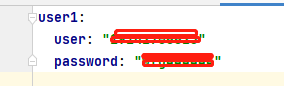
yaml = yaml_config["user1"]


class Test_login():
    def test_login(self,driver):
        NavPage(driver).my()
        UserPage(driver).login(yaml["user"],yaml["password"])
        el = UserPage(driver).actual()
        assert el == "19142706623"
========================================================
yaml的调用过程
path.py
## 管理项目下的路径
import os

# 获取当前文件的路径
config_path = os.path.abspath(__file__)
print(config_path)

# config 目录
config_dir = os.path.dirname(config_path)
print(config_dir)

# lesson9 项目路径
root_dir = os.path.dirname(config_dir)
print(root_dir)

# 获取 data 目录路径
data_dir = os.path.join(root_dir, 'conf')
print(data_dir)

if not os.path.exists(data_dir):
    os.mkdir(data_dir)

# yaml 配置文件的路径
config_yaml_path = os.path.join(data_dir, "yaml.yaml")
print(config_yaml_path)

# img 路径
img_path = os.path.join(root_dir, 'img')
if not os.path.exists(img_path):
    os.mkdir(img_path)
===========================================================
yaml_handler.py
import yaml
from common.path import config_yaml_path

def read_yaml(fpath):
    """fpath: yaml 文件的路径"""
    with open(fpath, encoding='utf-8') as f:
        # 读取yaml 当中的数据
        data = yaml.safe_load(f)
        return data


# 获取yaml配置项
yaml_config = read_yaml(config_yaml_path)
print(yaml_config)





 扫一扫
扫一扫


 1946
1946

 被折叠的 条评论
为什么被折叠?
被折叠的 条评论
为什么被折叠?
 到【灌水乐园】发言





