


 这篇博客详细探讨了Spring的IOC理论,从原始的成员变量new方式过渡到IOC原型。介绍了Hello-Spring示例,讲解了Spring中bean的默认配置,包括单例模式和懒加载选项。接着,博主详细阐述了如何使用XML配置实现IOC,涵盖了依赖注入的多种方式,如构造器注入、set注入以及数组、list、set、map、Properties和特殊标签的注入。最后,讨论了autowire特性,包括byName和byType的区别及其在Spring容器中的应用。
01-IOC理论推导
public class UserServiceImpl implements UserService{


    private UserDao dao = new UserDaoMysqlImpl();【写死了】
    public void getUser(){


        dao.getUser();
    }
}

public class Mytest {


     public static void main(String[] args) {


         UserServiceImpl userService = new UserServiceImpl();
         userService.getUser();
    }
}
原方式,成员变量中new。
改进后的IOC原型:
public class UserServiceImpl implements UserService{


    private UserDao dao;

    public void setDao(UserDao dao) {

    【通过set注入】
        this.dao = dao;
    }

    public void getUser(){


        dao.getUser();
    }

}
public class Mytest {


     public static void main(String[] args) {


         UserService userService = new UserServiceImpl();
         UserDao dao = new UserDaoOracleImpl();【主动权在用户手里】
         ((UserServiceImpl) userService).setDao(dao);
         userService.getUser();
    }
}
02-Hello-Spring
<?xml version="1.0" encoding="UTF-8"?>
<beans xmlns="http://www.springframework.org/schema/beans"
       xmlns:xsi="http://www.w3.org/2001/XMLSchema-instance"
       xsi:schemaLocation="http://www.springframework.org/schema/beans
       http://www.springframework.org/schema/beans/spring-beans.xsd">

    <!--bean就是java对象 , 由Spring创建和管理-->
    <bean id="hello" class="com.kuang.pojo.Hello">
        <property name="name" value="Spring"/>
    </bean>

</beans>
public class Hello {


    public String name;

    public String getName() {


        return name;
    }

	【set注入】
    public void setName(String name) {


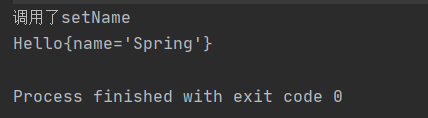
        System.out.println("调用了setName");
        this.name = name;
    }

    @Override
    public String toString() {


        return "Hello{" +
                "name='" + name + '\'' +
                '}';
    }
}

public class Mytest {


    public static void main(String[] args) {


        ApplicationContext context = new ClassPathXmlApplicationContext("beans.xml");
        Hello hello = (Hello) context.getBean("hello");
        System.out.println(hello);
    }
}
02 附
<bean id="hello" class="com.kuang.pojo.Hello 最低0.47元/天 解锁文章






 扫一扫
扫一扫


 3451
3451

 被折叠的 条评论
为什么被折叠?
被折叠的 条评论
为什么被折叠?
 到【灌水乐园】发言





