


Cordova IP地址查询应用实现技术博客
📋 项目概述
IP地址查询是网络应用中常见的功能需求,无论是用于网络安全监控、用户行为分析,还是内容分发网络(CDN)优化,都需要准确、高效的IP归属地查询服务。本文将详细介绍如何在Cordova应用中集成高精度IP地址查询功能,支持IPv4和IPv6地址查询,并提供完整的实现方案和代码示例。
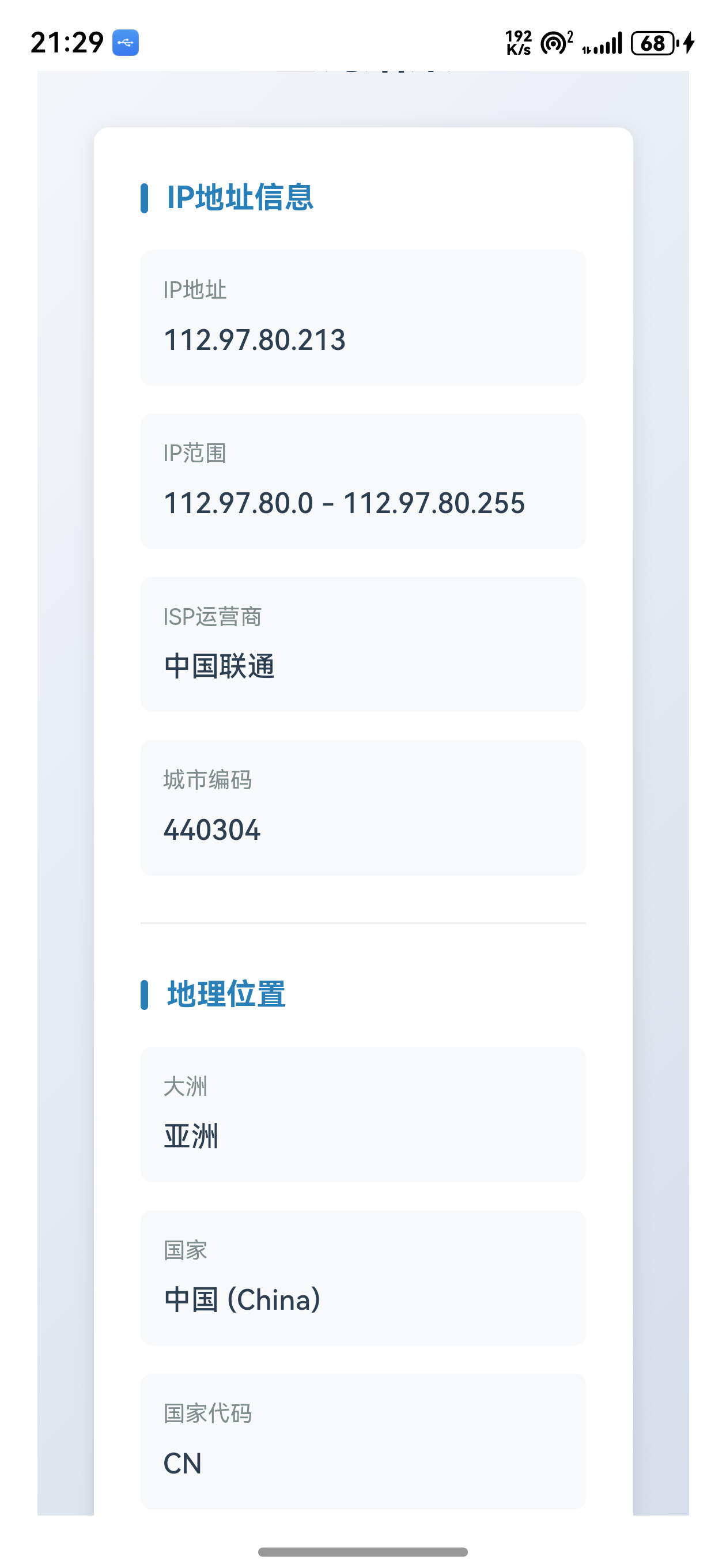
功能特性
- ✅ 高精度IP归属地查询 - 支持IPv4和IPv6地址格式
- ✅ 自动IP检测 - 不输入IP时自动查询当前客户端IP
- ✅ 地理位置信息 - 显示大洲、国家、省份、城市、区县等详细信息
- ✅ 坐标定位 - 提供经纬度坐标和地图链接
- ✅ ISP信息 - 显示IP运营商和城市编码
- ✅ Token管理 - 本地存储API Token,提升用户体验
- ✅ 响应式设计 - 完美适配移动端和桌面端
🛠️ 技术选型
核心技术栈
- 前端框架: HTML5 + CSS3 + JavaScript (ES6+)
- 跨平台框架: Apache Cordova
- API服务: AlAPI IP查询接口 (
https://v3.alapi.cn/api/ip) - 数据存储: LocalStorage (API Token持久化)
- UI设计: 响应式布局,渐变背景,卡片式设计
技术优势
- 跨平台兼容: 基于Cordova框架,一套代码支持Android、iOS、HarmonyOS等多个平台
- API集成简单: RESTful API设计,使用标准fetch API即可调用
- 用户体验优化: 本地存储Token,减少重复输入;响应式设计适配各种屏幕尺寸
- 错误处理完善: 网络错误、参数验证、API错误等全方位错误处理
📦 项目结构
CordovaApp/
├── www/
│   ├── ip.html              # IP查询页面
│   └── js/
│       └── ip.js            # IP查询功能逻辑
├── harmonyos/
│   └── entry/src/main/resources/rawfile/www/
│       ├── ip.html          # HarmonyOS版本IP查询页面
│       └── js/
│           └── ip.js        # HarmonyOS版本IP查询逻辑
└── IP地址查询.md            # API文档
🚀 实现步骤
步骤1: 创建HTML页面结构
创建 ip.html 文件,包含以下核心部分:
- 导航栏 - 统一的导航菜单
- 表单区域 - API Token输入和IP地址输入(可选)
- 结果展示区域 - 动态显示查询结果
- Token获取弹窗 - 引导用户获取API Token
关键HTML结构
<!DOCTYPE html>
<html>
<head>
<meta charset="utf-8">
<meta http-equiv="Content-Security-Policy" content="default-src 'self' data: https://ssl.gstatic.com https://v3.alapi.cn https://www.alapi.cn 'unsafe-eval'; style-src 'self' 'unsafe-inline'; media-src *; img-src 'self' data: content:; script-src 'self' 'unsafe-inline' 'unsafe-eval'; connect-src 'self' https://v3.alapi.cn https://www.alapi.cn; frame-src https://www.alapi.cn;">
<meta name="viewport" content="initial-scale=1, width=device-width, viewport-fit=cover">
<title>IP地址查询</title>
<link rel="stylesheet" href="css/index.css">
</head>
<body>
<!-- 导航栏 -->
<div class="nav">
<a href="index.html">首页</a>
<a href="about.html">关于我们</a>
<a href="poem.html">藏头诗</a>
<a href="translate.html">翻译</a>
<a href="express.html">快递查询</a>
<a href="ip.html" class="active">IP查询</a>
</div>
<!-- 主容器 -->
<div class="ip-container">
<!-- 页面标题 -->
<div class="ip-header">
<h1>IP地址查询</h1>
<p>高精度IP归属地查询,支持IPv4和IPv6</p>
</div>
<!-- 表单区域 -->
<div class="form-container">
<form id="ip-form">
<div class="form-group">
<label for="token" class="label-with-help">
<span>API Token *</span>
<button type="button" class="help-btn" onclick="openTokenModal()">获取 Token</button>
</label>
<input type="text" id="token" name="token" placeholder="请输入API Token" required>
</div>
<div class="form-group">
<label for="ip">IP地址(可选)</label>
<input type="text" id="ip" name="ip"
placeholder="留空则查询当前IP地址"
pattern="^((25[0-5]|2[0-4][0-9]|[01]?[0-9][0-9]?)\.){3}(25[0-5]|2[0-4][0-9]|[01]?[0-9][0-9]?)$|^([0-9a-fA-F]{1,4}:){7}[0-9a-fA-F]{1,4}$">
<div class="ip-hint">支持IPv4和IPv6格式,留空则自动查询当前IP地址</div>
</div>
<button type="submit" class="submit-btn" id="submit-btn">查询</button>
</form>
<!-- 加载状态 -->
<div class="loading" id="loading">正在查询</div>
<!-- 错误提示 -->
<div class="error-message" id="error-message"></div>
</div>
<!-- 结果展示区域 -->
<div class="result-container" id="result-container">
<div class="result-title">查询结果</div>
<div class="ip-info" id="ip-info"></div>
</div>
</div>
<!-- Token获取弹窗 -->
<div class="modal-overlay" id="token-modal" onclick="closeTokenModal(event)">
<div class="modal-content" onclick="event.stopPropagation()">
<div class="modal-header">
<h2>获取 API Token</h2>
<button class="modal-close" onclick="closeTokenModal()">×</button>
</div>
<div class="modal-body">
<p>请在下方页面注册并获取您的 API Token,然后将 Token 复制到输入框中。</p>
<iframe src="https://www.alapi.cn/aff/nutpi" id="token-iframe"></iframe>
</div>
</div>
</div>
<script src="cordova.js"></script>
<script src="js/ip.js"></script>
</body>
</html>
步骤2: 实现核心JavaScript逻辑
创建 ip.js 文件,实现IP查询的核心功能:
2.1 表单提交处理
// 表单提交处理
document.getElementById('ip-form').addEventListener('submit', function(e) {
    e.preventDefault();
    queryIP();
});
2.2 IP查询函数
function queryIP() {
    const submitBtn = document.getElementById('submit-btn');
    const loading = document.getElementById('loading');
    const errorMessage = document.getElementById('error-message');
    const resultContainer = document.getElementById('result-container');

    // 获取表单数据
    const formData = {
        token: document.getElementById('token').value.trim(),
        ip: document.getElementById('ip').value.trim()
    };

    // 验证token
    if (!formData.token) {
        showError('请输入API Token');
        return;
    }

    // 验证IP格式(如果输入了IP)
    if (formData.ip && !isValidIP(formData.ip)) {
        showError('IP地址格式不正确,请输入有效的IPv4或IPv6地址');
        return;
    }

    // 显示加载状态
    submitBtn.disabled = true;
    submitBtn.textContent = '查询中...';
    loading.classList.add('show');
    errorMessage.classList.remove('show');
    resultContainer.classList.remove('show');

    // 构建请求参数
    const params = new URLSearchParams();
    params.append('token', formData.token);
    if (formData.ip) {
        params.append('ip', formData.ip);
    }

    // 发送POST请求
    fetch('https://v3.alapi.cn/api/ip', {
        method: 'POST',
        headers: {
            'Content-Type': 'application/x-www-form-urlencoded',
        },
        body: params.toString()
    })
    .then(response => {
        if (!response.ok) {
            throw new Error('网络请求失败: ' + response.status);
        }
        return response.json();
    })
    .then(data => {
        console.log('API响应:', data);

        if (data.success && data.code === 200) {
            displayIPInfo(data.data);
        } else {
            showError(data.message || '查询失败,请检查参数');
        }
    })
    .catch(error => {
        console.error('请求错误:', error);
        showError('请求失败: ' + error.message + '。请检查网络连接或API Token是否正确');
    })
    .finally(() => {
        // 恢复按钮状态
        submitBtn.disabled = false;
        submitBtn.textContent = '查询';
        loading.classList.remove('show');
    });
}
2.3 IP格式验证
// 验证IP地址格式
function isValidIP(ip) {
    // IPv4格式验证
    const ipv4Regex = /^((25[0-5]|2[0-4][0-9]|[01]?[0-9][0-9]?)\.){3}(25[0-5]|2[0-4][0-9]|[01]?[0-9][0-9]?)$/;
    // IPv6格式验证(简化版)
    const ipv6Regex = /^([0-9a-fA-F]{1,4}:){7}[0-9a-fA-F]{1,4}$|^::1$|^::$/;

    return ipv4Regex.test(ip) || ipv6Regex.test(ip);
}
2.4 结果显示函数
// 显示IP信息
function displayIPInfo(data) {
    const resultContainer = document.getElementById('result-container');
    const ipInfo = document.getElementById('ip-info');

    let html = '';

    // IP基本信息
    html += '<div class="info-section">';
    html += '<div class="info-section-title">IP地址信息</div>';
    html += '<div class="info-grid">';
    html += `<div class="info-item"><div class="info-label">IP地址</div><div class="info-value">${data.ip || '未知'}</div></div>`;
    html += `<div class="info-item"><div class="info-label">IP范围</div><div class="info-value">${data.beginip || '未知'} - ${data.endip || '未知'}</div></div>`;
    html += `<div class="info-item"><div class="info-label">ISP运营商</div><div class="info-value">${data.isp || '未知'}</div></div>`;
    html += `<div class="info-item"><div class="info-label">城市编码</div><div class="info-value">${data.adcode || '未知'}</div></div>`;
    html += '</div>';
    html += '</div>';

    // 地理位置信息
    html += '<div class="info-section">';
    html += '<div class="info-section-title">地理位置</div>';
    html += '<div class="info-grid">';
    html += `<div class="info-item"><div class="info-label">大洲</div><div class="info-value">${data.continent || '未知'}</div></div>`;
    html += `<div class="info-item"><div class="info-label">国家</div><div class="info-value">${data.country || '未知'} ${data.country_en ? '(' + data.country_en + ')' : ''}</div></div>`;
    html += `<div class="info-item"><div class="info-label">国家代码</div><div class="info-value">${data.country_cc || '未知'}</div></div>`;
    html += `<div class="info-item"><div class="info-label">省份</div><div class="info-value">${data.province || '未知'}</div></div>`;
    html += `<div class="info-item"><div class="info-label">城市</div><div class="info-value">${data.city || '未知'}</div></div>`;
    html += `<div class="info-item"><div class="info-label">区县</div><div class="info-value">${data.district || '未知'}</div></div>`;
    html += `<div class="info-item"><div class="info-label">详细地址</div><div class="info-value">${data.pos || '未知'}</div></div>`;
    html += '</div>';
    html += '</div>';

    // 坐标信息
    if (data.lng && data.lat) {
        html += '<div class="info-section">';
        html += '<div class="info-section-title">坐标信息</div>';
        html += '<div class="info-grid">';
        html += `<div class="info-item"><div class="info-label">经度</div><div class="info-value">${data.lng}</div></div>`;
        html += `<div class="info-item"><div class="info-label">纬度</div><div class="info-value">${data.lat}</div></div>`;
        html += '</div>';
        html += `<a href="https://www.openstreetmap.org/?mlat=${data.lat}&mlon=${data.lng}&zoom=15" target="_blank" class="map-link">在地图上查看</a>`;
        html += '</div>';
    }

    ipInfo.innerHTML = html;

    // 显示结果容器
    resultContainer.classList.add('show');

    // 滚动到结果区域
    resultContainer.scrollIntoView({ behavior: 'smooth', block: 'start' });
}
2.5 Token本地存储
// 页面加载完成后的初始化
document.addEventListener('DOMContentLoaded', function() {
    // 尝试从本地存储加载token
    const savedToken = localStorage.getItem('ip_api_token');
    if (savedToken) {
        document.getElementById('token').value = savedToken;
    }

    // 保存token到本地存储
    document.getElementById('token').addEventListener('blur', function() {
        const token = this.value.trim();
        if (token) {
            localStorage.setItem('ip_api_token', token);
        }
    });

    console.log('IP查询页面加载完成');
});
步骤3: 样式设计
3.1 响应式布局
.ip-container {
    max-width: 800px;
    margin: 0 auto;
    padding: 20px;
    background-color: #fff;
    min-height: calc(100vh - 100px);
}

@media (max-width: 768px) {
    .ip-header h1 {
        font-size: 2em;
    }
    .nav a {
        display: block;
        margin: 5px 0;
    }
    .info-grid {
        grid-template-columns: 1fr;
    }
}
3.2 卡片式信息展示
.info-section {
    margin-bottom: 25px;
    padding-bottom: 25px;
    border-bottom: 1px solid #eee;
}

.info-grid {
    display: grid;
    grid-template-columns: repeat(auto-fit, minmax(200px, 1fr));
    gap: 15px;
}

.info-item {
    padding: 12px;
    background-color: #f8f9fa;
    border-radius: 6px;
}
3.3 渐变按钮设计
.submit-btn {
    width: 100%;
    padding: 15px;
    background: linear-gradient(135deg, #667eea 0%, #764ba2 100%);
    color: white;
    border: none;
    border-radius: 6px;
    font-size: 18px;
    font-weight: bold;
    cursor: pointer;
    transition: transform 0.2s, box-shadow 0.2s;
}

.submit-btn:hover:not(:disabled) {
    transform: translateY(-2px);
    box-shadow: 0 4px 12px rgba(102, 126, 234, 0.4);
}
🔍 核心代码分析
API集成详解
1. API端点
- URL:
https://v3.alapi.cn/api/ip - 方法: POST
- Content-Type:
application/x-www-form-urlencoded
2. 请求参数
| 参数名 | 类型 | 必填 | 说明 |
|---|---|---|---|
| token | string | 是 | 接口调用token |
| ip | string | 否 | 要查询的IP,默认获取请求客户端的IP |
3. 响应数据结构
{
    "request_id": "722950494561095681",
    "success": true,
    "message": "success",
    "code": 200,
    "data": {
        "ip": "114.114.114.114",
        "beginip": "114.114.114.114",
        "endip": "114.114.114.114",
        "continent": "亚洲",
        "country": "中国",
        "province": "江苏",
        "city": "南京",
        "district": "",
        "isp": "114DNS",
        "adcode": "320100",
        "country_en": "China",
        "country_cc": "CN",
        "lng": "118.7674",
        "lat": "32.0415",
        "pos": "中国江苏南京"
    },
    "time": 1733324829,
    "usage": 0
}
4. 错误处理
.catch(error => {
    console.error('请求错误:', error);
    showError('请求失败: ' + error.message + '。请检查网络连接或API Token是否正确');
})
IP格式验证
IPv4验证正则表达式
const ipv4Regex = /^((25[0-5]|2[0-4][0-9]|[01]?[0-9][0-9]?)\.){3}(25[0-5]|2[0-4][0-9]|[01]?[0-9][0-9]?)$/;
说明:
25[0-5]: 匹配250-2552[0-4][0-9]: 匹配200-249[01]?[0-9][0-9]?: 匹配0-199(允许前导零)
IPv6验证正则表达式
const ipv6Regex = /^([0-9a-fA-F]{1,4}:){7}[0-9a-fA-F]{1,4}$|^::1$|^::$/;
说明:
([0-9a-fA-F]{1,4}:){7}: 匹配7组4位十六进制数加冒号[0-9a-fA-F]{1,4}: 匹配最后一组4位十六进制数^::1$: 匹配本地回环地址^::$: 匹配未指定地址
🎨 UX优化
1. Token获取引导
通过弹窗方式引导用户获取API Token,提升用户体验:
function openTokenModal() {
    document.getElementById('token-modal').classList.add('show');
    document.body.style.overflow = 'hidden';
}

function closeTokenModal(event) {
    if (event && event.target !== event.currentTarget) {
        return;
    }
    document.getElementById('token-modal').classList.remove('show');
    document.body.style.overflow = '';
}
2. 加载状态提示
// 显示加载状态
submitBtn.disabled = true;
submitBtn.textContent = '查询中...';
loading.classList.add('show');
3. 结果自动滚动
// 滚动到结果区域
resultContainer.scrollIntoView({ behavior: 'smooth', block: 'start' });
4. 地图链接集成
当查询结果包含经纬度信息时,自动生成地图查看链接:
if (data.lng && data.lat) {
    html += `<a href="https://www.openstreetmap.org/?mlat=${data.lat}&mlon=${data.lng}&zoom=15" target="_blank" class="map-link">在地图上查看</a>`;
}
🐛 常见问题与解决方案
问题1: IP格式验证失败
症状: 输入有效的IP地址但提示格式不正确
原因: IPv6格式验证过于严格,未考虑压缩格式
解决方案: 扩展IPv6验证规则,支持压缩格式
// 更完善的IPv6验证
function isValidIPv6(ip) {
    // 支持压缩格式的IPv6验证
    const ipv6Regex = /^(([0-9a-fA-F]{1,4}:){7}[0-9a-fA-F]{1,4}|([0-9a-fA-F]{1,4}:){1,7}:|([0-9a-fA-F]{1,4}:){1,6}:[0-9a-fA-F]{1,4}|([0-9a-fA-F]{1,4}:){1,5}(:[0-9a-fA-F]{1,4}){1,2}|([0-9a-fA-F]{1,4}:){1,4}(:[0-9a-fA-F]{1,4}){1,3}|([0-9a-fA-F]{1,4}:){1,3}(:[0-9a-fA-F]{1,4}){1,4}|([0-9a-fA-F]{1,4}:){1,2}(:[0-9a-fA-F]{1,4}){1,5}|[0-9a-fA-F]{1,4}:((:[0-9a-fA-F]{1,4}){1,6})|:((:[0-9a-fA-F]{1,4}){1,7}|:)|fe80:(:[0-9a-fA-F]{0,4}){0,4}%[0-9a-zA-Z]+|::(ffff(:0{1,4}){0,1}:){0,1}((25[0-5]|(2[0-4]|1{0,1}[0-9]){0,1}[0-9])\.){3}(25[0-5]|(2[0-4]|1{0,1}[0-9]){0,1}[0-9])|([0-9a-fA-F]{1,4}:){1,4}:((25[0-5]|(2[0-4]|1{0,1}[0-9]){0,1}[0-9])\.){3}(25[0-5]|(2[0-4]|1{0,1}[0-9]){0,1}[0-9]))$/;
    return ipv6Regex.test(ip);
}
问题2: API Token过期
症状: 查询失败,提示token无效
原因: API Token可能过期或被撤销
解决方案: 添加token有效性检测和友好的错误提示
.then(data => {
    if (data.success && data.code === 200) {
        displayIPInfo(data.data);
    } else if (data.code === 401 || data.message.includes('token')) {
        showError('API Token无效或已过期,请重新获取Token');
        // 清除本地存储的token
        localStorage.removeItem('ip_api_token');
    } else {
        showError(data.message || '查询失败,请检查参数');
    }
})
问题3: 网络请求超时
症状: 长时间无响应,最终超时
原因: 网络不稳定或API服务响应慢
解决方案: 添加请求超时处理
function queryIPWithTimeout(url, options, timeout = 10000) {
    return Promise.race([
        fetch(url, options),
        new Promise((_, reject) =>
            setTimeout(() => reject(new Error('请求超时')), timeout)
        )
    ]);
}

// 使用超时请求
queryIPWithTimeout('https://v3.alapi.cn/api/ip', {
    method: 'POST',
    headers: {
        'Content-Type': 'application/x-www-form-urlencoded',
    },
    body: params.toString()
}, 10000)
问题4: 跨域问题
症状: 浏览器控制台报CORS错误
原因: Content-Security-Policy配置不当
解决方案: 正确配置CSP,允许API域名
<meta http-equiv="Content-Security-Policy" content="
    default-src 'self' data: https://ssl.gstatic.com https://v3.alapi.cn https://www.alapi.cn 'unsafe-eval';
    style-src 'self' 'unsafe-inline';
    media-src *;
    img-src 'self' data: content:;
    script-src 'self' 'unsafe-inline' 'unsafe-eval';
    connect-src 'self' https://v3.alapi.cn https://www.alapi.cn;
    frame-src https://www.alapi.cn;
">
⚡ 性能优化
1. 防抖处理
避免用户快速点击查询按钮导致重复请求:
// 防抖函数
function debounce(func, delay) {
    let timeoutId;
    return function(...args) {
        clearTimeout(timeoutId);
        timeoutId = setTimeout(() => func.apply(this, args), delay);
    };
}

// 应用防抖
const debouncedQueryIP = debounce(queryIP, 300);
document.getElementById('ip-form').addEventListener('submit', function(e) {
    e.preventDefault();
    debouncedQueryIP();
});
2. 请求缓存
对于相同IP的查询结果进行缓存,减少API调用:
// IP查询缓存
const ipCache = new Map();
const CACHE_DURATION = 5 * 60 * 1000; // 5分钟缓存

function getCachedResult(ip) {
    const cacheKey = ip || 'current';
    const cached = ipCache.get(cacheKey);
    if (cached && Date.now() - cached.timestamp < CACHE_DURATION) {
        return cached.data;
    }
    return null;
}

function setCachedResult(ip, data) {
    const cacheKey = ip || 'current';
    ipCache.set(cacheKey, {
        data: data,
        timestamp: Date.now()
    });
}

// 在queryIP函数中使用缓存
function queryIP() {
    const ip = document.getElementById('ip').value.trim();
    const cached = getCachedResult(ip);
    if (cached) {
        displayIPInfo(cached);
        return;
    }
    // ... 继续API请求
}
3. 懒加载地图
地图链接仅在用户点击时加载,减少初始页面加载时间:
// 延迟加载地图iframe
function loadMap(lat, lng) {
    const mapContainer = document.getElementById('map-container');
    if (!mapContainer.querySelector('iframe')) {
        const iframe = document.createElement('iframe');
        iframe.src = `https://www.openstreetmap.org/?mlat=${lat}&mlon=${lng}&zoom=15`;
        iframe.width = '100%';
        iframe.height = '400px';
        iframe.frameBorder = '0';
        mapContainer.appendChild(iframe);
    }
}
🔒 安全最佳实践
1. Token安全存储
- 使用LocalStorage存储Token,但要注意安全性
- 考虑使用加密存储(对于敏感应用)
- 定期清理过期的Token
// Token加密存储(示例)
function encryptToken(token) {
    // 简单的Base64编码(实际应用中应使用更安全的加密方法)
    return btoa(token);
}

function decryptToken(encryptedToken) {
    try {
        return atob(encryptedToken);
    } catch (e) {
        return null;
    }
}
2. 输入验证
对所有用户输入进行严格验证,防止XSS攻击:
// HTML转义函数
function escapeHtml(text) {
const map = {
'&': '&',
'<': '<',
'>': '>',
'"': '"',
"'": '''
};
return text.replace(/[&<>"']/g, m => map[m]);
}
// 在显示数据时使用
html += `<div class="info-value">${escapeHtml(data.ip || '未知')}</div>`;
3. HTTPS强制
确保所有API请求都通过HTTPS进行:
// 检查协议
if (window.location.protocol !== 'https:' && window.location.hostname !== 'localhost') {
    console.warn('建议使用HTTPS协议以确保安全');
}
📱 HarmonyOS平台适配
1. 文件同步
确保HarmonyOS版本的文件与通用版本保持同步:
# 同步IP查询页面
cp www/ip.html harmonyos/entry/src/main/resources/rawfile/www/ip.html
cp www/js/ip.js harmonyos/entry/src/main/resources/rawfile/www/js/ip.js
2. 权限配置
在 module.json5 中确保网络权限已配置:
{
  "module": {
    "requestPermissions": [
      {
        "name": "ohos.permission.INTERNET",
        "reason": "$string:internet_permission",
        "usedScene": {
          "abilities": ["EntryAbility"],
          "when": "inuse"
        }
      }
    ]
  }
}
3. CSP配置
在 config.xml 中配置Content-Security-Policy:
<preference name="Content-Security-Policy"
            value="default-src 'self' data: https://ssl.gstatic.com https://v3.alapi.cn https://www.alapi.cn 'unsafe-eval';
                   style-src 'self' 'unsafe-inline';
                   media-src *;
                   img-src 'self' data: content:;
                   script-src 'self' 'unsafe-inline' 'unsafe-eval';
                   connect-src 'self' https://v3.alapi.cn https://www.alapi.cn;
                   frame-src https://www.alapi.cn;" />
📊 测试用例
功能测试
-
基本查询测试
- 输入有效的API Token
- 不输入IP地址,查询当前IP
- 验证返回结果包含IP地址和地理位置信息
-
IP格式验证测试
- 输入有效的IPv4地址(如:114.114.114.114)
- 输入有效的IPv6地址
- 输入无效的IP格式,验证错误提示
-
错误处理测试
- 输入无效的API Token,验证错误提示
- 断开网络连接,验证网络错误提示
- 输入空Token,验证必填项提示
-
Token存储测试
- 输入Token后刷新页面,验证Token是否自动填充
- 清除浏览器缓存,验证Token是否清除
性能测试
-
响应时间测试
- 测试API响应时间(目标:< 2秒)
- 测试页面加载时间(目标:< 1秒)
-
并发测试
- 测试多个并发请求的处理能力
- 验证防抖功能是否正常工作
兼容性测试
-
浏览器兼容性
- Chrome、Firefox、Safari、Edge
- 移动端浏览器(iOS Safari、Chrome Mobile)
-
平台兼容性
- Android平台
- iOS平台
- HarmonyOS平台
🎯 最佳实践总结
1. API集成
- ✅ 使用标准的fetch API进行HTTP请求
- ✅ 实现完善的错误处理机制
- ✅ 添加请求超时处理
- ✅ 实现请求结果缓存
2. 用户体验
- ✅ 提供清晰的加载状态提示
- ✅ 友好的错误信息提示
- ✅ 自动保存用户输入(Token)
- ✅ 响应式设计适配各种设备
3. 代码质量
- ✅ 模块化代码结构
- ✅ 完善的注释和文档
- ✅ 输入验证和XSS防护
- ✅ 性能优化(防抖、缓存)
4. 安全性
- ✅ HTTPS协议通信
- ✅ 输入验证和转义
- ✅ Token安全存储
- ✅ CSP配置
📚 完整代码示例
ip.html(完整版)
<!DOCTYPE html>
<html>
<head>
    <meta charset="utf-8">
    <meta http-equiv="Content-Security-Policy" content="default-src 'self' data: https://ssl.gstatic.com https://v3.alapi.cn https://www.alapi.cn 'unsafe-eval'; style-src 'self' 'unsafe-inline'; media-src *; img-src 'self' data: content:; script-src 'self' 'unsafe-inline' 'unsafe-eval'; connect-src 'self' https://v3.alapi.cn https://www.alapi.cn; frame-src https://www.alapi.cn;">
    <meta name="format-detection" content="telephone=no">
    <meta name="msapplication-tap-highlight" content="no">
    <meta name="viewport" content="initial-scale=1, width=device-width, viewport-fit=cover">
    <meta name="color-scheme" content="light dark">
    <link rel="stylesheet" href="css/index.css">
    <title>IP地址查询</title>
    <!-- 样式代码见上文 -->
</head>
<body>
    <!-- HTML结构代码见上文 -->
    <script src="cordova.js"></script>
    <script src="js/ip.js"></script>
</body>
</html>
ip.js(完整版)
/*
* Licensed to the Apache Software Foundation (ASF) under one
* or more contributor license agreements. See the NOTICE file
* distributed with this work for additional information
* regarding copyright ownership. The ASF licenses this file
* to you under the Apache License, Version 2.0 (the
* "License"); you may not use this file except in compliance
* with the License. You may obtain a copy of the License at
*
* http://www.apache.org/licenses/LICENSE-2.0
*
* Unless required by applicable law or agreed to in writing,
* software distributed under the License is distributed on an
* "AS IS" BASIS, WITHOUT WARRANTIES OR CONDITIONS OF ANY
* KIND, either express or implied. See the License for the
* specific language governing permissions and limitations
* under the License.
*/
// 等待设备就绪
document.addEventListener('deviceready', function() {
console.log('设备就绪,IP查询功能可用');
}, false);
// IP查询缓存
const ipCache = new Map();
const CACHE_DURATION = 5 * 60 * 1000; // 5分钟缓存
// 表单提交处理
document.getElementById('ip-form').addEventListener('submit', function(e) {
e.preventDefault();
queryIP();
});
// 查询IP地址
function queryIP() {
const submitBtn = document.getElementById('submit-btn');
const loading = document.getElementById('loading');
const errorMessage = document.getElementById('error-message');
const resultContainer = document.getElementById('result-container');
// 获取表单数据
const formData = {
token: document.getElementById('token').value.trim(),
ip: document.getElementById('ip').value.trim()
};
// 验证token
if (!formData.token) {
showError('请输入API Token');
return;
}
// 检查缓存
const cacheKey = formData.ip || 'current';
const cached = ipCache.get(cacheKey);
if (cached && Date.now() - cached.timestamp < CACHE_DURATION && cached.token === formData.token) {
displayIPInfo(cached.data);
return;
}
// 验证IP格式(如果输入了IP)
if (formData.ip && !isValidIP(formData.ip)) {
showError('IP地址格式不正确,请输入有效的IPv4或IPv6地址');
return;
}
// 显示加载状态
submitBtn.disabled = true;
submitBtn.textContent = '查询中...';
loading.classList.add('show');
errorMessage.classList.remove('show');
resultContainer.classList.remove('show');
// 构建请求参数
const params = new URLSearchParams();
params.append('token', formData.token);
if (formData.ip) {
params.append('ip', formData.ip);
}
// 发送POST请求
fetch('https://v3.alapi.cn/api/ip', {
method: 'POST',
headers: {
'Content-Type': 'application/x-www-form-urlencoded',
},
body: params.toString()
})
.then(response => {
if (!response.ok) {
throw new Error('网络请求失败: ' + response.status);
}
return response.json();
})
.then(data => {
console.log('API响应:', data);
if (data.success && data.code === 200) {
// 缓存结果
ipCache.set(cacheKey, {
data: data.data,
timestamp: Date.now(),
token: formData.token
});
displayIPInfo(data.data);
} else if (data.code === 401 || data.message.includes('token')) {
showError('API Token无效或已过期,请重新获取Token');
localStorage.removeItem('ip_api_token');
} else {
showError(data.message || '查询失败,请检查参数');
}
})
.catch(error => {
console.error('请求错误:', error);
showError('请求失败: ' + error.message + '。请检查网络连接或API Token是否正确');
})
.finally(() => {
// 恢复按钮状态
submitBtn.disabled = false;
submitBtn.textContent = '查询';
loading.classList.remove('show');
});
}
// 验证IP地址格式
function isValidIP(ip) {
// IPv4格式验证
const ipv4Regex = /^((25[0-5]|2[0-4][0-9]|[01]?[0-9][0-9]?)\.){3}(25[0-5]|2[0-4][0-9]|[01]?[0-9][0-9]?)$/;
// IPv6格式验证(简化版)
const ipv6Regex = /^([0-9a-fA-F]{1,4}:){7}[0-9a-fA-F]{1,4}$|^::1$|^::$/;
return ipv4Regex.test(ip) || ipv6Regex.test(ip);
}
// HTML转义函数
function escapeHtml(text) {
if (!text) return '';
const map = {
'&': '&',
'<': '<',
'>': '>',
'"': '"',
"'": '''
};
return String(text).replace(/[&<>"']/g, m => map[m]);
}
// 显示错误信息
function showError(message) {
const errorMessage = document.getElementById('error-message');
errorMessage.textContent = message;
errorMessage.classList.add('show');
}
// 显示IP信息
function displayIPInfo(data) {
const resultContainer = document.getElementById('result-container');
const ipInfo = document.getElementById('ip-info');
let html = '';
// IP基本信息
html += '<div class="info-section">';
html += '<div class="info-section-title">IP地址信息</div>';
html += '<div class="info-grid">';
html += `<div class="info-item"><div class="info-label">IP地址</div><div class="info-value">${escapeHtml(data.ip || '未知')}</div></div>`;
html += `<div class="info-item"><div class="info-label">IP范围</div><div class="info-value">${escapeHtml(data.beginip || '未知')} - ${escapeHtml(data.endip || '未知')}</div></div>`;
html += `<div class="info-item"><div class="info-label">ISP运营商</div><div class="info-value">${escapeHtml(data.isp || '未知')}</div></div>`;
html += `<div class="info-item"><div class="info-label">城市编码</div><div class="info-value">${escapeHtml(data.adcode || '未知')}</div></div>`;
html += '</div>';
html += '</div>';
// 地理位置信息
html += '<div class="info-section">';
html += '<div class="info-section-title">地理位置</div>';
html += '<div class="info-grid">';
html += `<div class="info-item"><div class="info-label">大洲</div><div class="info-value">${escapeHtml(data.continent || '未知')}</div></div>`;
html += `<div class="info-item"><div class="info-label">国家</div><div class="info-value">${escapeHtml(data.country || '未知')} ${data.country_en ? '(' + escapeHtml(data.country_en) + ')' : ''}</div></div>`;
html += `<div class="info-item"><div class="info-label">国家代码</div><div class="info-value">${escapeHtml(data.country_cc || '未知')}</div></div>`;
html += `<div class="info-item"><div class="info-label">省份</div><div class="info-value">${escapeHtml(data.province || '未知')}</div></div>`;
html += `<div class="info-item"><div class="info-label">城市</div><div class="info-value">${escapeHtml(data.city || '未知')}</div></div>`;
html += `<div class="info-item"><div class="info-label">区县</div><div class="info-value">${escapeHtml(data.district || '未知')}</div></div>`;
html += `<div class="info-item"><div class="info-label">详细地址</div><div class="info-value">${escapeHtml(data.pos || '未知')}</div></div>`;
html += '</div>';
html += '</div>';
// 坐标信息
if (data.lng && data.lat) {
html += '<div class="info-section">';
html += '<div class="info-section-title">坐标信息</div>';
html += '<div class="info-grid">';
html += `<div class="info-item"><div class="info-label">经度</div><div class="info-value">${escapeHtml(data.lng)}</div></div>`;
html += `<div class="info-item"><div class="info-label">纬度</div><div class="info-value">${escapeHtml(data.lat)}</div></div>`;
html += '</div>';
html += `<a href="https://www.openstreetmap.org/?mlat=${data.lat}&mlon=${data.lng}&zoom=15" target="_blank" class="map-link">在地图上查看</a>`;
html += '</div>';
}
ipInfo.innerHTML = html;
// 显示结果容器
resultContainer.classList.add('show');
// 滚动到结果区域
resultContainer.scrollIntoView({ behavior: 'smooth', block: 'start' });
}
// 页面加载完成后的初始化
document.addEventListener('DOMContentLoaded', function() {
// 尝试从本地存储加载token
const savedToken = localStorage.getItem('ip_api_token');
if (savedToken) {
document.getElementById('token').value = savedToken;
}
// 保存token到本地存储
document.getElementById('token').addEventListener('blur', function() {
const token = this.value.trim();
if (token) {
localStorage.setItem('ip_api_token', token);
}
});
console.log('IP查询页面加载完成');
});
📖 参考资料
🎉 总结
本文详细介绍了如何在Cordova应用中实现IP地址查询功能,包括:
- 完整的实现方案 - 从HTML结构到JavaScript逻辑的完整代码
- API集成详解 - 详细的API调用和数据处理流程
- 用户体验优化 - Token管理、加载状态、错误处理等
- 性能优化 - 缓存机制、防抖处理等
- 安全最佳实践 - 输入验证、XSS防护、HTTPS等
- 跨平台适配 - HarmonyOS平台的特殊配置
通过本文的指导,开发者可以快速集成IP地址查询功能到自己的Cordova应用中,并提供良好的用户体验和稳定的性能表现。
作者: 坚果派(NutPi)技术团队
版本: 1.0





 扫一扫
扫一扫


 927
927

 被折叠的 条评论
为什么被折叠?
被折叠的 条评论
为什么被折叠?
 到【灌水乐园】发言





