


一、克隆别人的项目:(正常情况下1-6即可把分支代码提交到远程)
(1)git clone https://github.com/ygsxgeng/ygsxgeng.git
(2)git checkout -b one (这个命令是创建one分支,并且直接切换到该分支上;one是自己想的分支名,因为不可以在master主分支上改代码,否则改的是别人的代码)
(3)git status 查看代码状态 如果代码有变动执行(4)(5)
(4)git add .
(5)git commit -m “one-city” (意思是one修改了city代码是为了便于回查)
(6)git push origin one
(查看分支)git branch 查看分支都有哪些
二、特殊情况下,你克隆的GitHub网址( https://github.com/ceoghz/ygsx)被组长废弃了,又重新建了一个远程仓库(https://github.com/ygsxgeng/ygsxgeng.git),与克隆的时候地址不一样了,但是内部代码还一样,
此时就不用在克隆一次了,只是提交代码的时候需要注意。
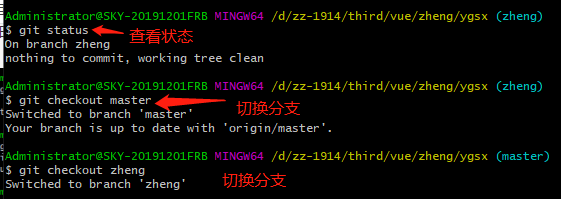
(1)git checkout zheng
(2)git status
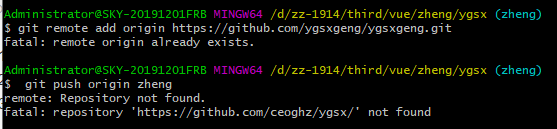
(3)提交的时候出现如下错误:
remote: Repository not found.
fatal: repository ‘https://github.com/ceoghz/ygsx/’ not found
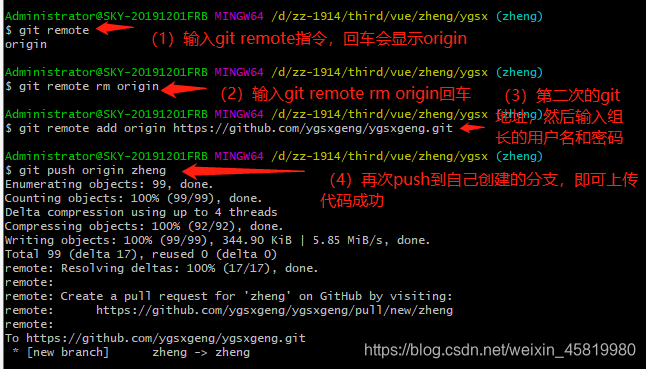
解决方法:





 扫一扫
扫一扫


 1593
1593

 被折叠的 条评论
为什么被折叠?
被折叠的 条评论
为什么被折叠?
 到【灌水乐园】发言





