




 本文介绍了Vuex的使用方式,包括如何通过模块化管理登录状态,以及state数据的四种访问方法。同时,详细阐述了mutation和action的提交方式,强调了mutation的同步性质和action的异步操作特性。通过示例代码展示了如何在组件中便捷地使用Vuex进行状态管理和更新。
vuex推荐使用方式
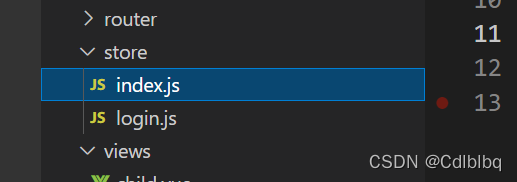
index.js内容:
import Vue from 'vue'
import Vuex from 'vuex'
import login from './login'

Vue.use(Vuex)

const store = new Vuex.Store({
  modules: {
    login: login
  }
})
export default store
login.js内容:
export default {
  state: {},
  mutations: {},
  actions: {},
  modules: {}
}
这样有利于分离数据,不至于与其他页面数据混淆,简单明了,
state数据的四种使用方法
// 第一种
<div class='containerBox'>
    {{$store.state.login.name}}
  </div>


// 第二种
computed: mapState({
  name: state => state.login.name
}),


// 第三种
import { mapState } from 'vuex'
  computed: {
    ...mapState(['login']),
  },


// 第四种
  computed: {
    name () {
      return this.$store.state.login.name
    }
  },
Mutation 更改 Vuex 的 store 中的状态的唯一方法 (只能提交必须是同步操作)
store内容

state: {
    name: 'admin',
    password: '111111'
  },
  mutations: {
    SET_PASSWORD (state, data) {
      state.password = data
    }
  },
  actions: {
    set_password ({ commit }, data) {
      commit('SET_PASSWORD', data)
    }
  },


第一种
this.$store.commit('SET_PASSWORD', '2222')


第二种
import {mapMutations} from 'vuex'
methods: {
    ...mapMutations([
      'SET_PASSWORD' // 将 `this.SET_PASSWORD()` 映射为 `this.$store.commit('SET_PASSWORD')`
     ])
  }),
    pssword () {
      console.log(this.$store.state.login.password)
      this.SET_PASSWORD('2222')
      console.log(this.$store.state.login.password)
    }
  },


第三种
import { mapMutations} from 'vuex'
methods: {
    ...mapMutations({
      setPassword: 'SET_PASSWORD' // 将 `this.setPassword()` 映射为 `this.$store.commit('SET_PASSWORD')`
    }),
    pssword () {
      console.log(this.$store.state.login.password)
      this.setPassword('2222')
      console.log(this.$store.state.login.password)
    }
  },
第四种是通过Actions的来提交
Actions:
Action 类似于 mutation,不同在于:
- Action 提交的是 mutation,而不是直接变更状态。
- Action 可以包含任意异步操作。
store内容

state: {
    name: 'admin',
    password: '111111'
  },
  mutations: {
    SET_PASSWORD (state, data) {
      state.password = data
    }
  },
  actions: {
    set_password ({ commit }, data) {
      commit('SET_PASSWORD', data)
    }
  },


第一种
this.$store.dispatch('set_password', '3333')


第二种
import { mapActions } from 'vuex'
methods: {
    ...mapActions(['set_password']),
    pssword () {
      this.set_password('222')
      console.log(this.$store.state.login.password)
    }
  },


第三种
import { mapActions } from 'vuex'
    ...mapActions({
      setPassword: 'set_password' // 将 `this.increment()` 映射为 `this.$store.commit('increment')`
    }),





 扫一扫
扫一扫


 2336
2336

 被折叠的 条评论
为什么被折叠?
被折叠的 条评论
为什么被折叠?
 到【灌水乐园】发言





