



 本文介绍了如何在Vue应用中集成百度地图API,实现地址输入、地图缩放、定位、标记点击事件及地理编码,包括自定义地图控件和事件处理。
一、
先贴效果
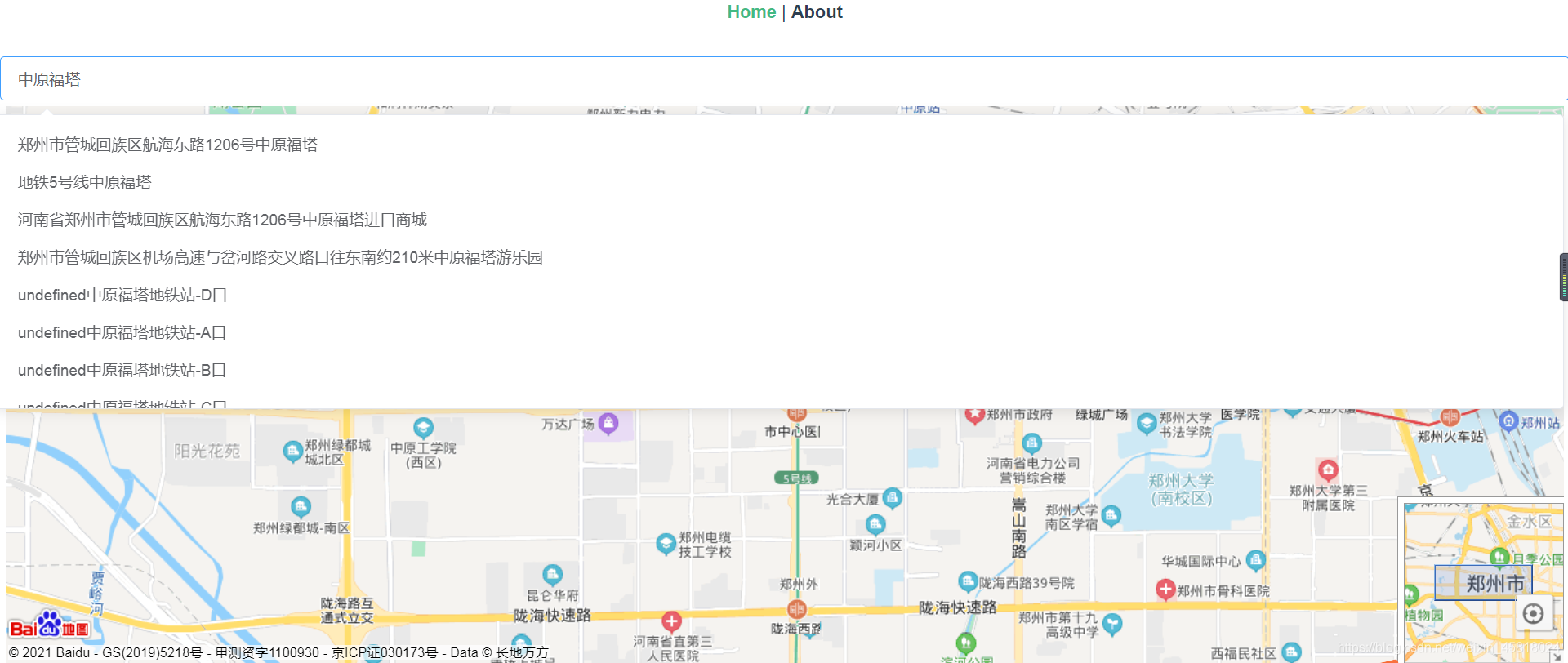
使用:
先下载依赖包
npm install vue-baidu-map --save全局注册将一次性引入百度地图组件库的所有组件。
import Vue from 'vue'
import BaiduMap from 'vue-baidu-map'

Vue.use(BaiduMap, {
  // ak 是在百度地图开发者平台申请的密钥 详见 http://lbsyun.baidu.com/apiconsole/key */
  ak: 'YOUR_APP_KEY'
})
然后复制一下代码
HTML片段:
<div class="app-container">
    <el-autocomplete v-model="mapLocation.address"
                     :fetch-suggestions="querySearch"
                     placeholder="请输入详细地址"
                     style="width: 100%;"
                     :trigger-on-focus="false"
                     @select="handleSelect" />
    <div style="margin: 5px">
      <baidu-map style="width: 100%;height: 500px;"
                 :center="mapCenter"
                 :zoom="mapZoom"
                 :scroll-wheel-zoom="true"
                 @click="clickEvent"
                 @zoomend="syncCenterAndZoom"
                 @ready="handlerBMap">
        <!-- 在右上角加入比例尺控件 -->
        <bm-scale anchor="BMAP_ANCHOR_TOP_RIGHT"></bm-scale>
        <!-- 在右上角加入缩放控件 -->
        <bm-navigation anchor="BMAP_ANCHOR_TOP_RIGHT"></bm-navigation>
        <!-- 在地图左上角加入地图类型控件 -->
        <!-- <bm-map-type :map-types="['BMAP_NORMAL_MAP', 'BMAP_HYBRID_MAP']"
                     anchor="BMAP_ANCHOR_TOP_LEFT"></bm-map-type> -->
        <!-- 在地图右下角加入缩略图控件 -->
        <bm-overview-map anchor="BMAP_ANCHOR_BOTTOM_RIGHT"
                         :isOpen="true"></bm-overview-map>
        <!-- 在地图右下角加入定位控件 -->
        <bm-geolocation anchor="BMAP_ANCHOR_BOTTOM_RIGHT"
                        :showAddressBar="true"
                        @locationSuccess="locationSuccess"
                        :autoLocation="true"></bm-geolocation>
        <!-- 在地图左上角加入城市切换控件 -->
        <bm-city-list anchor="BMAP_ANCHOR_TOP_LEFT"></bm-city-list>
        <!-- 在地图中心添加可拖动的跳跃点标记 -->
        <bm-marker :position="mapCenter"
                   :dragging="true"
                   animation="BMAP_ANIMATION_BOUNCE">
          <bm-label content="你在此"
                    :labelStyle="{color: 'red', fontSize : '12px'}"
                    :offset="{width: -10, height: 20}" />
        </bm-marker>
        <bm-context-menu>
          <bm-context-menu-item :callback="callbackItem"
                                text="去北京1"></bm-context-menu-item>
        </bm-context-menu>
      </baidu-map>
    </div>
  </div>
ji片段:
name: 'BaiduMapDemo',

  data () {
    return {
      mapZoom: 15,
      mapCenter: { lng: 0, lat: 0 },
      mapLocation: {
        address: undefined,
        coordinate: undefined
      }
    }
  },
  mounted () {

  },
  methods: {
    // 可以直接设置坐标位置
    syncCenterAndZoom (e) {
      // const { lng, lat } = e.target.getCenter()
      // this.mapCenter.lng = lng
      // this.mapCenter.lat = lat
      // this.mapZoom = e.target.getZoom()
    },
    callbackItem ({ type, target, point, pixel }) {
      console.log(111)
    },
    clickEvent (e) {
      this.mapCenter = e.point
      const geocoder = new this.BMap.Geocoder()
      geocoder.getLocation(e.point, rs => {
        this.mapLocation.address = rs.address
        // 这里打印可以看到里面的详细地址信息,可以根据需求选择想要的
        console.log(rs.address)
        // 结构化的地址描述(object)
        console.log(rs.addressComponents)
        // 省
        console.log(rs.addressComponents.province)
        // 城市
        console.log(rs.addressComponents.city)
        // 区县
        console.log(rs.addressComponents.district)
        //  街道
        console.log(rs.addressComponents.street)
        //  门牌号
        console.log(rs.addressComponents.streetNumber)
        //  附近的POI点(array)
        console.log(rs.surroundingPois)
        //  商圈字段,代表此点所属的商圈(string)
        console.log(rs.business)
      })
    },
    handlerBMap ({ BMap, map }) {
      this.BMap = BMap
      this.map = map
      if (this.mapLocation.coordinate && this.mapLocation.coordinate.lng) {
        this.mapCenter.lng = this.mapLocation.coordinate.lng
        this.mapCenter.lat = this.mapLocation.coordinate.lat
        this.mapZoom = 15
        map.addOverlay(new this.BMap.Marker(this.mapLocation.coordinate))
      } else {
        this.mapCenter.lng = 113.271429
        this.mapCenter.lat = 23.135336
        this.mapZoom = 10
      }
    },
    querySearch (queryString, cb) {
      var that = this
      var myGeo = new this.BMap.Geocoder()
      myGeo.getPoint(queryString, function (point) {
        if (point) {
          that.mapLocation.coordinate = point
          that.makerCenter(point)
        } else {
          that.mapLocation.coordinate = null
        }
      }, this.locationCity)
      var options = {
        onSearchComplete: function (results) {
          if (local.getStatus() === 0) {
            // 判断状态是否正确
            var s = []
            for (var i = 0; i < results.getCurrentNumPois(); i++) {
              var x = results.getPoi(i)
              var item = { value: x.address + x.title, point: x.point }
              s.push(item)
              cb(s)
            }
          } else {
            cb()
          }
        }
      }
      var local = new this.BMap.LocalSearch(this.map, options)
      local.search(queryString)
    },
    handleSelect (item) {
      var { point } = item
      this.mapLocation.coordinate = point
      this.makerCenter(point)
    },
    makerCenter (point) {
      if (this.map) {
        this.map.clearOverlays()
        this.map.addOverlay(new this.BMap.Marker(point))
        this.mapCenter.lng = point.lng
        this.mapCenter.lat = point.lat
        this.mapZoom = 15
      }
    },
    // 定位成功之后的回调
    locationSuccess (point, AddressComponent, marker) {
      // console.log(point.point)
      this.mapCenter = point.point
    }
  }
保存就可以看到效果了
如果通过城市名称得到的坐标不对,也可以通过其他方式获取,如 全国省市区json文件
贴上我自己的 json文件 提取码 json
二、
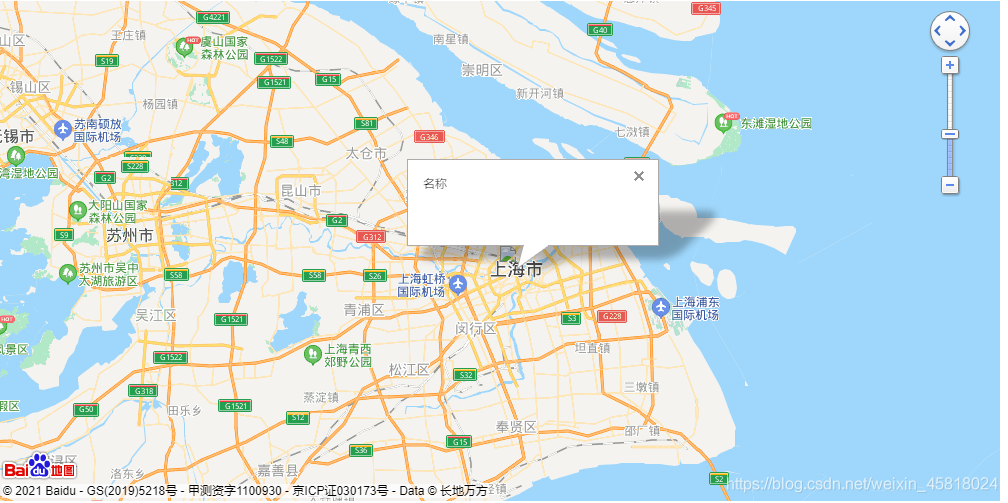
html
 <div class="map_box">
    <baidu-map
      :center="center"
      :zoom="zoom"
      :scroll-wheel-zoom="true"
      class="map"
      @ready="handlerBMap"
    >
      <bm-navigation anchor="BMAP_ANCHOR_TOP_RIGHT" />
      <bm-view class="map" />
      <bm-marker
        v-for="(item, index) in points"
        :key="index"
        :position="item.position"
        :icon="{url: item.icons, size: {width: 32, height: 48}}"
        @click="infoWindowOpen(item)"
      >
        <bm-info-window
          :show="item.show"
          animation="BMAP_ANIMATION_BOUNCE"
          @close="infoWindowClose(item)"
          @open="infoWindowOpen(item)"
        >
          <div @click="showModale(item)">名称</div>

        </bm-info-window>
      </bm-marker>
    </baidu-map>
  </div>
js
  data () {
    return {
      markers: [],
      points: [],
      zoom: 1,
      center: { lng: 121.000, lat: 31.000 }
    }
  },
  mounted () {
  },
  methods: {
    handlerBMap ({ BMap, map }) {
      this.BMap = BMap
      this.map = map
      this.get()
    },
    showModale (item) {
      console.log(item)
    },
    infoWindowOpen (item) {
      this.$set(item, 'show', true)
    },
    infoWindowClose (item) {
      this.$set(item, 'show', false)
    },
    get () {
      this.mapData = [
        {
          addr: '上海市',
          streetAddr: '上海市',
          city: '上海市',
          position: 0
        }
      ]
      this.manageData()
    },
    manageData () {
      const arr = []
      for (const item of this.mapData) {
        this.getPoint(item.addr + item.streetAddr, item.city).then((res) => {
          arr.push(Object.assign(item, res, { show: false }))
        })
      }
      this.points = arr
      console.log(arr)
    },
    getPoint (addr, city) {
      return new Promise((resolve, reject) => {
        // 创建地址解析器实例
        // eslint-disable-next-line no-undef
        var myGeo = new BMap.Geocoder()
        // 将地址解析结果显示在地图上,并调整地图视野
        myGeo.getPoint(addr, function (point) {
          if (point) {
            resolve({
              position: {
                lng: point.lng, lat: point.lat
              },
              icons: 'https://gimg2.baidu.com/image_search/src=http%3A%2F%2Fhbimg.huabanimg.com%2F299e85c057f069c3cb78580f4340ae602e4ee8a6c4ef-PZnvCJ_fw658&refer=http%3A%2F%2Fhbimg.huabanimg.com&app=2002&size=f9999,10000&q=a80&n=0&g=0n&fmt=jpeg?sec=1629257043&t=e9b4245275bffbd467bd8d0836a806d9'
            })
          }
        }, city)
      })
    }

  }
css
.map_box {
  position: relative;
  width: 1000px;
  height: 500px;
}
.map {
  width: 100%;
  height: 100%;
}





 扫一扫
扫一扫


 4万+
4万+

 被折叠的 条评论
为什么被折叠?
被折叠的 条评论
为什么被折叠?
 到【灌水乐园】发言





