


 文章讲述了在接到老师要求在论文中加入子ER图后,作者利用编程技能,通过canvas来绘制ER图的过程。作者通过计算角度和线长,确保椭圆间不重叠,并编写了一个工具,能从数据库表结构自动生成ER图,最后还分享了去除canvas多余空白的技巧和项目源码链接。
写论文交初稿后,老师说论文中要有子ER图,我就画了个系统ER图,我的项目中表还是不少的,20多张,这要画到什么时候啊!正好之前写的数据库填充小工具,有表导出功能,借此实现表ER图导出功能。
用canvas画ER图
表ER图是由一个矩形和多个椭圆组成,首先给这些形状确定大小,其次就要解决椭圆之间不重叠的问题。这就要涉及到高中知识了三角函数的问题了,为此我还百度回顾下,都快忘完了。
在canvas中画图就是要确定每个形状的坐标。
有个容易出错的地方,Math.sin、cos、tan中的是弧长,不是度数
我们将椭圆看成已长径为半径的圆。如何保证圆不重叠,就要看图吧
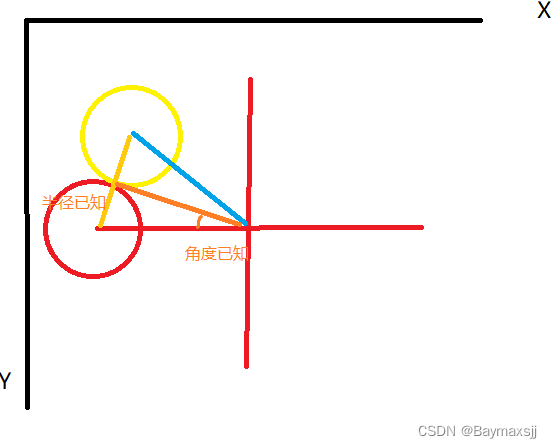
计算矩形与椭圆中心线长
 const attSize = table.table_attributes.length
  //属性间隔度数
  const degree = 360 / attSize
  //计算线长
  let lineLength = Math.abs(shapeWidth/1.5 / Math.tan(((2 * Math.PI) / 360) *(degree / 2)))
开始画图
一个原则,画线,圆椭圆,画文字,画完后,画矩形,上代码
 const centreLength = lineLength + shapeWidth

  const erEList: erElement[] = []

  let offsetDegree = 0,
    temDeg: number,
    centerX: number,
    centerY: number
  table.table_attributes.forEach((item) => {
    temDeg = ((2 * Math.PI) / 360) * offsetDegree
    ;(centerX = centreLength + Math.cos(temDeg) * lineLength),
      (centerY = centreLength + Math.sin(temDeg) * lineLength * -1),
      erEList.push({
        text: item.Comment != '' ? item.Comment : item.Field,
        shape: 'oval',
        centerX,
        centerY,
        x: centerX - shapeWidth / 2,
        y: centerY - shapeHeight / 2
      })
    offsetDegree += degree
  })
  erEList.push({
    text:
      table.table_info.table_comment != ''
        ? table.table_info.table_comment
        : table.table_info.table_name,
    shape: 'rectangle',
    centerX: centreLength,
    centerY: centreLength,
    x: centreLength - shapeWidth / 2,
    y: centreLength - shapeHeight / 2
  })
  console.log(erEList)
  //计算椭圆位置
  // const canvas = document.createElement('canvas')
  canvas.height = centreLength * 2
  canvas.width = centreLength * 2

  // canvas.style.width=centreLength*2+'px'
  // canvas.style.height=centreLength*2+'px'
  const ctx = canvas.getContext('2d')!

  ctx.clearRect(0, 0, canvas.width, canvas.height)

  erEList.forEach((shape) => {
    //画线
    ctx.beginPath()
    ctx.lineWidth = lineWidth
    ctx.strokeStyle = lineColor
    ctx.moveTo(shape.centerX, shape.centerY)
    ctx.lineTo(centreLength, centreLength)
    ctx.stroke()
    if (shape.shape == 'oval') {
      drawEllipse(ctx, shape.centerX, shape.centerY, shapeWidth, shapeHeight)
    } else {
      ctx.beginPath() //开始新的路径
      ctx.rect(shape.x, shape.y, shapeWidth, shapeHeight) //生成矩形路径,起点坐标(前两个参数)矩形大小(后两个参数)
      ctx.fillStyle = bgColor
      ctx.strokeStyle = lineColor
      ctx.fill()
      ctx.stroke() //绘制路径
    }
    // 画文字
    drawText(ctx, shape.text, shape.x, shape.y)
  })
  return getMinCanvas(canvas, ctx)
去除多余空白
const getMinCanvas = (
  canvas: HTMLCanvasElement,
  context: CanvasRenderingContext2D
): HTMLCanvasElement => {
  let imgData = context.getImageData(0, 0, canvas.width, canvas.height)
  const data = imgData.data
  //图形边界位置
  let left = canvas.width
  let right = 0
  let top = canvas.height
  let bottom = 0
  for (let i = 0; i < data.length; i += 4) {
  	//计算该像素在canvas的位置
    const x = (i / 4) % canvas.width
    const y = Math.floor(i / (4 * canvas.width))
    //获取颜色透明度
    const alpha = data[i + 3]
    //确定该像素是否可见
    if (alpha > 0) {
      //计算可视边界
      left = Math.min(left, x)
      right = Math.max(right, x)
      top = Math.min(top, y)
      bottom = Math.max(bottom, y)
    }
  }
  const width = right - left
  const height = bottom - top
  const canvas1 = document.createElement('canvas')
  canvas1.width = width
  canvas1.height = height
  context = canvas1.getContext('2d')!
  //填充白色背景
  context.beginPath()
  context.fillStyle = bgColor
  context.fillRect(0, 0, canvas.width, canvas.height)
  context.stroke()
  //裁剪
  context.drawImage(canvas, left, top, width, height, 0, 0, width, height)
  return canvas1
}
这里使用了上面提到的方法去除多余空白,将实际内容绘制到了一个新的canvas中,并将其替换原来的canvas。
项目地址:
gitee:https://gitee.com/baymaxsjj/sqlmock
github:https://github.com/baymaxsjj/sqlmock
本文代码实现在:src\renderer\src\db\doc-export\er-export.ts下





 扫一扫
扫一扫


 3478
3478


 到【灌水乐园】发言



