import axios from 'axios';

//axios是一个基于promise的HTTP库,可以用于浏览器和node.js

//特性: 支持Promise API;   拦截请求和响应;   转换请求数据和响应数据
//      取消请求;          自动转换JSON数据;      客户端支持防御XSRF
// get: 获取数据
// post: 提交数据(新增,表单提交+文件上传)
// put: 更新数据(修改,所有数据推送到后端)
// patch: 更新数据(修改,只将修改的数据推送到后端)
// delete: 删除数据
let data = {
  id: 2
};
// get请求--获取数据
axios.get('url', {
  params: data
}).then(res => {
  console.log(res);
});

axios({
  method: 'get',
  url: 'url',
  params: data
});

// post请求-提交数据
// application/json格式
axios.post('url', data).then(res => {
  console.log(res);
});

// form-data格式(图片上传,文件上传)
let formData = new FormData();
for (let key in data) {
  formData.append(key, data[key]);
}

axios.post('url', formData).then(res => {
  console.log(res);
});

//put方法--更新数据,提交全部数据
axios.put('url', data).then(res => {
  console.log(res);
});

//patch方法--更新数据-提交修改的数据
axios.patch('url', data).then(res => {
  console.log(res);
});

//delete方法--删除数据
axios.delete('url', {
  params: data//使用params,参数将在url上显示
}).then(res => {
  console.log(res);
});

axios.delete('url', {
  data: data // 使用data,参数不会显示在url上(使用哪种方式,是否需要在url上显示参数,需要与后台人员沟通)
}).then(res => {
  console.log(res);
});

// 并发请求: 同时处理多个请求,并统一处理返回值
// axios.all([]).then(axios.spread(() => {}))
axios.all(
  [
    axios.get('url', {
      params: data
    }),
    axios.get('url2', {
      params: data
    })
  ]
).then(
  axios.spread((res1, res2) => {
    console.log(res1);
    console.log(res2);
  }));

// axios实例:
// 应用:后端接口地址有多个,并且超时时长不一样
let instance = axios.create({
  baseURL: 'http://localhost:8080',
  timeout: 1000 //默认值
});

let instance2 = axios.create({
  baseURL: 'http://localhost:9000',
  timeout: 5000
});

instance.get('url').then(res => {
  console.log(res);
});

instance2.post('url', {
  params: data
}).then(res => {
  console.log(res);
});

// axios实例的相关配置
axios.create({
  baseURL: 'http://localhost:8080', //请求的域名,基本地址
  timeout: 1000, //默认值,超时时长(ms)
  url: '/data.json', //请求路径
  method: 'get,post,put,patch,delete', // 请求方法
  headers: { token: '' }, //请求头
  params: {}, //请求参数,拼接在url上
  data: {} //请求参数,放在请求体里面
});

// axios全局配置
axios.defaults.baseURL = 'http://localhost:9090';
axios.defaults.timeout = 3000;

// axios实例配置
let instance3 = axios.create();
instance3.defaults.timeout = 2000;

// axios请求配置
axios.get('url', {
  timeout: 4000
}).then(res => {
  console.log(res);
});

// 实际开发中,有两种请求接口
const url1 = 'http://localhost:8080';
const url2 = 'http:localhost:9090';

let instance4 = axios.create({
  baseURL: url1,
  timeout: 2000
});

let instance5 = axios.create({
  baseURL: url2,
  timeout: 4000
});

// baseUrl, timeout, url, method, params
instance4.get('/data.json', {
  params: data,
  timeout: 6000
}).then(res => {
  console.log(res);
});

// baseUrl, url, method, params
instance5.post('/adduser', {
  params: data
}).then(res => {
  console.log(res);
});

// 拦截器: 在请求或响应被处理前拦截它们
// 分为: 请求拦截器、响应拦截器

// 请求拦截器
axios.interceptors.request.use(
  config => {
    // 在发送请求前做些什么
    return config;
  }, err => {
    // 在请求错误的时候做些什么
    return Promise.reject(err);
  }
);

// 响应拦截器
axios.interceptors.response.use(
  res => {
    // 请求成功对响应数据做处理
    return res;
  }, err => {
    // 响应错误做些什么
    return Promise.reject(err);
  }
);

// 取消拦截器(了解)
let interceptors = axios.interceptors.request.use(
  config => {
    config.hearders = {
      auth: true
    };
    return config;
  }
);
axios.interceptors.request.eject(interceptors);

// 例子1: 登录
let instance6 = axios.create();

// 登录状态(token: ''),需要登录的接口(拦截请求,在请求头中添加token)
instance6.interceptors.request.use(
  config => {
    config.hearders.token = '';
    return config;
  }
);
instance6.post('./login', {
  params: data
}).then(res => {
  alert('登录成功');
  console.log(res);
}).catch(err => {
  console.log(err);
  alert('登录失败');
});

// 不需要登录的接口,直接发请求登录
instance6.post('./login', {
  params: data
}).then(res => {
  alert('登录成功');
  console.log(res);
}).catch(err => {
  alert('登录失败');
  console.log(err);
});

// 例子2: 拦截请求显示loading状态,请求成功后关闭loading状态
let instancePhone = axios.create();
instancePhone.interceptors.request.use(
  config => {
    '$'('#loading').show();
    return config;
  }
);
instancePhone.interceptors.response.use(
  res => {
    '$'('#loading').hide();
    return res;
  }
);

// 例子3: 统一错误处理
let handleErr = function() {
  '$'('#remind').show('errMsg');
  setTimeout(() => {
    '$'('#remind').hide();
  }, 2000);
};
let instance7 = axios.create();
instance7.interceptors.request.use(
  config => {
    return config;
  }, err => {
    // 请求错误,一般http状态码以4开头,常见401超时, 404 not found
    handleErr();
    return Promise.reject(err);
  }
);

instance7.interceptors.response.use(
  res => {
    return res;
  }, err => {
    // 响应错误处理,一般http状态码以5开头,500系统错误,502系统重启
    handleErr();
    return Promise.reject(err);
  }
);

instance7.get('url').then(res => {
  console.log(res); // 按统一错误处理,不需要添加catch
});

instance7.get('url').then(res => {
  console.log(res);
}).catch(err => {
  console.log(err); // 针对这次请求做单独的错误处理
});

// 取消http请求
let source = axios.CancelToken.source();
axios.get('url', {
  cancelToken: source.token
}).then(res => {
  console.log(res);
}).catch(err => {
  console.log(err);
});
// 取消请求
source.cancel('Cancel http');
// 项目实际开发
// 1. 创建统一的api管理文件   src > service > contactApi.js
// 2. 对axios方法封装   src > service > http.js
// 3. 使用
// 1. 创建统一的api管理文件   src > service > contactApi.js
const CONTACT_API = {
  // 获取联系人列表
  getContactList: {
    method: 'get',
    url: '/contactList'
  },
  //新建联系人 form-data
  newContactForm: {
    method: 'post',
    url: '/contact/new/form'
  },
  // 新建联系人 application/json
  newContactJson: {
    method: 'put',
    url: '/contact/edit'
  },
  // 编辑联系人
  editContact: {
    method: 'put',
    url: '/contact/edit'
  },
  // 删除联系人
  delContact: {
    method: 'delete',
    url: '/contact'
  }
};

export default CONTACT_API;
// 2. 对axios方法封装   src > service > http.js

import axios from 'axios';
import contactApi from './contactApi';

// contactApi循环遍历输出不同的请求方法
let instance = axios.create({
  baseURL: 'http://localhost:9090/api',
  timeout: 1000
});

const Http = {}; // 包裹请求方法的容器

// 请求格式/参数的统一
for (let key in contactApi) {
  let api = contactApi[key]; //url method
  let url = api.url;
  let method = api.method;

  // async 作用: 避免进入回调地狱
  // params  请求参数
  // isFormData 标识是否是form-data请求
  // config  配置参数
  Http[key] = async function(params, isFormData = false, config = {}) {
    let newParams = {};

    // content-type是否是form-data的判断
    if (params && isFormData) {
      newParams = new FormData();
      for (let i in params) {
        newParams.append(key, params[i]);
      }
    } else {
      newParams = params;
    }

    // 不同请求的判断
    let response = {}; //请求的返回值
    if (method === 'post' || method === 'put' || method === 'patch') {
      try {
        response = await instance[method](url, newParams, config);
      } catch (err) {
        response = err;
      }
    } else if (method === 'get' || method === 'delete') {
      config.params = newParams;
      try {
        response = await instance[method](url, config);
      } catch (err) {
        response = err;
      }
    }
    return response; // 返回响应值
  };
}

// 拦截器的添加
// 请求拦截器
instance.interceptors.request.use(
  config => {
    // 发起请求前做些什么
    '#Toast'.loading('加载中......');
    return config;
  }, err => {
    // 请求错误
    '#Toast'.clear();
    '#Toast'('请求错误,请稍后重试');
    return err;
  }
);

// 响应拦截器
instance.interceptors.response.use(
  res => {
    // 请求成功
    '#Toast'.clear();
    return res;
  }, () => {
    '#Toast'.clear();
    '#Toast'('请求错误,请稍后重试');
  }
);

export default Http;
// 3. 使用

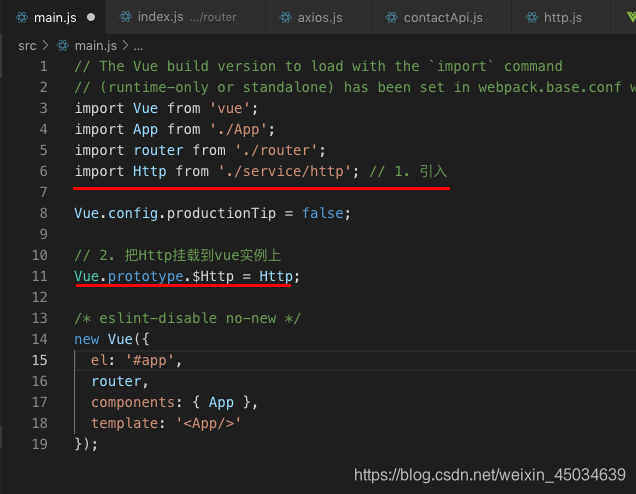
步骤一:
在main.js文件中将Http挂载到vue实例上
步骤二:
文件中调用封装的方法进行数据请求处理
<!--  -->
<template>
  <div class="home">
    <!-- 联系人列表 -->
    <van-contact-list :list="list" @add="onAdd" @edit="onEdit" />
    <!-- 联系人编辑 -->
    <van-popup v-model="showEdit" position="bottom">
      <van-contact-edit
        :contact-info="editingContact"
        :is-edit="isEdit"
        @save="onSave"
        @delete="onDelete"
      />
    </van-popup>
  </div>
</template>

<script>
import { ContactList, Toast, ContactEdit, Popup } from "vant";
import axios from "axios";
import { async } from "q";
export default {
  name: "contactList",
  components: {
    [ContactList.name]: ContactList,
    [ContactEdit.name]: ContactEdit,
    [Popup.name]: Popup
  },
  data() {
    return {
      // {
      //     id: 1,
      //     name: '',
      //     tel: ''
      // }
      list: [],
      instance: null, // axios 实例
      showEdit: false, // 编辑弹窗的显隐
      editingContact: {}, // 正在编辑的联系人数据
      isEdit: false // 新建或编辑
    };
  },
  //生命周期 - 创建完成(可以访问当前this实例)
  created() {
    this.instance = axios.create({
      baseURL: "http://localhost:9090/api",
      timeout: 1000
    });
    this.getList();
  },
  methods: {
    // 获取联系人列表,使用封装的方法
    async getList() {
      let res = await this.$Http.getContactList();
      this.list = res.data;
    },

    // 添加联系人
    onAdd() {
      this.showEdit = true;
      this.isEdit = false;
    },

    // 编辑联系人
    onEdit(info) {
      this.showEdit = true;
      this.isEdit = true;
      this.editingContact = info;
    },

    // 保存联系人, 使用封装的方法
    async onSave(info) {
      if (this.isEdit) {
        // 编辑保存
        let res = await this.$Http.editContact(info);
        if (res.code === 200) {
          Toast("编辑成功"); // 保存成功
          this.showEdit = false;
          this.getList();
        }
      } else {
        // 新建保存
        let res = await this.$Http.newContactJson(info);
        if (res.code === 200) {
          Toast("新建成功");
          this.showEdit = false;
          this.getList();
        }
      }
    },

    // 删除联系人, 使用封装的方法
    async onDelete(info) {
      let res = await this.$Http.delContact({
        id: info.id
      });
      if (res.code === 200) {
        Toast("删除成功");
        this.isEdit = false;
        this.getList();
      }
    }
  }
};
</script>
<style scoped>
</style>
未使用封装的方法前:
<!--  -->
<template>
  <div class="home">
    <!-- 联系人列表 -->
    <van-contact-list :list="list" @add="onAdd" @edit="onEdit" />
    <!-- 联系人编辑 -->
    <van-popup v-model="showEdit" position="bottom">
      <van-contact-edit
        :contact-info="editingContact"
        :is-edit="isEdit"
        @save="onSave"
        @delete="onDelete"
      />
    </van-popup>
  </div>
</template>

<script>
import { ContactList, Toast, ContactEdit, Popup } from "vant";
import axios from "axios";
export default {
  name: "contactList",
  components: {
    [ContactList.name]: ContactList,
    [ContactEdit.name]: ContactEdit,
    [Popup.name]: Popup
  },
  data() {
    return {
      // {
      //     id: 1,
      //     name: '',
      //     tel: ''
      // }
      list: [],
      instance: null, // axios 实例
      showEdit: false, // 编辑弹窗的显隐
      editingContact: {}, // 正在编辑的联系人数据
      isEdit: false // 新建或编辑
    };
  },
  //生命周期 - 创建完成(可以访问当前this实例)
  created() {
    this.instance = axios.create({
      baseURL: "http://localhost:9090/api",
      timeout: 1000
    });
    this.getList();
  },
  methods: {
    // 获取联系人列表
    getList() {
      this.instance
        .get("./contactList")
        .then(res => {
          this.list = res.data.data;
        })
        .catch(err => {
          console.log(err);
          Toast("请求失败,请稍后重试");
        });
    },

    // 添加联系人
    onAdd() {
      this.showEdit = true;
      this.isEdit = false;
    },

    // 编辑联系人
    onEdit(info) {
      this.showEdit = true;
      this.isEdit = true;
      this.editingContact = info;
    },

    // 保存联系人
    onSave(info) {
      if (this.isEdit) {
        // 编辑保存
        this.instance
          .put("/contact/edit", info)
          .then(res => {
            if (res.data.code === 200) {
              Toast("编辑成功"); // 保存成功
              this.showEdit = false;
              this.getList();
            }
          })
          .catch(() => {
            Toast("请求失败,请稍后重试");
          });
      } else {
        // 新建保存
        this.instance
          .post("/contact/new/json", info)
          .then(res => {
            if (res.data.code === 200) {
              Toast("新建成功");
              this.showEdit = false;
              this.getList();
            }
          })
          .catch(() => {
            Toast("请求失败,请稍后重试");
          });
      }
    },

    // 删除联系人
    onDelete(info) {
      this.instance
        .delete("/contact", {
          params: {
            id: info.id
          }
        })
        .then(res => {
          if (res.data.code === 200) {
            Toast("删除成功");
            this.isEdit = false;
            this.getList();
          }
        })
        .catch(() => {
          Toast("请求失败, 请稍后重试");
        });
    }
  }
};
</script>
<style scoped>
</style>





 本文深入解析Axios HTTP请求库的功能与使用方法,涵盖GET、POST、PUT、PATCH、DELETE等请求类型,以及如何处理并发请求、配置实例、设置拦截器和取消请求。通过实例演示,帮助开发者掌握Axios在项目中的高效应用。





 扫一扫
扫一扫


 2267
2267

 被折叠的 条评论
为什么被折叠?
被折叠的 条评论
为什么被折叠?
 到【灌水乐园】发言





