如何读取文件的内容为string

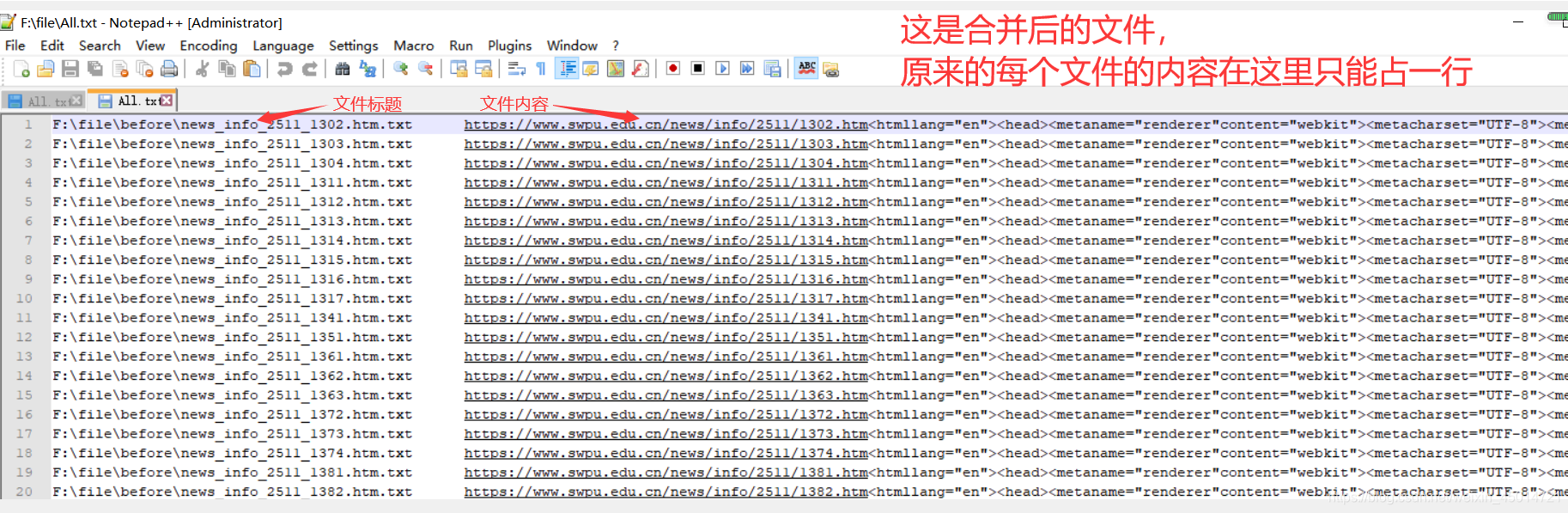
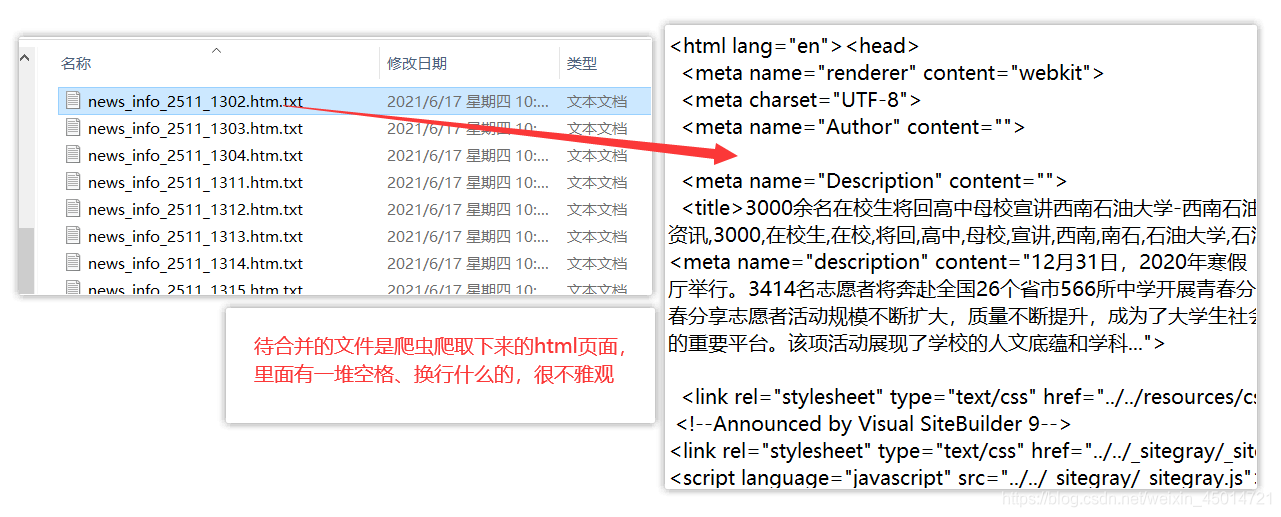
本文介绍了如何使用Java实现从文件中读取内容并转换为字符串的方法,同时还提供了一个示例程序来展示如何将多个文件的内容合并到一个新文件中,并在合并过程中去除不必要的空白字符。

1.如何读取文件的内容为字符串

    public String readFileAsString(String filePath) throws java.io.IOException {
        StringBuffer fileData = new StringBuffer("");
        BufferedReader reader = new BufferedReader(new FileReader(filePath));
        char[] buf = new char[1024];
        int numRead = 0;
        while ((numRead = reader.read(buf)) != -1) {
            String readData = String.valueOf(buf, 0, numRead);
            fileData.append(readData);
            buf = new char[1024];
        }
        reader.close();
        return fileData.toString();
    }

2.如何合并多个文件的内容到一个大文件中
这里是引用
在这里插入图片描述

public class Combine {
    public static void main(String[] args) throws Exception {

        //定义输出文件的位置
        String FileOut="C:\\Users\\Administrator\\Desktop\\Work\\combine.txt";
        BufferedWriter bw=new BufferedWriter(new FileWriter(FileOut));

        Process process = new Process();

        //读取待合并目录下的每个文件
        File[] list = new File("C:\\Users\\Administrator\\Desktop\\Work\\before").listFiles();
        for(File file : list)
        {
            //调用readFileAsString()方法,将读取到的内容转为字符串
            String text = process.readFileAsString(file.toString());

            //去掉字符串中的空格、换行等
            text = text.replace("\n", "").replace("\r", "").replace("\t","");

            //将文件名存入合并后的文件中
            bw.write(file.toString());
            bw.write("\t\t");

            //将文件内容存入合并后的文件中
            bw.write(text);
            bw.newLine();

        }
        bw.close();
        System.out.println("读取完成");
    }
}


public class Process {
	//读取文件的内容为字符串
    public String readFileAsString(String filePath) throws java.io.IOException {
        StringBuffer fileData = new StringBuffer("");
        BufferedReader reader = new BufferedReader(new FileReader(filePath));
        char[] buf = new char[1024];
        int numRead = 0;
        while ((numRead = reader.read(buf)) != -1) {
            String readData = String.valueOf(buf, 0, numRead);
            fileData.append(readData);
            buf = new char[1024];
        }
        reader.close();
        return fileData.toString();
    }
}
public static String loadAFileToStringDE1(File f) throws IOException { long beginTime = System.currentTimeMillis(); InputStream is = null; String ret = null; try { is = new BufferedInputStream( new FileInputStream(f) ); long contentLength = f.length(); ByteArrayOutputStream outstream = new ByteArrayOutputStream( contentLength > 0 ? (int) contentLength : 1024); byte[] buffer = new byte[4096]; int len; while ((len = is.read(buffer)) > 0) { outstream.write(buffer, 0, len); } outstream.close(); ret = outstream.toString(); //byte[] ba = outstream.toByteArray(); //ret = new String(ba); } finally { if(is!=null) {try{is.close();} catch(Exception e){} } } long endTime = System.currentTimeMillis(); System.out.println("方法1用时"+ (endTime-beginTime) + "ms"); return ret; } public static String loadAFileToStringDE2(File f) throws IOException { long beginTime = System.currentTimeMillis(); InputStream is = null; String ret = null; try { is = new FileInputStream(f) ; long contentLength = f.length(); byte[] ba = new byte[(int)contentLength]; is.read(ba); ret = new String(ba); } finally { if(is!=null) {try{is.close();} catch(Exception e){} } } long endTime = System.currentTimeMillis(); System.out.println("方法2用时"+ (endTime-beginTime) + "ms"); return ret; } public static String loadAFileToStringDE3(File f) throws IOException { long beginTime = System.currentTimeMillis(); BufferedReader br = null; String ret = null; try { br = new BufferedReader(new FileReader(f)); String line = null; StringBuffer sb = new StringBuffer((int)f.length()); while( (line = br.readLine() ) != null ) { sb.append(line).append(LINE_BREAK); } ret = sb.toString(); } finally { if(br!=null) {try{br.close();} catch(Exception e){} } } long endTime = System.currentTimeMillis(); System.out.println("方法3用时"+ (endTime-beginTime) + "ms"); return ret; } 3个方法去读取一个大于50M的文件,当不设置jvm参数时都OutofMemery,当设置-Xmx128M时。只有方法3 可以通过,设置到-Xmx256M时也只有方法3可以通过,干脆设置512M,都可以了,运行时间如果正常的话一般都在4~5S
评论 1
成就一亿技术人!
拼手气红包6.0元
还能输入1000个字符
 
红包 添加红包
表情包 插入表情
 条评论被折叠 查看
添加红包

请填写红包祝福语或标题

红包个数最小为10个

红包金额最低5元

当前余额3.43前往充值 >
需支付:10.00
成就一亿技术人!
领取后你会自动成为博主和红包主的粉丝 规则
hope_wisdom
发出的红包

打赏作者

BlackTurn

你的鼓励将是我创作的最大动力

¥1 ¥2 ¥4 ¥6 ¥10 ¥20
扫码支付:¥1
获取中
扫码支付

您的余额不足,请更换扫码支付或充值

打赏作者

实付
使用余额支付
点击重新获取
扫码支付
钱包余额 0

抵扣说明:

1.余额是钱包充值的虚拟货币,按照1:1的比例进行支付金额的抵扣。
2.余额无法直接购买下载,可以购买VIP、付费专栏及课程。

余额充值