


 本文介绍了如何在Python中使用Pandas进行窗口数据处理,包括移动平均、滚动求和等统计运算,以及Pandas对CSV、Excel、HDF和MySQL等数据格式的读写操作。
#CDA学习打卡 #CDA数据分析师
十、Pandas窗口数据
# 窗口数据
import pandas as pd

data = {'column':[1,2,3,4,5,6,7,8,9,10]}
df = pd.DataFrame(data)

# 滚动计算函数:移动平均值
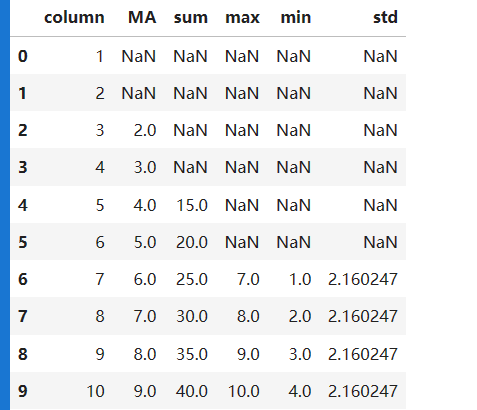
df['MA'] = df['column'].rolling(window=3).mean()

# 滚动求和
df['sum'] = df['column'].rolling(window=5).sum()

# 滑动最大值
df['max'] = df['column'].rolling(window=7).max()

# 滑动最小值
df['min'] = df['column'].rolling(window=7).min()

# 滑动标准差
df['std'] = df['column'].rolling(window=7).std()

df


# 自定义窗口函数
import pandas as pd
def custom_function(data1):
    # 自定义 窗口函数逻辑
    retrun max(data1) - min(data1)

df['aaa'] = df['column'].rolling(window=3).apply(custom_function)
df
十一、Pandas数据读写
# 数据读写

import pandas as pd
import numpy as np

data = np.random.rand(10,10)
columns = ['col'+str(i) for i in range(10)]

df = pd.DataFrame(data,columns=columns)
df
csv文件
# 使用相对路径写入csv文件
df.to_csv('./输出csv.csv')
# 读取csv
pd.read_csv('./输出csv.csv')
excel文件
# 输出excel文件
df.to_excel('./输出excel.xlsx',sheet_name='Sheet3',index=None)
# 输出excel文件
pd.read_excel('./输出excel.xlsx','Sheet3',index_col=None,na_values=['NA'])
hdf文件
# 输出hdf文件
df.to_hdf('./输出hdf.h5','df')
# 读取hdf文件
pd.read_hdf('./输出hdf.h5','df').head()
mysql
# 写入mysql
from sqlalchemy import create_engine
import pandas as pd

mysql_engine=create_engine("mysql+pymasql:root:password@localhost/test")
df.to_sql(pust_table_name,mysql_engine,if_exists='replace',index=Flase)

# 读取文件
df = pd.read_sql("""
select a,b from pust_table_name;""",mysql_engine)
df





 扫一扫
扫一扫


 576
576


 到【灌水乐园】发言



