


 本文深入解析了CSS中的四种基本定位方式:relative、absolute、static和fixed的特性与使用场景。通过实例代码展示了每种定位方式如何影响元素的位置,并解释了它们之间的区别。
positon的四个常用基本属性详解:
1、relative:相对定位。相对于其当前所在位置进行定位,比如“left:20”会向元素的leift位置添加20像素。
2、absolute:绝对定位。生成绝对定位的元素,相对于static定位以外的第一个父元素进行定位。元素的位置可以通过left、right、top、bottom来定义。
3、static:静态定位。默认值,没有定位,元素出现在正常流中(忽略top、bottom、left、right或z-index的声明)。
4、fixed:生成固定定位的元素,相对于浏览器窗口进行定位,位置不会随网页进行改变。元素的位置通过left、top、right、bottom属性进行定位。
<!DOCTYPE html>
<html>
	<head>
		<meta charset="UTF-8">
		<title></title>
	</head>
	<style>
		.one{
			background-color: red;
			border: 1px solid gray;
			width: 300px;
			height: 300px;
			float: left;
			position:relative;
			margin: 150px 150px;
		}
		.one_11{
			background-color: blue;
			border: 1px solid gray;
			width: 150px;
			height: 150px;
			/*float: left;*/
			left: 70px;
			top: 70px;
			position: absolute;
		}
		.one_12{
			background-color: gold;
			border: 1px solid gray;
			width: 100px;
			height: 100px;
			/*float: left;*/
			left: 50px;
			top: 50px;
			position: absolute;
		}
		.one_13{
			background-color: orange;
			border: 1px solid gray;
			width: 80px;
			height: 80px;
			/*float: left;*/
			top: 80px;
			position: absolute;
		}
		.one_14{
			background-color: purple;
			border: 1px solid gray;
			width: 80px;
			height: 80px;
			/*float: left;*/
			position: absolute;
		}
		.one1{
			background-color: green;
			border: 1px solid gray;
			width: 100px;
			height: 100px;
			/*float: left;*/
			position: absolute;
		}
		.one2{
			background-color: pink;
			border: 1px solid gray;
			width: 100px;
			height: 100px;
			/*float: left;*/
			position: fixed;
			left: 30px;
			top: 30px;
		}
	</style>
	<body>
		<div class="one">
			<div class="one_11">把红色背景作为父窗口定位的absolute
				<div class="one_12">把蓝色背景作为父窗口定位的absolute
				</div>
			</div>
			<div class="one_13">把红色背景作为父窗口定位的absolute
				</div>
			<div class="one_14">把红色背景作为父窗口定位的absolute
			</div>
		</div>
		<div class="one1">把浏览器窗口作为父窗口的定位absolute</div>
		<div class="one2">不会改变的定位fixed</div>
	</body>

</html>
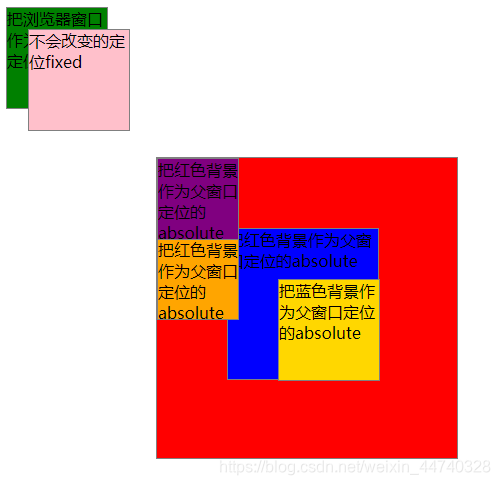
运行结果:





 扫一扫
扫一扫


 1486
1486

 被折叠的 条评论
为什么被折叠?
被折叠的 条评论
为什么被折叠?
 到【灌水乐园】发言





