



 本文介绍了如何使用DevExpress的TreeList组件,调整样式、设置列宽、启用或禁用功能,以及实现父节点选中子节点的联动效果。还涵盖了颜色设置、图片绑定和事件处理等内容。
this.treeList.OptionsView.AutoWidth = false; //禁用自动宽度
this.treeList.Columns[“stateName”].Width = 180; //设置指定列宽
this.treeList.BorderStyle = DevExpress.XtraEditors.Controls.BorderStyles.NoBorder; //TreeList 边框
//默认显示下拉三角形样式,设置TreeList的两个皮肤属性即可变成连接虚线
this.treeList.LookAndFeel.UseDefaultLookAndFeel = false;
this.treeList.LookAndFeel.UseWindowsXPTheme = true;
this.treeList.OptionsView.ShowHorzLines = false; //是否显示水平线。默认为True;
this.treeList.OptionsView.ShowVertLines = true; //是否显示垂直线。默认为True;
this.treeList.OptionsView.ShowIndicator = false; //是否显示Node的指示符面板,就是最左边有个三角箭头。默认为True;
this.treeList.OptionsView.ShowButtons = true; //是否显示展开与收缩按钮。默认为True;
this.treeList.OptionsView.ShowColumns = false; //是否显示列标题。默认为True;
this.treeList.OptionsView.ShowIndentAsRowStyle = false; //是否用相应Node的Appearance设置来生成Tree的缩进。默认为False
this.treeList.OptionsView.FocusRectStyle = DevExpress.XtraTreeList.DrawFocusRectStyle.None; //在获得焦点的Cell上,是否显示焦点框架。默认为True;
//this.treeList.OptionsView.FocusRectStyle = DrawFocusRectStyle.CellFocus;
this.treeList.OptionsView.ShowRoot = true; //是否在根Node间显示连接线。默认为True;
this.treeList.OptionsView.ShowCheckBoxes = false; //显示勾选框。默认为False
this.treeList.OptionsDragAndDrop.DragNodesMode = DragNodesMode.None;//拖拽节点
this.treeList.OptionsBehavior.ReadOnly = true; //只读
this.treeList.OptionsBehavior.Editable = false; //不可编辑
this.treeList.OptionsBehavior.AllowIndeterminateCheckState = true; //设置节点是否有中间状态,即一部分子节点选中,一部分子节点没有选中
this.treeList.OptionsSelection.InvertSelection = true; //选中风格是只应用于选中的Cell
this.treeList.OptionsSelection.MultiSelect = false; //允许多选
this.treeList.OptionsSelection.EnableAppearanceFocusedCell = true; //选中的Cell的Appearance设置是否可用
this.treeList.ExpandAll(); //展开所有层级
// this.treeList.ExpandToLevel(0); //展开的层级
注册这两个事件实现选择父节点自动选子节点,反之亦然
//this.treeList.BeforeCheckNode += this.treeList_BeforeCheckNode;
//this.treeList.AfterCheckNode += this.treeList_AfterCheckNode;
//this.treeList.AfterFocusNode += this.treeList_AfterFocusNode;
//this.treeList.DoubleClick += this.treeList_DoubleClick; //但要注意的是要在TreeList.OptionsBehavior.Editable = false的情况下,双击Node才能触发该事件
颜色设置
this.treeList.Appearance.Row.BackColor = Color.Transparent;//节点默认背景色
this.treeList.Appearance.FocusedRow.BackColor = Color.Orange; // 选中节点的背景色
this.treeList.Appearance.HideSelectionRow.BackColor = Color.LightYellow;//选中节点失去焦点时的背景色
设置图片
this.treeList.CustomDrawNodeImages += this.treeList_CustomDrawNodeImages;
或者
// 绑定图片 ImageCollection 控件
this.treeList.StateImageList = this.imageCollection;
// 注册事件
this.treeList.GetStateImage += TreeList_GetStateImage;
private void TreeList_GetStateImage(object sender, DevExpress.XtraTreeList.GetStateImageEventArgs e)
{
// 通过节点的值 确定对应的下标图片
e.NodeImageIndex = (int)e.Node.GetValue(“ImageIndex”);
}
效果图
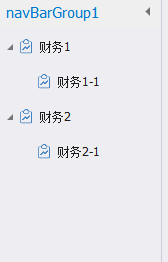
Code
using System;
using System.Drawing;
using System.Windows.Forms;
using DevExpress.Skins;
using DevExpress.XtraTreeList.Nodes;

namespace XXX
{
    public partial class UsFinanceManageMenu : UserControl
    {

        public ListEx<FinanceManageMenuTreeListDto> menuList { get; set; }

        public UsFinanceManageMenu()
        {
            InitializeComponent();
            this.Load += UsFinanceManageMenu_Load;
            this.treeList.FocusedNodeChanged += TreeList_FocusedNodeChanged;
            this.treeList.CustomDrawNodeCell += TreeList_CustomDrawNodeCell;
            this.treeList.CustomDrawNodeImages += TreeList_CustomDrawNodeImages;
            this.treeList.GetStateImage += TreeList_GetStateImage;
        }

        private void TreeList_GetStateImage(object sender, DevExpress.XtraTreeList.GetStateImageEventArgs e)
        {
            e.NodeImageIndex = (int)e.Node.GetValue(nameof(FinanceManageMenuTreeListDto.Img));
        }

        private void TreeList_FocusedNodeChanged(object sender, DevExpress.XtraTreeList.FocusedNodeChangedEventArgs e)
        {
        }

        private void UsFinanceManageMenu_Load(object sender, EventArgs e)
        {
            treeList.BorderStyle = DevExpress.XtraEditors.Controls.BorderStyles.NoBorder;
            var skin = CommonSkins.GetSkin(DevExpress.LookAndFeel.UserLookAndFeel.Default);
            Color controlColor = skin.Colors.GetColor("Control");
            this.treeList.Appearance.Empty.BackColor = controlColor;
            this.treeList.Appearance.Row.BackColor = controlColor;
            this.treeList.Appearance.FocusedRow.BackColor = controlColor;
            this.treeList.Appearance.FocusedCell.BackColor = controlColor;
            this.treeList.OptionsSelection.EnableAppearanceFocusedCell = false;
            this.treeList.OptionsSelection.EnableAppearanceFocusedRow = false;
            this.treeList.StateImageList = this.imageCollection;
            this.treeList.OptionsView.FocusRectStyle = DevExpress.XtraTreeList.DrawFocusRectStyle.None;
            this.treeList.RowHeight = 30;

            this.menuList = new ListEx<FinanceManageMenuTreeListDto>();

            InitData();
        }

        private void InitData()
        {
            var id = Guid.NewGuid();
            this.menuList.Data.Add(new FinanceManageMenuTreeListDto()
            {
                Img = 0,
                Id = id,
                ParentId = Guid.Empty,
                Name = "财务1",
                Tag = "财务1",
            });
            this.menuList.Data.Add(new FinanceManageMenuTreeListDto()
            {
                Img = 0,
                Id = Guid.NewGuid(),
                ParentId = id,
                Name = "财务1-1",
                Tag = "财务1-1",
            });

            id = Guid.NewGuid();
            this.menuList.Data.Add(new FinanceManageMenuTreeListDto()
            {
                Img = 0,
                Id = id,
                ParentId = Guid.Empty,
                Name = "财务2",
                Tag = "财务2",
            });
            this.menuList.Data.Add(new FinanceManageMenuTreeListDto()
            {
                Img = 0,
                Id = Guid.NewGuid(),
                ParentId = id,
                Name = "财务2-1",
                Tag = "财务2-1",
            });
            this.treeList.DataSource = this.menuList.BindingSource;
            this.treeList.KeyFieldName = "Id";
            this.treeList.ParentFieldName = "ParentId";

            this.treeList.Columns[nameof(FinanceManageMenuTreeListDto.Name)].Caption = Context.L("Name");
            this.treeList.Columns[nameof(FinanceManageMenuTreeListDto.Tag)].Visible = false;
            this.treeList.Columns[nameof(FinanceManageMenuTreeListDto.Img)].Visible = false;
        }

        private void TreeList_CustomDrawNodeImages(object sender, DevExpress.XtraTreeList.CustomDrawNodeImagesEventArgs e)
        {
        }

        private void TreeList_CustomDrawNodeCell(object sender, DevExpress.XtraTreeList.CustomDrawNodeCellEventArgs e)
        {
            if (!Context.IsRunTime) { return; }

        }
    }
}
Dto
using System;
using System.Collections.Generic;
using System.Linq;
using System.Text;
using System.Threading.Tasks;

namespace XXX
{
    public class FinanceManageMenuTreeListDto
    {
        public Guid Id { get; set; }

        public Guid? ParentId { get; set; }

        /// <summary>
        /// 名称
        /// </summary>
        public string Name { get; set; }

        /// <summary>
        /// 标签
        /// </summary>
        public string Tag { get; set; }

        /// <summary>
        /// ImageIndex
        /// </summary>
        public int Img { get; set; }
    }
}





 扫一扫
扫一扫


 3045
3045

 被折叠的 条评论
为什么被折叠?
被折叠的 条评论
为什么被折叠?
 到【灌水乐园】发言





