



 本文详细介绍了Java 8中引入的Stream API,包括Stream的基本概念、创建方法、多线程处理、基本操作如匹配、过滤、映射、归约及收集等。此外还探讨了functional interface的应用场景,例如使用lambda表达式简化代码。
1. Streams简介
今天要讲的Stream指的是java.util.stream包中的诸多类。Stream可以方便的将之前的结合类以转换为Stream并以流式方式进行处理,大大的简化了我们的编程,Stream包中,最核心的就是interface Stream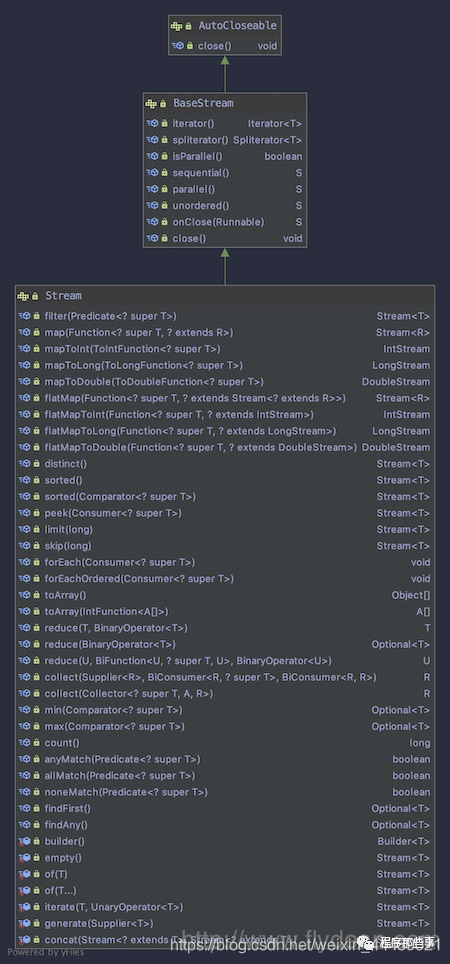
从上面的图中我们可以看到Stream继承自BaseStream。Stream中定义了很多非常实用的方法,比如filter,map,flatmap,forEach,reduce,collect等等。接下来我们将会逐一讲解。
1.1 创建Stream
Stream的创建有很多方式,java引入Stream之后所有的集合类都添加了一个stream()方法,通过这个方法可以直接得到其对应的Stream。也可以通过Stream.of方法来创建:
//Stream Creation
        String[] arr = new String[]{"a", "b", "c"};
        Stream<String> stream = Arrays.stream(arr);
        stream = Stream.of("a", "b", "c");
1.2 Streams多线程
如果我们想使用多线程来处理集合类的数据,Stream提供了非常方便的多线程方法parallelStream():
//Multi-threading
        List<String> list =new ArrayList();
        list.add("aaa");
        list.add("bbb");
        list.add("abc");
        list.add("ccc");
        list.add("ddd");
        list.parallelStream().forEach(element -> doPrint(element));
1.3 Stream的基本操作
Stream的操作可以分为两类,一类是中间操作,中间操作返回Stream,因此可以级联调用。另一类是终止操作,这类操作会返回Stream定义的类型。
//Operations
        long count = list.stream().distinct().count();
上面的例子中,distinct()返回一个Stream,所以可以级联操作,最后的count()是一个终止操作,返回最后的值。
Matching
Stream提供了anyMatch(), allMatch(), noneMatch()这三种match方式,我们看下怎么使用:
//Matching
   boolean isValid =list.stream()
        .anyMatch(element -> element.contains("h"));
   boolean isValidOne = list.stream()
        .allMatch(element -> element.contains("h"));
   boolean isValidTwo = list.stream()
        .noneMatch(element -> element.contains("h"));
Filtering
filter() 方法允许我们对Stream中的数据进行过滤,从而得到我们需要的:
Stream<String> filterStream = list.stream()
              .filter(element -> element.contains("d"));
上面的例子中我们从list中选出了包含“d”字母的String。
Mapping
map就是对Stream中的值进行再加工,然后将加工过后的值作为新的Stream返回。
//Mapping
        Stream<String> mappingStream = list.stream()
                   .map(element -> convertElement(element));
    private static String convertElement(String element) {
        return "element"+"abc";
    }
上的例子中我们把list中的每个值都加上了“abc”然后返回一个新的Stream。
FlatMap
flatMap和Map很类似,但是他们两个又有不同,看名字我们可以看到flatMap意思是打平之后再做Map。
怎么理解呢?
假如我们有一个CustBook类:
@Data
public class CustBook {

    List<String> bookName;
}
CustBook定义了一个bookName字段。
先看一下Map返回的结果:
List<CustBook> users = new ArrayList<>();
        users.add(new CustBook());
Stream<Stream<String>> userStreamMap
                = users.stream().map(user -> user.getBookName().stream());
在上面的代码中,map将每一个user都转换成了stream,所以最后的结果是返回Stream的Stream。
如果我们只想返回String,则可以使用FlatMap:
List<CustBook> users = new ArrayList<>();
        users.add(new CustBook());
        Stream<String> userStream
                = users.stream().flatMap(user -> user.getBookName().stream());
简单点讲FlatMap就是将层级关系铺平重来。
Reduction
使用reduce() 方法可以方便的对集合的数据进行运算,reduce()接收两个参数,第一个是开始值,后面是一个函数表示累计。
//Reduction
        List<Integer> integers = Arrays.asList(1, 1, 1);
        Integer reduced = integers.stream()
              .reduce(100, (a, b) -> a + b);
上面的例子我们定义了3个1的list,然后调用reduce(100, (a, b) -> a + b)方法,最后的结果是103.
Collecting
collect()方法可以方便的将Stream再次转换为集合类,方便处理和展示:
List<String> resultList
                = list.stream().map(element -> element.toUpperCase()).collect(Collectors.toList
2. functional interface的分类和使用
java 8引入了lambda表达式,lambda表达式实际上表示的就是一个匿名的function。
在java 8之前,如果需要使用到匿名function需要new一个类的实现,但是有了lambda表达式之后,一切都变的非常简介。
我们看一个之前讲线程池的时候的一个例子:
//ExecutorService using class
        ExecutorService executorService = Executors.newSingleThreadExecutor();
        executorService.submit(new Runnable() {
            @Override
            public void run() {
            log.info("new runnable");
            }
        });
executorService.submit需要接收一个Runnable类,上面的例子中我们new了一个Runnable类,并实现了它的run()方法。
上面的例子如果用lambda表达式来重写,则如下所示:
//ExecutorService using lambda
        executorService.submit(()->log.info("new runnable"));
看起是不是很简单,使用lambda表达式就可以省略匿名类的构造,并且可读性更强。
那么是不是所有的匿名类都可以用lambda表达式来重构呢?也不是。
我们看下Runnable类有什么特点:
@FunctionalInterface
public interface Runnable
Runnable类上面有一个@FunctionalInterface注解。这个注解就是我们今天要讲到的Functional Interface。
2.1 Functional Interface
Functional Interface是指带有 @FunctionalInterface 注解的interface。它的特点是其中只有一个子类必须要实现的abstract方法。如果abstract方法前面带有default关键字,则不做计算。
其实这个也很好理解,因为Functional Interface改写成为lambda表达式之后,并没有指定实现的哪个方法,如果有多个方法需要实现的话,就会有问题。
@Documented
@Retention(RetentionPolicy.RUNTIME)
@Target(ElementType.TYPE)
public @interface FunctionalInterface {}
Functional Interface一般都在java.util.function包中。
根据要实现的方法参数和返回值的不同,Functional Interface可以分为很多种,下面我们分别来介绍。
2.2 Function:一个参数一个返回值
Function接口定义了一个方法,接收一个参数,返回一个参数。
@FunctionalInterface
public interface Function<T, R> {

    /**
     * Applies this function to the given argument.
     *
     * @param t the function argument
     * @return the function result
     */
    R apply(T t);
一般我们在对集合类进行处理的时候,会用到Function。
Map<String, Integer> nameMap = new HashMap<>();
        Integer value = nameMap.computeIfAbsent("name", s -> s.length());
上面的例子中我们调用了map的computeIfAbsent方法,传入一个Function。
上面的例子还可以改写成更短的:
Integer value1 = nameMap.computeIfAbsent("name", String::length);
Function没有指明参数和返回值的类型,如果需要传入特定的参数,则可以使用IntFunction, LongFunction, DoubleFunction:
@FunctionalInterface
public interface IntFunction<R> {

    /**
     * Applies this function to the given argument.
     *
     * @param value the function argument
     * @return the function result
     */
    R apply(int value);
}
如果需要返回特定的参数,则可以使用ToIntFunction, ToLongFunction, ToDoubleFunction:
@FunctionalInterface
public interface ToDoubleFunction<T> {

    /**
     * Applies this function to the given argument.
     *
     * @param value the function argument
     * @return the function result
     */
    double applyAsDouble(T value);
}
如果要同时指定参数和返回值,则可以使用DoubleToIntFunction, DoubleToLongFunction, IntToDoubleFunction, IntToLongFunction, LongToIntFunction, LongToDoubleFunction:
@FunctionalInterface
public interface LongToIntFunction {

    /**
     * Applies this function to the given argument.
     *
     * @param value the function argument
     * @return the function result
     */
    int applyAsInt(long value);
}
2.3 BiFunction:接收两个参数,一个返回值
如果需要接受两个参数,一个返回值的话,可以使用BiFunction:BiFunction, ToDoubleBiFunction, ToIntBiFunction, ToLongBiFunction等。
@FunctionalInterface
public interface BiFunction<T, U, R> {

    /**
     * Applies this function to the given arguments.
     *
     * @param t the first function argument
     * @param u the second function argument
     * @return the function result
     */
    R apply(T t, U u);
我们看一个BiFunction的例子:
//BiFunction
        Map<String, Integer> salaries = new HashMap<>();
        salaries.put("alice", 100);
        salaries.put("jack", 200);
        salaries.put("mark", 300);

        salaries.replaceAll((name, oldValue) ->
                name.equals("alice") ? oldValue : oldValue + 200);
2.4 Supplier:无参的Function
如果什么参数都不需要,则可以使用Supplier:
@FunctionalInterface
public interface Supplier<T> {

    /**
     * Gets a result.
     *
     * @return a result
     */
    T get();
}
2.5 Consumer:接收一个参数,不返回值
Consumer接收一个参数,但是不返回任何值,我们看下Consumer的定义:
@FunctionalInterface
public interface Consumer<T> {

    /**
     * Performs this operation on the given argument.
     *
     * @param t the input argument
     */
    void accept(T t);
看一个Consumer的具体应用:
//Consumer
        nameMap.forEach((name, age) -> System.out.println(name + " is " + age + " years old"));
2.6 Predicate:接收一个参数,返回boolean
@FunctionalInterface
public interface Predicate<T> {
    /**
     * Evaluates this predicate on the given argument.
     *
     * @param t the input argument
     * @return {@code true} if the input argument matches the predicate,
     * otherwise {@code false}
     */
    boolean test(T t);
如果用在集合类的过滤上面那是极好的:
//Predicate
        List<String> names = Arrays.asList("A", "B", "C", "D", "E");
        List<String> namesWithA = names.stream()
                .filter(name -> name.startsWith("A"))
                .collect(Collectors.toList());
2.7 Operator:接收和返回同样的类型
Operator接收和返回同样的类型,有很多种Operator:UnaryOperator BinaryOperator ,DoubleUnaryOperator, IntUnaryOperator, LongUnaryOperator, DoubleBinaryOperator, IntBinaryOperator, LongBinaryOperator等。
@FunctionalInterface
public interface IntUnaryOperator {

    /**
     * Applies this operator to the given operand.
     *
     * @param operand the operand
     * @return the operator result
     */
    int applyAsInt(int operand);
我们看一个BinaryOperator的例子:
 //Operator
        List<Integer> values = Arrays.asList(1, 2, 3, 4, 5);
        int sum = values.stream()
                .reduce(0, (i1, i2) -> i1 + i2);





 扫一扫
扫一扫


 1613
1613

 被折叠的 条评论
为什么被折叠?
被折叠的 条评论
为什么被折叠?
 到【灌水乐园】发言





