ApplicationContext 的实现类,点击左上角小图标可以查看,我们用到的主要是如下红框“注解实现”和“XML实现”两种方式
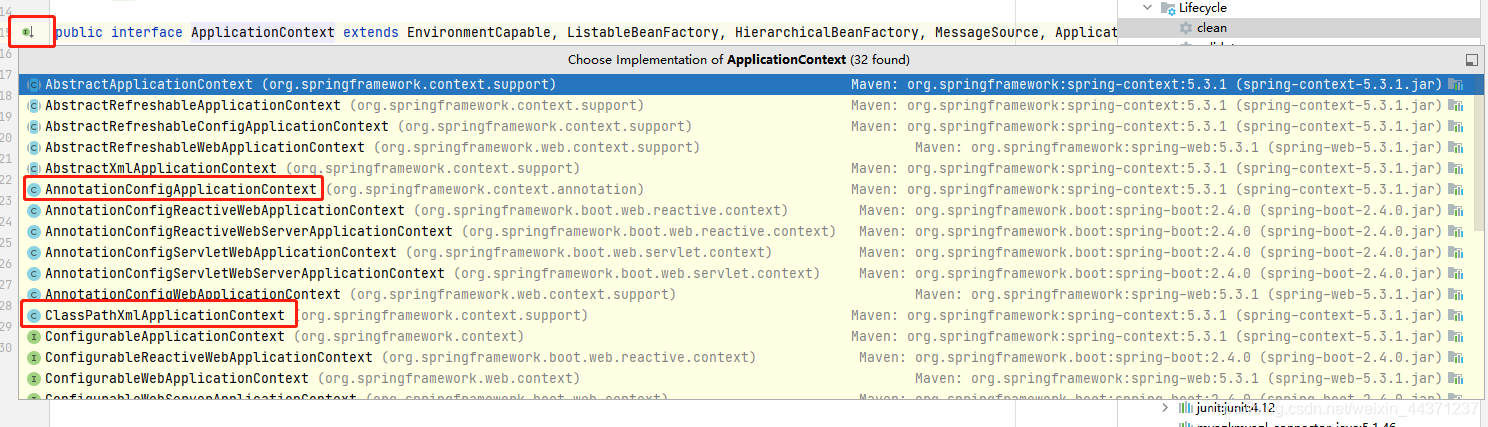
XML配置需要写xml文件
注解配置把相应配置写java文件里
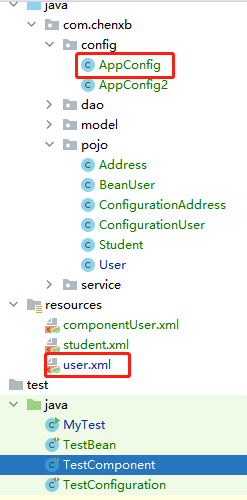
JAVA配置类
package com.chenxb.config;
import com.chenxb.pojo.ConfigurationAddress;
import com.chenxb.pojo.ConfigurationUser;
import org.springframework.context.annotation.Bean;
import org.springframework.context.annotation.Configuration;
@Configuration
public class AppConfig {
@Bean
public ConfigurationUser getConfigurationUser() {
return new ConfigurationUser();
}
@Bean
public ConfigurationAddress getConfigurationAddress() {
return new ConfigurationAddress();
}
}
XML配置类
<?xml version="1.0" encoding="UTF-8"?>
<beans xmlns="http://www.springframework.org/schema/beans"
       xmlns:xsi="http://www.w3.org/2001/XMLSchema-instance"
       xmlns:p="http://www.springframework.org/schema/p" xmlns:c="http://www.springframework.org/schema/c"
       xmlns:context="http://www.springframework.org/schema/context"
       xsi:schemaLocation="http://www.springframework.org/schema/beans
        https://www.springframework.org/schema/beans/spring-beans.xsd
        http://www.springframework.org/schema/context
        https://www.springframework.org/schema/context/spring-context.xsd">
    <!--    指定要扫描的包-->
    <context:component-scan base-package="com.chenxb.model"></context:component-scan>
<!--    <context:annotation-config/>-->
    <bean id="ComponentAddress" class="com.chenxb.model.ComponentAddress"  scope="singleton" />
<!--    <bean id="Address" class="com.chenxb.pojo.Address"/>-->
</beans>




 本文探讨了Spring框架中ApplicationContext的两种主要实现方式:注解配置和XML配置。注解配置通过在Java类上使用注解来定义bean,而XML配置则需要在XML文件中声明bean。示例展示了如何在JAVA配置类中创建ConfigurationUser和ConfigurationAddress bean,以及XML配置文件中如何指定扫描包和定义bean。这两种方式为Spring应用提供了灵活的初始化和管理组件的方式。





 扫一扫
扫一扫


 2959
2959

 被折叠的 条评论
为什么被折叠?
被折叠的 条评论
为什么被折叠?
 到【灌水乐园】发言





