



 本文介绍了如何在SpringBoot项目中使用jasypt对数据库密码进行加密,包括配置文件的设置、加密工具类的封装以及pom.xml的相关依赖引入。
首先准备配文件:
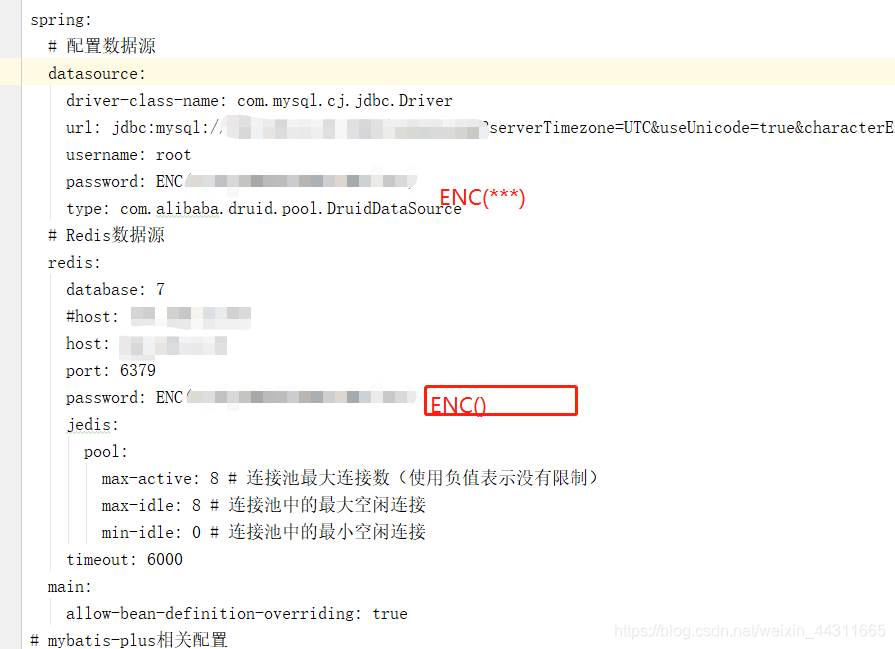
准备好封装的util:
package com.nh.schoolexam.schoolexam.utils;

import com.alibaba.druid.filter.config.ConfigTools;
import org.jasypt.encryption.pbe.StandardPBEStringEncryptor;
import org.jasypt.encryption.pbe.config.EnvironmentPBEConfig;
import org.junit.Test;
//数据库加密
public class ADSUtil {


    @Test
    public void testEncrypt() throws Exception {
        StandardPBEStringEncryptor standardPBEStringEncryptor = new StandardPBEStringEncryptor();
        EnvironmentPBEConfig config = new EnvironmentPBEConfig();

        config.setAlgorithm("PBEWithMD5AndDES");          // 加密的算法,这个算法是默认的
        config.setPassword("redis");                        // 加密的密钥,随便自己填写,很重要千万不要告诉别人
        standardPBEStringEncryptor.setConfig(config);
        String plainText = "123456";         //自己的密码
        String encryptedText = standardPBEStringEncryptor.encrypt(plainText);
        System.out.println(encryptedText);
    }

    @Test
    public void testDe() throws Exception {
        StandardPBEStringEncryptor standardPBEStringEncryptor = new StandardPBEStringEncryptor();
        EnvironmentPBEConfig config = new EnvironmentPBEConfig();

        config.setAlgorithm("PBEWithMD5AndDES");
        config.setPassword("Hello");
        standardPBEStringEncryptor.setConfig(config);
        String encryptedText = "uDZT5i+7Mjq5PHGFmpXmrTohbvw0E6ys";   //加密后的密码
        String plainText = standardPBEStringEncryptor.decrypt(encryptedText);
        System.out.println(plainText);
    }

}
pom文件:
<dependency>
    <groupId>com.github.ulisesbocchio</groupId>
    <artifactId>jasypt-spring-boot-starter</artifactId>
    <version>2.1.0</version>
</dependency>





 扫一扫
扫一扫


 1060
1060

 被折叠的 条评论
为什么被折叠?
被折叠的 条评论
为什么被折叠?
 到【灌水乐园】发言





