


 本文介绍了如何利用TexturePacker工具制作Unity图集。首先,阐述了TexturePacker作为图集制作工具的优势,并提供了官方教程链接。接着,详细说明了安装和配置过程,包括下载TexturePacker、在Unity Asset Store获取TexturePacker Importer插件。内容还涉及选择Unity框架、导入精灵、生成.png和.tpsheet文件,以及将这些资源导入Unity。在Unity中,资源会被自动处理,可以存放在Resources文件夹下,通过Resources.LoadAll()方法便捷地加载和管理精灵。
使用TexturePacker的优点,附上官方讲解链接:https://www.codeandweb.com/texturepacker/tutorials/using-spritesheets-with-unity
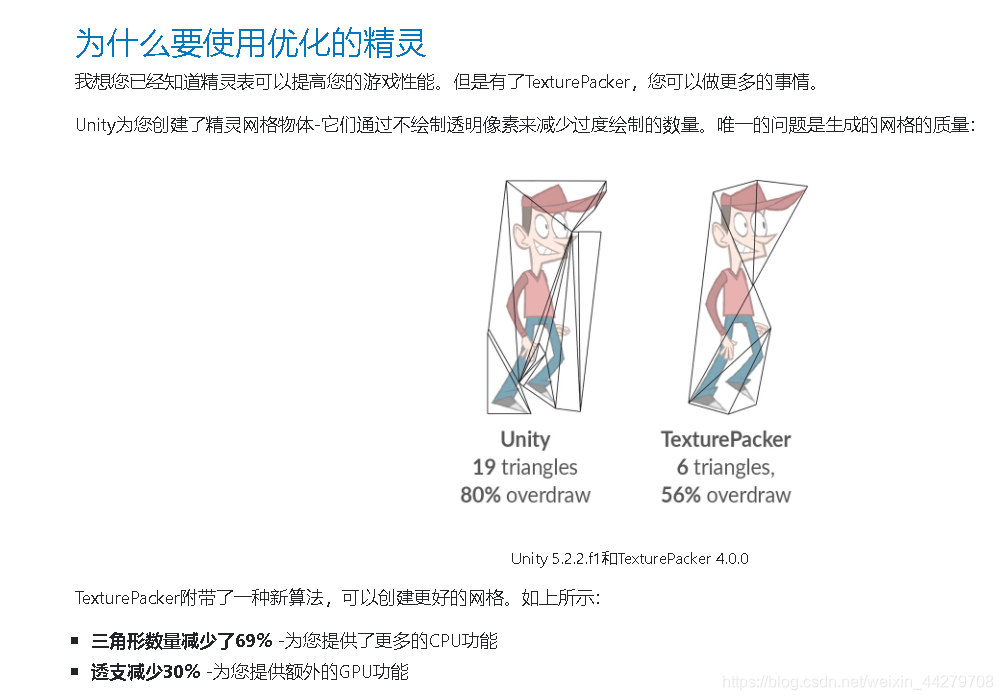
准备工作
- 安装 TexturePacker,官方网址:https://www.codeandweb.com/texturepacker
- unity商店中下载TexturePacker Importer,导入unity中,下载地址:https://assetstore.unity.com/packages/tools/sprite-management/texturepacker-importer-16641
 最低0.47元/天 解锁文章






 扫一扫
扫一扫


 2604
2604

 被折叠的 条评论
为什么被折叠?
被折叠的 条评论
为什么被折叠?
 到【灌水乐园】发言





