



 本文详细介绍了如何使用Java和JSP实现一个图书管理系统,包括图书的添加、编辑、删除和查询功能。系统采用MVC架构,利用自定义的BaseDao类进行数据库操作,实现了分页查询和数据展示。
实现如下:
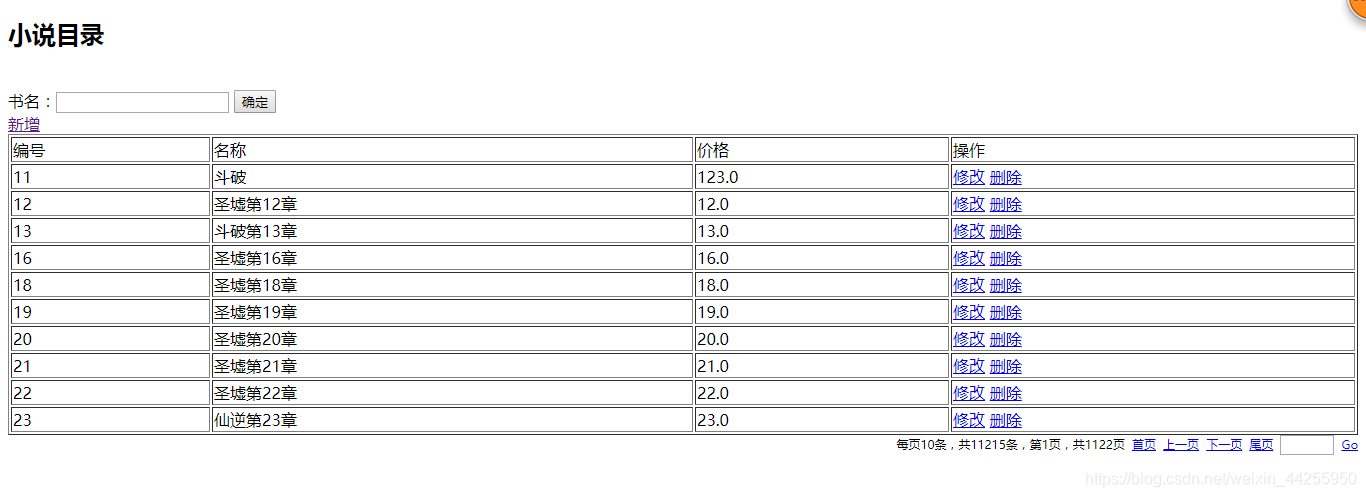
bookEdit.jsp
<%@ page language="java" contentType="text/html; charset=utf-8"
    pageEncoding="utf-8"%>
<!DOCTYPE html PUBLIC "-//W3C//DTD HTML 4.01 Transitional//EN" "http://www.w3.org/TR/html4/loose.dtd">
<html>
<head>
<meta http-equiv="Content-Type" content="text/html; charset=utf-8">
<title>书籍的编辑页面</title>
</head>
<body>
<form action="${pageContext.request.contextPath}/book.action?methodName=${book.bname==null ? 'add' : 'edit'}" method="post">
bid:<input type="text" value="${book.bid }" name="bid" ><br>
bname:<input type="text" value="${book.bname }" name="bname" ><br>
price:<input type="text" value="${book.price }" name="price" ><br>
<input type="submit" value="ok" >
</form>
</body>
</html>
bookList.jsp
<%@ page language="java" contentType="text/html; charset=utf-8"
pageEncoding="utf-8"%>
<%@ taglib uri="http://java.sun.com/jsp/jstl/core" prefix="c" %>
<%@ taglib uri="/onlyK" prefix="z" %>
<!DOCTYPE html PUBLIC "-//W3C//DTD HTML 4.01 Transitional//EN" "http://www.w3.org/TR/html4/loose.dtd">
<html>
<head>
<meta http-equiv="Content-Type" content="text/html; charset=utf-8">
<title>书籍主页</title>
</head>
<body>
<h2>小说目录</h2>
<br>
<form action="${pageContext.request.contextPath}/book.action?methodName=list"
method="post">
<!-- 每页20行数据 -->
<!-- <input type="hidden" name='rows' value="20" > -->
<!-- 不分页 -->
<input type="hidden" name='pagination' value="false" >
书名:<input type="text" name="bname">
<!-- 书籍的类别:<input type="checkbox" name="bookType" value="1">玄幻
<input type="checkbox" name="bookType" value="2">都市
<input type="checkbox" name="bookType" value="3">言情 -->
<input type="submit"
value="确定">
</form>
<a href="${pageContext.request.contextPath}/book.action?methodName=preSave">新增</a>
<table border="1" width="100%">
<tr>
<td>编号</td>
<td>名称</td>
<td>价格</td>
<td>操作</td>
</tr>
<c:forEach items="${bookList }" var="b">
<tr>
<td>${b.bid }</td>
<td>${b.bname }</td>
<td>${b.price }</td>
<td>
<a href="${pageContext.request.contextPath}/book.action?methodName=preSave&&bid=${b.bid}">修改</a>
<a href="${pageContext.request.contextPath}/book.action?methodName=del&&bid=${b.bid}">删除</a>
</td>
</tr>
</c:forEach>
</table>
<z:page pageBean="${pageBean }"></z:page>
<%-- <form id='pageBeanForm' action=' ${pageBean.url }' method='post'>
<input type='hidden' name=''> <input type='hidden' name='page'>
</form>
<div style='text-align: right; font-size: 12px;'>
每页N条,共N条,第N页,共N页 <a href='javascript:gotoPage(?)'>首页</a> <a
href='javascript:gotoPage(?)'>上一页</a> <a
href='javascript:gotoPage(?)'>下一页</a> <a
href='javascript:gotoPage(?)'>尾页</a> <input type='text'
id='skipPage'
style='text-align: center; font-size: 12px; width: 50px;'> <a
href='javascript:skipPage()'>Go</a>
</div> --%>
<!-- <script type='text/javascript'>
function gotoPage(page) {
document.getElementById('pageBeanForm').page.value = page;
document.getElementById('pageBeanForm').submit();
}
function skipPage() {
var page = document.getElementById('skipPage').value;
if(!page || isNaN(page) || parseInt(page)<1 || parseInt(page)>maxPage){
alert('请输入1~N的数字');
return;
}
gotoPage(page);
}
</script> -->
</body>
</html>
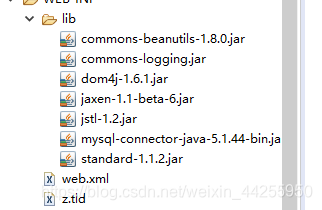
使用的jar包
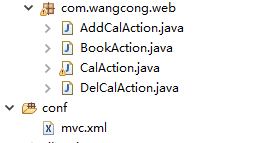
所用辅助类:
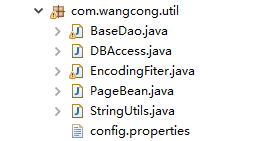
在前面的博客中有使用过。
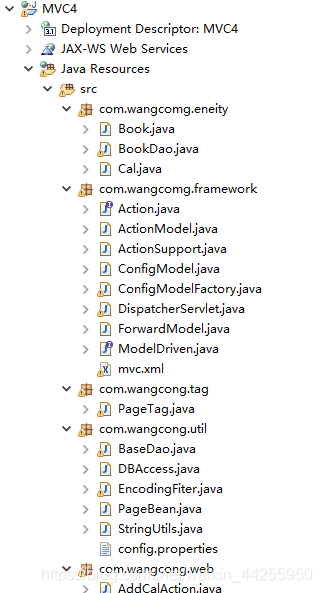
贴上book实体类
package com.wangcomg.eneity;

public class Book {
	private int bid;
	private String bname;
	private float price;

	@Override
	public String toString() {
		return "Book [bid=" + bid + ", bname=" + bname + ", price=" + price + "]";
	}

	public int getBid() {
		return bid;
	}

	public void setBid(int bid) {
		this.bid = bid;
	}

	public String getBname() {
		return bname;
	}

	public void setBname(String bname) {
		this.bname = bname;
	}

	public float getPrice() {
		return price;
	}

	public void setPrice(float price) {
		this.price = price;
	}

    public Book() {

    }

	public Book(int bid, String bname, float price) {
		super();
		this.bid = bid;
		this.bname = bname;
		this.price = price;
	}

}
bookdao
package com.wangcomg.eneity;

import java.sql.Connection;

import java.sql.PreparedStatement;
import java.sql.SQLException;
import java.util.List;

import com.wangcong.util.BaseDao;
import com.wangcong.util.DBAccess;
import com.wangcong.util.PageBean;
import com.wangcong.util.StringUtils;

public class BookDao extends BaseDao<Book> {
	//查询
public List<Book> list(Book book,PageBean pageBean) throws InstantiationException, IllegalAccessException, SQLException{
	String sql="select * from t_mvc_book where true";
	String bname=book.getBname();
	int bid = book.getBid();

	if(StringUtils.isNotBlank(bname)) {
		sql+=" and bname like '%"+bname+"%'";
	}

	if(bid!=0) {
		sql+=" and bid = "+bid;
	}
	return super.executeQuery(sql, Book.class, pageBean);
}

public int add(Book book) throws SQLException, IllegalArgumentException, IllegalAccessException {
	String sql="insert into t_mvc_book values(?,?,?)";
	return super.executeUpdate(sql, new String [] {"bid","bname","price"}, book);
}

public int edit(Book book) throws SQLException, IllegalArgumentException, IllegalAccessException {
	String sql="update t_mvc_book set bname=?,price=? where bid=?";
	return super.executeUpdate(sql, new String [] {"bname","price","bid"}, book);
}

public int del(Book book) throws SQLException, IllegalArgumentException, IllegalAccessException {
	String sql="delete from t_mvc_book where bid=?";
	return super.executeUpdate(sql, new String [] {"bid"}, book);
}

public static void main(String[] args) throws IllegalArgumentException, IllegalAccessException, SQLException {
	BookDao bookDao=new BookDao();
	Book book=new Book(141313,"xxx",56f);
	bookDao.del(book);
}
}
baseDao
package com.wangcong.util;

import java.lang.reflect.Field;

import java.sql.Connection;
import java.sql.PreparedStatement;
import java.sql.ResultSet;
import java.sql.SQLException;
import java.util.ArrayList;
import java.util.List;


/**
 * 用来处理所有表的增删改查
 *
 * 查询值得是:通用的分页查询
 * @author 86135
 *
 * @param <T>
 */
public class BaseDao<T>{
	/**
	 * sql 可能不用的表,那么意味着Sql是获得变化的那边它是从子类再传递到父类
	 * clz 需要返回不同的对象集合,Book.Class/Order.Class
	 * page 可能要分页
	 * @param sql
	 * @param clz
	 * @param page
	 * @return
	 * @throws SQLException
	 * @throws IllegalAccessException
	 * @throws InstantiationException
	 */
//	public List<T> executeQuery(String sql,Class clz,PageBean page) throws SQLException, InstantiationException, IllegalAccessException{
//		List<T> list=new ArrayList<T>();
//		Connection con=DBAccess.getConnection();
//		PreparedStatement ps = con.prepareStatement(sql);
//		ResultSet rs = ps.executeQuery();
//		T t=null;
//		while(rs.next()) {
//			//list.add(new Book(rs.getInt("bid"),rs.getString("bname"),rs.getFloat("price")));
//			/**
//			 * 1.实例化了一个Book对象
//			 * 2.通过book对象的属性名去游标中取出属性值
//			 *  2.1获取到类对象中的属性
//			 *  2.2然后给属性赋值
//			 * 3.已经赋值好的book实例对象放入list集合中
//			 *
//			 * clz>Book.class
//			 */
//			t=(T) clz.newInstance();
//			Field[] field = clz.getDeclaredFields();
//			for (Field f : field) {
//				f.setAccessible(true);
//				f.set(t, rs.getObject(f.getName()));
//			}
//			list.add( t);
//		}
//		return list;
//	}

	//第三
		public List<T> executeQuery(String sql,Class clz,PageBean pageBean) throws SQLException, InstantiationException, IllegalAccessException{
		List<T> list=new ArrayList<T>();
		Connection con=DBAccess.getConnection();
		PreparedStatement ps =null;
		ResultSet rs = null;
		if(pageBean!=null && pageBean.isPagination()) {
			//分页代码
			/*
			 * 1.分页是与PageBean中total有关,意味着需要查询数据库得到得到total给pageBean
			 * 2。查询出符合条件的某一页的数据
			 * select count(*) from (select * from t_mvc_book where bname like '%圣墟%') t;
			 */
			//通过原生Sql拼接出符合条件的
			String countSql=getCountSql(sql);
			ps = con.prepareStatement(countSql);
			 rs=ps.executeQuery();
			 if(rs.next()) {
				 pageBean.setTotal(rs.getObject(1).toString());
			 }
			 //第二部 拼接 select * from t_mvc_book where bname like '%圣墟%'  limit 10,10;
			 String pageSql=getPageSql(sql,pageBean);
			 ps = con.prepareStatement(pageSql);
			 rs=ps.executeQuery();
		}else {
			//不分页代码
			ps = con.prepareStatement(sql);
			 rs=ps.executeQuery();
		}

		T t=null;
		while(rs.next()) {
			//list.add(new Book(rs.getInt("bid"),rs.getString("bname"),rs.getFloat("price")));
			/**
			 * 1.实例化了一个Book对象
			 * 2.通过book对象的属性名去游标中取出属性值
			 *  2.1获取到类对象中的属性
			 *  2.2然后给属性赋值
			 * 3.已经赋值好的book实例对象放入list集合中
			 *
			 * clz>Book.class
			 */
			t=(T) clz.newInstance();
			Field[] field = clz.getDeclaredFields();
			for (Field f : field) {
				f.setAccessible(true);
				f.set(t, rs.getObject(f.getName()));
			}
			list.add( t);
		}
		DBAccess.close(con, ps, rs);
		return list;
	}


	private String getPageSql(String sql, PageBean pageBean) {
		return sql+" limit "+pageBean.getStartIndex()+","+pageBean.getRows();
	}


	private String getCountSql(String sql) {
		return "select count(1) from ("+sql+") t";
	}
	/**
	 * 通用增删改
	 *
	 * @param sql 增删改的Sql语句
	 * @param t 实体类(里面包含了参数值)
	 * @param attrs 代表Sql语句的问号
	 * @return
	 */
	public int executeUpdate(String sql,String[] attrs,T t) throws IllegalArgumentException, IllegalAccessException, SQLException {
		Connection con=DBAccess.getConnection();
	    PreparedStatement pst = con.prepareStatement(sql);
	    Field field=null;
     /* pst.setInt(1, book.getBid());
	    pst.setString(2, book.getBname());
	    pst.setFloat(3, book.getPrice()); */
	    //一切反射的相关代码都是从类对象开始
	    //Field[] fields = t.getClass().getDeclaredFields();
	   for (int i = 0; i < attrs.length; i++) {
		   try {
			field=t.getClass().getDeclaredField(attrs[i]);
			 field.setAccessible(true);
	          pst.setObject(i+1,field.get(t));
		} catch (NoSuchFieldException | SecurityException e) {
			e.printStackTrace();
		}
	}
	   int num = pst.executeUpdate();
	   DBAccess.close(con, pst, null);
		return num;
	}

}
bookAction
package com.wangcong.web;


import java.sql.SQLException;
import java.util.List;

import javax.servlet.http.HttpServletRequest;
import javax.servlet.http.HttpServletResponse;

import com.wangcomg.eneity.Book;
import com.wangcomg.eneity.BookDao;
import com.wangcomg.framework.ActionSupport;
import com.wangcomg.framework.ModelDriven;
import com.wangcong.util.PageBean;

public class BookAction extends ActionSupport implements ModelDriven<Book>{
private Book book=new Book();
private BookDao bookDao=new BookDao();

public String list(HttpServletRequest req,HttpServletResponse resp	) {
	PageBean pageBean = new PageBean();
	pageBean.setRequest(req);
	try {
		List<Book> list = this.bookDao.list(book, pageBean);
		req.setAttribute("bookList", list);
		req.setAttribute("pageBean", pageBean);

	} catch (InstantiationException | IllegalAccessException | SQLException e) {
		e.printStackTrace();
	}
	return "list";
}
/**
 * 跳转新增修改页面(新增修改页面是同一个)
 * @param req
 * @param resp
 * @return
 */
public String preSave(HttpServletRequest req,HttpServletResponse resp) {
	if(book.getBid()!=0) {
		try {
			//数据回显的数据
			Book b = this.bookDao.list(book, null).get(0);
			req.setAttribute("book", b);
		} catch (InstantiationException | IllegalAccessException | SQLException e) {
			// TODO Auto-generated catch block
			e.printStackTrace();
		}
	}
	return "edit";
}

public String add(HttpServletRequest req,HttpServletResponse resp) {
	try {
		this.bookDao.add(book);
	} catch (IllegalArgumentException | IllegalAccessException | SQLException e) {
		e.printStackTrace();
	}
	return "toList";
}

public String edit(HttpServletRequest req,HttpServletResponse resp) {
	try {
		this.bookDao.edit(book);
	} catch (IllegalArgumentException | IllegalAccessException | SQLException e) {
		// TODO Auto-generated catch block
		e.printStackTrace();
	}
	return "toList";
}


public String del(HttpServletRequest req,HttpServletResponse resp) {
	try {
		this.bookDao.del(book);
	} catch (IllegalArgumentException | IllegalAccessException | SQLException e) {
		e.printStackTrace();
	}
	return "toList";
}
@Override
public Book getModel() {
	return book;
}

}
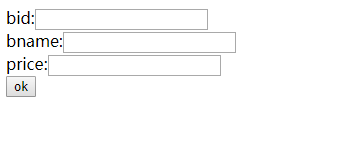
新增页面





 扫一扫
扫一扫


 258
258

 被折叠的 条评论
为什么被折叠?
被折叠的 条评论
为什么被折叠?
 到【灌水乐园】发言





