



 本文介绍了如何在Spring+SpringMVC环境下整合Kafka,包括环境变量安装、启动Zookeeper和Kafka、项目结构、配置文件设置以及生产者和消费者的实现。通过详细步骤和源码分享,帮助读者理解并实现Spring集成Kafka的基本过程。
记一次spring+springmvc整合kafka的过程,简单示例初学者(附源码)
环境变量的安装
1.首先是jdk的安装
下载地址:jdk下载
2.安装zookper和kafka,网上有很多案例 不在赘述
启动zookper和kafka
成功安装zookper和kafka之后
1.启动zookper:zkserver
启动成功

2.启动kafka
在kafka安装目录下–>shift+鼠标右键–>打开Powershell窗口
输入命令: .\bin\windows\kafka-server-start.bat .\config\server.properties

项目结构图

pom.xml 引入kafka所需的jar包
注意pom依赖的版本问题 我就是其中一个版本太低导致我一直错误
  <!-- kafka客户端支持包 -->
	   <dependency>
	        <groupId>org.apache.kafka</groupId>
	        <artifactId>kafka-clients</artifactId>
	        <version>0.11.0.1</version>
	    </dependency>
		<!-- spring支持kafka -->
	    <dependency>
	        <groupId>org.springframework.kafka</groupId>
	        <artifactId>spring-kafka</artifactId>
	        <version>2.0.4.RELEASE</version>
	    </dependency>
config.properties配置文件
#============================= kafka ============================#
#主题
#页面浏览  topic
kafka.topic_page=pageTopic
#点击  topic
kafka.topic_click=clickTopic
#kafka 集群地址
kafka.servers=192.168.28.129:9092,192.168.28.130:9092,192.168.28.131:9092
#指定组名
kafka.group_id_report=report-data
kafka.report_data_container="reportDataContainer1"
application-kafka.xml
<?xml version="1.0" encoding="UTF-8"?>
<beans xmlns="http://www.springframework.org/schema/beans"
    xmlns:xsi="http://www.w3.org/2001/XMLSchema-instance"
    xmlns:p="http://www.springframework.org/schema/p"
    xmlns:aop="http://www.springframework.org/schema/aop"
    xmlns:context="http://www.springframework.org/schema/context"
    xmlns:jee="http://www.springframework.org/schema/jee"
    xmlns:tx="http://www.springframework.org/schema/tx"
    xmlns:task="http://www.springframework.org/schema/task"
    xmlns:mvc="http://www.springframework.org/schema/mvc"
    xmlns:rabbit="http://www.springframework.org/schema/rabbit"
    xsi:schemaLocation="
        http://www.springframework.org/schema/aop http://www.springframework.org/schema/aop/spring-aop-4.0.xsd
        http://www.springframework.org/schema/beans http://www.springframework.org/schema/beans/spring-beans-4.0.xsd
        http://www.springframework.org/schema/context http://www.springframework.org/schema/context/spring-context-4.0.xsd
        http://www.springframework.org/schema/jee http://www.springframework.org/schema/jee/spring-jee-4.0.xsd
        http://www.springframework.org/schema/tx http://www.springframework.org/schema/tx/spring-tx-4.0.xsd
        http://www.springframework.org/schema/task http://www.springframework.org/schema/task/spring-task-4.1.xsd
        http://www.springframework.org/schema/mvc http://www.springframework.org/schema/mvc/spring-mvc.xsd
        http://www.springframework.org/schema/rabbit http://www.springframework.org/schema/rabbit/spring-rabbit-2.1.xsd
        ">
        <!-- 加载配置文件 -->
		<context:property-placeholder ignore-unresolvable="false" location="classpath:properties/config.properties"/>

		<!-- 生产者 -->
		<bean id="producerFactory" class="org.springframework.kafka.core.DefaultKafkaProducerFactory">
			<constructor-arg>
				<map>
					<entry key="bootstrap.servers" value="${kafka.servers}"></entry>
					<entry key="key.serializer" value="org.apache.kafka.common.serialization.StringSerializer"></entry>
					<entry key="value.serializer" value="org.apache.kafka.common.serialization.StringSerializer"></entry>
					<entry key="key.deserializer" value="org.apache.kafka.common.serialization.StringDeserializer"></entry>
					<entry key="value.deserializer" value="org.apache.kafka.common.serialization.StringDeserializer"></entry>
				</map>
			</constructor-arg>
		</bean>
		<!-- 用于发送消息的模板 kafkaTemplate-->
        <bean id="kafkaTemplate" class="org.springframework.kafka.core.KafkaTemplate">
        	<constructor-arg ref="producerFactory"></constructor-arg>
        	<constructor-arg name="autoFlush" value="true"></constructor-arg>
        </bean>

        <!-- 创建消费者 -->
       <bean id="consumerFactory" class="org.springframework.kafka.core.DefaultKafkaConsumerFactory">
       		<constructor-arg>
       			<map>
       				<entry key="bootstrap.servers" value="${kafka.servers}"></entry>
       				<entry key="group.id" value="${kafka.report_data_container}"></entry>
       				<entry key="key.deserializer" value="org.apache.kafka.common.serialization.StringDeserializer"></entry>
       				<entry key="value.deserializer" value="org.apache.kafka.common.serialization.StringDeserializer"></entry>
       			</map>
       		</constructor-arg>
       </bean>
       <!-- 消息消费者监听器 用于在接收到消息时执行相关的业务代码  (自行定义的类 用户于处理相应的业务操作)-->
       <bean id="consumerListener" class="com.cyou.web.newsSSM.listener.KafkaConsumerListener"/>


       <!-- 用于将监听器和个某个主题绑定在一起 -->
       <bean id="containerProperties_example" class="org.springframework.kafka.listener.config.ContainerProperties">
       		<constructor-arg value="test-topic"></constructor-arg>
       		<property name="messageListener" ref="consumerListener"></property>
       		<!-- <property name="messageListener" ref="reportDataListener"/> -->
       		<!-- <constructor-arg>
       			<list>
       			 	<value>${kafka.topic_page}</value>
       			 	<value>${kafka.topic_click}</value>
       			</list>
       		</constructor-arg> -->
       </bean>
       <!-- 用于将消息监听器与消息消费者工厂绑定在一起 -->
       <bean id="messageListtenerContainer_example" class="org.springframework.kafka.listener.KafkaMessageListenerContainer">
       		<constructor-arg ref="containerProperties_example"></constructor-arg>
       		<constructor-arg ref="consumerFactory"></constructor-arg>
       </bean>

       	<!-- springMvc4 用于将对象转换为 JSON  -->
	    <bean id="stringConverter"
	        class="org.springframework.http.converter.StringHttpMessageConverter">
	        <property name="supportedMediaTypes">
	            <list>
	                <value>text/plain;charset=UTF-8</value>
	            </list>
	        </property>
	    </bean>
	    <bean id="jsonConverter"
	        class="org.springframework.http.converter.json.MappingJackson2HttpMessageConverter"></bean>
	    <bean
	        class="org.springframework.web.servlet.mvc.annotation.AnnotationMethodHandlerAdapter">
	        <property name="messageConverters">
	            <list>
	                <ref bean="stringConverter" />
	                <ref bean="jsonConverter" />
	            </list>
	        </property>
	    </bean>

</beans>
spring-mvc.xml
<?xml version="1.0" encoding="UTF-8"?>
<beans xmlns="http://www.springframework.org/schema/beans"
    xmlns:xsi="http://www.w3.org/2001/XMLSchema-instance"
    xmlns:p="http://www.springframework.org/schema/p"
    xmlns:aop="http://www.springframework.org/schema/aop"
    xmlns:context="http://www.springframework.org/schema/context"
    xmlns:jee="http://www.springframework.org/schema/jee"
    xmlns:tx="http://www.springframework.org/schema/tx"
    xsi:schemaLocation="
        http://www.springframework.org/schema/aop http://www.springframework.org/schema/aop/spring-aop-4.0.xsd
        http://www.springframework.org/schema/beans http://www.springframework.org/schema/beans/spring-beans-4.0.xsd
        http://www.springframework.org/schema/context http://www.springframework.org/schema/context/spring-context-4.0.xsd
        http://www.springframework.org/schema/jee http://www.springframework.org/schema/jee/spring-jee-4.0.xsd
        http://www.springframework.org/schema/tx http://www.springframework.org/schema/tx/spring-tx-4.0.xsd">

         <!-- 开启注解扫描功能 springMvc-->
        <context:component-scan base-package="com.java.kafka.controller" />


        <!-- 视图解析器 (对应DispatcherServlet跳转(逻辑视图名))-->
		<bean id="viewResolver"
			class="org.springframework.web.servlet.view.InternalResourceViewResolver">
			<property name="prefix" value="/WEB-INF" />
			<property name="suffix" value=".jsp"></property>
		</bean>


</beans>
web.xml
<?xml version="1.0" encoding="UTF-8"?>
<web-app xmlns:xsi="http://www.w3.org/2001/XMLSchema-instance" xmlns="http://xmlns.jcp.org/xml/ns/javaee" xsi:schemaLocation="http://xmlns.jcp.org/xml/ns/javaee http://xmlns.jcp.org/xml/ns/javaee/web-app_3_1.xsd" id="WebApp_ID" version="3.1">
  <display-name>NewsSSM</display-name>
  <welcome-file-list>
    <welcome-file>index.jsp</welcome-file>
  </welcome-file-list>

    <servlet-mapping>
   		<servlet-name>default</servlet-name>
   		<url-pattern>*.js</url-pattern>
   </servlet-mapping>

   <servlet-mapping>
   		<servlet-name>default</servlet-name>
   		<url-pattern>*.css</url-pattern>
   </servlet-mapping>

  	<!-- Spring监听器 -->
	<listener>
		<listener-class>org.springframework.web.context.ContextLoaderListener</listener-class>
	</listener>
	<!-- 防止spring内存溢出监听器 -->
    <listener>
        <listener-class>org.springframework.web.util.IntrospectorCleanupListener</listener-class>
    </listener>
    <!-- 监听servletContext,启动contextConfigLocation中的spring配置信息 -->
    <listener>
        <listener-class>org.springframework.web.context.ContextLoaderListener</listener-class>
    </listener>


	<!-- spring 配置   加载配置文件 -->
	<context-param>
		<param-name>contextConfigLocation</param-name>
		<param-value>classpath:application-kafka.xml</param-value>
	</context-param>

	<!-- 编码过滤器 -->
	<filter>
		<filter-name>encodingFilter</filter-name>
		<filter-class>org.springframework.web.filter.CharacterEncodingFilter</filter-class>
		<async-supported>true</async-supported>
		<init-param>
			<param-name>encoding</param-name>
			<param-value>UTF-8</param-value>
		</init-param>
	</filter>
	<filter-mapping>
		<filter-name>encodingFilter</filter-name>
		<url-pattern>/*</url-pattern>
	</filter-mapping>

    <!-- 添加对springmvc的支持 -->
	<servlet>
		<servlet-name>springMVC</servlet-name>
		<servlet-class>org.springframework.web.servlet.DispatcherServlet</servlet-class>
		<init-param>
			<param-name>contextConfigLocation</param-name>
			<param-value>classpath:spring-mvc.xml</param-value>
		</init-param>
		<load-on-startup>1</load-on-startup>
		<async-supported>true</async-supported>
	</servlet>
	<servlet-mapping>
		<servlet-name>springMVC</servlet-name>
		<url-pattern>*.do</url-pattern>
	</servlet-mapping>

    <context-param>
        <param-name>spring.profiles.active</param-name>
        <param-value>dev</param-value>
    </context-param>
    <context-param>
        <param-name>spring.profiles.default</param-name>
        <param-value>dev</param-value>
    </context-param>
    <context-param>
        <param-name>spring.liveBeansView.mbeanDomain</param-name>
        <param-value>dev</param-value>
    </context-param>

    <!-- 启用Web监控统计功能需要在Web应用的web.xml中加入这个Servlet声明 -->
    <servlet>
      <servlet-name>DruidStatView</servlet-name>
      <servlet-class>com.alibaba.druid.support.http.StatViewServlet</servlet-class>
  	</servlet>
  	<servlet-mapping>
      <servlet-name>DruidStatView</servlet-name>
      <url-pattern>/druid/*</url-pattern>
  	</servlet-mapping>

</web-app>
生产者SpringProducer
import org.springframework.context.ApplicationContext;
import org.springframework.context.support.ClassPathXmlApplicationContext;
import org.springframework.kafka.core.KafkaTemplate;

public class SpringProducer {
	 public static void main(String[] args) {
	        // TODO Auto-generated method stub
	        ApplicationContext context = new ClassPathXmlApplicationContext("application-kafka.xml");
	        KafkaTemplate<String, String> kafkaTemplate = (KafkaTemplate<String, String>)context.getBean("kafkaTemplate");
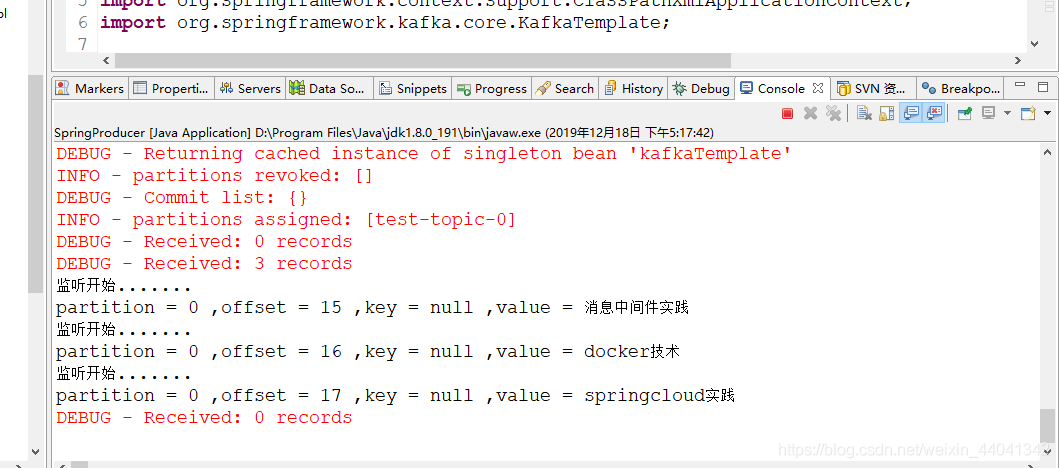
	        kafkaTemplate.send("test-topic","消息中间件实践");
	        kafkaTemplate.send("test-topic","docker技术");
	        kafkaTemplate.send("test-topic","springcloud实践");
	    }

}
消费者KafkaConsumerListener
import org.apache.kafka.clients.consumer.Consumer;
import org.apache.kafka.clients.consumer.ConsumerRecord;
import org.springframework.kafka.listener.MessageListener;
import org.springframework.kafka.support.Acknowledgment;

public class KafkaConsumerListener implements MessageListener<String, String>{

	public void onMessage(ConsumerRecord<String, String> record) {
        // TODO Auto-generated method stub
        System.out.println("监听开始.......");
        System.out.println("partition = " + record.partition()
                  + " ,offset = " + record.offset()
                  + " ,key = " + record.key() + " ,value = " + record.value());
    }

    public void onMessage(ConsumerRecord<String, String> data,
            Acknowledgment acknowledgment) {
        // TODO Auto-generated method stub

    }

    public void onMessage(ConsumerRecord<String, String> data,
            Consumer<?, ?> consumer) {
        // TODO Auto-generated method stub

    }

    public void onMessage(ConsumerRecord<String, String> data,
            Acknowledgment acknowledgment, Consumer<?, ?> consumer) {
        // TODO Auto-generated method stub

    }

}
总结
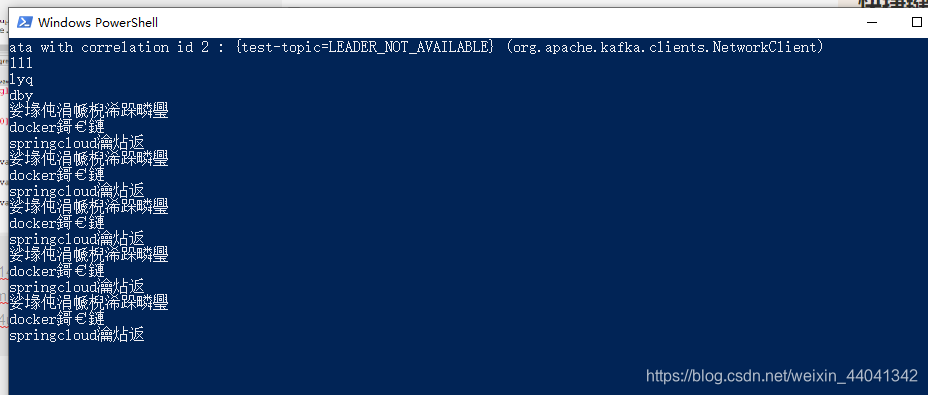
这个时候只需要启动生产者类 在控制台看到生产者生产的消息
源码链接在这里: //download.youkuaiyun.com/download/weixin_44041342/12038655
参考博文链接
https://blog.youkuaiyun.com/qq_31987649/article/details/86500936





 扫一扫
扫一扫


 420
420

 被折叠的 条评论
为什么被折叠?
被折叠的 条评论
为什么被折叠?
 到【灌水乐园】发言





