



背景:
发现项目很多entity的createTime、updateTime没有进行维护。想通过框架层面进行拓展实现自动填充数据。
    @ApiModelProperty("创建人")
    private String creator;

    @ApiModelProperty("创建时间")
    private LocalDateTime createTime;

    @ApiModelProperty("修改人")
    private String modifier;

    @ApiModelProperty("修改时间")
    private LocalDateTime modifyTime;
方案一:
通过实现MetaObjectHandler进行实现
步骤一:自定义实现 MetaObjectHandler
@Component
public class MyMetaObjectHandler implements MetaObjectHandler {
    @Override
    public void insertFill(MetaObject metaObject) {
        LocalDateTime now = LocalDateTime.now();
        String userId = LoginUserContext.getUserInfo().getId();
        this.strictInsertFill(metaObject, "creator", String.class, userId);
        this.strictInsertFill(metaObject, "create_time", LocalDateTime.class, now);
        this.strictInsertFill(metaObject, "createTime", LocalDateTime.class, now);
        this.strictInsertFill(metaObject, "modifier", String.class, userId);
        this.strictInsertFill(metaObject, "modifyTime", LocalDateTime.class, now);
    }

    @Override
    public void updateFill(MetaObject metaObject) {
        LocalDateTime now = LocalDateTime.now();
        String userId = LoginUserContext.getUserInfo().getId();
        this.strictInsertFill(metaObject, "modifier", String.class, userId);
        this.strictInsertFill(metaObject, "modifyTime", LocalDateTime.class, now);
    }
}
步骤二:实体类Entity上加@TableField注解
	@ApiModelProperty("创建人")
    @TableField(fill = FieldFill.INSERT)
    private String creator;

    @ApiModelProperty("创建时间")
    @TableField(fill = FieldFill.INSERT)
    private LocalDateTime createTime;

    @ApiModelProperty("修改人")
    @TableField(fill = FieldFill.UPDATE)
    private String modifier;

    @ApiModelProperty("修改时间")
    @TableField(fill = FieldFill.UPDATE)
    private LocalDateTime modifyTime;
两个步骤缺一不可,我的MP版本是3.5.1,这个版本里,并不支持没有@TableField(fill=XXX)的时候触发自动填充
并且理论上是只要在任意字段上加了@TableField(fill =XXX)就可以了,用不着都使用这个注解。不过还是建议加上,别误导其他小伙伴了
可以看文章后面,为什么没加这个注解就不生效!
方案二
使用MP拦截器 不使用@TableField
步骤一:定义拦截器
package com.alin.db.handler;

import com.alin.common.handler.LoginUserContext;
import lombok.extern.slf4j.Slf4j;
import org.apache.ibatis.executor.Executor;
import org.apache.ibatis.mapping.MappedStatement;
import org.apache.ibatis.plugin.*;

import java.lang.reflect.Field;
import java.lang.reflect.InvocationTargetException;
import java.time.LocalDateTime;
import java.util.Map;
import java.util.Properties;


@Intercepts({@Signature(type = Executor.class, method = "update", args = {MappedStatement.class, Object.class})})
@Slf4j
public class MpInterceptor implements Interceptor {

    @Override
    public Object intercept(Invocation invocation) throws InvocationTargetException, IllegalAccessException {
        try {
            Object[] args = invocation.getArgs();
            if (args.length > 1) {
                Object parameter = args[1];
                MappedStatement mappedStatement = (MappedStatement) args[0];
                String sqlCommandType = mappedStatement.getSqlCommandType().name();
                if ("INSERT".equals(sqlCommandType)) {
                    LocalDateTime now = LocalDateTime.now();
                    // 获取当前用户登录id
                    String userId = LoginUserContext.getUserInfo().getId();
                    this.insertFill(parameter, "creator", userId);
                    this.insertFill(parameter, "createTime", now);
                    this.insertFill(parameter, "modifier", userId);
                    this.insertFill(parameter, "modifyTime", now);
                } else if ("UPDATE".equals(sqlCommandType)) {
                    LocalDateTime now = LocalDateTime.now();
                    String userId = LoginUserContext.getUserInfo().getId();
                    this.updateFill(parameter, "modifier", userId);
                    this.updateFill(parameter, "modifyTime", now);
                }
            }
        } catch (Exception e) {
            log.error("尝试填充默认值失败", e);
        }
        return invocation.proceed();
    }


    private void insertFill(Object object, String fieldName, Object value) throws IllegalAccessException {
        Field createTimeField = this.findField(object, fieldName);
        if (createTimeField != null) {
            createTimeField.setAccessible(true);
            if (createTimeField.get(object) == null) {  // 值为空才填充
                createTimeField.set(object, value);
            }
        }
    }

    private void updateFill(Object object, String fieldName, Object value) throws IllegalAccessException {
        if (object instanceof Map) {
            Map objectMap = (Map) object;
            object = objectMap.get("param1");
        }
        Field updateTimeField = this.findField(object, fieldName);
        if (updateTimeField != null) {
            updateTimeField.setAccessible(true);
            if (updateTimeField.get(object) == null) {  // 值为空才填充
                updateTimeField.set(object, value);
            }
        }
    }

    private Field findField(Object object, String fieldName) {
        Class<?> clazz = object.getClass();
        while (clazz != null) {
            try {
                return clazz.getDeclaredField(fieldName);
            } catch (NoSuchFieldException e) {
                clazz = clazz.getSuperclass();
            }
        }
        return null;
    }

    @Override
    public Object plugin(Object target) {
        return target instanceof Executor ? Plugin.wrap(target, this) : target;
    }

    @Override
    public void setProperties(Properties properties) {
    }
}
拦截器被Bean扫描到就可以了。
踩坑记录
为啥方案一必须要使用@TableField注解,请看MP源代码
MetaObjectHandler执行的必要条件:

也就是说执行的必要条件:
- 检测到有handler
- tableInfo.isWithInsertFill() == true
tableInfo.isWithInsertFill() 是怎么情况下 == true呢?
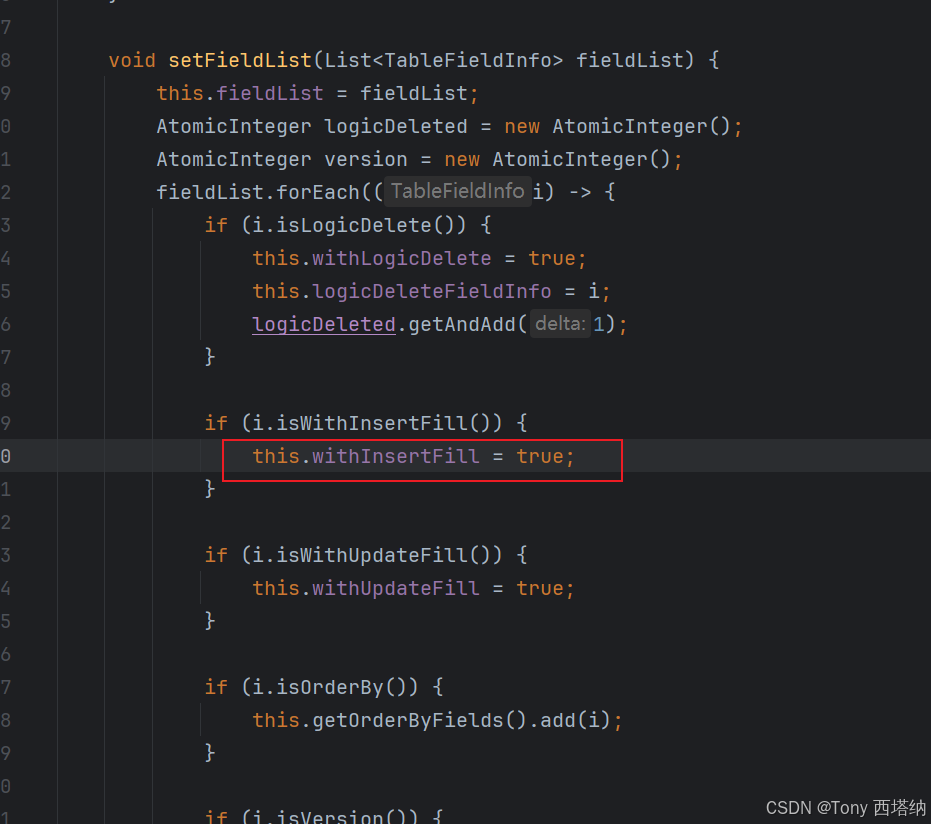
当字段的@TableFiel(fill=XXX)时,这个时候Field就会被标记,并且TableInfo也会被标记为withInsertFill 或 withUpdateFill
其实这样也就能够理解方案一的必要条件为什么是两个缺一不可了。
当然我的Entity太多了,我没办法每一个都去加上注解,而且我的字段名是固定的,所以我选择了第二种方式。
如有更好的方式,欢迎各位大佬指点





 扫一扫
扫一扫


 1709
1709

 被折叠的 条评论
为什么被折叠?
被折叠的 条评论
为什么被折叠?
 到【灌水乐园】发言





