



 本文介绍了Netty中的Channel、Buffer和Selector概念及其工作原理。详细解释了不同类型的Channel,如SocketChannel和ServerSocketChannel,以及Buffer如何与Channel交互进行数据传输。此外还探讨了Selector在多路复用中的作用。
目录
Channel
Channel 是一种 IO 操作的连接,它代表的是到实体的开放连接,这个实体可以是硬件设备、文件、网络套接字或者可执行 IO 操作(比如读、写)的程序组件。这有点类似与 Linux 系统中:一切皆文件,可以将 Netty 的 Channel 看作到文件的连接,并可以通过 IO 来操作文件。
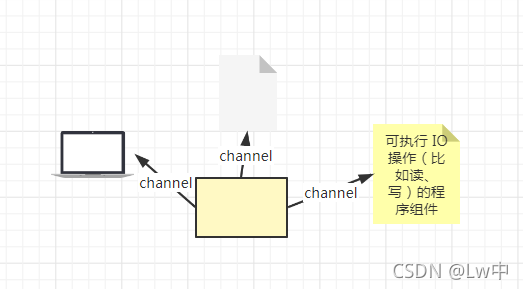
针对不同的文件类型又衍生出了不同类型的 Channel:
- SocketChannel:用于 TCP 协议,客户端与服务端之间的 Channel
- ServerSocketChannel:用于 TCP 协议,仅用于服务端的 Channel
- FileChannel:操作普通文件
- DatagramChannel:用于 UDP 协议
ServerSocketChannel 和 SocketChannel 是专门用于 TCP 协议中的。
ServerSocketChannel 是一种服务端的 Channel,只能用在服务端,可以看作是到网卡的一种 Channel,它监听着网卡的某个端口。
SocketChannel 是一种客户端与服务端之间的 Channel,客户端连接到服务器的网卡之后,被服务端的 Channel 监听到,然后与客户端之间建立一个 Channel,这个 Channel 就是 SocketChannel。
不过 Channel 需要和 Buffer 组件一起使用,接下来就看一看什么是Buffer。
Buffer
Buffer 是一个容器,用于存放特定基本类型的数据。Buffer容器它是线性的,有限的序列,元素是某种基本类型的数据。Buffer容器主要有三个属性:capacity、limit、position(容量、极限、位置)。
capacity,比较好理解,Buffer 的容量,即能够容纳多少数据。
limit,这个稍微费脑一些,表示的是最大可写或者最大可读的数据。
position,这个就更难理解一些,表示下一次可使用的位置,针对读模式表示下一个可读的位置,针对写模式表示下一个可写的位置。
那为什么 Buffer 需要和 Channel 一起使用呢?这里打个比方,比如需要运送一批生鲜从 A 地到 B 地,将每只生鲜当作数据,A 地到 B 地之间的公路当作 Channel 通道,运货工具大货车、小货车看作成为不同的网络协议,大货车可以看成TCP、小货车可以看成UDP,而装生鲜的箱子可以看成Buffer,所以只有将箱子(Buffer)和公路(Channel)一起使用,并且通过货车(Protocol)协议才可以达到良好的效果。
Buffer的几个重要的方法:
分配一个 Buffer:allocate ()
写入数据:buf.put () 或者 channel.read (buf),read 为 read to 的意思,从 channel 读出并写入 buffer
切换为读模式:buf.flip (),调换这个buffer的位置,并且设置当前位置为0,将缓存字节数组的下标调增为0,以便从头读取缓存区中的所有数据
读取数据:buf.read () 或者 channel.write (buf),write 为 write from 的意思,从 buffer 读出并写入 channel
重新读取或重新写入:rewind (),重置 position 为 0,limit 和 capacity 保持不变,可以重新读取或重新写入数据
清空数据:buf.clear (),清空所有数据
压缩数据:buf.compact (),清除已读取的数据,并将未读取的数据往前移
Selector
Selector 和 Channel 之间有什么关系?Selector 和 Channel 是一对多的关系,一个 Selector 可以为多个 Channel 服务,监听它们准备好的事件。Selector 就像饭店中的服务员一样,一个服务员是可以服务于多位顾客的,时刻监听着顾客的吩咐。
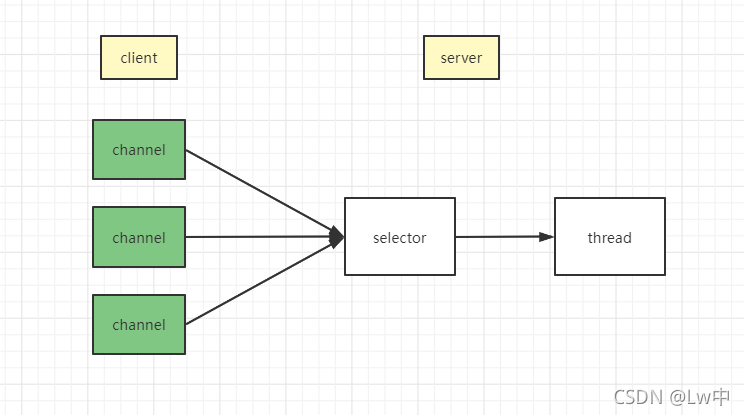
创建 selector 并将 相关事件注册到 selector 上
// 创建选择器
Selector selector = Selector.open();

// 设置为非阻塞状态
serverSocketChannel.configureBlocking(false);
// 将accept事件绑定到selector上
serverSocketChannel.register(selector, SelectionKey.OP_ACCEPT);
什么是事件?事件是 Channel 感兴趣的事情,比如读事件、写事件等等,在 Java 中,定义了四种事件,位于 SelectionKey 这个类中:
读事件:SelectionKey.OP_READ = 1 << 0 = 0000 0001
写事件:SelectionKey.OP_WRITE = 1 << 2 = 0000 0100
连接事件:SelectionKey.OP_CONNECT = 1 << 3 = 0000 1000
接受连接事件:SelectionKey.OP_ACCEPT = 1 << 4 = 0001 0000
Channel、Buffer、Selector共同使用
public static void main(String[] args) throws IOException {
        // 创建一个selector
        Selector selector = Selector.open();
        // 创建一个serverSocketChannel
        ServerSocketChannel channel = ServerSocketChannel.open();
        // 绑定8080端口
        channel.bind(new InetSocketAddress(8002));
        // 设置为非阻塞状态
        channel.configureBlocking(false);
        // 将channel注册到selector上,并注册Accept事件
        channel.register(selector, SelectionKey.OP_ACCEPT);
        System.out.println("server start");

        while (true) {
            // 阻塞在select上(第一阶段阻塞)
            selector.select();

            // 如果使用的是select(timeout)或selectNow()需要判断返回值是否大于0

            // 有就绪的Channel
            Set<SelectionKey> selectionKeys = selector.selectedKeys();
            // 遍历selectKeys
            Iterator<SelectionKey> iterator = selectionKeys.iterator();
            while (iterator.hasNext()) {
                SelectionKey selectionKey = iterator.next();
                // 如果是accept事件
                if (selectionKey.isAcceptable()) {
                    // 强制转换为ServerSocketChannel
                    ServerSocketChannel ssc = (ServerSocketChannel) selectionKey.channel();
                    SocketChannel socketChannel = ssc.accept();
                    System.out.println("accept new conn: " + socketChannel.getRemoteAddress());
                    socketChannel.configureBlocking(false);
                    // 将SocketChannel注册到Selector上,并注册读事件
                    socketChannel.register(selector, SelectionKey.OP_READ);
                } else if (selectionKey.isReadable()) {
                    // 如果是读取事件
                    // 强制转换为SocketChannel
                    SocketChannel socketChannel = (SocketChannel) selectionKey.channel();
                    // 创建Buffer用于读取数据
                    ByteBuffer buffer = ByteBuffer.allocate(1024);
                    // 将数据读入到buffer中(第二阶段阻塞)
                    int length = socketChannel.read(buffer);
                    if (length > 0) {
                        buffer.flip();
                        byte[] bytes = new byte[buffer.remaining()];
                        // 将数据读入到byte数组中
                        buffer.get(bytes);

                        // 换行符会跟着消息一起传过来
                        String content = new String(bytes, "UTF-8").replace("\r\n", "");
                        System.out.println("receive msg: " + content);
                    }
                }
                iterator.remove();
            }
        }
    }





 扫一扫
扫一扫


 1193
1193

 被折叠的 条评论
为什么被折叠?
被折叠的 条评论
为什么被折叠?
 到【灌水乐园】发言





