


 本文介绍使用EasyPoi进行Excel导入导出的方法,包括依赖包引入、工具类编写及控制器实现等关键步骤,并提供实体类示例。
EasyPoi导入、导出Excel表格
步骤:
你好! 这是你第一次使用 Markdown编辑器 所展示的欢迎页。如果你想学习如何使用Markdown编辑器, 可以仔细阅读这篇文章,了解一下Markdown的基本语法知识。
1、导入依赖包
 <dependency>
    <groupId>cn.afterturn</groupId>
     <artifactId>easypoi-base</artifactId>
     <version>4.1.0</version>
 </dependency>
 <dependency>
     <groupId>cn.afterturn</groupId>
     <artifactId>easypoi-web</artifactId>
     <version>4.1.0</version>
 </dependency>
 <dependency>
     <groupId>cn.afterturn</groupId>
     <artifactId>easypoi-annotation</artifactId>
     <version>4.1.0</version>
 </dependency>
2、Excel导出工具类
package cn.netrust.util;

import cn.afterturn.easypoi.excel.ExcelExportUtil;
import cn.afterturn.easypoi.excel.ExcelImportUtil;
import cn.afterturn.easypoi.excel.entity.ExportParams;
import cn.afterturn.easypoi.excel.entity.ImportParams;
import cn.afterturn.easypoi.excel.entity.enmus.ExcelType;
import org.apache.commons.lang3.StringUtils;
import org.apache.poi.ss.usermodel.Workbook;
import org.springframework.web.multipart.MultipartFile;

import javax.servlet.http.HttpServletResponse;
import java.io.File;
import java.io.IOException;
import java.io.InputStream;
import java.net.URLEncoder;
import java.util.List;
import java.util.Map;
import java.util.NoSuchElementException;

public class ExcelUtils {
  /**
    * excel 导出
    *
    * @param list           数据
    * @param title          标题
    * @param sheetName      sheet名称
    * @param pojoClass      pojo类型
    * @param fileName       文件名称
    * @param isCreateHeader 是否创建表头
    * @param response
    */
  	public static void exportExcel(List<?> list, String title, String sheetName, Class<?> pojoClass, String fileName, boolean isCreateHeader, HttpServletResponse response) throws IOException {
         ExportParams exportParams = new ExportParams(title, sheetName, ExcelType.XSSF);
         exportParams.setCreateHeadRows(isCreateHeader);
         defaultExport(list, pojoClass, fileName, response, exportParams);
    }

  /**
    * excel 导出
    *
    * @param list      数据
    * @param title     标题
    * @param sheetName sheet名称
    * @param pojoClass pojo类型
    * @param fileName  文件名称
    * @param response
    */
	public static void exportExcel(List<?> list, String title, String sheetName, Class<?> pojoClass, String fileName, HttpServletResponse response) throws IOException {
       defaultExport(list, pojoClass, fileName, response, new ExportParams(title, sheetName, ExcelType.XSSF));
   	}

   /**
    * excel 导出
    *
    * @param list         数据
    * @param pojoClass    pojo类型
    * @param fileName     文件名称
    * @param response
    * @param exportParams 导出参数
    */
   public static void exportExcel(List<?> list, Class<?> pojoClass, String fileName, ExportParams exportParams, HttpServletResponse response) throws IOException {
       defaultExport(list, pojoClass, fileName, response, exportParams);
   }

   /**
    * excel 导出
    *
    * @param list     数据
    * @param fileName 文件名称
    * @param response
    */
   public static void exportExcel(List<Map<String, Object>> list, String fileName, HttpServletResponse response) throws IOException {
       defaultExport(list, fileName, response);
   }

   /**
    * 默认的 excel 导出
    *
    * @param list         数据
    * @param pojoClass    pojo类型
    * @param fileName     文件名称
    * @param response
    * @param exportParams 导出参数
    */
   private static void defaultExport(List<?> list, Class<?> pojoClass, String fileName, HttpServletResponse response, ExportParams exportParams) throws IOException {
       Workbook workbook = ExcelExportUtil.exportExcel(exportParams, pojoClass, list);
       downLoadExcel(fileName, response, workbook);
   }

   /**
    * 默认的 excel 导出
    *
    * @param list     数据
    * @param fileName 文件名称
    * @param response
    */
   private static void defaultExport(List<Map<String, Object>> list, String fileName, HttpServletResponse response) throws IOException {
       Workbook workbook = ExcelExportUtil.exportExcel(list, ExcelType.HSSF);
       downLoadExcel(fileName, response, workbook);
   }

   /**
    * 下载
    *
    * @param fileName 文件名称
    * @param response
    * @param workbook excel数据
    */
   private static void downLoadExcel(String fileName, HttpServletResponse response, Workbook workbook) throws IOException {
       try {
           response.setCharacterEncoding("UTF-8");
           response.setHeader("content-Type", "application/vnd.ms-excel");
           response.setHeader("Content-Disposition", "attachment;filename=" + URLEncoder.encode(fileName + "." + ExcelTypeEnum.XLSX.getValue(), "UTF-8"));
           workbook.write(response.getOutputStream());
       } catch (Exception e) {
           throw new IOException(e.getMessage());
       }
   }


  /**
   * excel 导入
   *
   * @param filePath   excel文件路径
   * @param titleRows  标题行
   * @param headerRows 表头行
   * @param pojoClass  pojo类型
   * @param <T>
   * @return
   */
   public static <T> List<T> importExcel(String filePath, Integer titleRows, Integer headerRows, Class<T> pojoClass) throws IOException {
       if (StringUtils.isBlank(filePath)) {
           return null;
       }
       ImportParams params = new ImportParams();
       params.setTitleRows(titleRows);
       params.setHeadRows(headerRows);
       params.setNeedSave(true);
       params.setSaveUrl("/excel/");
       try {
           return ExcelImportUtil.importExcel(new File(filePath), pojoClass, params);
       } catch (NoSuchElementException e) {
           throw new IOException("模板不能为空");
       } catch (Exception e) {
           throw new IOException(e.getMessage());
       }
   }

   /**
    * excel 导入
    *
    * @param file      excel文件
    * @param pojoClass pojo类型
    * @param <T>
    * @return
    */
   public static <T> List<T> importExcel(MultipartFile file, Class<T> pojoClass) throws IOException {
       return importExcel(file, 1, 1, pojoClass);
   }

   /**
    * excel 导入
    *
    * @param file       excel文件
    * @param titleRows  标题行
    * @param headerRows 表头行
    * @param pojoClass  pojo类型
    * @param <T>
    * @return
    */
    public static <T> List<T> importExcel(MultipartFile file, Integer titleRows, Integer headerRows, Class<T> pojoClass) throws IOException {
        return importExcel(file, titleRows, headerRows, false, pojoClass);
    }

   /**
    * excel 导入
    *
    * @param file       上传的文件
    * @param titleRows  标题行
    * @param headerRows 表头行
    * @param needVerfiy 是否检验excel内容
    * @param pojoClass  pojo类型
    * @param <T>
    * @return
    */
    public static <T> List<T> importExcel(MultipartFile file, Integer titleRows, Integer headerRows, boolean needVerfiy, Class<T> pojoClass) throws IOException {
        if (file == null) {
            return null;
        }
        try {
            return importExcel(file.getInputStream(), titleRows, headerRows, needVerfiy, pojoClass);
        } catch (Exception e) {
            throw new IOException(e.getMessage());
        }
    }

   /**
    * excel 导入
    *
    * @param inputStream 文件输入流
    * @param titleRows   标题行
    * @param headerRows  表头行
    * @param needVerfiy  是否检验excel内容
    * @param pojoClass   pojo类型
    * @param <T>
    * @return
    */
	public static <T> List<T> importExcel(InputStream inputStream, Integer titleRows, Integer headerRows, boolean needVerfiy, Class<T> pojoClass) throws IOException {
         if (inputStream == null) {
             return null;
         }
         ImportParams params = new ImportParams();
         params.setTitleRows(titleRows);
         params.setHeadRows(headerRows);
         params.setSaveUrl("/home/admin/sto-app-face/upload/prohibition/");
         params.setNeedSave(false);
         params.setNeedVerify(needVerfiy);
         try {
             return ExcelImportUtil.importExcel(inputStream, pojoClass, params);
         } catch (NoSuchElementException e) {
             throw new IOException("excel文件不能为空");
         } catch (Exception e) {
             throw new IOException(e.getMessage());
         }
     }

   /**
    * Excel 类型枚举
    */
   enum ExcelTypeEnum {
       XLS("xls"), XLSX("xlsx");
       private String value;

       ExcelTypeEnum(String value) {
           this.value = value;
       }

       public String getValue() {
           return value;
       }

       public void setValue(String value) {
           this.value = value;
       }
   }
}
3、Excel样式工具类
import cn.afterturn.easypoi.excel.entity.params.ExcelExportEntity;
import cn.afterturn.easypoi.excel.entity.params.ExcelForEachParams;
import cn.afterturn.easypoi.excel.export.styler.IExcelExportStyler;
import org.apache.poi.ss.usermodel.*;

public class ExcelStylerUtil implements IExcelExportStyler {

    private static final short STRING_FORMAT = (short) BuiltinFormats.getBuiltinFormat("TEXT");
    private static final short FONT_SIZE_TEN = 9;
    private static final short FONT_SIZE_ELEVEN = 10;
    private static final short FONT_SIZE_TWELVE = 10;
    /**
     * 大标题样式
     */
    private CellStyle headerStyle;
    /**
     * 每列标题样式
     */
    private CellStyle titleStyle;
    /**
     * 数据行样式
     */
    private CellStyle styles;

    public ExcelStylerUtil(Workbook workbook) {
        this.init(workbook);
    }

    /**
     * 初始化样式
     * @param workbook
     */
    private void init(Workbook workbook) {
        this.headerStyle = initHeaderStyle(workbook);
        this.titleStyle = initTitleStyle(workbook);
        this.styles = initStyles(workbook);
    }

    /**
     * 大标题样式
     * @param color
     * @return
     */
    @Override
    public CellStyle getHeaderStyle(short color) {
        return headerStyle;
    }

    /**
     * 每列标题样式
     * @param color
     * @return
     */
    @Override
    public CellStyle getTitleStyle(short color) {
        return titleStyle;
    }

    /**
     * 数据行样式
     * @param parity 可以用来表示奇偶行
     * @param entity 数据内容
     * @return 样式
     */
    @Override
    public CellStyle getStyles(boolean parity, ExcelExportEntity entity) {
        return styles;
    }

    /**
     * 获取样式方法
     * @param dataRow 数据行
     * @param obj     对象
     * @param data    数据
     */
    @Override
    public CellStyle getStyles(Cell cell, int dataRow, ExcelExportEntity entity, Object obj, Object data) {
        return getStyles(true, entity);
    }

    /**
     * 模板使用的样式设置
     */
    @Override
    public CellStyle getTemplateStyles(boolean isSingle, ExcelForEachParams excelForEachParams) {
        return null;
    }

    /**
     * 初始化--大标题样式
     * @param workbook
     * @return
     */
    private CellStyle initHeaderStyle(Workbook workbook) {
        CellStyle style = getBaseCellStyle(workbook);
        style.setFont(getFont(workbook, FONT_SIZE_TWELVE, true));
        return style;
    }

    /**
     * 初始化--每列标题样式
     * @param workbook
     * @return
     */
    private CellStyle initTitleStyle(Workbook workbook) {
        CellStyle style = getBaseCellStyle(workbook);
        style.setFont(getFont(workbook, FONT_SIZE_ELEVEN, false));
        //背景色
        style.setFillForegroundColor(IndexedColors.GREY_25_PERCENT.getIndex());
        style.setFillPattern(FillPatternType.SOLID_FOREGROUND);
        return style;
    }

    /**
     * 初始化--数据行样式
     * @param workbook
     * @return
     */
    private CellStyle initStyles(Workbook workbook) {
        CellStyle style = getBaseCellStyle(workbook);
        style.setFont(getFont(workbook, FONT_SIZE_TEN, false));
        style.setDataFormat(STRING_FORMAT);
        return style;
    }

    /**
     * 基础样式
     * @return
     */
    private CellStyle getBaseCellStyle(Workbook workbook) {
        CellStyle style = workbook.createCellStyle();
        //下边框
        style.setBorderBottom(BorderStyle.THIN);
        //左边框
        style.setBorderLeft(BorderStyle.THIN);
        //上边框
        style.setBorderTop(BorderStyle.THIN);
        //右边框
        style.setBorderRight(BorderStyle.THIN);
        //水平居中
        style.setAlignment(HorizontalAlignment.CENTER);
        //上下居中
        style.setVerticalAlignment(VerticalAlignment.CENTER);
        //设置自动换行
        style.setWrapText(true);
        return style;
    }

    /**
     * 字体样式
     * @param size   字体大小
     * @param isBold 是否加粗
     * @return
     */
    private Font getFont(Workbook workbook, short size, boolean isBold) {
        Font font = workbook.createFont();
        //字体样式
        font.setFontName("宋体");
        //是否加粗
        font.setBold(isBold);
        //字体大小
        font.setFontHeightInPoints(size);
        return font;
    }
}
4、编写Controller控制层
import cn.afterturn.easypoi.excel.entity.ExportParams;
import cn.afterturn.easypoi.excel.entity.enmus.ExcelType;
import cn.netrust.modules.yonglian.dto.EventDTO;
import cn.netrust.modules.yonglian.mapper.EventMapper;
import cn.netrust.modules.yonglian.vo.EventExportExcelTemperatureVO;
import cn.netrust.util.ExcelStylerUtil;
import cn.netrust.util.ExcelUtils;
import io.swagger.annotations.Api;
import lombok.extern.slf4j.Slf4j;
import org.springframework.web.bind.annotation.*;

import javax.annotation.Resource;
import javax.servlet.http.HttpServletRequest;
import javax.servlet.http.HttpServletResponse;
import java.util.List;

@Slf4j
@RestController
@Api(tags = "导入导出Controller")
@RequestMapping("/aa")
public class DownLoadExcel {

    @Resource
    private EventMapper eventMapper;

    @RequestMapping(path = "/downLoadExcel", method = RequestMethod.GET)
    @ResponseBody
    public void downLoadExcel(HttpServletRequest request , HttpServletResponse response) {

        try {
            EventDTO eventDTO = new EventDTO();
            eventDTO.setAlarmType(2);
            List<EventExportExcelTemperatureVO> list = eventMapper.eventAlarmListExportTemperature(eventDTO);

            //标题名
            String title = "报警标题名";
            //表名
            String sheetName = "报警表名";

            // Excel样式设置
            ExportParams exportParams  = new ExportParams(title, sheetName, ExcelType.XSSF);
            exportParams.setStyle(ExcelStylerUtil.class);

            // list数据,title标题,sheet名称,pojo实体类型,fileName文件名称
            ExcelUtils.exportExcel(list, EventExportExcelTemperatureVO.class, sheetName, exportParams, response);
        } catch (Exception e) {
            log.error(e.getMessage(), e.fillInStackTrace());
        }
    }
}
5、实体类
import cn.afterturn.easypoi.excel.annotation.Excel;
import lombok.Data;
/**
 * 出入口检测-测温导出报表模板对象
 */
@Data
public class EventExportExcelTemperatureVO {

    /**
     * 设备名称
     */
    @Excel(name = "设备名称",width = 20,orderNum = "0")
    private String machineName;

    /**
     * 设备地址
     */
    @Excel(name = "告警地址",width = 20,orderNum = "1")
    private String address;

    /**
     * 时间
     */
    @Excel(name = "告警时间",width = 20,orderNum = "2")
    private String happenTime;

    /**
     * 告警状态
     */
    @Excel(name = "告警状态",width = 20,orderNum = "3")
    private String status;
}
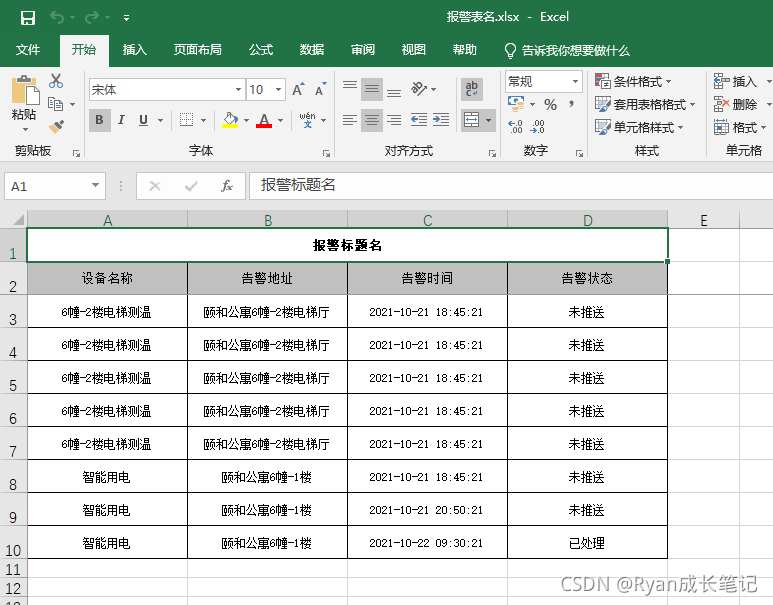
效果图
引用链接:
[1] https://www.cnblogs.com/miles322/p/14282247.html.
[2] https://blog.youkuaiyun.com/zgz15515397650/article/details/112967832.





 扫一扫
扫一扫


 2256
2256

 被折叠的 条评论
为什么被折叠?
被折叠的 条评论
为什么被折叠?
 到【灌水乐园】发言





