


 本文介绍了一个基于PHP、MySQL和Bootstrap的简易新闻管理系统,适合初学者理解新闻管理的基本流程和技术实现,包括浏览、编辑和发布新闻的功能。
PHP新闻管理系统(PHP+MySQL+bootsrap)
php学习课余,利用这段时间学的php基础写一个简单的新闻管理,功能很简单,主要用php+MySQL+Bootraps写成的简单页面,适合初学者观看,共勉!
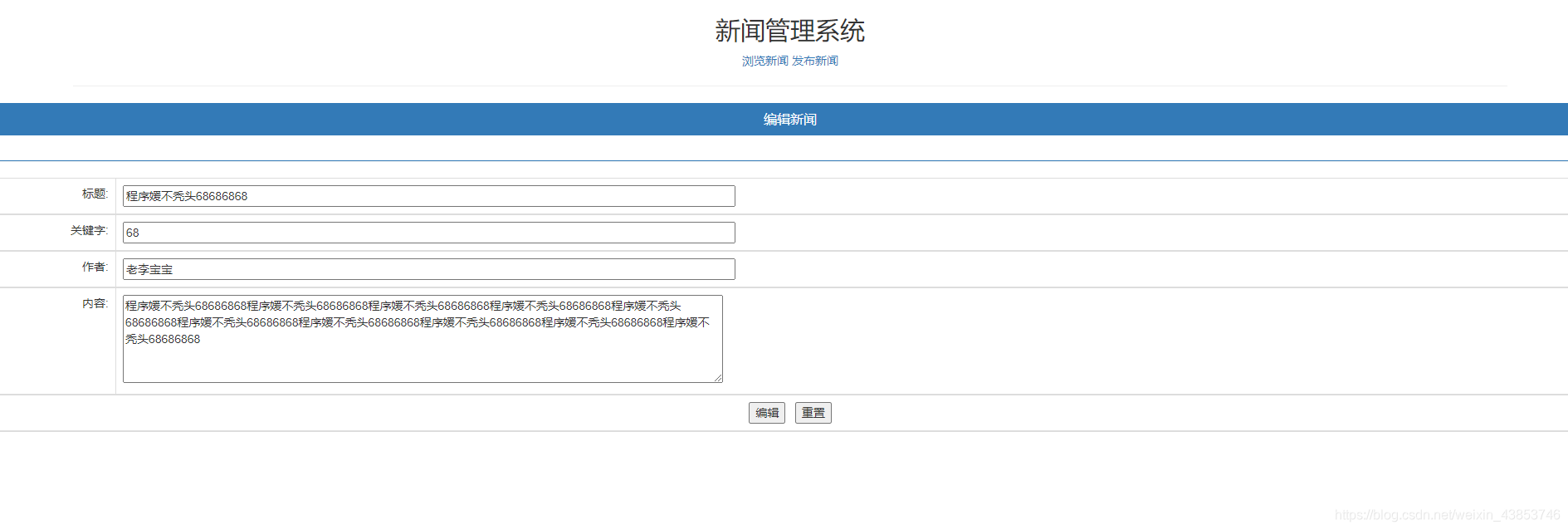
界面效果图如下
浏览页面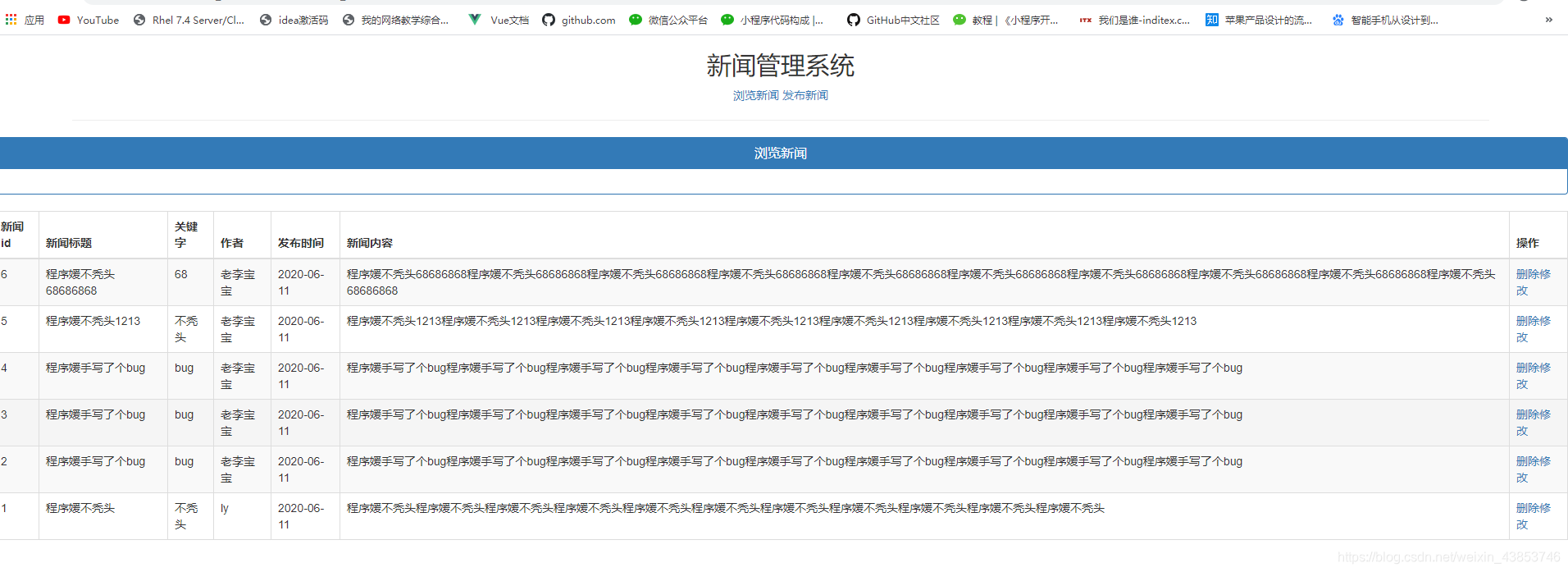
编辑页面
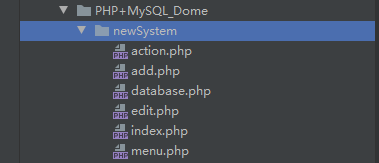
案例所包含内容:6个php文件+bootsraps.min.css+数据库
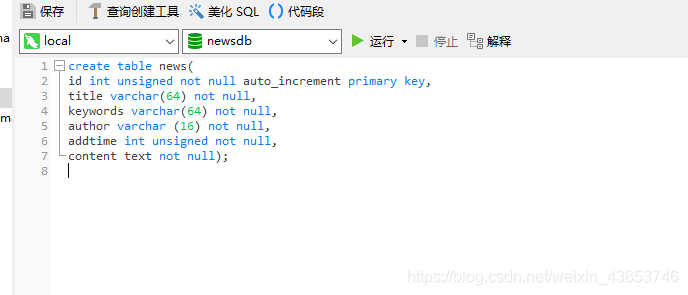
数据库如下:
menu.php
// 主页菜单文件
<!doctype html>
<html lang="en">
<head>
    <meta charset="UTF-8">
    <title>Document</title>
</head>
<body>
<h2>新闻管理系统</h2>
<a href="index.php">浏览新闻</a>
<a href="add.php">发布新闻</a>
<hr width="80%">
</body>
</html>
database.php
<?php
define("host","localhost");
define("user","root");
define("password","");
define("dbname","newsdb");
?>
index.php
<!doctype html>
<html lang="en">
<head>
    <meta charset="UTF-8">
    <link rel="stylesheet" href="../../css/bootstrap.min.css">
    <title>新闻管理系统</title>
    <script>
        function dodel(id){
            if (confirm("确定要删除吗")){
                window.location="action.php?action=del&id="+id;
            }
        }
    </script>
</head>
<body>
<center>
    <?php include ("menu.php");?>
    <div class="panel panel-primary">
        <div class="panel-heading">
            <h2 class="panel-title">浏览新闻</h2>
        </div>
        <div class="panel-body form-inline">
        </div>
    </div>
    <table class="table table-bordered table-hover table-striped">
        <thead>
          <tr>
            <th>新闻id</th>
            <th>新闻标题</th>
            <th>关键字</th>
            <th>作者</th>
            <th>发布时间</th>
            <th>新闻内容</th>
            <th>操作</th>
          </tr>
        </thead>
        <?php
         require("database.php");
        $connection=@mysqli_connect(host,user,password) or die("数据库连接失败!");
        @mysqli_select_db($connection,dbname);

        //执行查询并返回结果集
        $sql="select * from news order by addtime desc";
        $result=mysqli_query($connection,$sql);

        //解析结果集 并遍历
        while($row =mysqli_fetch_assoc($result)){

            echo "<tr>";
            echo "<td>{$row['id']}</td>";
            echo "<td>{$row['title']}</td>";
            echo "<td>{$row['keywords']}</td>";
            echo "<td>{$row['author']}</td>";
            echo "<td>".date("Y-m-d",$row['addtime'])."</td>";
            echo "<td>{$row['content']}</td>";
            echo "<td><a href='javascript:dodel({$row['id']})'>删除</a>/<a href='edit.php?id={$row['id']}'>修改</a></td>";
            echo"</tr>";
        }

        //释放结果集
        mysqli_free_result($result);
        mysqli_close($connection);

        ?>
    </table>
  </center>
</body>
</html>
edit.php
<!doctype html>
<html lang="en">
<head>
<meta charset="UTF-8">
<link rel="stylesheet" href="../../css/bootstrap.min.css">
<title>新闻管理系统</title>
</head>
<body>
<?php
include ("menu.php");
include("database.php");
$connection=@mysqli_connect(host,user,password) or die("数据库连接失败!");
@mysqli_select_db($connection,dbname);
//获取要修改id号
$sql="select * from news where id={$_GET['id']}";
$result=mysqli_query($connection,$sql);
//判断是否获取到了要修改的信息
if($result && mysqli_num_rows($result)>0){
$news=mysqli_fetch_assoc($result);
}else{
die("没有找到要修改的信息!");
}
?>
<div class="panel panel-primary">
<div class="panel-heading">
<h2 class="panel-title">编辑新闻</h2>
</div>
<div class="panel-body form-inline">
</div>
</div>
<form action = "action.php?action=update" method="post">
<input type="hidden" name="id" value="<?php echo $news['id']; ?>" />
<table class="table table-bordered table-hover table-striped">
<thead>
<tr>
<td align="right">标题:</td>
<td><input type="text" name="title" size="100" value="<?php echo $news['title']; ?>" /></td>
</tr>
<tr>
<td align="right">关键字:</td>
<td><input type="text" name="keywords" size="100" value="<?php echo $news['keywords']; ?>" /></td>
</tr>
<tr>
<td align="right">作者:</td>
<td><input type="text" name="author" size="100" value="<?php echo $news['author']; ?>" /></td>
</tr>
<tr>
<td align="right" valign="top">内容:</td>
<td><textarea cols="100" rows="5" name="content"><?php echo $news['content']; ?></textarea></td>
</tr>
<tr>
<td colspan="2" align="center">
<input type="submit" name="update" value="编辑"/>
<input type="reset" value="重置"/>
</td>
</tr>
</thead>
</table>
</form>
</body>
</html>
add.php
<!doctype html>
<html lang="en">
<head>
<meta charset="UTF-8">
<link rel="stylesheet" href="../../css/bootstrap.min.css">
<title>新闻管理系统</title>
</head>
<body>
<?php include ("menu.php");?>
<div class="panel panel-primary">
<div class="panel-heading">
<h2 class="panel-title">发布新闻</h2>
</div>
<div class="panel-body form-inline">
</div>
</div>
<div class="container">
<form action="action.php?action=add" method="post">
<table class="table table-bordered table-hover table-striped">
<tr>
<td >标题:</td>
<td><input type="text" name="title" size="100"></td>
</tr>
<tr>
<td>关键字:</td>
<td><input type="text" name="keywords" size="100"></td>
</tr>
<tr>
<td >作者:</td>
<td><input type="text" name="author" size="100"></td>
</tr>
<tr>
<td >内容:</td>
<td><textarea name="content" cols="100" rows="5" ></textarea></td>
</tr>
<tr>
<td align="center" colspan="2">
<input type="submit" name="add" value="添加">
<input type="reset" value="重置">
</td>
</tr>
</table>
</form>
</div>
</body>
</html>
action.php
<meta charset="UTF-8">
<?php
require("database.php");
//连接mysql,并选择数据库
$connection=@mysqli_connect(host,user,password) or die("数据库连接失败!");
@mysqli_select_db($connection,dbname);
switch ($_GET['action']){
case "add"://执行添加操作
//获取要添加的信息并补充其他信息
$title=$_POST["title"];
$keywords=$_POST["keywords"];
$author=$_POST["author"];
$content=$_POST["content"];
$addtime=time();
$sql="insert into news values (null,'{$title}','{$keywords}','{$author}','{$addtime}','{$content}')";
@mysqli_query($connection,$sql);
//判断是否成功
$id=mysqli_insert_id($connection);//获取刚刚添加信息的自增id值
if($id>0){
echo "新闻信息添加成功!";
}else{
echo "新闻信息添加失败!";
}
echo "<a href='javascript:window.history.back();'>返回</a> ";
echo "<a href='index.php'>浏览新闻</a>";
break;
case "del"://执行删除操作
$id=$_GET['id']; //获取亚删除的id号
$sql="delete from news where id={$id}";
mysqli_query($sql,$connection);//执行删除操作
//自动跳转到浏览新闻页面
header("Location:index.php");
break;
case "update":
$title=$_POST['title'];
$keywords=$_POST['keywords'];
$author=$_POST['author'];
$content=$_POST['content'];
$id=$_POST['id'];
$sql="update news set title='{$title}',keywords='{$keywords}',author='{$author}',content='{$content}' where id={$id}";
mysqli_query($connection,$sql);
header("Location:index.php");//跳回浏览界面
break;
}
//关闭数据库连接
mysqli_close($connection);
目前这个只是初步效果,功能没有完善全,后面再补上…





 扫一扫
扫一扫


 1261
1261


 到【灌水乐园】发言



