


 本文详细介绍了如何在项目中通过gradle.properties设置singleModule开关,以及根据不同模式配置module、AndroidManifest文件和build.gradle。重点讲解了独立模块模式下的清单文件和依赖管理。
添加module开关
在项目根目录的 gradle.properties 添加变量 singleModule ,为 true 表示 各模块可以作为独立 app运行,为 false 表示 各个module 作为依赖库使用
singleModule = false
module模块配置
配置模块作为独立 app 时的环境配置,如下图所示:
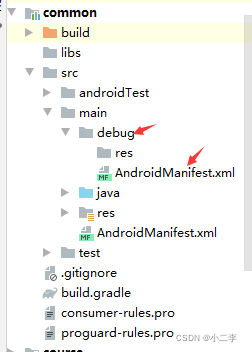
debug 模式下的清单文件详情:
<?xml version="1.0" encoding="utf-8"?>
<manifest xmlns:android="http://schemas.android.com/apk/res/android"
    package="com.imooc.common">
    <application
        android:allowBackup="true"
        android:icon="@mipmap/ic_launcher"
        android:label="@string/app_name"
        android:roundIcon="@mipmap/ic_launcher_round"
        android:supportsRtl="true">
        <activity android:name=".ComponentListActivity"
            android:theme="@style/Theme.AppCompat.Light.DarkActionBar">
            <intent-filter>
                <action android:name="android.intent.action.MAIN" />
                <category android:name="android.intent.category.LAUNCHER" />
            </intent-filter>
        </activity>
    </application>
</manifest>
独立module 模式下的清单文件
<?xml version="1.0" encoding="utf-8"?>
<manifest xmlns:android="http://schemas.android.com/apk/res/android"
    package="com.imooc.common">
    <application>
        <activity android:name=".ComponentListActivity"></activity>
    </application>
</manifest>
module 项目配置
根据开关对模块的 build.gradle 进行配置:
// 根据模块是否独立,将模块作为 apk 还是 module
if(singleModule.toBoolean())
{
    apply plugin: 'com.android.application'
}else{
    apply plugin: 'com.android.library'
}
apply from: '../dependencies.gradle'
android {
    //限制资源名称
    resourcePrefix  project.getName() +"_"
    defaultConfig {
        // 只有独立运行时才需要 applicationId
        if(singleModule.toBoolean()){
            applicationId "com.imooc.common"
        }
    }

    sourceSets {
        main {
            // 单独调试与集成调试时使用不同的 AndroidManifest.xml 文件
            if (singleModule.toBoolean()) {
                manifest.srcFile 'src/main/debug/AndroidManifest.xml'
                //多增加一个资源调试路径 src/main/debug/res
                res.srcDirs = ['src/main/res', 'src/main/debug/res']
            }else{
                manifest.srcFile 'src/main/AndroidManifest.xml'
                java {
                    //module 模式下要 排除src/test/文件夹下的所有文件
                    exclude 'src/debug/'
                }
            }
        }
    }
}
dependencies {
    implementation 'androidx.appcompat:appcompat:1.1.0'
    implementation 'androidx.constraintlayout:constraintlayout:1.1.3'
    implementation "org.jetbrains.kotlin:kotlin-stdlib:$kotlin_version"
}
主工程依赖
根据开关进行模块依赖:
 if(!singleModule.toBoolean()) {
        runtimeOnly project(':common')
 }





 扫一扫
扫一扫


 2785
2785

 被折叠的 条评论
为什么被折叠?
被折叠的 条评论
为什么被折叠?
 到【灌水乐园】发言





