1. 简介
Vue.js使用基于HTML的模板语法,可以将DOM绑定到Vue实例中的数据
模板就是{{}},用来进行数据绑定,显示在页面中
也称为Mustache语法
2. 数据绑定的方式
a.双向绑定
    v-model
b.单向绑定
    方式1:使用两对大括号{{}},可能会出现闪烁的问题,可以使用v-cloak解决
    方式2:使用v-text、v-html
https://cn.vuejs.org/v2/guide/syntax.html
<!DOCTYPE html>
<html lang="en">

<head>
    <meta charset="UTF-8">
    <script src="js/vue.js"></script>
    <title>vue</title>
    <script>
        window.onload = function() {
            new Vue({
                el: '.itany',
                data: {
                    msg: "welcome to itany"
                },
                created: function() {
                    alert(111);
                }
            });
        }
    </script>

</head>

<body>
    <div class="itany">
        <h3>aaa{{msg}}</h3>
    </div>
</body>

</html>

3. 其他指令
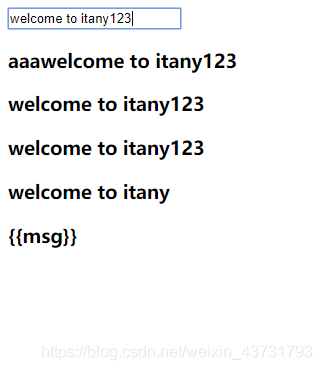
    v-once 数据只绑定一次
    v-pre 不编译,直接原样显示
<!DOCTYPE html>
<html lang="en">
<head>
<meta charset="UTF-8">
<script src="js/vue.js"></script>
<title>vue</title>
<script>
window.onload = function() {
new Vue({
el: '.itany',
data: {
msg: "welcome to itany"
},
created: function() {
}
});
}
</script>
<style>
[v-cloak] {
display: none;
}
</style>
</head>
<body>
<div class="itany">
<input type="text" v-model="msg">
<h3>aaa<span v-clock>{{msg}}</span></h3>
<h3 v-text="msg"></h3>
<h3 v-html="msg"></h3>
<h3 v-once>{{msg}}</h3>
<h3 v-pre>{{msg}}</h3>
</div>
</body>
</html>



 本文详细介绍了Vue.js中的数据绑定方法,包括基于HTML的模板语法、Mustache语法、双向绑定v-model、单向绑定的多种实现方式,以及v-once、v-pre等其他指令的使用场景和示例。





 扫一扫
扫一扫


 530
530

 被折叠的 条评论
为什么被折叠?
被折叠的 条评论
为什么被折叠?
 到【灌水乐园】发言





