


 本文提供了一套Android期末机试考核模拟题,涵盖了从基本的“Hello World”程序到复杂的Activity间数据传递、布局设计、事件处理以及广播发送等方面的知识,旨在检验开发者对Android开发的掌握程度。
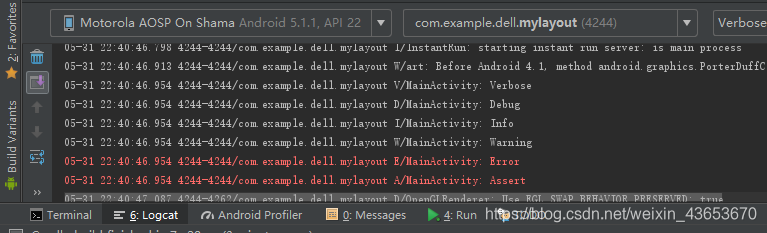
1、创建一个Android的“Hello World”应用程序,用log.d()等方法打印一条调试信息。
package com.example.dell.helloworld;

import android.support.v7.app.AppCompatActivity;
import android.os.Bundle;
import android.util.Log;

public class MainActivity extends AppCompatActivity {

    @Override
    protected void onCreate(Bundle savedInstanceState) {
        super.onCreate(savedInstanceState);
        //setContentView(R.layout.activity_main);

        Log.v("MainActivity", "Verbose");//打印所有信息
        Log.d("MainActivity", "Debug");//打印调试信息
        Log.i("MainActivity", "Info");//information、特定信息、提示性消息
        Log.w("MainActivity", "Warning");//警告
        Log.e("MainActivity", "Error");//错误
        Log.wtf("MainActivity", "Assert");
        //Log.println(, "MainActivity", "println");

    }

}
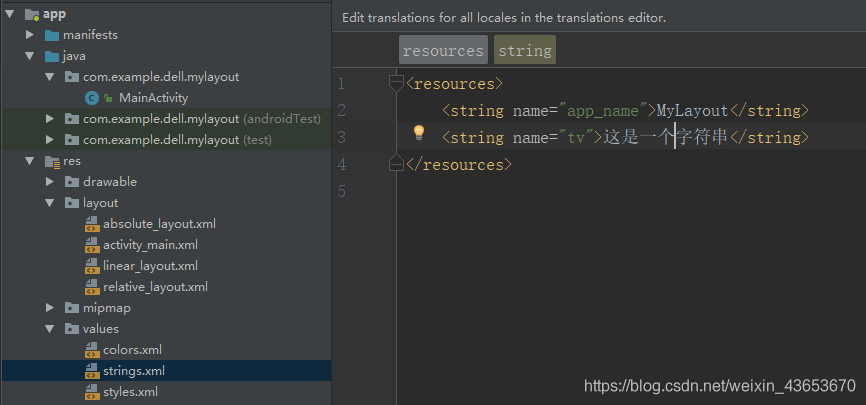
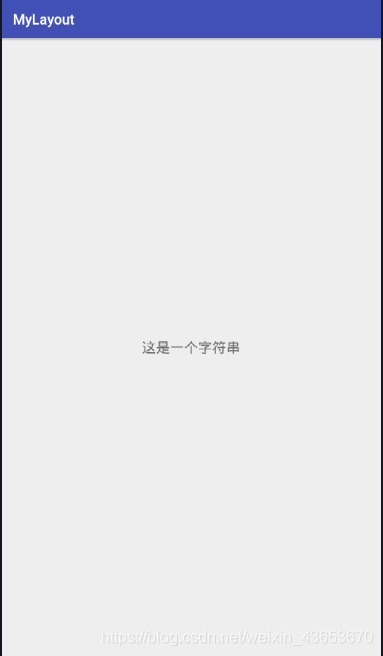
2、给android工程添加一个字符串资源,并将资源内容显示在一个textview控件中。
<?xml version="1.0" encoding="utf-8"?>
<android.support.constraint.ConstraintLayout xmlns:android="http://schemas.android.com/apk/res/android"
    xmlns:app="http://schemas.android.com/apk/res-auto"
    xmlns:tools="http://schemas.android.com/tools"
    android:layout_width="match_parent"
    android:layout_height="match_parent"
    tools:context="com.example.dell.mylayout.MainActivity">
   <!-- android:text="@string/tv" -->
    <TextView
        android:layout_width="wrap_content"
        android:layout_height="wrap_content"
        android:text="@string/tv"
        android:textSize="20sp"
        app:layout_constraintBottom_toBottomOf="parent"
        app:layout_constraintLeft_toLeftOf="parent"
        app:layout_constraintRight_toRightOf="parent"
        app:layout_constraintTop_toTopOf="parent" />

</android.support.constraint.ConstraintLayout>
或
package com.example.dell.mylayout;

import android.support.v7.app.AppCompatActivity;
import android.os.Bundle;
import android.widget.TextView;

public class MainActivity extends AppCompatActivity {
    TextView textView;

    @Override
    protected void onCreate(Bundle savedInstanceState) {
        super.onCreate(savedInstanceState);
        setContentView(R.layout.activity_main);

        textView = (TextView)findViewById(R.id.textView);
        //getResources().getString(R.string.tv);
        textView.setText(getResources().getString(R.string.tv));
    }
}
3、通过xml资源设置一个线性布局,并显示不少于三种控件内容,其中要求布局背景绿色,文字颜色红色。
<?xml version="1.0" encoding="utf-8"?>
<LinearLayout xmlns:android="http://schemas.android.com/apk/res/android"
android:orientation="vertical"
android:layout_width="match_parent"
android:layout_height="match_parent"
android:background="#1be101"
android:padding="20dp">
<TextView
android:layout_width="match_parent"
android:layout_height="wrap_content"
android:text="1.TextView显示文本信息"
android:textColor="#f90404"
android:textSize="20sp"
android:gravity="center"
android:textStyle="italic"/>
<Button
android:layout_width="match_parent"
android:layout_height="wrap_content"
android:text="2.按钮"
android:textColor="#f90404"
android:textSize="20sp"/>
<EditText
android:layout_width="match_parent"
android:layout_height="wrap_content"
android:text="3.编辑框:请输入信息"
android:textColor="#f90404"
android:textSize="20sp"/>
<!--单选按钮-->
<RadioGroup
android:layout_width="match_parent"
android:layout_height="wrap_content"
android:orientation="horizontal">
<RadioButton
android:layout_width="wrap_content"
android:layout_height="wrap_content"
android:text="4.男"
android:textColor="#f90404"
android:textSize="20sp"/>
<RadioButton
android:layout_width="wrap_content"
android:layout_height="wrap_content"
android:text="女"
android:textColor="#f90404"
android:textSize="20sp"/>
</RadioGroup>
<!--复选框-->
<CheckBox
android:layout_width="wrap_content"
android:layout_height="wrap_content"
android:text="电脑"
android:textColor="#f90404"
android:textSize="20sp"/>
<CheckBox
android:layout_width="wrap_content"
android:layout_height="wrap_content"
android:text="手机"
android:textColor="#f90404"
android:textSize="20sp"/>
</LinearLayout> 最低0.47元/天 解锁文章






 扫一扫
扫一扫


 628
628

 被折叠的 条评论
为什么被折叠?
被折叠的 条评论
为什么被折叠?
 到【灌水乐园】发言





