



 文章详细介绍了如何使用CSS动画和过渡效果实现PK动效,包括人物碰撞、图标放大、头像显隐、进度条拉扯等效果,并通过React组件展示了具体的实现代码,主要依赖translateX()和宽度变化来创建各种动效。
PK动效
效果预览
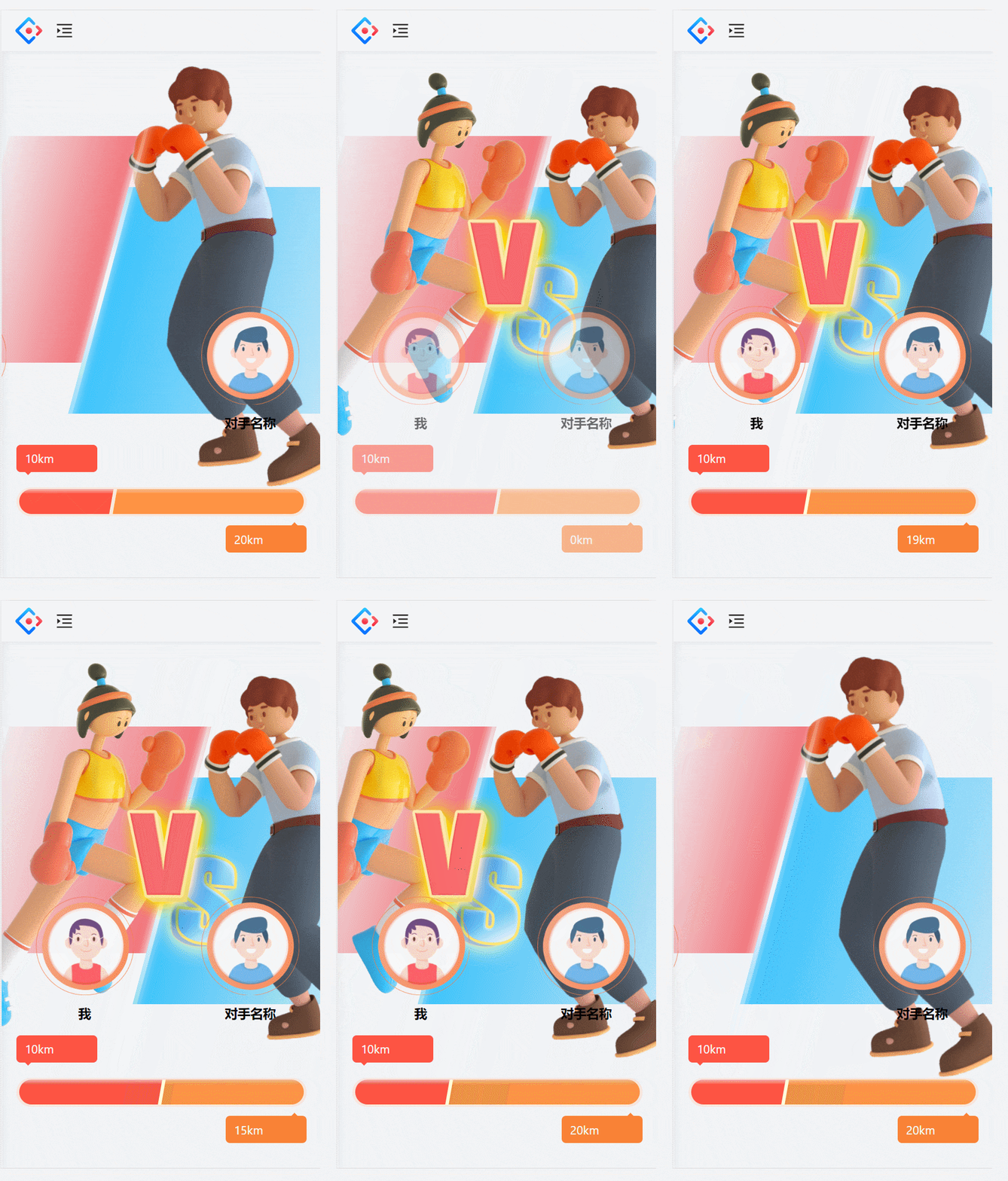
实现原理
最初的碰触效果
一开始的人物是设置在屏幕可视范围之外的,写两个动效,最后的位置处于可视范围之内就行了,看css代码的rleftstrike,rightstrike
vs图标瞬间放大效果
看css代码的vsAnimation
头像动效
效果:最初的时候显隐,在被打败后,头像横向飞出
显隐原理:用 transition: opacity 2s 设置过渡效果,在人物碰撞动画结束之后,设置opacity 为1
横向飞出:看css代码的rightheadLose和leftheadLose
进度条以及人物推拉动效
原理都是通过宽度变化过渡去设置,我用setInterval去生成循环设置随机宽度,知道拉扯到指定次数,清除定时器。
怎样设置随机宽度呢?通过随机生成一个不大于对手分数的数,然后求自己的分数和随机生成的分数的百分比,得到的百分比去控制宽度
const temprivalScore = Math.round(Math.random()*rivalScore) //随机分数
const total = temprivalScore+myScore
setleftWidth((myScore/total)*100) //设置百分比
setrightWidth((temprivalScore/total)*100) //设置百分比
输的一方飞出的动效
看css代码的leftLose和rightLost
赢的一方放大往前顶的动效
看css代码的leftWin和rightWin
总结
总的来说呢,实现的重点就是都是通过translateX()去左右移动
另外就是用过渡属性过渡宽度的变化,通过改变宽度来达成最终效果
实现代码
import React, { FC, useEffect, useRef, useState } from "react";
import styles from "./index.less";


const text = {
  105:{
    title:"驾驶时间",
    text:"驾驶时间较多",
    bottomtext:"我的驾驶时长",
    unit:"小时",
    dataName:"winDriveTime"
  },
  106:{
    title:"打卡城市",
    text:"打卡城市较多",
    bottomtext:"我的打卡城市数",
    unit:"个",
    dataName:"cityCn"
  },
  107:{
    title:"驾驶行为",
    text:"三急行为次数较低",
    bottomtext:"我的三急行为次数",
    unit:"次",
    dataName:"badDriveCnt"
  },
  119:{
    title:"消费额度",
    text:"CPSP实付金额总数较多",
    bottomtext:"我的CPSP实付金额总数",
    unit:"元",
    dataName:"cpspPay"
  },
  111:{
    title:"远控使用",
    text:"远控功能使用次数总数较多",
    bottomtext:"我的远控功能使用次数",
    unit:"次",
    dataName:"remoteControlCnt"
  },
  110:{
    title:"APP使用",
    text:"APP打开总次数较多",
    bottomtext:"我的APP打开总次数",
    unit:"次",
    dataName:"appOpenTimes"
  },
  118:{
    title:"加油优惠",
    text:"智慧加油省钱额度总数较多",
    bottomtext:"我的智慧加油省钱额度总数",
    unit:"元",
    dataName:"gassDisAmt"
  },
  104:{
    title:"假期里程",
    text:"行驶里程数较多",
    bottomtext:"我的行驶里程",
    unit:"km",
    dataName:"driveMiles"
  },
  112:{
    title:"听歌天数",
    // text:`打开${carType==="ccs2plus"?"酷狗":"酷我"}天数较多`,
    bottomtext:"我的听歌天数",
    unit:"天",
    // dataName:`${carType==="ccs2plus"?"kwgUseDays":"kuwUseDays"}`
  },
  113:{
    title:"刷剧天数",
    text:"打开爱奇艺天数较多",
    bottomtext:"我的刷剧天数",
    unit:"天",
    dataName:"aqyUseDays"
  },
}

const PkingModal: FC = () => {
  // const pkingModalVisible = useSelector((state: any) => state.nationalday2022.pkingModalVisible);
  const pkResults = {
      "pkResult": 1,
      "rivalScore": 20,
      "myScore": 10,
      "rivalName":"对手名称",
  }
  const pkResultsRef = useRef<any>()
  pkResultsRef.current = pkResults

  const [opacity,setopacity] = useState(0)
  const [leftWidth,setleftWidth] = useState(50)
  const [rightWidth,setrightWidth] = useState(50)

  const [vsopacity,setvsopacity] = useState(1)
  const [rivalScore,setrivalScore] =useState(0)

  const leftRef = useRef<any>()

  const leftpeopleRef = useRef<any>()
  const leftheadportraitRef = useRef<any>()
  const rightpeopleRef = useRef<any>()
  const rightheadportraitRef = useRef<any>()
  const pkmodalType = 104

  const pkmodalTypeRef = useRef<any>()
  pkmodalTypeRef.current = pkmodalType

  const isBegin = useRef<any>(false)


  useEffect(()=>{
    document.documentElement.style.fontSize=(document.documentElement.clientWidth/750)*100+'px';
    if(leftRef.current){
      leftRef.current.addEventListener('animationend',()=>{
        // console.log("动画结束")
        if( isBegin.current ) return
        isBegin.current = true
        setopacity(1)
        // 执行宽度变化的函数
        setTimeout(()=>{
            const {myScore,rivalScore} = pkResultsRef.current
            // 随机生成对手的分数用来改变宽度
            let time = 0
            let timemax= 6
            if(myScore==0||rivalScore==0) timemax=2

            let temprivalScore = rivalScore;


            const timer = setInterval(()=>{
                  time+=1
                  // 5次的时候清除定时器 设置最终的对手分数
                  temprivalScore = Math.round(Math.random()*rivalScore)


                  if(time===timemax){
                    temprivalScore = rivalScore
                    setTimeout(()=>{
                        setvsopacity(0)
                        const leftPeople = leftpeopleRef.current
                        const rightPeople = rightpeopleRef.current
                        const leftheadportrait = leftheadportraitRef.current
                        const rightheadportrait = rightheadportraitRef.current
                         // 三急行为 小的获胜
                        if( pkmodalTypeRef.current ==107){
                          if(myScore<temprivalScore){
                            // 左边胜利
                             // 右边胜利
                             leftPeople.style["animation"] = `${styles.leftWin} 1s forwards`
                             rightPeople.style["animation"] = `${styles.rightLose} 1s forwards`
                             rightheadportrait.style["animation"] = `${styles.rightheadLose} 1s forwards`
                        }else if(myScore>temprivalScore){
                             // 右边胜利
                             rightPeople.style["animation"] = `${styles.rightWin} 1s forwards`
                             leftPeople.style["animation"] = `${styles.leftLose} 1s forwards`
                             leftheadportrait.style["animation"] = `${styles.leftheadLose} 1s forwards`
                        }else{
                          // 平局
                          // 不做处理
                        }
                      }else{
                        // 大的获胜
                        if(myScore>temprivalScore){
                          // 左边胜利
                           // 右边胜利
                           leftPeople.style["animation"] = `${styles.leftWin} 1s forwards`
                           rightPeople.style["animation"] = `${styles.rightLose} 1s forwards`
                           rightheadportrait.style["animation"] = `${styles.rightheadLose} 1s forwards`
                          }else if(myScore<temprivalScore){
                              // 右边胜利
                              rightPeople.style["animation"] = `${styles.rightWin} 1s forwards`
                              leftPeople.style["animation"] = `${styles.leftLose} 1s forwards`
                              leftheadportrait.style["animation"] = `${styles.leftheadLose} 1s forwards`
                          }else{
                            // 平局
                            // 不做处理
                          }
                      }


                        clearInterval(timer)

                    },1000)

                    // 打开结果弹窗
                    setTimeout(()=>{
                        // dispatch({
                        //   type:"nationalday2022/save",
                        //   payload:{pkresultVisible:true,pkingModalVisible:false}
                        // })
                    },2000)

                    clearInterval(timer)
                  }
                  const total = temprivalScore+myScore
                  if(total===0){
                    setleftWidth(50)
                    setrightWidth(50)
                    setrivalScore(temprivalScore)
                    clearInterval(timer)
                    setvsopacity(0)
                    setTimeout(()=>{
                      // dispatch({
                      //   type:"nationalday2022/save",
                      //   payload:{pkresultVisible:true,pkingModalVisible:false}
                      // })
                    },1000)

                  }else{
                    if( pkmodalTypeRef.current ==107){
                      // 互换一下占比
                        setrightWidth((myScore/total)*100)
                        setleftWidth((temprivalScore/total)*100)
                        setrivalScore(temprivalScore)
                      }else{
                        setleftWidth((myScore/total)*100)
                        setrightWidth((temprivalScore/total)*100)
                        setrivalScore(temprivalScore)
                      }

                  }

            },500)
        },500)
      })
    }else{
      isBegin.current==false
    }
  },[])

  return (
    <>
      <div className={styles.pking}>
        <div
          className={styles.content}
        >
          <div className={styles.left_div} ref={leftRef}  style={{width:`${leftWidth}%`}}>
            <i className={styles.girl_icon} ref={leftpeopleRef} />
            <div className={styles.light}/>
          </div>

          <div className={styles.right_div}  style={{width:`${rightWidth}%`}}>
            <i className={styles.boy_icon} ref={rightpeopleRef}/>
            <div className={styles.light}/>
            <i className={styles.vs_icon} style={{opacity:vsopacity}}/>
          </div>

          <div className={styles.user_box} style={{opacity:opacity}}>
            <div ref={leftheadportraitRef}>
              <i className={styles.user_icon} />
              <span>我</span>
            </div>
            <div ref={rightheadportraitRef}>
              <i className={styles.user_icon} />
              <span>{pkResults?.rivalName}</span>
            </div>
          </div>

           <div className={styles.pkProgress} style={{opacity:opacity}}>
              <span className={styles.left_toast}>
                <i className={styles.arrow_down} />
                {pkResults?.myScore}{text[pkmodalType]?.unit}
              </span>
              <span className={styles.right_toast}>
                <i className={styles.arrow_up} />
                {rivalScore}{text[pkmodalType]?.unit}
              </span>

                <div className={styles.inner}>
                  <div className={styles.yellow}/>
                   <div className={styles.leftProgress}
                   style={{width:`${leftWidth}%`}}
                   > </div>
                  <div className={styles.rightProgress}
                    style={{width:`${rightWidth}%`}}
                  > </div>
                </div>
              </div>
        </div>
      </div>
      {/* <Pkresult/> */}
    </>
  );
};
export default PkingModal;
// 动画
@keyframes vsAnimation {


  50%{
    transform: scale(1) skew(15deg);
  }
  80%{
    transform: scale(1.2) skew(15deg);
  }
  100% {
    transform: scale(1) skew(15deg);
  }
}

@keyframes leftWin {
  90% {
    transform: scale(1.15) skew(15deg) translateX(-20%);
  }
  100% {
    transform: scale(1.1) skew(15deg) translateX(0%);
  }
}

@keyframes rightLose {
  85% {
    transform: translateX(-5%) skew(15deg);
  }
  100% {
    transform: translateX(100%)  skew(15deg);
  }
}

@keyframes leftLose {
  85% {
    transform: translateX(5%) skew(15deg);
  }
  100% {
    transform: translateX(-100%)  skew(15deg);
  }
}

@keyframes leftheadLose {
  85% {
    transform: translateX(5%)
  }
  100% {
    transform: translateX(-130%);
  }
}
@keyframes rightheadLose {
  85% {
    transform: translateX(-5%)
  }
  100% {
    transform: translateX(130%);
  }
}

@keyframes rightWin {
  90% {
    transform: scale(1.15) skew(15deg) translateX(-20%);
  }
  100% {
    transform: scale(1.1) skew(15deg) translateX(0%);
  }
}

// 相撞的动画
@keyframes leftstrike{
    100%{
      left: 0.8rem;
    }
}

@keyframes rightstrike{
    100%{
      right: 2.2rem;
    }
}


.pking {

  height: 100vh;
  width: 100vw;
  overflow: hidden;
  .content {
    height: 100%;
    width: 130%;
    position: relative;
    .left_div {
      width: 50%;
      height: 40%;
      background: linear-gradient(to right, #f26c7312, #F26C73);
      position: absolute;
      // left: -0.7rem;
      left: -6rem;
      top: 15%;
      transform: skew(-15deg);
      animation: leftstrike 1s  forwards 0.5;
      transition: width 2s;
      .light{
        position: absolute;
        right: 0rem;
        top: -1.5rem;
        background: linear-gradient(rgba(255, 255, 255, 0.2), #fff, rgba(255, 255, 255, 0.2));
        width: 0.1rem;
        height: 9.4rem;
        border-radius: 40%;
        box-shadow: 0 0 0.2rem #fff;
      }
      .girl_icon {
        width: 5.4rem;
        height: 8.76rem;
        display: inline-block;
        background: transparent url("../../img/pkingModal/girl_icon.png")
          no-repeat;
        background-size: contain;
        position: absolute;
        right: -0.3rem;
        top: -1.5rem;
        transform: skew(15deg);
      }
    }
    .right_div {
      width: 50%;
      height: 40%;
      background: linear-gradient(to right, #38C2FC, #38c1fc38);
      display: inline-block;
      transform: skew(-15deg);
      position: absolute;
      right: -4rem;
      bottom: 36%;
      animation: rightstrike 1s  forwards 0.5;
      transition: width 2s;

      .light{
        position: absolute;
        left: 0rem;
        top: -2.4rem;
        background: linear-gradient(rgba(255, 255, 255, 0.2), #fff, rgba(255, 255, 255, 0.2));
        width: 0.1rem;
        height: 9.4rem;
        border-radius: 40%;
        box-shadow: 0 0 0.2rem #fff;
      }

      .boy_icon {
        width: 5.3rem;
        height: 9rem;
        display: inline-block;
        background: transparent url("../../img/pkingModal/boy_icon.png")
          no-repeat;
        background-size: contain;
        position: absolute;
        left: 0.8rem;
        top: -2.4rem;
        transform: skew(15deg);
      }
    }
    .vs_icon {
      width: 3.3rem;
      height: 4.3rem;
      background: transparent url("../../img/pkingModal/vs-icon.png")
        no-repeat;
      background-size: cover;
      display: inline-block;
      position: absolute;
      top: 5%;
      left: -1.2rem;
      animation: vsAnimation 1s;
      transform: skew(15deg);
      transition: opacity 1s;
    }
    .user_box {
      width: 80%;
      display: flex;
      justify-content: space-around;
      top: 45%;
      position: absolute;
      transition: opacity 2s;
      opacity: 0;
      > div {
        display: flex;
        flex-direction: column;
        > span {
          font-size: 0.3rem;
          font-weight: 600;
          color: black;
          margin-top: 0.2rem;
          text-align: center;
        }
      }
      > div:first-child {
        .user_icon {
          background: transparent
            url("../../img/pkingModal/right_user.png") no-repeat;
          background-size: cover;
        }
        animation: leftUserAnimation 0.4s cubic-bezier(0.95, 0.65, 0.35, 0.05);
        -webkit-animation: leftUserAnimation 0.4s
          cubic-bezier(0.95, 0.65, 0.35, 0.05);
      }
      > div:last-child {
        .user_icon {
          background: transparent
            url("../../img/pkingModal/left_user.png") no-repeat;
          background-size: cover;
        }
        animation: righttUserAnimation 0.4s cubic-bezier(0.95, 0.65, 0.35, 0.05);
        -webkit-animation: righttUserAnimation 0.4s
          cubic-bezier(0.95, 0.65, 0.35, 0.05);
      }
      .user_icon {
        width: 2.31rem;
        height: 2.31rem;
        display: inline-block;
      }
    }
    .progress_bar {
      bottom: 17%;
      position: absolute;
      width: 100vw;
      .left_pg {
        width: 3rem;
        height: 0.6rem;
        background: transparent
          url("../../img/pkingModal/left_progress.png") no-repeat;
        background-size: cover;
        display: inline-block;
        position: relative;
        z-index: 1;
        .left_toast {
          background-color: #fe5442;
          padding: 0.1rem 0.2rem;
          border-radius: 0.1rem;
          display: inline-block;
          position: relative;
          top: -1rem;
          left: -0.3rem;
          color: #fff;
          font-size: 0.28rem;
        }
        .arrow_down {
          width: 0.15rem;
          height: 0.15rem;
          display: inline-block;
          background-color: #fe5442;
          transform: rotate(45deg);
          position: absolute;
          bottom: -0.05rem;
        }
      }
      .middle {
        background-color: #fdffc6;
        width: 0.5rem;
        height: 0.48rem;
        display: inline-block;
        position: absolute;
        left: 3.5rem;
        top: 0.02rem;
      }
      .right_pg {
        width: 3rem;
        height: 0.6rem;
        background: transparent
          url("../../img/pkingModal/right_progress.png") no-repeat;
        background-size: cover;
        display: inline-block;
        position: relative;
        z-index: 1;
        left: -0.15rem;
        .right_toast {
          background-color: #fa8236;
          padding: 0.1rem 0.2rem;
          border-radius: 0.1rem;
          display: inline-block;
          position: relative;
          left: 0;
          top: 0.9rem;
          color: #fff;
          font-size: 0.28rem;
        }
        .arrow_up {
          width: 0.15rem;
          height: 0.15rem;
          display: inline-block;
          background-color: #fa8236;
          transform: rotate(45deg);
          position: absolute;
          top: -0.05rem;
          right: 0.2rem;
        }
      }
    }
    > p {
      position: absolute;
      bottom: 3%;
      width: 100vw;
      color: #fff;
      font-size: 0.3rem;
    }

    .pkProgress {
      transition: opacity 2s;
      opacity: 0;
      position: absolute;
      // top: 9.5rem;
      bottom: 18%;
      width: 70%;
      height: 0.68rem;
      background: #fee1d0aa;
      // margin: auto;
      margin-top: 0.8rem;
      border-radius: 0.5rem;
      display: flex;
      padding: 0.04rem 0rem;
      left:0.35rem;
      .left_toast {
        min-width: 1.9rem;
        background-color: #fe5442;
        padding: 0.1rem 0.2rem;
        border-radius: 0.1rem;
        display: inline-block;
        position: absolute;
        top: -1rem;
        left: 0rem;
        color: #fff;
        font-size: 0.28rem;
        .arrow_down {
          width: 0.15rem;
          height: 0.15rem;
          display: inline-block;
          background-color: #fe5442;
          transform: rotate(45deg);
          position: absolute;
          bottom: -0.05rem;
        }
      }

      .right_toast {
        background-color: #fa8236;
        min-width: 1.9rem;
        padding: 0.1rem 0.2rem;
        border-radius: 0.1rem;
        display: inline-block;
        position: absolute;
        right: 0;
        top: 0.9rem;
        color: #fff;
        font-size: 0.28rem;
        .arrow_up {
          width: 0.15rem;
          height: 0.15rem;
          display: inline-block;
          background-color: #fa8236;
          transform: rotate(45deg);
          position: absolute;
          top: -0.05rem;
          right: 0.2rem;
        }
      }

      .inner {
        position: relative;
        border-radius: 0.4rem;
        height: 100%;
        width: 100%;
        margin: auto;
      }
      .yellow{
        position: absolute;
        background-color: #FFFFDC;
        width: 95%;
        height: 95%;
        border-radius: 0.4rem;
        left: 0.2rem;
        top: 0.02rem;
      }

      .leftProgress {
        position: absolute;
        top: 0;
        left: 0.06rem;
        height: 98%;
        width: 0;
        transition: width 1s;
        overflow: hidden;
        border-radius: 0.4rem 0 0 0.4rem;
        &::after{
          content: '';
          width: 100%;
          height: 100%;
          background: linear-gradient(#FFB6AE,#FE5442 20%);
          display: block;
          transform: skewX(-10deg);
          position: absolute;
          top: 0;
          left: -0.1rem;
        }
      }

      .rightProgress {
        position: absolute;
        top: 0;
        right: 0.06rem;
        width: 0;
        height: 98%;
        transition: width 1s;
        overflow: hidden;
        border-radius: 0 0.4rem  0.4rem 0;
        &::after{
          content: '';
          width: 100%;
          height: 100%;
          background: linear-gradient(#FFBC8C,#FF9344 20%);
          display: block;
          transform: skewX(-10deg);
          position: absolute;
          top: 0;
          right: -0.1rem;
        }
      }
    }
  }

}





 扫一扫
扫一扫


 1783
1783

 被折叠的 条评论
为什么被折叠?
被折叠的 条评论
为什么被折叠?
 到【灌水乐园】发言





