python程序如何封装成接口_把你的python算法封装成HTTP接口

本文介绍了如何将Python程序封装成HTTP接口,通过使用FastAPI和Tornado框架来创建get和post接口服务。并提供了接口测试的相关内容,鼓励读者继续学习和进步。
部署运行你感兴趣的模型镜像
0ab8d35057ace48116b1d747b9988d5a.gif8b1c13c29830d6d8c7ce79d072481e0c.png3e6e4cded2d1bd40d56d64fe20f04135.png

9b3d7b7e6666e31f734cb1ab9d23c7ea.gif

python提供了很多web框架,帮助我们快速构建API,如Flask、FastAPI、Tornado。Flask、FastAPI如出一辙,所以这里只讲FastAPI、Tornado,如何构建GET和POST接口。

一、安装需要的包

pip install fastapipip install uvicornpip install tornado

二、FastAPI的get/post接口服务

get/post接口
# -*- coding: utf-8 -*-from fastapi import FastAPIfrom pydantic import BaseModel  app = FastAPI()class Item(BaseModel):    a: int = None    b: int = None @app.get('/test/a={a}/b={b}')def calculate(a: int=None, b: int=None):    c = a + b    res = {"res":c}    return res@app.post('/test')def calculate(request_data: Item):    a = request_data.a    b = request_data.b    c = a + b    res = {"res":c}    return res  if __name__ == '__main__':    import uvicorn    uvicorn.run(app=app,                host="localhost",                port=8000,                workers=1)
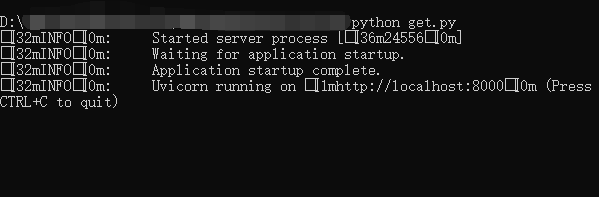
将上述代码保存为get.py,存储在某一路径首先,进入python文件路径,在控制台启动服务

9ab223b518c5ab61c8d949de557306e6.png

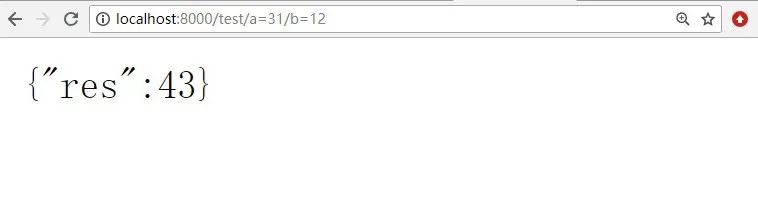
①浏览器测试:访问http://localhost:8000/test/a=31/b=12

5731063b8943687f55dd615fb68a6719.png

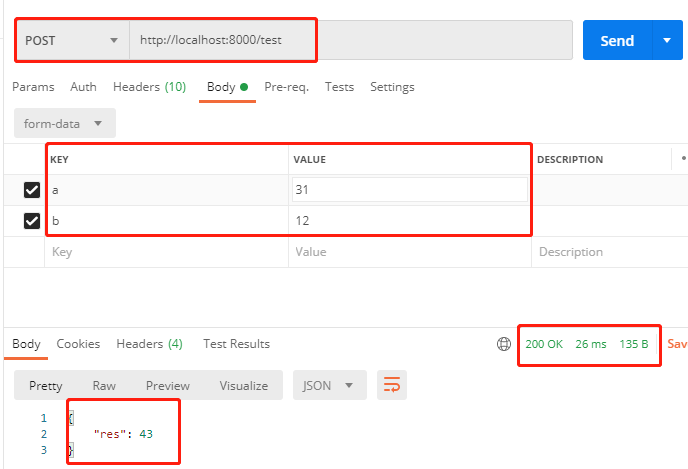
②postman测试:

bbba3e4cc61c45a29f741c9f79897f13.png

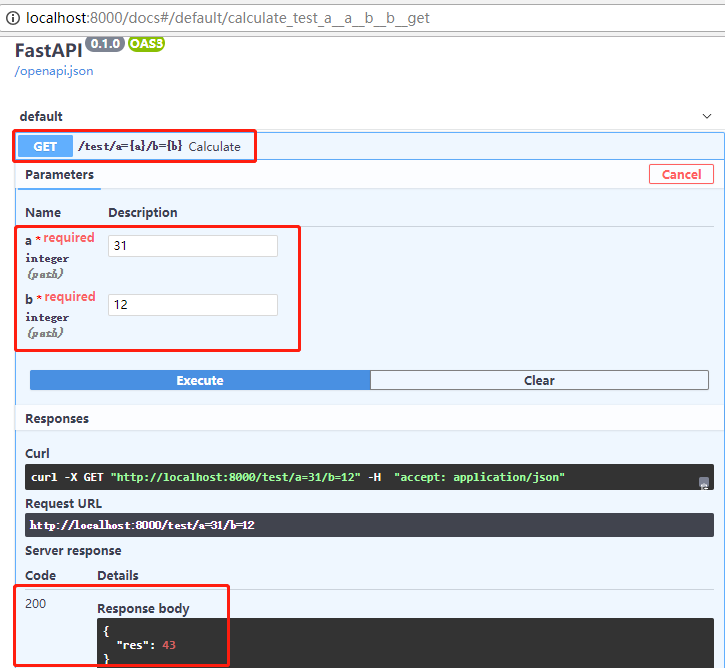
③FastAPI的交互测试:访问http://localhost:8000/docs

152f7258e60cfe6bf7ca4ab01901206a.png

三、Tornado的get/post接口服务

据称,Tornado比FastAPI更能承受高并发。get/post接口
import tornado.httpserverimport tornado.ioloopimport tornado.optionsimport tornado.webfrom tornado import genfrom tornado.concurrent import run_on_executorfrom concurrent.futures import ThreadPoolExecutorimport timefrom tornado.options import define, optionsfrom tornado.platform.asyncio import to_asyncio_future,AsyncIOMainLoopfrom tornado.httpclient import AsyncHTTPClientimport asynciodefine("port", default=8000, help="just run", type=int)class MainHandler(tornado.web.RequestHandler):    def main(self,a,b):        c = float(a) + float(b)        res = {"res":c}        return res        # get接口         def get(self):        a = self.get_body_argument('a')        b = self.get_body_argument('b')        res = self.main(a,b) # 主程序计算        self.write(json.dumps(res,ensure_ascii=False))        # post接口       def post(self):        a = self.get_body_argument('a')        b = self.get_body_argument('b')        res = int(a) * int(b) #主程序计算        self.write(json.dumps(res,ensure_ascii=False))         if __name__ == "__main__":    #运行程序    application = tornado.web.Application([(r"/test", MainHandler),])    application.listen(8000,'localhost')    tornado.ioloop.IOLoop.instance().start()

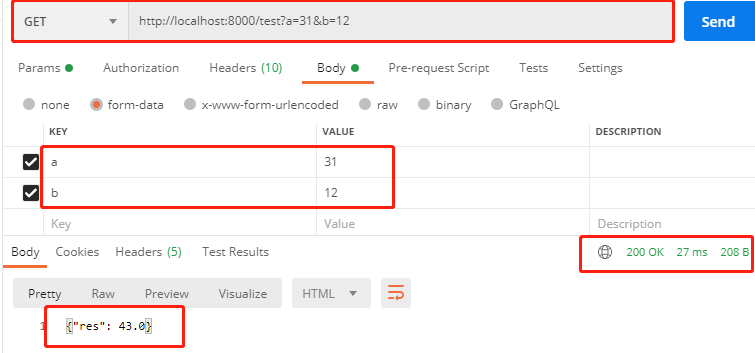
get接口测试:

f994abe5489c271a72777b4cb6328af5.png

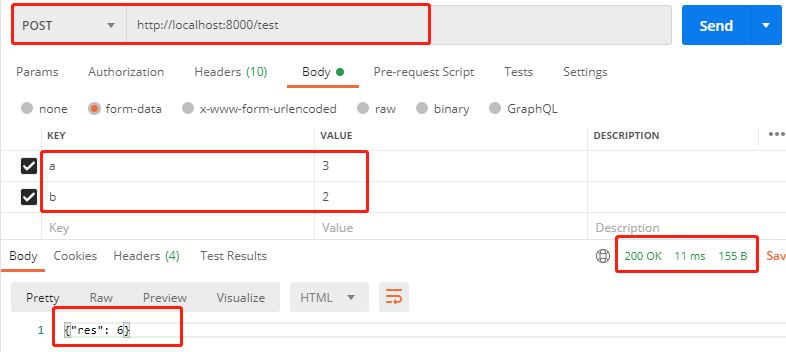
post接口测试:

0774f0a4a9eeddeda70b9bb31d0efaaa.png

你get了么?

今天也要

加油鸭!

d7b3f852f02c12651264fcb25887d05b.png

您可能感兴趣的与本文相关的镜像

Python3.8

Python3.8

Conda
Python

Python 是一种高级、解释型、通用的编程语言,以其简洁易读的语法而闻名,适用于广泛的应用,包括Web开发、数据分析、人工智能和自动化脚本

### Python 算法接口封装的最佳实践 #### 封装的重要性 在Python中,通过创建类来实现封装能够有效地管理复杂度并提高代码可维护性。类作为一种自定义的数据类型,不仅包含属性还包含了对这些数据进行操作的方法[^3]。 #### 类型注解的应用 自从Python 3.5版本引入了PEP484类型的提示功能以来,在编写面向对象程序时利用类型注解可以帮助开发者更好地理解参数以及返回值的预期类型,从而减少错误的发生几率[^2]。 #### 使用抽象基类增强灵活性 为了使算法更加通用化并且易于扩展,可以采用模板方法模式中的设计思路,即定义一个带有抽象方法的基础类,并让具体的子类去实现特定的行为逻辑。这种方式下,即使未来需求发生变化也只需要修改相应的派生类即可完调整而不需要改动核心框架部分[^4]。 #### 实际案例分析:车牌识别算法的服务端部署 对于较为简单的应用场合比如车牌号码自动读取任务来说,可以直接在一个名为`main.py`文件里边构建起完整的业务处理链条并向外界暴露必要的API入口点;这里展示了一个简化版的例子: ```python from typing import List, Dict class LPRNet(object): def __init__(self): """初始化模型""" self.model = None def load_model(self, model_path: str) -> bool: """ 加载训练好的神经网络权重 参数: model_path (str): 模型路径 返回: 功与否 (bool) """ try: # 假设此处执行加载预训练模型的操作... return True except Exception as e: print(f"Load Model Failed! Error Message:{e}") return False def predict(self, image_data: bytes) -> Dict[str, any]: """ 对输入图片做预测得到结果字典 参数: image_data (bytes): 图片二进制流 返回: 预测的结果 ({'plate_number': '京A12345', ...}) """ result = {} if not isinstance(image_data, bytes): raise ValueError("Input data must be binary format!") try: # 进行推理计算... plate_num = "模拟出来的车牌号" confidence_score = 0.97 result['plate_number'] = plate_num result['confidence'] = confidence_score return result except Exception as ex: print(ex) return {} if __name__ == "__main__": lprnet = LPRNet() if lprnet.load_model("./model.pth"): test_image = b'\x89PNG...' # 测试用图像数据 prediction_result = lprnet.predict(test_image) print(prediction_result) ```
评论
添加红包

请填写红包祝福语或标题

红包个数最小为10个

红包金额最低5元

当前余额3.43前往充值 >
需支付:10.00
成就一亿技术人!
领取后你会自动成为博主和红包主的粉丝 规则
hope_wisdom
发出的红包
实付
使用余额支付
点击重新获取
扫码支付
钱包余额 0

抵扣说明:

1.余额是钱包充值的虚拟货币,按照1:1的比例进行支付金额的抵扣。
2.余额无法直接购买下载,可以购买VIP、付费专栏及课程。

余额充值