


 本文介绍Oracle数据库告警日志的重要性和多种查看方法,包括使用外部表和v$diag_alert_ext视图,并提供了一个自动化的告警日志记录过程。
Oracle的告警日志之v$diag_alert_ext视图
最近由于自己写的一个job老是报错,找不出来原因,数据库linux的terminal由于安全原因不让连接,因此告警日志就没有办法阅读,没有办法就想想其它的办法吧,比如采用外部表的形式来阅读告警日志就是一个不错的办法。
告警日志的重要性就不多说了。。。。
实验环境
本次所有的实验环境是Oracle Database 11g Enterprise Edition Release 11.2.0.3.0 - 64bit Production,10g的话应该很多是类似的,就不去研究那个了。。。。。
C:\Users\Administrator>sqlplus lhr/lhr@orclasm
SQL*Plus: Release 11.2.0.1.0 Production on 星期四 7月 17 14:34:47 2014
Copyright (c) 1982, 2010, Oracle. All rights reserved.
连接到:
Oracle Database 11g Enterprise Edition Release 11.2.0.3.0 - 64bit Production
With the Partitioning, Automatic Storage Management, OLAP, Data Mining
and Real Application Testing options
SQL> select * from v$version;
BANNER
--------------------------------------------------------------------------------
Oracle Database 11g Enterprise Edition Release 11.2.0.3.0 - 64bit Production
PL/SQL Release 11.2.0.3.0 - Production
CORE 11.2.0.3.0 Production
TNS for Linux: Version 11.2.0.3.0 - Production
NLSRTL Version 11.2.0.3.0 - Production
SQL>
ADR目录
Automatic Diagnostic Repository (ADR)
一个存放数据库诊断日志、跟踪文件的目录,称作ADR base,对应初始化参数DIAGNOSTIC_DEST,如果设置了ORACLE_BASE环境变量,DIAGNOSTIC_DEST等于 ORACLE_BASE,如果没有设置ORACLE_BASE,则等与ORACLE_HOME/log。SQL> show parameter DIAGNOSTICNAME TYPE VALUE------------------------------------ ----------- ------------------------------diagnostic_dest string /oracle/oracle
关于ADR这里不多说了,网上一百度一大堆。。。。。。。
告警文件的路径
首先,告警日志文件有2种类型,一个是纯文本格式的,另外一种是xml文件格式的,不管哪个版本都可以用这个参数得到纯文本格式告警日志的路径:
SQL> show parameter background_dump_dest
NAME TYPE VALUE
------------------------------------ ----------- ------------------------------
background_dump_dest string /u01/app/oracle/diag/rdbms/orc
lasm/orclasm/trace
SQL>
文本格式的日志还可以通过这个视图来查询:
select value from v$diag_info where name='Diag Trace';

还有xml格式的告警日志文件在:
SQL> select value from v$diag_info where name='Diag Alert';
VALUE
--------------------------------------------------------------------------------
/u01/app/oracle/diag/rdbms/orclasm/orclasm/alert
SQL>
/u01/app/oracle/diag/rdbms/orclasm/orclasm/alert/log.xml
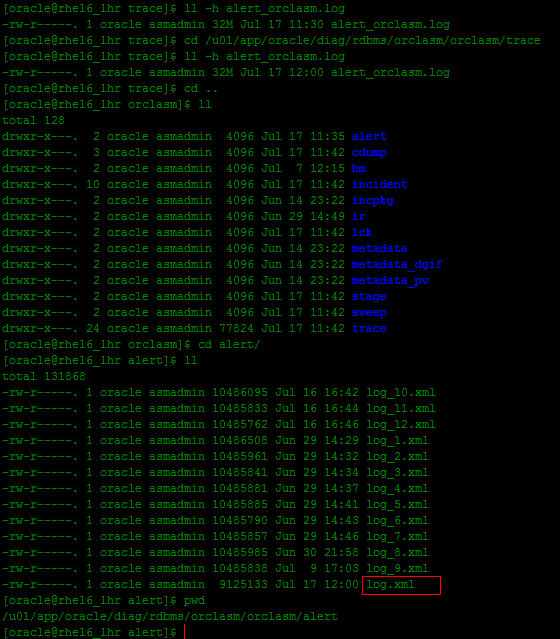
告警日志的内容
消息和错误的类型(Types of messages and errors)
ORA-600内部错误(ORA-600 internal errors that need immediate support from Oracle's customer support )'
ORA-1578块损坏错误(ORA-1578 block corruption errors that require recovery)
ORA-12012(作业队列错误(ORA-12012 job queue errors)
实例启动关闭,恢复等信息(STARTUP & SHUTDOWN, and RECOVER statement execution messages)
特定的DDL命令(Certain CREATE, ALTER, & DROP statements )
影响表空间,数据文件及回滚段的命令(Statements that effect TABLESPACES, DATAFILES, and ROLLBACK SEGMENTS )
可持续的命令被挂起(When a resumable statement is suspended )
LGWR不能写入到日志文件(When log writer (LGWR) cannot write to a member of a group )
归档进程启动信息(When new Archiver Process (ARCn) is started )
调度进程的相关信息(Dispatcher information)
动态参数的修改信息(The occurrence of someone changing a dynamic parameter)
使用外部表查看oracle报警日志
关于外部表的使用网上一搜又是一大堆,这里不列举起语法了,直接到使用层次吧。。。。。
先来个最简单的使用方法
SQL> drop directory DIR_ALERT;
目录已删除。
SQL> create directory DIR_ALERT as '/u01/app/oracle/diag/rdbms/orclasm/orclasm/trace';
目录已创建。
SQL>
SQL>
SQL> drop table alert_log;
表已删除。
SQL> create table alert_log(
2 text varchar2(500)
3 )organization external
4 (type oracle_loader
5 default directory DIR_ALERT
6 access parameters
7 (records delimited by newline
8 )location('alert_orclasm.log')
9 ) reject limit unlimited;
表已创建。
SQL>
查看ora错误:
select* fromalert_log wheretext like'ORA-%';
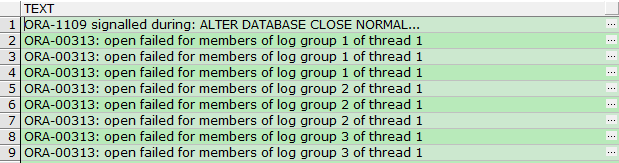
-------查看最新的10条告警日志记录
select* from(
selectrownumrn,a.text fromalert_log a) b whereb.rn>=(selectcount(1)-10fromalert_log a);
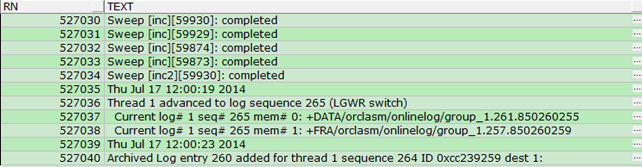
-------查看最新的10条ora告警日志记录
SELECT*
FROM(SELECTrownumrn,
a.text
FROMalert_log a
WHEREa.text LIKE'ORA-%') b
WHEREb.rn >=
(SELECTCOUNT(1) - 10FROMalert_log a WHEREa.text LIKE'ORA-%');
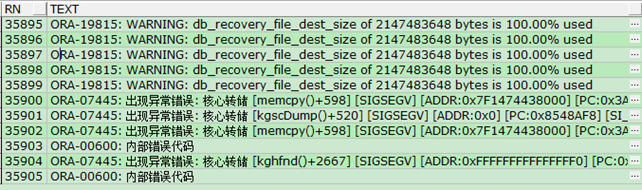
以上代码细心的网友可能会发现一个缺点,我不能查看历史某一时间段内的告警日志,或者说查看历史某一时间段内的告警日志很困难。。。。别急,,,,哥还有办法的。。。。。以下给出另一段代码,这段代码可以把历史告警日志做了格式化处理,采用了分区表的形式,我不运行了,直接贴代码了:
再来个稍微复杂点的
------创建表xb_alert_log_lhr用于存放告警日志的历史信息
-- drop table xb_alert_log_lhr;
createtablexb_alert_log_lhr (
idnumberprimarykey,
alert_date date,
alert_text varchar2(500)
) nologging
partitionbyrange(alert_date)
interval(numtoyminterval(1,'month'))
(partitionP201406 VALUESLESSTHAN(TO_DATE('201407','YYYYMM')));
createsequences_xb_alert_log_lhr ;
createindexalert_log_idx onxb_alert_log_lhr(alert_date) localnologging; --为表alert_log创建索引
columndb new_value _DB noprint;
columnbdump new_value _bdump noprint;
selectinstance_name db fromv$instance; --获得实例名以及告警日志路径
selectvaluebdump fromv$parameter
wherename='background_dump_dest';
-- drop directory DIR_ALERT_LHR;
createdirectoryDIR_ALERT_LHR as'/u01/app/oracle/diag/rdbms/orclasm/orclasm/trace';
-- drop table xb_alert_log_disk_lhr;
createtablexb_alert_log_disk_lhr ( text varchar2(500) ) --创建外部表
organizationexternal(
typeoracle_loader
defaultdirectoryDIR_ALERT_LHR
accessparameters(
recordsdelimited bynewline nologfile nobadfile
)
location('alert_orclasm.log')
) rejectlimitunlimited;
CREATEORREPLACEPROCEDUREpro_alert_log_lhr AS
isdate NUMBER:= 0;
start_updating NUMBER:= 0;
v_rows_inserted NUMBER:= 0;
v_alert_date DATE;
v_max_date DATE;
v_alert_text xb_alert_log_disk_lhr.text%TYPE;
BEGIN
EXECUTEIMMEDIATE'alter session set NLS_DATE_FORMAT=''YYYY-MM-DD HH24:MI:SS''';
EXECUTEIMMEDIATE'alter session set nls_date_language=''american''';
/* find a starting date */
SELECTMAX(v_alert_date) INTOv_max_date FROMxb_alert_log_lhr;
IF(v_max_date ISNULL) THEN
v_max_date := to_date('01-01-1980', 'dd-mm-yyyy');
ENDIF;
--使用for循环从告警日志过滤信息
FORcur IN(SELECT*
FROMxb_alert_log_disk_lhr
) LOOP
isdate := 0;
v_alert_text := NULL;
SELECTCOUNT(*)
INTOisdate --设定标志位,用于判断该行是否为时间数据
FROMdual
WHEREsubstr(cur.text, 21) IN
('2009', '2010', '2011', '2012', '2013', '2014', '2015') ---Sat Jun 14 23:22:14 2014
ANDlength(cur.text) = 24;
IF(isdate = 1) THEN
--将时间数据格式化
SELECTto_date(substr(cur.text, 5), 'Mon dd hh24:mi:ss rrrr')
INTOv_alert_date
FROMdual;
IF(v_alert_date > v_max_date) THEN
--设定标志位用于判断是否需要update
start_updating := 1;
ENDIF;
ELSE
v_alert_text := cur.text;
ENDIF;
IF(v_alert_text ISNOTNULL) AND(start_updating = 1) THEN
--start_updating标志位与v_alert_text为真,插入记录
INSERTINTOxb_alert_log_lhr nologging
(id, alert_date, alert_text)
VALUES
(s_xb_alert_log_lhr.nextval, v_alert_date, v_alert_text);
v_rows_inserted := v_rows_inserted + 1;
COMMIT;
ENDIF;
ENDLOOP;
sys.dbms_output.put_line('Inserting after date '||
to_char(v_max_date, 'YYYY-MM-DD HH24:MI:SS'));
sys.dbms_output.put_line('Rows Inserted: '|| v_rows_inserted);
COMMIT;
ENDpro_alert_log_lhr;
/
执行存过:
begin
pro_alert_log_lhr;
end;
执行结束后大家可以查看,格式化之后的表:
select* fromxb_alert_log_disk_lhr ;
select* fromxb_alert_log_lhr partition(SYS_P381) a wherea.id>=834180orderbya.id;
select* fromxb_alert_log_lhr partition(SYS_P381) a wherea.alert_text like'%ORA%';
虽然可以采用了分区表存储了历史告警日志,也有索引可用,但是存过有个缺点,每次都会对外部表全部扫描,这个有点慢。。。。。
自己用的(本篇的重点)
主要采用v$diag_alert_ext视图中的内容,因为这个视图中的内容很全,记录到历史表中,利于我们分析。
-------------------------------------------------历史告警日志记录
---drop table XB_ALERTLOG_ALL_LHR ;
createtableXB_ALERTLOG_ALL_LHR
(
IDNUMBERprimarykey,
alert_date date,
message_text VARCHAR2(3000),
message_type NUMBER,
message_level NUMBER,
message_id VARCHAR2(67),
message_group VARCHAR2(67),
detailed_location VARCHAR2(163),
problem_key VARCHAR2(67),
record_id NUMBER,
organization_id VARCHAR2(67),
component_id VARCHAR2(67),
host_id VARCHAR2(67),
host_address VARCHAR2(49),
client_id VARCHAR2(67),
module_id VARCHAR2(67),
process_id VARCHAR2(35)
) nologging
partitionbyrange(alert_date)
interval(numtoyminterval(1,'month'))
(partitionP201406 VALUESLESSTHAN(TO_DATE('201407','YYYYMM')));
--drop SEQUENCE S_XB_SQL_MONITOR_LHR;
CREATESEQUENCES_XB_ALERTLOG_ALL_LHR STARTWITH1INCREMENTBY1cache20;
createindexind_ALERTLOG_ALL_In_Date onXB_ALERTLOG_ALL_LHR(ALERT_DATE,Record_Id) localnologging;
---------记录历史告警日志
CREATE PROCEDUREp_alert_log_lhr AS
v_max_recordid NUMBER;
v_max_date DATE;
BEGIN
SELECTMAX(a.record_id),
MAX(a.alert_date)
INTOv_max_recordid,
v_max_date
FROMXB_ALERTLOG_ALL_LHR a
WHEREa.alert_date >= SYSDATE- 360/ 1440--3h'之前
ANDa.alert_date <= SYSDATE;
INSERTINTOXB_ALERTLOG_ALL_LHR nologging
(ID,
ALERT_DATE,
MESSAGE_TEXT,
MESSAGE_TYPE,
MESSAGE_LEVEL,
MESSAGE_ID,
MESSAGE_GROUP,
DETAILED_LOCATION,
PROBLEM_KEY,
RECORD_ID,
ORGANIZATION_ID,
COMPONENT_ID,
HOST_ID,
HOST_ADDRESS,
CLIENT_ID,
MODULE_ID,
PROCESS_ID)
SELECTs_XB_ALERTLOG_ALL_LHR.Nextval,
to_date(to_char(a.ORIGINATING_TIMESTAMP,
'YYYY-MM-DD HH24:MI:SS'),
'YYYY-MM-DD HH24:MI:SS') alert_date,
a.MESSAGE_TEXT,
a.MESSAGE_TYPE,
a.MESSAGE_LEVEL,
a.MESSAGE_ID,
a.MESSAGE_GROUP,
a.DETAILED_LOCATION,
a.PROBLEM_KEY,
a.RECORD_ID,
a.ORGANIZATION_ID,
a.COMPONENT_ID,
a.HOST_ID,
a.HOST_ADDRESS,
a.CLIENT_ID,
a.MODULE_ID,
a.PROCESS_ID
FROMv$diag_alert_ext a
WHEREa.COMPONENT_ID = 'rdbms'
ANDa.FILENAME LIKE
'/u01/app/oracle/diag/rdbms/orclasm/orclasm/alert/log.xml%'
ANDa.RECORD_ID > v_max_recordid
ANDa.ORIGINATING_TIMESTAMP >= v_max_date;
COMMIT;
ENDp_alert_log_lhr;
/
定时任务:
BEGIN
DBMS_SCHEDULER.CREATE_JOB(JOB_NAME => 'job_p_alert_log_lhr',
JOB_TYPE => 'STORED_PROCEDURE',
JOB_ACTION => 'p_alert_log_lhr',
ENABLED => TRUE,
START_DATE => SYSDATE,
comments => '记录历史告警日志,每2个小时执行一次');
END;
/
归档告警文件
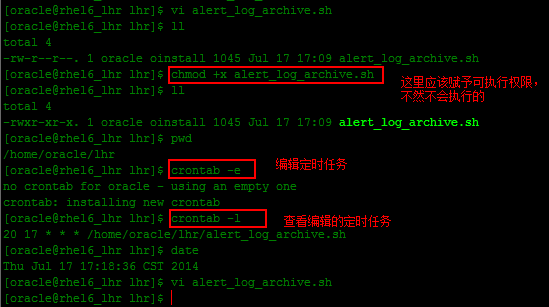
归档告警日志文件,每周日早上凌晨归档一次,,,(linux下的crontab如何使用?????百度吧,哥这里不列出了。。。。。。):
#*************************************************************************
# FileName :alert_log_archive.sh
#*************************************************************************
# Author :lhr
# CreateDate :2014-07-16
# blogs :http://blog.itpub.net/26736162
# Description :this script is made the alert log archived every day
# crontab : 2 0 * * 0 /home/oracle/lhr/alert_log_archive.sh ---sunday exec
#*************************************************************************
#! /bin/bash
# these solved the oracle variable problem.
export ORACLE_SID=orclasm
export ORACLE_BASE=/u01/app/oracle
mydate=`date +'%Y%m%d%H%M%S'`
alert_log_path="$ORACLE_BASE/diag/rdbms/$ORACLE_SID/$ORACLE_SID/trace/"
alert_log_file="alert_$ORACLE_SID.log"
alert_arc_file="alert_$ORACLE_SID.log""."${mydate}
cd ${alert_log_path};
if [ ! -e "${alert_log_file}" ]; then
echo "the alert log didn't exits, please check file path is correct!";
exit;
fi
if [ -e ${alert_arc_file} ];then
echo "the alert log file have been archived!"
else
mv ${alert_log_file} ${alert_arc_file}
cat /dev/null > ${alert_log_file}
fi
与告警日志有关的视图
select* fromdba_alert_history a orderbya.sequence_id desc;
select* fromdba_alert_arguments;
select* fromdba_outstanding_alerts;
列出3个OCP考题
1、Identify the two situations in which you use the alert log file in your database to check the details. (Choose two.)
选项
A.Running aquery on a table returns"ORA-600: Internal Error ."
B.Inserting a value in a table returns"ORA-01722: invalid number ."
C.Creating a table returns"ORA-00955: name is already used by an existing object."
D.Inserting a value in a table returns "ORA-00001: unique constraint (SYS.PK_TECHP)
violated."
E.Inserting a row in a table returns"ORA-00060:deadlock detected while waiting for resource."
Correct Answers: A E
2、Identify the three predefined server-generated alerts. (Choose three.)
确定三个预定义的服务器生成的警报。
A. Drop User
B. Tablespace Space Usage表空间空间使用率
C. Resumable Session Suspended可恢复会话暂停
D. Recovery Area Low On Free Space自由空间上的恢复区低
E. SYSTEM Tablespace Size Increment
Answer: B,C,D
3、Which two statements are true about alerts? (Choose two.) 选项
A.Clearing an alert sends the alert to the alert history .
B.Response actions cannot be specified with server-generated alerts.
C.The nonthreshold alerts appear in the DBA_OUTSTANDING_ALERTS view .
D.Server-generated alerts notify the problems that cannot be resolved automatically and require administrators to be notified.
Correct Answers: A D
列出官网的一些内容
Alerts help you monitor your database. Most alerts notify you of when particular metric thresholds are exceeded. For each alert, you can set critical and warning threshold values. These threshold values are meant to be boundary values that when exceeded, indicate that the system is in an undesirable state. For example, when a tablespace becomes 97 percent full, this can be considered undesirable, and Oracle Database generates a critical alert.
Other alerts correspond to database events such as Snapshot Too Old or Resumable Session suspended. These types of alerts indicate that the event has occurred.
In addition to notification, you can set alerts to perform some action such as running a script. For instance, scripts that shrink tablespace objects can be useful for a Tablespace Usage warning alert.
By default, Oracle Database issues several alerts, including the following:
Archive Area Used (warning at 80 percent full)
Broken Job Count and Failed Job Count (warning when goes above 0)
Current Open Cursors Count (warning when goes above 1200)
Dump Area Used (warning at 95 percent full)
Session Limit Usage (warning at 90 percent, critical at 97 percent)
Tablespace Space Used (warning at 85 percent full, critical at 97 percent full)
You can modify these alerts and others by setting their metrics
The alert log is an XML file that is a chronological log of database messages and errors. It is stored in the ADR and includes messages about the following:
Critical errors (incidents)
Administrative operations, such as starting up or shutting down the database, recovering the database, creating or dropping a tablespace, and others.
Errors during automatic refresh of a materialized view
Other database events
You can view the alert log in text format (with the XML tags stripped) with Enterprise Manager and with the ADRCI utility. There is also a text-formatted version of the alert log stored in the ADR for backward compatibility. However, Oracle recommends that any parsing of the alert log contents be done with the XML-formatted version, because the text format is unstructured and may change from release to release.





 扫一扫
扫一扫


 1203
1203

 被折叠的 条评论
为什么被折叠?
被折叠的 条评论
为什么被折叠?
 到【灌水乐园】发言





