





 这篇博客分享了作者在开发过程中,如何基于Vant组件库手动实现一个自定义的手风琴组件。作者详细描述了如何通过CSS样式和Vue的数据绑定来控制组件的行为和外观,包括标题的激活状态、内容的显示隐藏以及过渡动画效果。同时,文章还展示了个人实现的组件代码结构和样式定义,提供了一个不依赖预置组件库的解决方案。
个人在开发中,使用较多的H5组件库是Vant,之前对于手风琴这种业务场景,直接引入手风琴组件进行开发了。这次由于设计图要求较高,所以使用vant组件库继续开发,需要修改较多的样式,索性自己手动实现一下。
官方文档的实例如下:
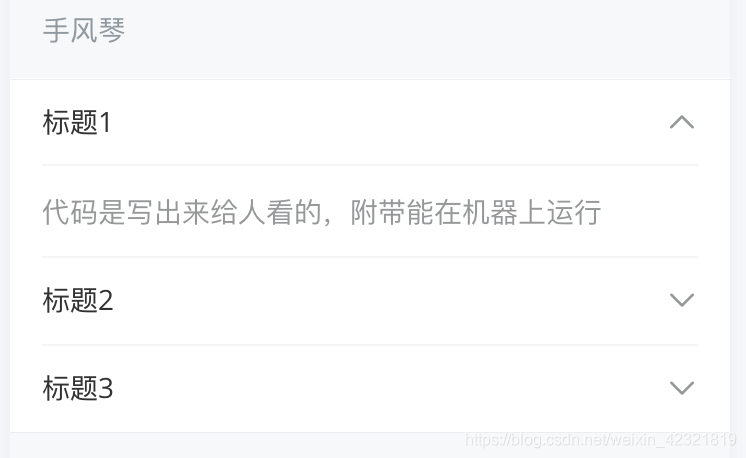
通过 accordion 可以设置为手风琴模式,最多展开一个面板,此时 activeName 为字符串格式。
<van-collapse v-model="activeName" accordion>
  <van-collapse-item title="标题1" name="1">内容</van-collapse-item>
  <van-collapse-item title="标题2" name="2">内容</van-collapse-item>
  <van-collapse-item title="标题3" name="3">内容</van-collapse-item>
</van-collapse>
export default {
  data() {
    return {
      activeName: '1',
    };
  },
};
个人实现的手风琴组件如下:
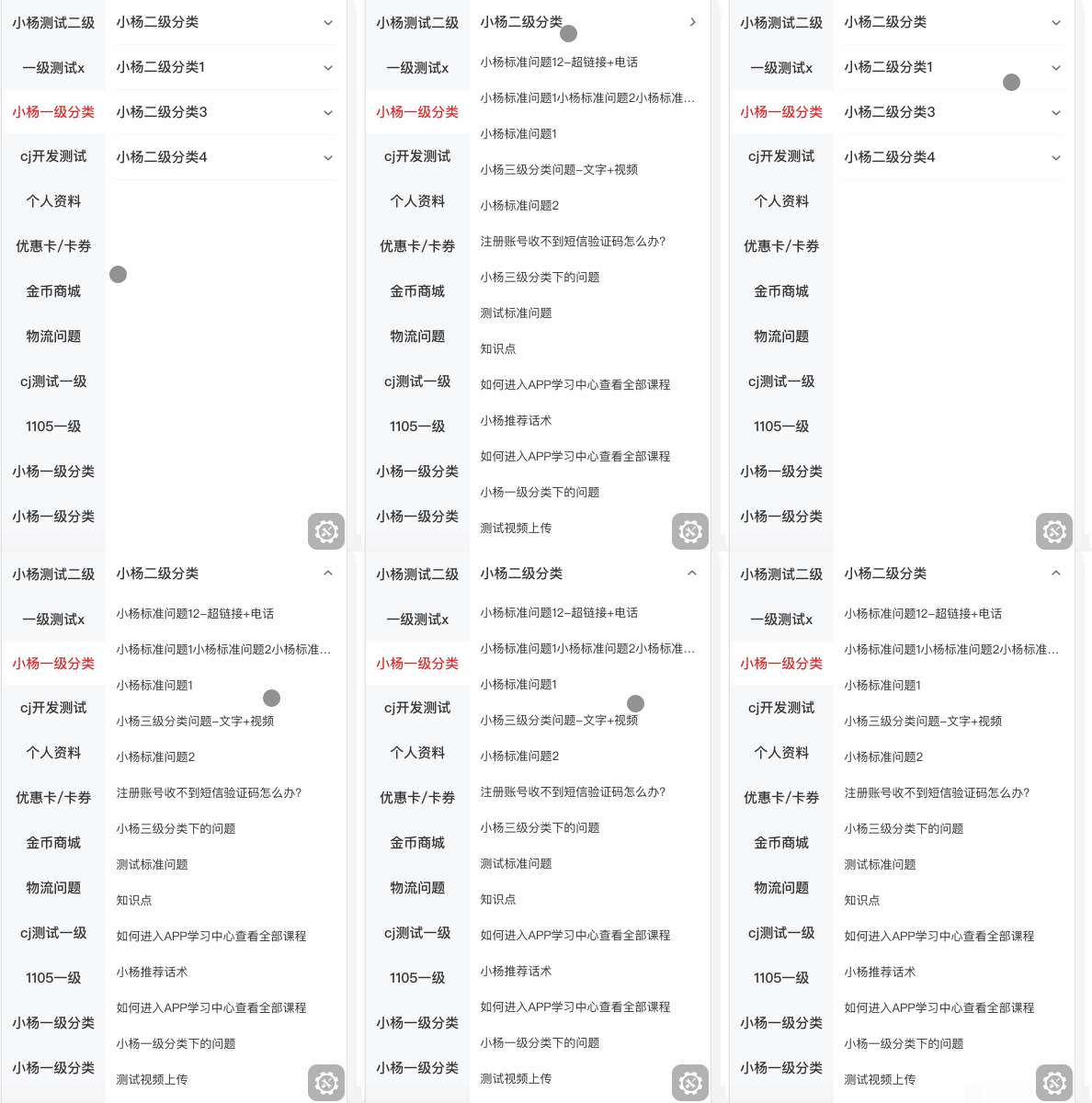
<div class="slideContentwo" >
          <div
            class="problemLi"
            :class="{ active1: index === isRotate }"
            v-for="(item, index) in data"
            :key="index"
          >
          //每一个标签头内容
            <div
              class="problemHead"
              :class="{ active2: index === isRotate }"
              @click="getProblemLi(item.typeId, index)"
            >
              <div class="topSlide">
                {{ item.typeName }}
              </div>
              // 标签icon
              <div class="icon">
                <img
                  src="../../assets/img/service/bot.png"
                  class="img"
                  :class="{ imgRotate: index === isRotate }"
                />
              </div>
            </div>
            // 对应标签下的内容
            <div class="proList" v-if="isRotate === index">
              <div
                class="proLabel"
                v-for="(i, index) in secProList"
                :key="index"
                @click="jumpDetail(i.id)"
              >
                {{ i.title }}
              </div>
            </div>
          </div>
        </div>
data(){
	return{
	// 标签头数据
	data: [],
	// 标签下的问题列表数据
	secProList: [],
	// 当前选择的标签
    isRotate: 0
	}
}
.slideContentwo {
        height: 100%;
        .active1 {
          position: relative;
        }
        .active2 {
          position: sticky;
          top: 0;
        }
        .problemLi {
          line-height: 48px;
          margin: 0 12px;
          border-bottom: 1px solid #f7f7f8;
          .problemHead {
            z-index: 10;
            background-color: #fff;
            display: flex;
            justify-content: space-between;
            .topSlide {
              font-size: 15px;
              font-family: PingFangSC-Medium, PingFang SC;
              font-weight: 400;
              color: #333333;
              .active {
                color: #e02727;
                font-weight: 500;
              }
            }
            .icon {
              margin: auto 0;
              .img {
                width: 16px;
                height: 16px;
                margin: 0 auto;
                display: block;
                transition: all 0.2s ease-in-out;
                -webkit-transition: all 0.2s ease-in-out;
                -moz-transition: all 0.2s ease-in-out;
                -o-transition: all 0.2s ease-in-out;
              }
              .imgRotate {
                transform: rotate(-180deg);
                -webkit-transform: rotate(-180deg);
                -moz-transform: rotate(-180deg);
                -o-transform: rotate(-180deg);
                -ms-transform: rotate(-180deg);
              }
            }
          }
          .proList {
            z-index: 5;
            position: relative;
            animation: mymove 0.1s;
            -webkit-animation: mymove 0.1s; /*Safari and Chrome*/
            .proLabel {
              line-height: 40px;
              font-size: 13px;
              font-family: PingFangSC-Regular, PingFang SC;
              font-weight: 400;
              color: #333333;
              overflow: hidden;
              white-space: nowrap;
              text-overflow: ellipsis;
            }
          }
          @keyframes mymove {
            from {
              height: 0px;
            }
            to {
              max-heigh: 350px;
            }
          }

          @-webkit-keyframes mymove /*Safari and Chrome*/ {
            from {
              height: 0px;
            }
            to {
              max-heigh: 350px;
            }
          }
        }
      }





 扫一扫
扫一扫


 被折叠的 条评论
为什么被折叠?
被折叠的 条评论
为什么被折叠?
 到【灌水乐园】发言





