IDEA导入配置文件
- 找到

- 选择Edit Configurations
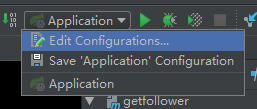
- 找到

- 配置别名与具体文件目录的映射

Spring使用配置文件
- 在核心配置文件中配置Bean
 <bean id="propertiesConfigurer" class="org.springframework.beans.factory.config.PropertyPlaceholderConfigurer">
     <property name="order" value="1"/>
     <property name="locations">
         <list>
             <value>file:${data.properties}</value>
         </list>
     </property>
 </bean>
- 创建setting类
@Configuration
@PropertySource("file:${data.properties}")
public class Setting {
    @Value("${data.param}")
    private String param;
	...
}
- @Configuration:标志该类为配置文件类
- @PropertySource(“file:${data.properties}”):指明使用的属性文件
- @Value("${data.param}"):完成属性值的注入








 扫一扫
扫一扫


 21万+
21万+

 被折叠的 条评论
为什么被折叠?
被折叠的 条评论
为什么被折叠?
 到【灌水乐园】发言





