


 博主分享了将Linux操作系统从CentOS切换到Ubuntu Server的理由,包括Ubuntu Server的免费可用性、更方便的系统管理、强大的tasksel工具以及详尽的官方文档。文章通过对比Ubuntu Server与RedHat系的网卡配置,强调了Ubuntu Server的易用性,并提到了tasksel在安装服务器环境时的便利性。
以前选定的CentOS做服务端操作系统的,毕竟与大名鼎鼎的RedHat Enterprise Linux同宗。但是在实验OpenStack过程中体验了Ubuntu Server,现在改道了。理由:
1、RHEL只能免费“试用”,无法免费“使用”,CentOS发行版又比RHEL滞后约半年,Ubuntu Server可以“原厂”新鲜体验,放心部署;
2、Ubuntu Server在系统管理方面感觉更加“舒服”,比如网卡配置,/etc/network/interfaces 一个配置文件就能解决大部分问题,含所有的网络适配器以及静态路由等,这个比RedHat系的/etc/sysconfig/network-scripts/ifcfg-ethX 要简便很多。
例如:
/etc/network/interfaces
# The loopback network interface
auto lo
iface lo inet loopback
iface lo inet6 loopback
# The primary network interface
auto eth0
iface eth0 inet static
address 192.168.2.1
network 192.168.2.0
netmask 255.255.255.0
broadcast 192.168.2.255
up route add -net 192.168.3.0 netmask 255.255.255.0 gw 192.168.2.2
down route del -net 192.168.3.0 netmask 255.255.255.0 gw 192.168.2.2
up route add -net 192.168.4.0 netmask 255.255.255.0 gw 192.168.2.2
down route del -net 192.168.4.0 netmask 255.255.255.0 gw 192.168.2.2
iface eth0 inet6 static
address 2000:2::1
netmask 64
up route -A inet6 add 2000:3::/64 gw 2000:2::2
up route -A inet6 add 2000:4::/64 gw 2000:2::2
down route -A inet6 del 2000:3::/64 gw 2000:2::2
down route -A inet6 del 2000:4::/64 gw 2000:2::2
auto eth1
iface eth1 inet dhcp
3、服务器软件包安装工具 tasksel,可以轻松的配置服务器环境。“Tasksel 是Debian 安装程序里固有的一个的软件安装程序。它以任务形式收集软件包并使用户能轻松的安装软件包。它同样也提供传统的元软件包功能(http://wiki.ubuntu.com.cn/UbuntuHelp:Tasksel)。”
tasksel 在 Ubuntu Server中默认安装。
$ sudo tasksel
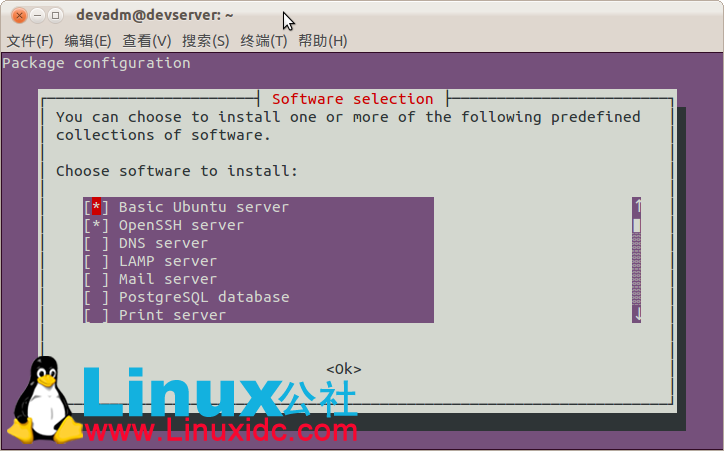
看图操作,很清晰吧?
也可以在命令行直接执行安装任务,比如安装LAMP Server和 DNS Server:
$ sudo tasksel install lamp-server
$ sudo tasksel install dns-server
呵呵,我不知道Redhat有没有这类工具,有就有吧,谁知道麻烦分享一下。

4、Ubuntu官方文档比较详细周密,排版很清晰,我喜欢。
最后废话一句:每个发行版系列都有各自的优点和缺点,选择哪个发行版完全代表个人意见,争论无益。











 扫一扫
扫一扫


 1081
1081

 被折叠的 条评论
为什么被折叠?
被折叠的 条评论
为什么被折叠?
 到【灌水乐园】发言





