


 本文介绍如何使用TDM-GCC提供的MinGW-w64版本4.9.2编译器来构建MATLAB MEX文件及独立应用程序。通过MATLAB的Add-Ons菜单进行安装,并提醒不要将编译器安装在路径名包含空格的位置。

You can use the MinGW-w64 version 4.9.2 compiler from TDM-GCC to build MEX files and standalone MATLAB? engine and MAT-file applications.
Installing Compiler from Add-Ons Menu
To install the MinGW compiler, open the installer from MATLAB Add-Ons menu. On the Home tab, in the Environment section, click the Add-Ons icon. Under Refine by Type, select Features, or search for MinGW. Follow the prompts to add the compiler.
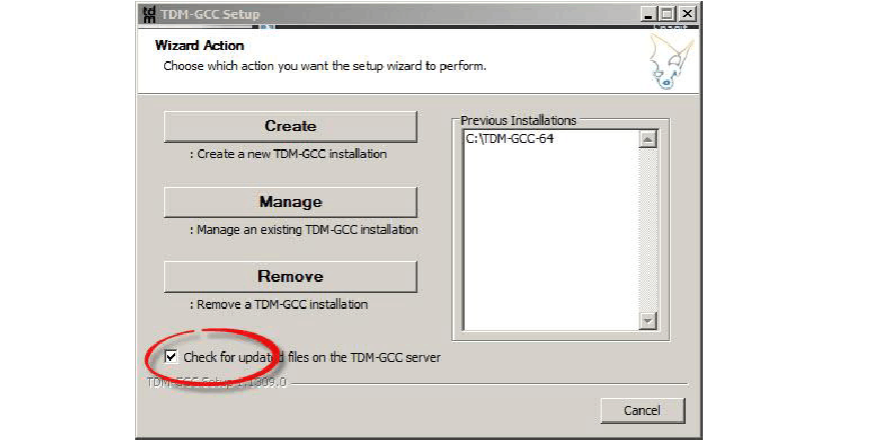
Note:To install the MATLAB-supported version of MinGW-w64, you must clear the check box highlighted in the following figure.
MinGW Installation Folder Cannot Contain Space
Do not install MinGW in a location with spaces in the path name. For example, do not use:
C:\Program Files\TDM-GCC-64
Instead, use:
C:\TDM-GCC-64





 扫一扫
扫一扫


 2万+
2万+

 被折叠的 条评论
为什么被折叠?
被折叠的 条评论
为什么被折叠?
 到【灌水乐园】发言





